The 90 seconds before checkout that kill every expensive mistake
Most "I got scammed" threads I've combed through aren't scams. They're misdeliveries. Tokens that arrived flawlessly, just on somebody else's account. Costs you about a minute and a half of squinting to dodge.
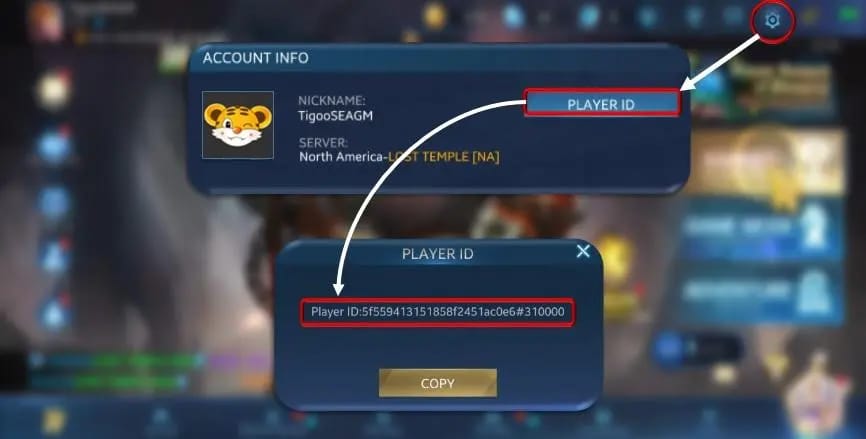
Your Player ID is the account's actual fingerprint, and it's not your display name. New players read those two as interchangeable. They aren't. Per the Heroes Evolved Official Guide, you grab the right ID by logging in, tapping your avatar top-left, then clicking the ID itself to copy. Copy it. Don't eyeball-transcribe it. One flipped digit ships your money to a stranger who's never handing it back, and a top-up to the wrong ID is functionally gone forever. Community top-up guides flag the identical landmine: punching in a display name instead of the exact Player ID is the single most common delivery flub players commit.
Now the server. That same guide notes your server/region surfaces in-game through settings or the avatar panel, and it has to line up with what you pick at checkout. This game isn't one shared pool. Accounts are bound to a region, so a top-up fired at the wrong server can whiff the account completely even when the ID's perfect. Nearly every rival guide skips this step. I'd rank it over every other anti-scam tip combined, honestly. Confirm ID, confirm server, then open the wallet.
A habit that's spared me headaches: I dump the copied ID into a notes app and check it against the live game screen one last time before it touches any payment field. Dull. Also airtight.
Official store, verified partner, and the line you never cross
There are three clean tiers of where to buy, and only the bottom one bites.
Safest path is the official payment center. According to the Heroes Evolved Payment Center, you hit the site directly, drop your Player ID, choose a pack, and pay via PayPal or another supported rail. No account login, which spooks newcomers. That's normal here. The Player ID is the routing address. For most first-timers this is where I'd plant the flag.
Tier two: developer-authorized partners. The official Facebook channel openly names SEAGM, Unipin, Topup Live, and Smile One as recommended third parties, per Heroes Evolved Facebook. They exist because the official USD-only checkout doesn't fit every wallet. A player in Southeast Asia chasing PayNow, or somebody who'd rather pay local currency than eat a card forex hit, gets a smoother run through an authorized channel. A legit service asks for exactly what the official store asks for: Player ID and server. Nothing weirder. If a checkout ever wants your game password or a verification code off your account, that isn't a top-up. Close the tab.
Disclosure: this piece is published by VGTopup, which is itself a third-party top-up platform. The advice I'd hand a friend doesn't shift based on whose roof the article sits under. Whatever channel you run, the verification discipline up top is your armor, not the brand on the sign.

Tier three is everything the developer hasn't listed. Random sites, random apps, suspiciously cheap Tokens. The official warning is blunt: that same Facebook channel flat-out tells players to "use official top-up center to avoid loss." Unlisted platforms and unverified apps waving discounts are the flare. A few cents saved on an unauthorized site is the priciest discount in gaming the second your purchase, or your account, evaporates.
Walking a clean first buy, start to finish
Here's how the real transaction ran, and where the bonus quietly changes the answer.
Copied my verified ID, confirmed the server, hit the payment center, pasted the ID, pack list loaded. Current listings, mirrored off the official store, run a tidy ladder.

| Pack Price |
Tokens |
Effective $/100 Tokens |
Where it fits |
| $0.99 |
240 |
$0.41 |
First-ever test purchase |
| $2.39 |
500 |
$0.48 |
Small top-off |
| $9.99 |
1,200 |
$0.83 |
Mid |
| $19.99 |
2,500 |
$0.80 |
Mid-tier |
| $49.99 |
6,500 |
$0.77 |
Large |
| $99.99 |
14,000 |
$0.71 |
Best raw value per Token |
Source: Heroes Evolved Pack Listings / MTCGame (2026).
Two things leap off that table. First, the headline "best value" is the $99.99 pack. Bigger packs genuinely carry better per-Token value, per the mirrored listings. Second, and this is the bit that actually decides your spend: raw per-Token rate is not the number a first-timer should be chasing.
The reason's the first-purchase bonus. The official Facebook channel confirms first-time buys come stapled with extra rewards, bonus vouchers or diamonds bolted onto select packs. And here's the wrinkle almost nobody spells out: that bonus often attaches per package tier, not as a flat percentage of dollars spent. When the bonus is tier-shaped, a smartly-picked mid pack can out-efficiency the giant one once you fold the bonus value back in. The biggest brick wins on raw Tokens-per-dollar. It does not automatically win on total value received on your first buy.
So my read for a fresh account: don't reflexively slam the $99.99 pack to "get the best rate." Spot which tier the first-purchase bonus actually lands on, and size to that. The first top-up is the single best-value purchase you'll ever make on the account, but only if you aim it at the bonus instead of the biggest number.
Once I'd picked a pack, paid, and the confirmation bounced back, I screenshotted the receipt and stashed the transaction ID. That ID isn't a nice-to-have. It's the one piece of evidence support actually moves on. More on that in a sec.
If you're weighing where to run that first transaction, the value question is worth 60 seconds: pull the official payment center up next to a verified channel, see which tier the bonus sits on, then grab the pack that maxes the bonus and not the sticker discount. As a transparent option, Heroes Evolved Tokens top up through a verified channel does the identical job once your Player ID and server are locked. The analysis around the purchase carries the value, not the storefront.
I rank payment methods by how reversible they are
For a jittery first-timer, the right way to sort payment methods isn't convenience or shaving pennies. It's what happens when something breaks.
The Heroes Evolved Official Website nudges beginners toward the official site with PayPal or credit card, with authorized partners like SEAGM and Unipin handling local methods. That ordering isn't an accident. Cards and PayPal both pack fraud protection and a dispute path. If a transaction genuinely fails or an unauthorized charge hits, you've got recourse, a lever to claw the money back. Irreversible methods hand you none of that on the exact purchase where you're least sure of your footing.

| Method |
Fraud recourse |
Reversibility |
Notes for first-timers |
| Credit card |
Strong (bank dispute) |
High |
Bank fraud monitoring is a free safety net |
| PayPal |
Strong (buyer dispute) |
High |
Supported directly on official center |
| Local wallet / regional method |
Varies |
Lower |
Convenient via authorized partners; weaker recourse |
The trade-off's real but lopsided. A local wallet might run cheaper or smoother in your region via an authorized partner, fine for a confident repeat buyer. For your first purchase I'd take the method with a dispute button every single time. Forum advice that tells you to hunt the absolute cheapest rail is optimizing the wrong variable when you've never stress-tested the channel.
One caveat on chargebacks, since it cuts both ways. App Store and community reports note that while PayPal and card chargebacks are doable, forcing one can trigger account issues. The dispute path is a net for genuine fraud and non-delivery, not a casual undo button for buyer's remorse. Pull it when you've actually been wronged. Not when you change your mind.
Regional pricing is real, tunneling after it through a VPN isn't worth it
Token prices do swing by market, and the swing is structural, not a glitch.
The official payment center lists in USD. Under its authorized-partner setup, third-party channels offer regional variants, local currencies via Unipin, methods like PayNow across Southeast Asia. So a player in the US, the EU, SEA, or LATAM may genuinely see a different effective cost for the same pack once currency conversion, local rails, and regional partner pricing fold in. Normal storefront behavior across the whole industry.
The trap is what new players do with that knowledge. The gap's real, but the instant you reach for a VPN or a foreign payment method to chase a cheaper region, you've stepped outside the verified-channel safety zone. The friction, the failed transactions, the account-binding mismatches that follow tend to cost more than the gap you were after. Buy in your own region, through the official center or an authorized partner that serves your currency. The legit regional difference is already baked into that path. No need to hack it.
When the Tokens don't show up
Most "missing Tokens" panic is delivery lag, not theft, and the gut-reflex fix is the one that genuinely burns money.
Delivery on official and authorized partners (Codashop, SEAGM, Unipin among them) advertises as instant or near-immediate, per Codashop and the studio's partner listings. In practice "instant" can mean a few minutes under load. So before you assume the worst: wait. App Store reviews and community reports line up that retrying a "failed" purchase right away is precisely how people stack double charges. The first one was processing, not dead. Give it 30 minutes before you touch anything.
If the Tokens truly never land, here's the escalation that works. Hit in-game support, or email heroesevolved@netdragon.com with your order receipt, per the official site's guidance. The help center carries a dedicated Payments category built for exactly these top-up snags, per the Heroes Evolved Help Center. And the detail that sets how fast your ticket clears: lead with the transaction ID / order receipt, not a screenshot of your in-game balance. Support routes on the transaction record. A game screenshot alone rarely closes a missing-Token ticket, since it can't prove what you paid or where it was supposed to go. The receipt can.
On refunds I'll shoot straight, because most guides won't: digital currency is basically no-refund. Community and App Store reports paint digital-currency refunds as limited, chargebacks technically possible through PayPal or your card but dragging account-issue risk. Translation: don't buy Tokens you aren't committed to burning. The refund button you're picturing mostly isn't there.
What I'd do differently knowing all this
Fresh account tomorrow, I'd change exactly two things from instinct. I'd quit optimizing my first purchase for raw cost-per-Token and instead point it squarely at whichever tier the first-purchase bonus lands on. That's where the real first-buy value hides. And I'd treat the 90 seconds of pasting and re-checking Player ID and server as the non-negotiable spine of the transaction, not the annoying bit before it. Everything pricey that goes sideways on a first top-up traces back to a skipped verification or a panicked retry. Slow down on those two. The rest of this is genuinely safe.
Frequently Asked Questions
Where exactly do I find my Heroes Evolved Player ID?
Log in, tap your avatar in the top-left corner, click the ID to copy it directly, per the official guide. The nuance that matters: copy it rather than reading it off by eye, and never substitute your display name. Display name and Player ID are different values, and paying by the wrong one is the classic misdelivery that can't be undone.
Is it safe to top up with a credit card on my first purchase?
Yes, and it's actually the safer pick for a first-timer. The official site supports card and PayPal precisely because both carry fraud protection and a dispute path. Your bank's fraud monitoring is a free safety net irreversible local methods can't match, worth more on an untested first buy than any small discount.
How long should I wait before assuming my Tokens are lost?
Give it a full 30 minutes. Verified channels advertise instant or near-instant delivery, but load can stretch that to a few minutes. The expensive mistake is retrying immediately, since the original transaction is usually still processing and a second tap double-charges you. Wait, then escalate with your receipt if it's genuinely gone.
Are Heroes Evolved Tokens refundable if I change my mind?
Practically, no. Digital-currency refunds are reported as limited, and while a PayPal or card chargeback is technically possible, forcing one risks account problems. Reserve disputes for real fraud or non-delivery, not buyer's remorse, and only buy Tokens you intend to spend.
Do I have to top up on the same device I play on?
No. The official payment center routes purchases by Player ID, not by device, so a top-up bought in a desktop browser lands on the same account you play on mobile, as long as the ID and server match. That's exactly why nailing those two values matters more than which device you check out from.









Comments