The consensus S+ tier is a trap for solo queue
Most published lists, including the most-cited one, the Zathong Heroes Evolved Tier List, hand you a single flat ranking with zero context for how you queue. Zathong (2026) stacks eleven heroes into S+: Arlequin, Wolfram, Estrath, Cleopatra, Phobos, Yanbing Cao, Fumiko, Raker, Zhang Fei, Borgon, and Master Crane. As a draft-power ranking, it's perfectly defensible. My claim is that copying it blind in solo queue costs you games, and the way to check that is to ask what those heroes demand from the four teammates you didn't get to pick.
A hard carry like Arlequin or Estrath is tuned around being peeled for and fed early. Pull that assumption out from under it (random teammates, no comms, nobody peeling) and the hero's real-world tier sags. A frontline initiator barely budges, because it manufactures value the second it walks forward. That asymmetry is the whole argument. So the question isn't whose ceiling is highest. It's whose ceiling survives a team that refuses to cooperate.
Heroes Evolved hands you a deep bench to test this on. The Heroes Evolved Official Website lists 130+ unique heroes, sorted by roles the game names outright: Melee, Ranged, Nuker, Durable, Disabler, Ganker, Carry, and Pusher. That taxonomy matters in a minute, because it's how you spot the hole in your roster your next unlock should fill.
Four metrics, not one win-rate
There's no official public win-rate or pick-rate dashboard for this game. The official site ships a hero database and patch notes, not a stats API. And that absence is the single most important methodology note in this whole piece: anyone quoting you a precise win-rate percentage is reading it off a community spreadsheet, not an official feed. Treat the numbers as directional, never gospel.
So rather than fake a stats pipeline, here's the four-part frame I actually weigh, in order:
- Draft flexibility — can the hero slot into several roles or lanes? In blind pick and solo queue, a hero who's "fine" in three positions beats one who's S+ in a single slot and griefs you the moment it's contested. This factor alone bumps a hero up a tier for me.
- Skill floor — how brutal is the hero before you've mastered it? A towering ceiling means nothing if you int for thirty games learning the thing.
- Self-sufficiency — does the hero create impact alone, or does it lean on a coordinated team to pay off? This is where hard carries quietly hemorrhage points for the average climber.
- Power-spike timing — when the hero comes online. Flat lists erase this, and it's the hidden reason a few "weak" heroes overperform.
Why win-rate alone lies to you
The most common analytical slip in these debates, flagged again and again across r/heroesevolved tier-list threads (2026), is trusting a raw win-rate that's been inflated by a microscopic pick-rate. A niche hero played by its three devotees posts a gorgeous number that vaporizes the instant a casual touches it. Pick-rate is the sanity check. High win-rate plus near-zero pick-rate usually translates to "a few specialists," not "broadly strong." See a hero you've never heard of topping a chart? Assume specialist bias until something proves otherwise.
That's also why I won't print fake precision. Creators like The Dank Oreo and Krorn ch. rebuild their rankings each patch around ranked performance (per their tier-list videos, 2026–2026), and that directional consensus is what I'm leaning on.
The working tier list, solo-queue weighted
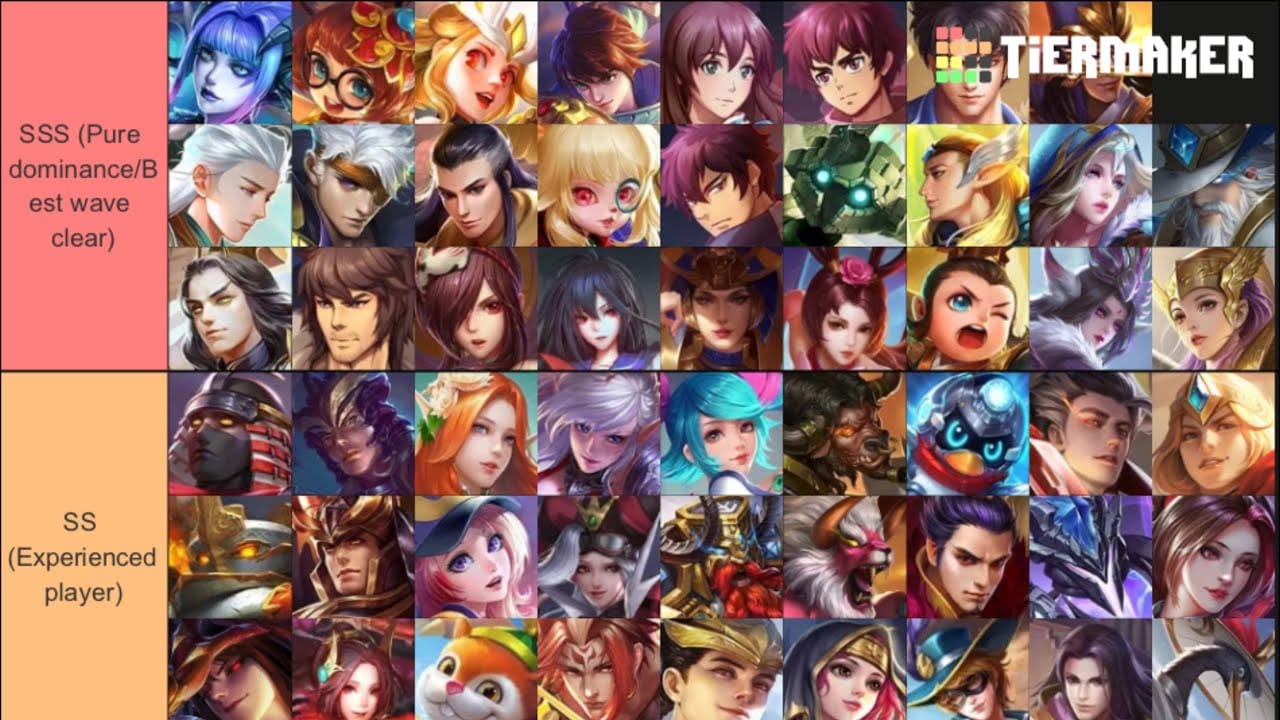
Below is the consensus power ranking with my solo-queue adjustment column, the part no flat list bothers to give you. Base tiers track the published community ranking; the "solo-queue read" reflects the four metrics above.
| Tier |
Heroes |
Role skew |
My solo-queue read |
| S+ |
Arlequin, Wolfram, Estrath, Cleopatra, Phobos, Yanbing Cao, Fumiko, Raker, Zhang Fei, Borgon, Master Crane |
Carries, assassins, mages, two frontliners |
Zhang Fei / Master Crane hold S+ everywhere; the hard carries (Arlequin, Estrath) effectively drop a notch unless you can pilot them |
| S |
Wendy, Lu Bu, Burninator, Electros, E-Stein, Rena, Naya, Prosper, Prometheus, Caesar, Fay |
Bruisers, mixed |
Lu Bu and the durable bruisers climb up for solo queue — they forgive mistakes |
| A |
Cherith, Apollo, Grom, Lapina, Crystal, Yuki, Nosferatu, Lunaria, Hegemon, Siren, Sprite Auric, Khaos |
Support, flex, durable |
Siren and the durable A-tiers are where most new players should actually live |
Source: Zathong (2026), with solo-queue adjustments by this author.
Two things to pull off that table. First, the only heroes I'd call unconditionally S+ for a solo climber are the two frontline initiators, Zhang Fei and Master Crane, because initiation creates value with zero help. Second, a clutch of "S" durable bruisers (the Lu Bu type) outplay their listed tier for the average player precisely because nobody has to babysit them. The published list isn't wrong. It's answering a different question than the one you face when you queue alone.
Best heroes by role, and where the hole usually sits
Roles here aren't decoration. The official database tags them, and your roster's gap is almost always a role, not a specific hero.
Carries and DPS. The community's headline carries are Arlequin and Wolfram, with Estrath the top assassin-style pick-off (per Zathong, 2026). These are the heroes everyone screenshots, and the ones I'd unlock last if you're green. They reward farm, positioning, and a team that peels, three things solo queue rarely bothers to provide. When they work, they hard-carry. When your support disconnects at minute four, they're a 0/5 anchor dragging the team under. Pilot first, then commit.
Mid mages and burst nukers. Cleopatra and Phobos lead the nuker class. Burst mages are the good aggressive pick for solo queue because their impact arrives front-loaded. You press buttons, someone dies, and you didn't need a teammate to confirm the kill. Want a damage role without the carry tax of needing peel? This is the lane. A mage who one-shots the enemy support tilts fights solo.
Tanks and initiators. Zhang Fei and Master Crane are the named frontline examples, and they're the spine of the whole argument. A tank produces value the moment it engages. It doesn't wait on items, it doesn't beg for farm priority, and a botched combo costs far less than a fed carry does. Learn exactly one role to climb? Learn this one.
Supports and roamers. Siren and Naya are the standout roam picks (per community tier lists, 2026). And here's an opinion the lists won't volunteer: supports get chronically under-ranked because their work never shows up on a damage chart. A sharp roam Siren wins games the post-match scoreboard hands to your carry. Lists rank on visible output, so supports always read a tier weaker than they play. Believe the win condition, not the placement.
Beginners: skip the absolute S+, grab something that forgives you
Picking a first hero? The single most useful sentence in this article: the highest-win-rate hero is not the best beginner hero, and conflating the two will bleed you games. The Heroes Evolved New Player Guide and community consensus both park in the same spot, start with free-rotation or low-cost heroes and dodge the high-skill carries early.
A durable A-tier bruiser does three things a fragile carry can't manage for a beginner. It survives your sloppy positioning, it stays relevant even when you're behind, and it doesn't punish you for lacking a coordinated team. You'll learn the map, the timings, the fights, all without spending thirty matches as the enemy's favorite snack.
For players who genuinely want the high ceiling, the Arlequins and Estraths, that payoff is real. It just belongs in a pro-draft list, not a solo-queue one. The community refreshes these rankings around ranked meta each patch, and the steady thread is that mechanically demanding heroes sit lower for the average ladder player than for an organized team (per multiple YouTube tier-list videos, 2026–2026). High ceiling, low floor. Brilliant when you're ready, a trap before then.
Which heroes actually deserve your Tokens
Tokens are the premium currency. They unlock heroes, skins, and event rewards, per Heroes Evolved Mobile's official channels. Recharging 100 Tokens unlocks certain permanent heroes or event prizes. The non-Token route is a grind, with heroes priced steep (59,999 gold or hefty ticket costs, tickets earned through events) per discussion in the official Facebook group.
The costliest mistake in this game has nothing to do with which hero is "best." It's spending Tokens on a hyped carry before you own a frontline and a support staple (per r/heroesevolved community discussions, 2026). You wind up with a flashy carry and nobody to play the two roles that decide solo-queue games, so your draft tilts lopsided forever. Buy the role you're missing, not the one that looks coolest in the splash art.
Here's the priority frame I'd spend on, sorted by role gap:
| Buy priority |
Role gap it fills |
Why now (or why wait) |
| First |
Frontline initiator (Zhang Fei / Master Crane type) |
Self-sufficient, climbs alone, never contested-griefs you — highest value per Token |
| Second |
Roam support (Siren / Naya type) |
Under-ranked, hard to get from teammates, wins games invisibly |
| Third |
Burst mage (Cleopatra / Phobos type) |
Front-loaded impact, no peel tax, your damage role |
| Wait |
Hard carry (Arlequin / Estrath) |
Only after you can pilot it; needs a team you don't have yet |
Source: role data per Heroes Evolved Official Website (2026); unlock-priority synthesis by this author from community guidance.
One mechanic most guides skip should reshape your spending entirely: free hero rotation lets you trial a hero before you sink Tokens into it. Wait for one you're eyeing to hit the rotation, play it for real in normals, and then decide. Tokens dropped on a hero you've never piloted is how regret threads get written. For genuinely free climbers, the standing community advice is blunt, grind events for tickets and points instead of buying expensive heroes with gold. The rotation pool plus a couple of event unlocks is plenty to climb. Early spending is the new-player trap, not the requirement.
Already trialed a hero and ready to commit? You can Heroes Evolved Tokens top up through VGTopup as a transparent option. But that's a decision for after the free-rotation test, never before.
Counters and synergy: the part flat lists skip
No official counter database exists, so treat what follows as practical draft logic, not a stats table. The dependable interactions in this meta run on archetype, not name:
- Burst mages counter immobile carries. A Cleopatra/Phobos nuker deletes a fragile farmed carry before it does damage. Enemy locks an Arlequin or Estrath early? A burst mage is your blind-pick insurance.
- Initiators counter passive backlines. Zhang Fei / Master Crane engagement forces a fight on a team that wants to scale. You don't let the hard carry reach its item spike.
- Durable bruisers counter assassins. An assassin's whole gig is the pick-off; a frontline that won't fold to one combo neutralizes it.
For comp, the solo-queue synergy that actually wins is dull and effective: one self-sufficient frontline, one roam support, one burst mage, and let the carry be whoever your last teammate locks. Draft flexibility outweighs raw power. A comp where every role can be played by a forgiving hero out-stabilizes one built around a single fragile carry that needs the other four to play flawlessly. You aren't drafting for the highlight reel. You're drafting for the 51% of games decided by whoever throws less.
What the latest patches actually changed
Official patch notes landed on May 6, May 20, and April 22, 2026, per Heroes Evolved Official News. Three balance touchpoints in roughly a month, a brisk cadence that means any tier list, mine included, is a snapshot with a short shelf life.
Now the honest part the stale lists bury: the official notes are the only authoritative record of what moved, and they don't publish before/after win-rates. So claims that a patch "shifted the top tier" are usually vibes until the community re-tests over a couple of weeks. When a creator swears one minute after a patch that the meta flipped, that's a hypothesis, not a finding. The durable truth across every recent patch is that the frontline-initiator and burst-mage roles ride out balance churn, because they're built around self-sufficiency, the exact trait patches rarely gut. Hard carries are the heroes most likely to swing tiers patch to patch. The anchors I keep pushing are the ones that don't. That stability is a feature, not luck.
The picks I'd actually commit Tokens to
One thing to carry out of all this: in solo queue, buy the role you can't trust teammates to cover, learn one initiator cold, and let the flashy carry sit until you've trialed it free. Zhang Fei or Master Crane first. A roam support second. A burst mage for your damage itch. The Arlequin you've been eyeing? Fourth, after the free rotation proves you can actually pilot it.
The community S+ list isn't lying. It's answering a draft question while you're living a solo-queue life. Weight flexibility and skill floor over raw ceiling, refuse to print win-rates nobody can source, and spend Tokens on gaps instead of hype. That's the climb.
Frequently Asked Questions
Which hero should I buy first with Tokens as a new player?
A self-sufficient frontline initiator, a Zhang Fei or Master Crane type, before any carry. It generates value alone and never griefs your draft when a role gets contested (per community guidance, 2026). But trial it during free rotation first. The rotation exists precisely so you don't drop Tokens on a hero you've never piloted.
Are free-rotation and low-cost heroes good enough to climb ranked?
For most of the ladder, yes. The official New Player Guide and the community both steer free players toward free-rotation and event-unlocked heroes rather than expensive gold buys. The ceiling you'll smack into is mechanical, not roster-based. You'll plateau on your own play long before you plateau on hero access.
What's the strongest carry in Heroes Evolved right now?
Community lists put Arlequin and Wolfram atop the carry class, with Estrath leading assassin-style pick-offs (per Zathong, 2026). For a coordinated team, that's accurate. In solo queue I'd effectively drop the hard carries a notch. They need peel you can't guarantee, which is why durable bruisers rank higher for the average climber in my read.
How is this tier list decided if there's no official win-rate?
No public official win/pick-rate dashboard exists, so every numeric ranking traces back to community spreadsheets and creator testing (The Dank Oreo, Krorn ch., Zathong, 2026–2026), not an official feed. This ranking weights draft flexibility, skill floor, self-sufficiency, and power-spike timing over raw win-rate, because a sky-high win-rate on a near-zero pick-rate hero usually just means a handful of specialists.
Is buying a hyped S-tier hero with Tokens ever worth it early?
Rarely. The most-flagged regret in community threads is spending Tokens on a flashy carry before owning a frontline and support staple. It leaves your draft permanently lopsided (per r/heroesevolved, 2026). Buy the role your teammates won't reliably cover first. The hype hero is a fourth purchase, after you've confirmed you can pilot it for free.









Comments