The question worth answering before you spend a cent
When people type "where's my User ID," they're not really asking a navigation question. Finding the ID takes ten seconds, give or take. What actually drains wallets is a different question: which identifier does the store route by, and what quietly breaks that routing? I've stared at enough checkout screens to know the ID is rarely the thing that goes sideways. Region, link status, the Mailbox. That's the trio where crystals go missing.
So here's the rule I'm running for the whole piece. A claim only earns space if it changes whether your crystals land in your inventory. Everything else gets trimmed.
Where the ID lives, and what it looks like
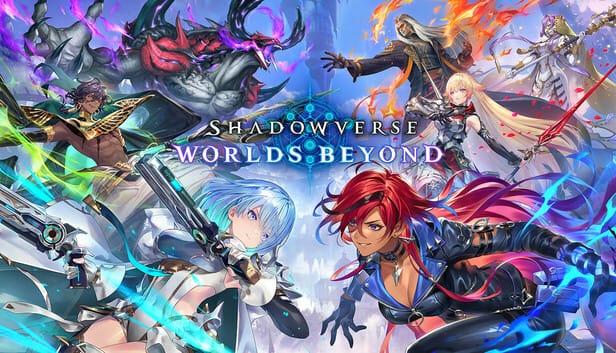
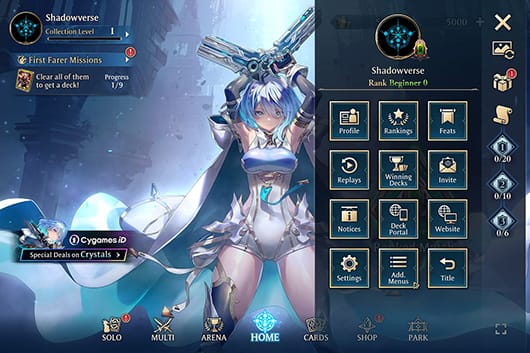
On the original Shadowverse title screen, the User ID sits down in the lower-right corner. You can also reach it through More → Profile, per Gamepressure. In Worlds Beyond, the same identifier shows up through Data Link, which you open from the title screen or from Additional Menus, where you punch in the User ID next to a one-time password (the official Data Link Guide covers this).
Format is the bit most guides botch. The User ID is a numeric string displayed on the title screen or your profile. The one-time password gets generated separately, by email, after you set things up in Additional Menus. That distinction matters in a practical way: if a store field spits back what you pasted, your first move is dead simple. Is it all digits? If you're looking at letters in there, you grabbed the wrong thing.
A community walkthrough from LootBar (2026) lays the in-game route out as Menu (top-right) → Additional Menus → Link User ID to view or prep the number. Handy confirmation that the path holds steady whether you're linking or topping up.
Friend code is not your User ID
This is the mix-up I see go wrong more than any other, so it gets real space. Confusing the friend code with the User ID is the slip flagged most often in account-linking threads, and it walks you straight into a failed link or a failed top-up, per r/Shadowverse.
| Identifier |
What it's for |
Top-up uses it? |
| User ID |
Account identifier for linking and data transfer |
Yes — this is the one |
| Player Name |
Your in-game display name |
No |
| Friend Code |
Social identifier for adding friends |
No |
Source: Shadowverse News Linking Guide (2025); r/Shadowverse (2025).
Here's why it bites. All three sit in roughly the same corner of the UI, and the friend code looks official enough that people paste it without a second thought. It isn't the one. The store routes your payment off the User ID. Your display name and friend code are decoration as far as a crystal order cares. And if a top-up page ever asks you for a "player name," read that as a warning light, then double-check which field actually delivers your crystals.
Step-by-step on iOS, Android, and PC
The truth a lot of guides skate past: the path barely changes across platforms because the menu tree is shared. It's the entry point that shifts enough to throw new players. Here's where each one splits off.
| Platform |
Path to your User ID |
| iOS |
Launch the game → Menu (top-right) → Additional Menus → Link User ID, or read it off the title screen / Profile |
| Android |
Same as iOS — Menu → Additional Menus → Link User ID; the title-screen reading also applies |
| PC / Steam |
Launch the game → access Additional Menus from the home screen → Link User ID or Cygames ID options |
Source: LootBar (2026); Steam Community Discussions (2025); Gamepressure (2025).
On PC, the Steam build floats both Link User ID and Cygames ID from the home-screen Additional Menus (per Steam Community Discussions, 2025). Which is convenient, because on Steam you almost certainly want the Cygames ID route for purchases anyway. More on that split in a bit.
There's no published character count for the ID, and nobody official has said the format changes by platform. So don't go hunting for some "PC-format" versus "mobile-format" version. One numeric account identifier, surfaced through slightly different menus. That's all it is.
The pre-payment check most guides skip
Time to get opinionated. The region match is the failure that genuinely loses money, and most speed-guides bury it under three paragraphs of "here's how to find the ID." Topping up on the wrong region or server store makes the order fail. Verify your region matches your account before you pay, per BuffBuff.
Region is baked into the account. A mismatched store can reject the order outright or send it to the wrong place, and neither one refunds itself the moment it happens. So my ranked pre-payment list runs like this:
- Confirm the field is your numeric User ID — not the friend code, not the display name.
- Match the region/server to the store you're on. This is the step that quietly eats orders.
- Copy, never retype. Hand-keying the ID risks a transposition slip that fires crystals off to a stranger's account, per a top-up walkthrough from LDShop (2026). Where the game lets you copy, copying isn't a nice-to-have. It's the whole job.
- Screenshot before you confirm. A pre-payment capture of the User ID screen is the cheapest insurance going. Community linking guides recommend screenshotting the ID screen, the top-up confirmation, and the Mailbox precisely so you've got receipts if you ever open a support ticket.
That fourth step reads as paranoid right up until the one time you need it. Then it's the gap between a five-minute fix and an unwinnable "prove it was you" standoff.
Once you've copied and verified the ID and confirmed the region, a Shadowverse Worlds Beyond top up through a third-party store works the way every reputable one does: User ID plus a one-time password, crystals routed to your account. That's one such option. The value sitting here is the verification habit around it, which holds no matter where you end up buying.
Confounders nobody checks: links, guests, and the Mailbox
The take I'll defend: the bigger danger isn't a mistyped ID landing on a stranger. It's topping up an unlinked guest account you can lose down the line. Recharging an unlinked guest risks wiping everything on a device change, which the official Data Link guidance stresses hard. A guest account will happily show a User ID and accept your money, then vanish when you reinstall or swap phones. Link first, top up second. That order isn't a suggestion, it's the protection your purchase rides on.
This is also exactly why the Cygames ID matters. Linking to a Cygames ID is the route Cygames recommends for official WebStore purchases over third-party top-up, according to the Cygames Support FAQ, and that same ID lets you play across iOS, Android, and PC/Steam without losing data. So if you're stuck on whether to link before or after spending, there's nothing ambiguous about it. Link across your devices first, then buy. A linked account survives a phone swap. A guest account is a bet you'll eventually lose.
Then there's the false-alarm panic, which is what bit my friend at the top of this entry. Crystals land in the in-game Mailbox after a successful third-party top-up. They don't always drop straight into your visible balance, per third-party store instructions (LootBar and BuffBuff, 2026). I've seen people decide an order flopped and reach for their wallet again before they ever checked. Open the Mailbox first. The crystals are usually parked there, waiting to be claimed.
One timing note that heads off pointless tickets. The one-time password generated through Data Link is good for 30 minutes after you make it, per the official guide, while the link password in the original Shadowverse runs 8 hours, per the Shadowverse News announcement (Jun 2025). If yours expires mid-process, your account isn't broken. You've just got a stale code. Make a fresh one and carry on.
When a top-up goes wrong
Work the diagnosis in order, because the order roughly tracks how likely each cause is:
- Crystals not showing? Check the Mailbox before you touch anything else. That alone clears most "it didn't arrive" reports.
- Order rejected at checkout? Re-check the region match. A mismatched server store is the most common silent reject.
- Password not accepted? It probably timed out. Regenerate it (30 minutes for the Data Link code).
- Crystals genuinely went somewhere wrong? Now your pre-payment screenshot earns its keep. Bring the User ID screen, the top-up confirmation, and the Mailbox to a support ticket, which is exactly the evidence community guides tell you to hang onto.
If you skipped the screenshot and entered a wrong ID, recovery gets harder and slower. Which is the whole reason to treat copy-paste plus a screenshot as non-negotiable instead of optional.
What's safe to share, and what never leaves your hands
The community tends to fret over User ID privacy while shrugging at the real exposure. Sharing your User ID and a one-time password with a trusted top-up provider, or using them for official linking, is the intended workflow. What you never hand over is your Cygames ID password or your full account credentials, per top-up site privacy warnings.
Think of it this way. The User ID is an address. A one-time password is a single-use, time-limited key (30 minutes, as covered above). Your Cygames ID login is the master key to the whole house. Give out the address and a disposable key for one delivery. Never the master key. Anyone fishing for your actual login password isn't running a top-up. They're running something else entirely.
That boundary is the one privacy rule that genuinely protects your account. The User ID, by design, is low-risk.
Frequently Asked Questions
How do I copy my User ID instead of typing it?
Use the in-game Link User ID screen (Menu → Additional Menus), where the number's displayed, and copy it straight from there instead of reading it off and retyping. Manual entry is where transposition slips creep in, per LDShop's top-up walkthrough (2026). If your platform won't let you copy directly, screenshot it and zoom in, then check each digit against the store field before you confirm.
Does my region actually change where I top up?
It does, and it's the failure that quietly costs the most. Region and server are bound to your account, and a store set to the wrong region can reject or misroute the order, per BuffBuff (2026). Always confirm the store's region matches your account region. This single check stops more failed orders than getting the ID perfect ever does.
Can I top up without logging into the game?
You can finish a third-party order with just your User ID and a one-time password, no play session required, but you do need the game to generate that password. It's emailed after you set up Data Link in Additional Menus (per the official Data Link Guide). The code's good for 30 minutes, so make it right before you pay, not hours out.
Is sharing my User ID a security risk?
For top-ups, it's low risk. The User ID plus a one-time, 30-minute password is the intended workflow with trusted providers or official linking. The real danger is handing over your Cygames ID password or full credentials, which top-up site warnings flat-out tell you never to do. Treat the User ID like a delivery address and your login like a house key.
Should I link my account before topping up?
Link first, every single time. An unlinked guest account can show a User ID and take your money, then get wiped on a device change, per Cygames' Data Link guidance. Linking to a Cygames ID also unlocks cross-platform play across iOS, Android, and PC/Steam without data loss (per Cygames Support FAQ, 2025), so the link guards both your purchase and your whole collection.










Comments