
MIGO Live Gold Top Up: Fast and Direct In-App Currency
MIGO Live is an interactive live streaming and social entertainment platform where creators, gamers, and viewers connect in real time. To participate actively in live video broadcasts, multi-guest voice rooms, and competitive PK battles, users rely on Migo Live Gold. Gold serves as the primary spending currency within the app, allowing you to send virtual gifts, trigger dynamic screen effects, support your favorite broadcasters, and raise your profile level.
VGTopup provides direct MIGO Live Gold top up processing using only your public Migo ID. You do not need to share passwords or link personal third-party credentials. Select your desired Gold package on the live checkout menu, input your numeric account identifier, and receive your balance directly in your Migo Live wallet.
How to Top Up MIGO Live Gold on VGTopup
Recharging your Migo Live balance through VGTopup takes just a few moments. Follow these straightforward steps to complete your purchase:
- Select Your Gold Denomination: Choose the package size that matches your gifting and support needs from the product list above. Current real-time rates are displayed on the checkout cards.
- Enter Your Migo ID: Input your numeric Migo ID into the recipient field. Double-check the digits to ensure the currency arrives in the correct account.
- Select Your Payment Option: Pick your preferred payment method from the available local and international options.
- Finalize the Transaction: Click the buy button and complete your payment through our secure checkout portal.
- Check Your In-App Balance: Open Migo Live and check your user profile wallet. Your Gold balance will reflect the credited amount.
How to Find Your Migo ID in the Migo Live App
Your Migo ID is a unique numeric identifier linked permanently to your user profile. You only need this number to complete a top-up for yourself or any other user.
To locate your Migo ID:
- Launch the Migo Live app on your mobile device.
- Tap the Me or Profile icon located at the bottom right corner of the main screen.
- Look directly under your profile avatar and display name at the top of the screen.
- You will see ID: followed by a sequence of numbers.
- Tap the copy icon next to the number, or write down the exact sequence.
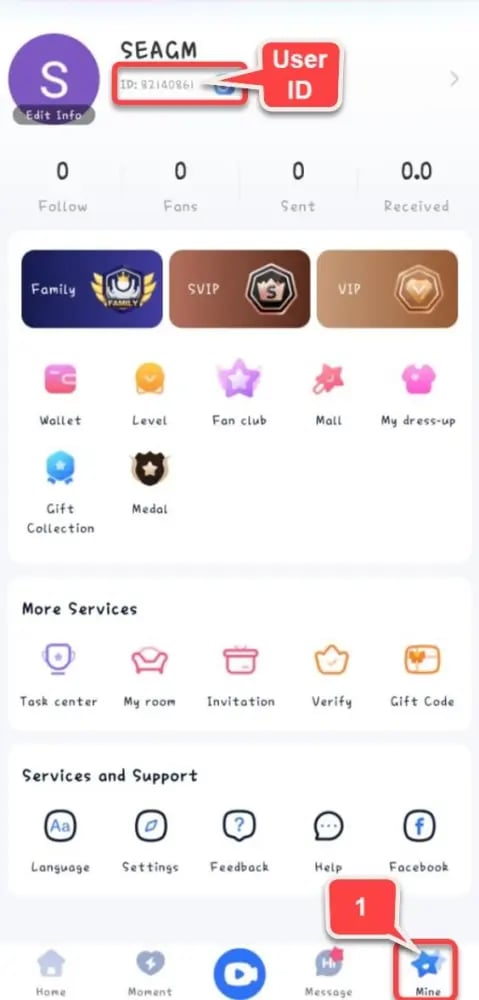
Paste this copied ID directly into the input field on VGTopup to avoid typing errors.
What Are Migo Live Gold and Coins Used For?
Different regional versions of live streaming applications sometimes refer to virtual currency as Gold, Coins, or Diamonds. Understanding the platform currency structure helps you manage your balance and gifting strategy effectively.
| Currency Term | Primary Role | How It Is Obtained | User Access |
|---|---|---|---|
| Migo Gold / Coins | Buying virtual gifts, VIP badges, room entry effects, and PK boosters | Direct top up on VGTopup or in-app purchase | All viewers, supporters, and active users |
| Diamonds / Beans | Host earnings accumulated from received gifts | Earned by streamers during live broadcasts | Broadcasters and agency creators (convertible/withdrawable) |
| VIP Privileges | Exclusive chat frames, entry banners, and priority display in rooms | Purchased using Gold balances | Supporters wanting enhanced profile visibility |
Interactive Virtual Gifting
Broadcasters compete in timed PK challenges where viewers decide the winner by sending gifts. Gold allows you to send everything from small animated hearts to large customized screen-filling animations that increase a host's ranking on the daily and weekly leaderboards.
Room Privileges and Fan Club Badges
Spending Gold unlocks customized profile frames, entry vehicles when you enter popular live rooms, and exclusive membership badges in specific creator fan clubs. These features distinguish your profile among thousands of active viewers.
Direct Player ID Top-Up Without Account Passwords
Account safety is essential when purchasing digital goods online. VGTopup operates strictly through direct API and server-side top-up channels that only require your public Migo ID.
- No Login Credentials Needed: You never have to provide your login password, phone verification codes, or access tokens.
- Protected Social Logins: If your Migo Live account is connected via Google, Facebook, Apple ID, or phone number, those credentials remain completely private on your personal device.
- Gifting and Third-Party Top-Ups: Because only the Migo ID is required, you can send Gold directly to content creators, friends, or family members as a surprise gift without asking for their login details.
Troubleshooting and Refreshing Your In-App Balance
Top-ups on VGTopup are processed immediately after payment confirmation. If your updated Gold balance does not appear right away, use the following troubleshooting steps:
- Refresh the Migo Live Application: Completely close the Migo Live app from your device background app manager, then reopen it. This forces the client to pull the latest wallet balance from the server.
- Check Your In-App Wallet History: Navigate to your profile settings and open the wallet or Gold record tab to view recent deposit logs.
- Verify the Submitted Migo ID: Check your VGTopup order confirmation email to verify that the Migo ID entered matches your current profile ID.
- Inspect Network Connectivity: Switch between Wi-Fi and mobile data if the app fails to sync with Migo Live data servers.
- Contact VGTopup Support: If the balance remains uncredited after a short wait, reach out to the VGTopup 24/7 customer service team with your Order Number and Migo ID for fast assistance.
Global Payment Methods for MIGO Live Recharge in 2026
VGTopup supports an expansive selection of global and regional payment solutions to make recharging accessible no matter where you live. In 2026, buyers can choose from:
- Major international credit and debit cards
- Regional digital e-wallets and localized instant checkout solutions
- Direct online banking and regional bank transfer channels
All checkout values and package prices are calculated in real time. Visit the live checkout section above to see the active rates and choose the package that fits your entertainment budget.
Frequently Asked Questions About Migo Live Recharge
What is Migo Live used for?
Migo Live is a global live streaming and social entertainment app used for watching live broadcasts, interacting with creators, joining multi-person voice and video chat rooms, and participating in live PK battles between streamers.
How do I find my Migo ID?
Open the Migo Live app, tap the Me profile tab in the bottom right corner, and locate the numeric ID displayed beneath your avatar and username. Tap the copy icon next to the number to copy your exact ID.
Do I need to share my Migo Live account password to top up?
No. Recharging MIGO Live Gold on VGTopup requires only your numeric Migo ID. You never need to share passwords, SMS verification codes, or third-party login credentials.
What should I do if my Migo Live Gold does not appear after purchase?
First, restart the Migo Live app to force a data refresh. If the Gold still does not show in your wallet, check your order receipt to confirm the entered Migo ID was correct, then contact VGTopup 24/7 customer support with your order details.
Can you make money or earn rewards on Migo Live?
Yes. Broadcasters on Migo Live receive virtual gifts sent by viewers using Gold. These gifts convert into in-app host earnings (such as Diamonds or Beans) that eligible creators can exchange according to the platform's host reward policies.
Can I recharge Migo Live Gold for a friend using their Migo ID?
Yes. Because the top-up process only requires a Migo ID, you can enter your friend's or favorite streamer's ID at checkout on VGTopup to credit Gold directly to their account balance.
Select Denomination
Tax, payment fees and eligible coupons are calculated at checkout.
| Package | Price |
|---|---|
| 14,000 Gold Coins | USD 1.53 |
| 28,000 Gold Coins | USD 3.07 |
| 56,000 Gold Coins | USD 6.13 |
| 65,000 Gold Coins | USD 7.12 |
| 93,500 Gold Coins | USD 10.24 |
| 112,000 Gold Coins | USD 12.27 |
| 130,000 Gold Coins | USD 14.24 |
| 224,000 Gold Coins | USD 24.53 |
| 260,000 Gold Coins | USD 28.47 |
| 325,000 Gold Coins | USD 35.59 |
| 336,000 Gold Coins | USD 36.80 |
| 650,000 Gold Coins | USD 71.18 |
| 672,000 Gold Coins | USD 73.59 |
| 1,344,000 Gold Coins | USD 147.19 |