Fix PUBG New State crashing on startup Android devices with this step-by-step troubleshooting guide addressing OS anti-cheat bugs, cache, and API errors.
Tapping the game icon, watching the Krafton splash screen flash for two seconds, and landing straight back on your home screen means the operating system killed the process. You ready your loadout to jump into Troi, but the app refuses to boot.
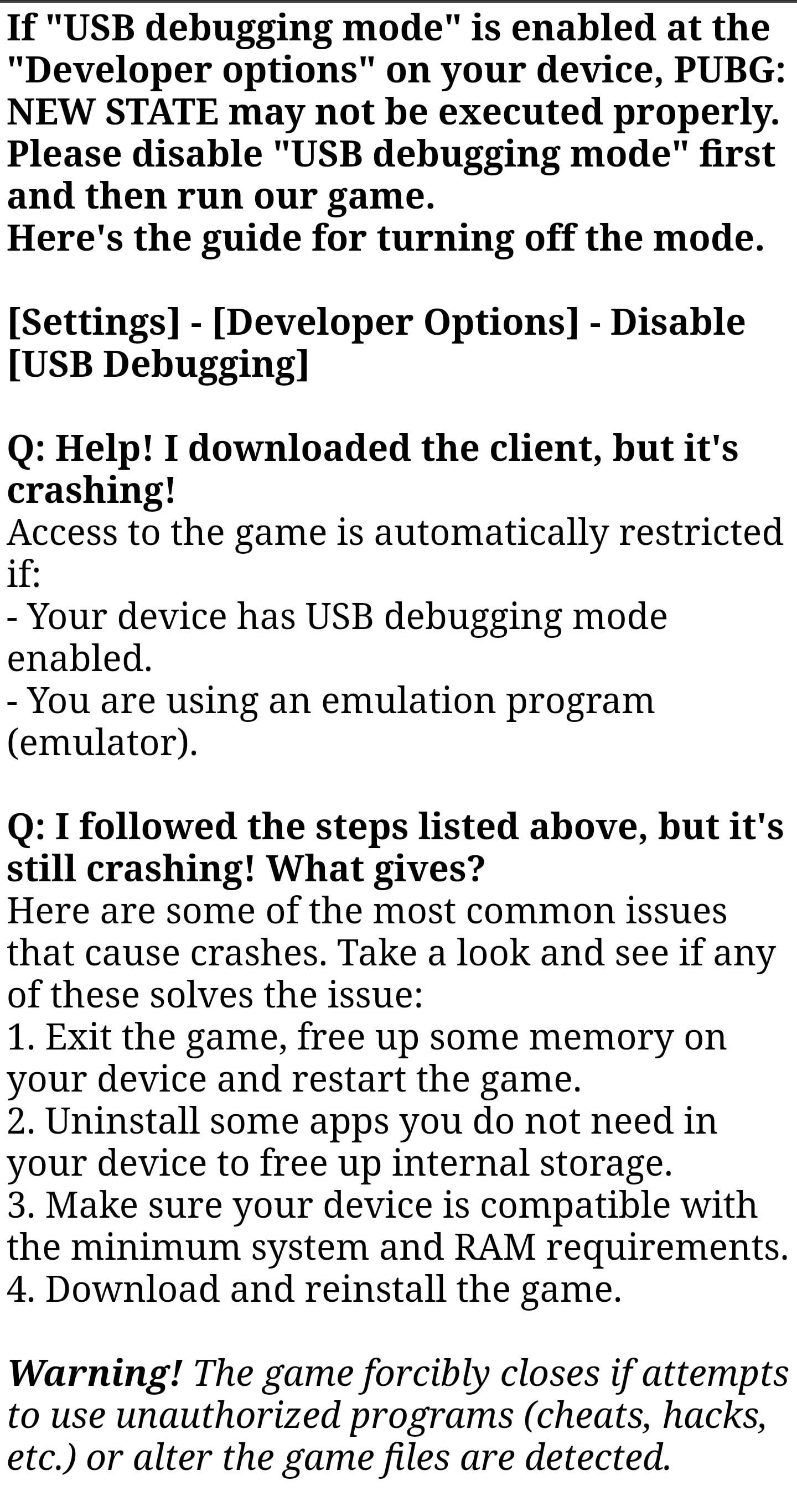
If your client instantly force-closes, freezes on launch, or pushes you to a browser page, your device is failing Krafton's strict boot integrity scan. The anti-cheat layer inspects running processes, OS environment flags, and GPU drivers before rendering the main menu. When one parameter violates security policies or trips a driver fault, the runtime terminates.
Players often re-download 2GB update packages multiple times without addressing the underlying conflict. An order-of-elimination check fixes the root cause faster than reinstalling blindly.
The Real Reasons PUBG: New State Closes on Boot
Your game rarely crashes on startup due to random bad luck. Krafton built an aggressive security layer designed to catch unauthorized memory modification, third-party overlay injection, and rooted environments before a player enters matchmaking.
Unfortunately, this system treats standard Android power-user tools as hostile threats. If you unlocked your bootloader, turned on USB debugging to transfer files to a PC, or run a floating resource monitor in the background, the anti-cheat flags your device instantly. Instead of displaying a polite error dialog, the client immediately shuts down and dumps you to an external security support webpage.
Driver incompatibility creates a second failure point. The mobile client initially pushed Vulkan as its rendering standard. On paper, Vulkan handles draw calls with minimal overhead. In practice, rogue shader compilation delays and fragmented mobile GPU drivers cause instant pipeline aborts on Android chipsets. When that happens, you get a black screen followed by an unceremonious boot to your launcher.
Before you start tearing through settings menus, compare your specific symptom against the common triggers in the table below.
| Launch Failure Symptom | Primary Root Cause | Fast Resolution |
|---|
| Instant force-close & browser opens | Developer Options or USB Debugging enabled | Toggle off Developer Options in Android Settings |
| Crash on Krafton splash screen | Corrupt launch logs / bad cache data | Clear app cache and storage via App Info |
| Black screen then freeze on boot | Vulkan API shader compilation pipeline fault | Revert Graphics API setting to OpenGL ES |
| Freeze at exactly 38 percent loading | Server maintenance or network timeout | Wait for Krafton backend deployment to finish |
| Immediate drop after update installation | Modified package or sideloaded APK integrity fail | Perform clean install directly via Google Play |
| Crash during graphic optimization on launch | Outdated system firmware (notably Xiaomi MIUI) | Update device OS under Settings > About Phone |
Diagnosing the exact visual behavior of your crash reveals whether you face an OS permission block, a GPU driver conflict, or backend server downtime.
Step 1: Kill Developer Options and USB Debugging
By far, the most frequent reason for PUBG: New State crashing on startup Android devices is an active Developer Options menu. Krafton strictly forbids this environment setting to prevent memory injection and runtime manipulation.
If you adjusted window animation scales, turned on USB debugging, or tested layouts, the anti-cheat daemon detects the active flag and terminates the app within three seconds.
- Open your device Settings.
- Scroll down to System (or search directly for
Developer Options in the top search bar). - Open the Developer Options menu.
- Find the master toggle at the very top and switch it to Off.
- Ensure USB Debugging is toggled off specifically before closing the menu.
One common trap: custom Android skins (including older MIUI, ColorOS, and OxygenOS builds) do not flush OS environment variables immediately when you toggle the setting off. Reboot your phone right after disabling Developer Options. Skipping the reboot leaves the flag active in memory, triggering another instant crash.
Once rebooted, tap the game icon. If the title launches cleanly into the start screen, you are safe to top up PUBG New State NC and check out the active survival pass gear.
Step 2: Clear Corrupted Cache and Launch Logs
When PUBG: New State crashes halfway through an asset update, it leaves behind half-written launch logs and fragmented activity files. When the engine boots, it attempts to parse these broken logs, fails an internal integrity assertion, and closes immediately.
Running a basic app wipe clears the path without forcing you to re-download the massive core game installation.
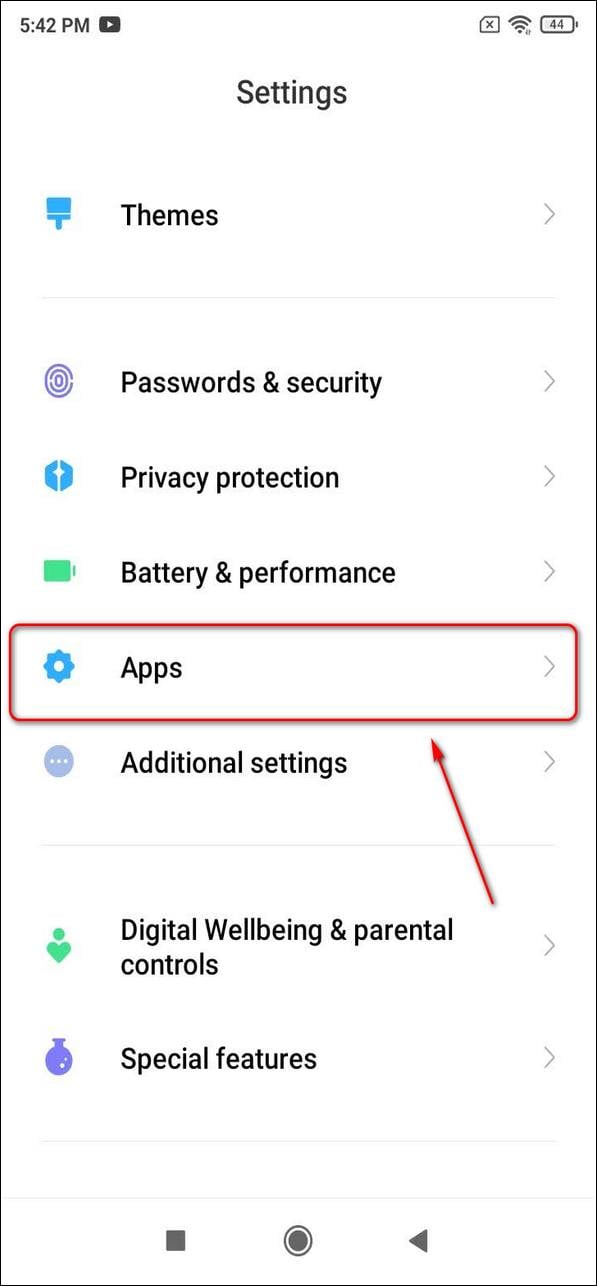
- Long-press the PUBG: New State app icon on your home screen or app drawer.
- Tap the App Info (small "i") icon to open application properties.
- Tap Storage & Cache.
- Tap Clear Cache.
- Launch the game to test stability.
If the splash screen continues to crash, head back to that same menu and select Clear Storage (or Clear Data). This purges saved local preferences, temporary user configs, and the corrupted boot manifests. You will have to re-enter your account credentials on the next boot, but this single action clears persistent post-patch crash loops.
Step 3: Switch the Graphics API from Vulkan to OpenGL ES
Mobile graphics drivers remain a fragmented mess across the Android ecosystem. Google notes that baseline Vulkan support exists from Android 7.0 onward, with Vulkan 1.1 running across roughly 85% of active 64-bit devices on Android 10 and above.
That 85% adoption rate looks clean on paper, but GPU drivers on physical hardware tell another story. Incompatible or vendor-tweaked drivers choke during startup shader compilation. Multi-threading pipeline errors force the engine to abort, dropping you to a black screen before quitting to your launcher.
Krafton recognized this exact instability early on. The studio issued patches specifically reverting the default mobile rendering pipeline from Vulkan to OpenGL ES for unstable devices. If your phone allows you to reach in-game settings before crashing, or if you can access graphics files, force the game onto OpenGL ES.
| Graphics API Metric | Vulkan Pipeline | OpenGL ES Pipeline |
|---|
| Baseline Android Support Level | Android 7.0+ (Vulkan 1.1 on 85% of Android 10+ 64-bit) | Android 6.0 and above across all vendors |
| Shader Compilation Behavior | Pre-compiles at runtime; prone to boot driver aborts | Established driver maturity; stable initial launch |
| Graphic Artifact Occurrence | Prone to color distortion and pipeline crashes | Low visual artifact rate; consistent rendering |
| Driver Stability on Mid-Tier SoCs | Inconsistent; high crash rate on non-flagships | High stability; recommended fallback by Krafton |
While Vulkan offers lower driver overhead in theoretical benchmarks, OpenGL ES delivers the stability needed to prevent launch-sequence GPU crashes.
Switching to OpenGL ES eliminates abnormal color artifacts, screen flickering, and GPU driver lockups. If your device boots up and stutters heavily before crashing, check your in-game Graphics menu and toggle the Graphics API option directly to OpenGL ES.
Krafton does not just look at your device settings; its anti-cheat inspects what is running in system memory alongside the game. If you run auto-clickers, macro tools, virtual gamepads, screen filters, network monitors, or floating overlays, the anti-cheat marks them as potential tampering software.
Close all running applications from your recent apps view before launching New State. Check your notification shade for active background services like VPN clients, overlay tools, or performance monitoring software. Shut them down completely.
The PC Emulator Restriction
Do not waste hours trying to get PUBG: New State to run on Bluestacks, Nox, or LDPlayer. The game explicitly blocks Android emulators. The engine detects virtualized hardware environments immediately and drops the process before the title screen renders. Krafton enforces this rule to keep competitive mobile lobbies free of mouse-and-keyboard setups. The game must run on physical mobile hardware.
Step 5: Check Hardware Baselines and Update Firmware
Hardware limits cause their own set of launch failures.
PUBG: New State enforces strict hardware baselines: your phone must pack at least 2GB of physical RAM and run Android 6.0 (Marshmallow) or higher. Any hardware falling short cannot initialize the game runtime.
During pre-launch optimization, Krafton validated that the title ran smoothly on hardware matching the Samsung Galaxy S7 tier equipped with 2GB of RAM. Yet early release builds told a bumpier story: players on early Android 12 builds reported severe lockups and near-bricking freezes during Google and Facebook account authentication. Krafton pushed hotfixes to address asset optimization routines that stalled on boot.
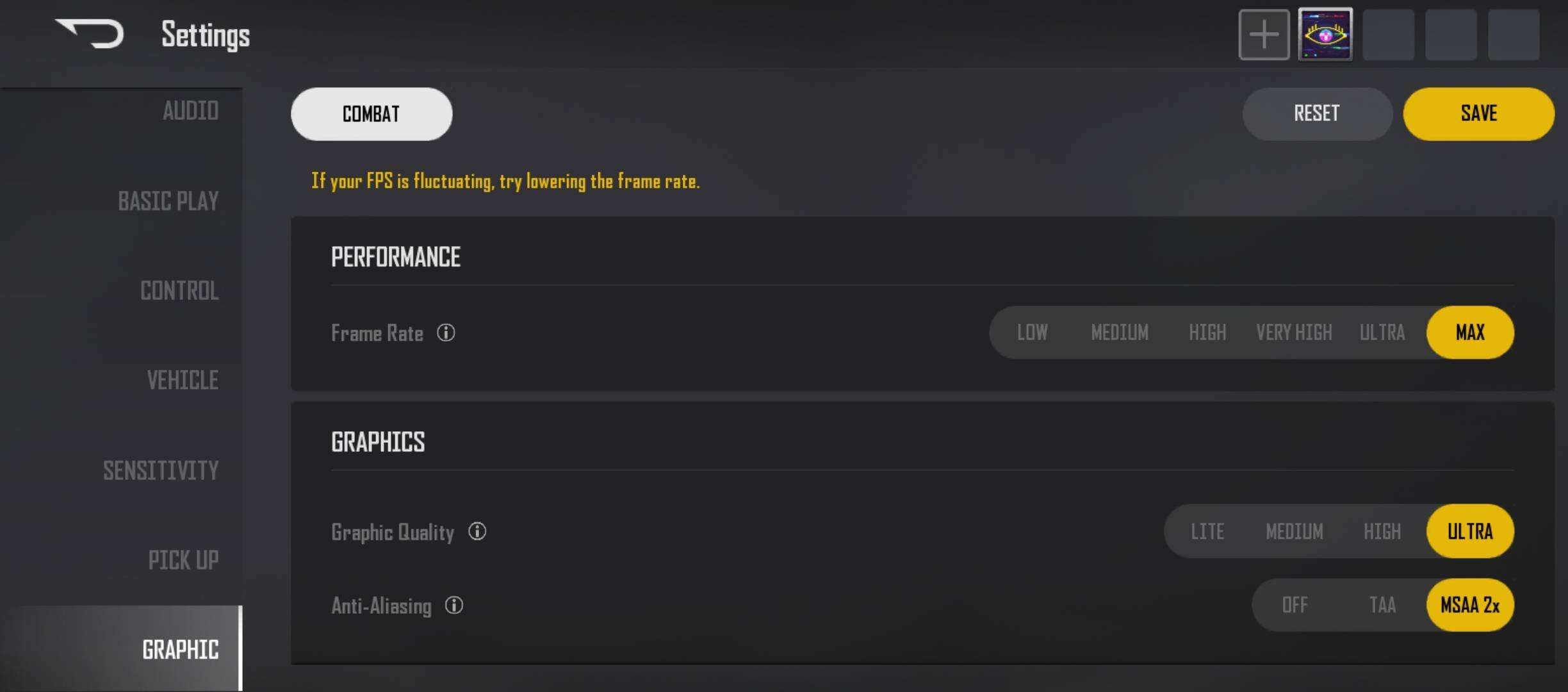
If you play on a Xiaomi, Redmi, or POCO phone, outdated MIUI builds frequently cause launch crashes. The operating system's custom memory management interferes with the game's startup asset optimization.
- Open your phone's Settings.
- Tap About Phone.
- Select your MIUI/OS version tile.
- Check for and install any pending system updates.
- Restart the device after the installation finishes.
Keeping system firmware updated resolves low-level vendor driver bugs that Krafton cannot patch directly.
Step 6: Eliminate Sideloading and Reinstall Clean
Grabbing an APK and OBB combo from a mirror site is tempting when Play Store downloads crawl. With PUBG: New State, sideloading is a straight road to crash loops.
The game relies on cryptographic integrity checks linked to the Google Play Store. Sideloaded installations frequently fail signature checks, ship with outdated OBB split archives, or lack region-specific verification tokens. The moment the client dials home during boot, the integrity check fails, and the game closes.
If nothing else has worked, follow this clean reinstall procedure:
- Uninstall the existing PUBG: New State installation completely.
- Open your device file manager and delete any leftover
com.pubg.newstate folders in Android/data and Android/obb. - Restart your phone.
- Open the official Google Play Store.
- Download the game directly from Krafton's official store listing.
Let the installer download all core files directly. Do not interrupt the download or swap networks halfway through. Once you are back in the lobby, grab what you need from the PUBG New State store and jump straight into match queues.
Understanding the 38 Percent Loading Stall
Not every launch failure is a crash caused by your phone. A notorious issue in New State is the launch progress bar halting squarely at 38%.
You tap the game, the splash screen clears, the progress bar crawls forward, and it freezes at 38% before popping an error: "Unable to Connect to Server."
Do not clear your data. Do not reinstall the game. This specific stall is not an app corruption issue.
A freeze at 38% happens when your client cannot establish a handshake with Krafton's authentication servers. It almost always points to active server-side maintenance, emergency hotfix deployments, or an ISP routing outage. When this happens, your local installation is perfectly healthy. You simply have to wait for Krafton's engineering team to bring the servers back online.
Startup stability depends on your hardware profile and software environment. Each setup introduces distinct security barriers and driver expectations.
| Platform / Environment | Launch Stability Status | Core Startup Obstacle | Recommended User Action |
|---|
| Physical Android Phone (Stock OS) | Highly Stable | Developer Options / USB Debugging active | Toggle off Developer Options and reboot device |
| Physical Android Phone (Custom ROM) | Moderate Instability | Unflushed OS variables and root detection | Flash certified vendor firmware; disable root |
| Xiaomi / MIUI Android Devices | Variable Stability | Asset optimization freeze on older builds | Update system firmware via About Phone menu |
| PC Android Emulators (Bluestacks, etc.) | Complete Launch Failure | Explicit platform ban via anti-cheat engine | Play on physical mobile hardware; no bypass exists |
| Sideloaded / Split APK Packages | Crash Loop on Launch | Cryptographic signature verification failure | Uninstall and reinstall cleanly from Google Play |
PUBG: New State strictly targets verified physical mobile hardware; running the app outside of verified environments triggers immediate termination by design.
If your squad is already grinding matches while your game boots up smoothly, make sure your account is stocked. Secure your NC using safe PUBG New State top ups so you can grab new weapon crates the second you hit the lobby.
FAQ
Why does PUBG New State crash on startup on Android?
It most commonly crashes because Developer Options or USB Debugging is turned on in your device settings. Krafton's anti-cheat system flags these debugging tools as potential tampering risks and immediately terminates the application. Clearing the app cache or switching the graphics API also resolves crashes caused by corrupted data.
How do I turn off Developer Options to stop PUBG New State from crashing?
Open your Android Settings app, search for Developer Options, and toggle the master switch to the Off position. Make sure USB Debugging is turned off as well. Always restart your phone right after changing this setting so the change updates across your entire operating system.
Can I run PUBG New State on an Android emulator?
No, PUBG: New State explicitly blocks emulator environments and force-closes upon launch detection. Krafton prohibits emulators to preserve fair matchmaking against touch-screen mobile players. There is no legitimate bypass for this restriction.
Why is PUBG New State freezing at 38% on the loading screen?
Stopping at 38% with a connection error indicates an authentication server outage rather than a corrupted game file. This freeze occurs during backend server maintenance or widespread network interruptions. You must wait for Krafton to restore server availability.
How does switching to OpenGL ES fix startup crashes?
OpenGL ES avoids unstable Vulkan mobile drivers that crash during launch shader compilation routines. Krafton rolled back the game's default rendering engine to OpenGL ES specifically to prevent startup crashes on incompatible phone chipsets.
Will sideloading the PUBG New State APK cause it to crash?
Yes, sideloaded installations fail the app's internal cryptographic signature and integrity checks. When the client fails verification during startup, it shuts down immediately. Always install the title directly from the Google Play Store.
What are the minimum Android requirements for PUBG New State?
Your phone must have at least 2GB of physical RAM and run Android 6.0 or higher. Any device below these baseline hardware specifications cannot launch the game client.
The Final Verdict on Launch Crashes
Getting locked out of your game by a silent crash is frustrating, but fixing it does not require complex workarounds. Most startup crashes in PUBG: New State stem directly from Krafton's strict anti-cheat rules tripping over active developer flags or modified system files.
Turn off Developer Options, disable USB Debugging, and restart your phone. If the client still fails at the splash screen, clear the app cache and force the graphics API to OpenGL ES. Stick to official Google Play builds on physical hardware to bypass anti-cheat lockouts.









Comments