Regional Server Matching: The Key to Retaining Your Data
Accidental server mismatches cause most perceived data loss during PC setup. Knives Out operates across four server regions:
- Asia
- America
- Europe
- Japan
Character profiles are permanently locked to their initial server region. The game does not support cross-region data transfers. If you created your character on the North American server, choosing Europe or Asia on PC prompts you to create a brand-new avatar.
Check the server selection indicator on both mobile and PC before scanning. Confirming that the selected region matches your primary account ensures unlocked outfits, vehicle wraps, rank tiers, and voucher balances appear correctly. When you secure discounted Knives Out Vouchers, matching your server ensures those funds load straight into your active desktop profile.
Standalone Windows Client vs. Android Emulator: Choosing Your Route
Players attempting a knives out transfer mobile account to windows must choose between the official standalone PC client and an Android emulator. Each approach handles lobbies, input, and matchmaking differently.
Matchmaking pools differ significantly between these options. The standalone PC client places players exclusively on dedicated PC servers to prevent mouse-and-keyboard advantages over touchscreen players. Standalone PC players cannot enter standard handheld mobile matchmaking pools.
To squad up with friends playing on phones, run the mobile game through an Android emulator like BlueStacks or NoxPlayer. This method lets you complete a knives out login pc with android account through Google Play, retaining access to standard mobile lobbies.
| Feature / Metric |
Official Standalone PC Client |
Android Emulator (BlueStacks / NoxPlayer) |
| Matchmaking Pool |
Isolated dedicated PC servers |
Standard mobile device lobbies |
| Login Method |
Mobile QR code authorization scan |
Direct Google Play / NetEase login credentials |
| Initial Download Size |
~750MB base launcher data |
Full mobile APK + 2GB to 4GB emulator footprint |
| Control Customization |
Locked to fixed PC default keybinds |
Fully customizable keymapping overlays |
| Hardware Overhead |
Low (Optimized native Windows code) |
Moderate to High (Virtualization overhead) |
The standalone client yields higher frame stability on budget PCs, while emulators maintain squad compatibility with mobile teammates.
Hardware Requirements and Graphic Error Troubleshooting
While Knives Out runs on modest hardware, outdated system software can trigger startup crashes. The most frequent error on PC states: Failed to create Direct3D9 device due to lack of SM3.0 support.
This error occurs when the GPU lacks Shader Model 3.0 support or when graphics drivers are missing or corrupted. To resolve it:
- Open the NVIDIA Control Panel or AMD Software suite.
- Install the latest WHQL display drivers.
- Verify that DirectX 9.0c and DirectX 11 runtime libraries are installed.
- Set the executable to run on your dedicated graphics card instead of integrated graphics.
System specifications for the standalone Windows client:
| Hardware Component |
Minimum System Requirement |
Recommended System Requirement |
| Operating System |
Windows 7 / 8 / 10 (64-bit required) |
Windows 10 (64-bit) |
| Processor (CPU) |
Intel Core i3-3220 or equivalent |
Intel Core i5-6500 or equivalent |
| System Memory (RAM) |
4 GB |
8 GB |
| Graphics Card (GPU) |
NVIDIA GeForce GT 610 (SM3.0 support) |
NVIDIA GeForce GTX 950 (DirectX 11) |
| Storage Requirement |
2 GB available space |
4 GB available space |
Meeting the recommended hardware specifications targets 60 frames per second at standard display resolutions.
Account Assets and Progression: What Syncs to Windows
Authorizing the knives out mobile to pc data sync loads all server-side data directly into your PC session. Because NetEase stores account progress on remote servers rather than local mobile storage, items remain intact.
Synchronized assets include:
- Cosmetics and Weapon Skins: All outfits, gun finishes, vehicle wraps, and parachute skins load immediately.
- Battle Pass Progress: Active tier rank, mission completions, and unclaimed rewards carry over.
- Rank and Match Records: Season rank points, K/D ratios, and match histories mirror your mobile stats.
- Premium Currency: When you buy Knives Out Vouchers, your balance syncs across both platforms.
Core mechanics operate the same on both platforms. Characters start with 100 base HP and 120 units of inventory space. Equipping body armor expands inventory volume while adding defensive durability.
| Equipment Tier | Durability Value | Inventory Capacity Bonus | Total Resulting Capacity |
| :--- | :--- | :--- |
| Base Character (No Armor) | 0 Durability (100 Base HP) | +0 Units | 120 Units |
| Level 1 Bulletproof Vest | 200 Durability | +50 Units | 170 Units |
| Level 2 Bulletproof Vest | 220 Durability | +50 Units | 170 Units |
| Level 3 Bulletproof Vest | 250 Durability | +50 Units | 170 Units |
Because all armor tiers provide an identical +50 carrying capacity bonus, tactical upgrades center entirely on vest durability.
In-Game Configuration: Display and Keybinding Constraints
The standalone PC client requires a few initial setting adjustments:
- Display Mode: The launcher opens in windowed mode by default. Open the settings menu or press
Escape, navigate to display options, and toggle Full Screen on PC.
- Keybind Restrictions: Open Controls for PC to check your layout. The official client does not allow custom key remapping; you must use NetEase's default keybinds. Custom keymapping requires running the game through an Android emulator instead.
- Code Redemption: Redeem promotional codes for supply crates or weapon trials directly in the PC interface. Open the top-left menu and select Pack to submit active codes.
Final Verdict on the Knives Out PC Setup
For stable framerates and minimal latency, the standalone Windows client is the most efficient choice. Its initial 750MB footprint bypasses the heavy virtualization demands of full emulation software. While you must scan a QR code on every launch, progress and cosmetics remain fully synchronized across devices.
Always verify your server region before scanning. Matching your mobile region prevents accidental profile resets and ensures all cosmetics load properly. To unlock Battle Pass tiers or acquire new skins on your synchronized PC account, you can top up Knives Out Vouchers to fund your regional character directly.
FAQ
How do I log in to the official Knives Out PC client with my mobile account?
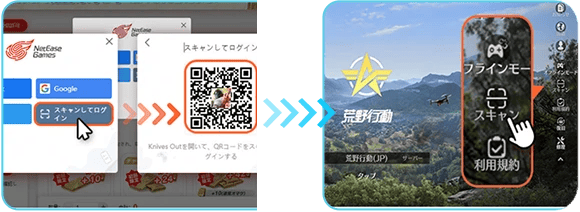
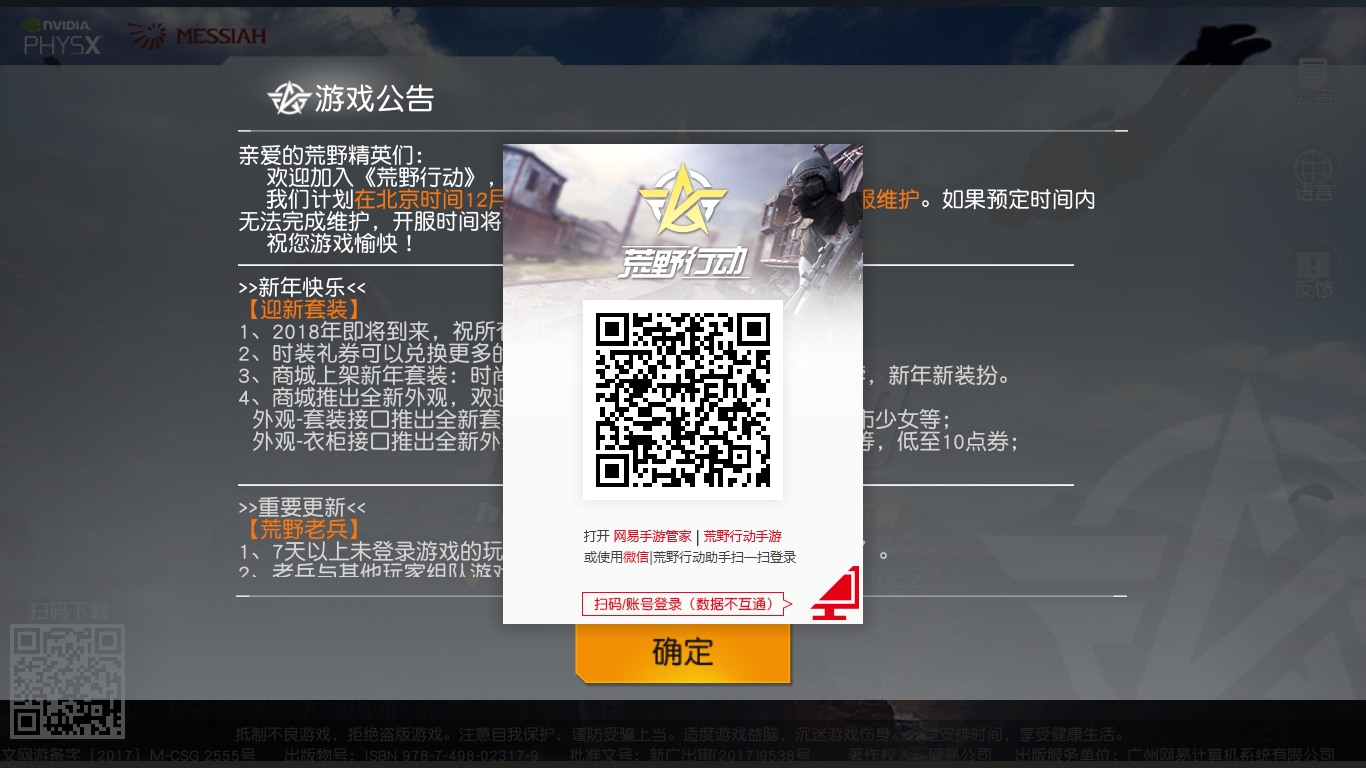
Open the standalone PC client to display the dynamic QR code on the title screen. Open the Knives Out mobile app, tap the Scan icon on the title screen or User Center, scan the PC screen, and tap confirm on your phone.
Will I lose my skins, rank, and vouchers when switching between mobile and PC?
No. Cosmetics, rank, and vouchers are saved server-side. Select the same server region (Asia, America, Europe, or Japan) on PC to load your existing profile instead of a blank character.
Can PC players play directly with mobile players?
No. The official standalone PC client routes players to dedicated PC servers. To join mobile player lobbies from a desktop, run the mobile version inside an Android emulator such as BlueStacks or NoxPlayer.
Why do I get a Direct3D9 SM3.0 error when starting Knives Out on PC?
This crash indicates outdated GPU drivers or lack of hardware Shader Model 3.0 support. Updating to current WHQL display drivers and installing DirectX runtime libraries resolves the error.
Can I transfer my Knives Out account progress between different regional servers?
No. Character profiles and purchases are permanently tied to their original server region. Data cannot transfer between Asia, America, Europe, or Japan.
Do I have to scan the QR code every time I launch the PC version?
Yes. The official PC client requires a fresh QR scan from the mobile app for each session because login tokens are temporary.






Comments