Master your first week on Mico Live with this beginner guide. Learn how EXP leveling works, complete daily tasks, and reach broadcaster status fast.
Launching Mico Live drops you straight into active streams, gift animations, multi-guest panels, and chat rooms. MICO Live (developed by Mico World) is a global live-streaming platform where users broadcast, chat, and exchange virtual gifts bought with Mico Coins.
Progression requires a structured routine. This walkthrough breaks down account leveling, daily tasks, room mechanics, and creator features for your first seven days.
Account Setup and Critical Day-One Constraints
Profile configuration dictates how the platform handles your account from day one. Setting up properly prevents locked features and regional routing problems later.
Mico Live enforces a strict 18+ age policy. Accounts belonging to minors or using false birthdates receive immediate permanent suspensions. Enter your accurate date of birth during registration.
Select your country carefully. The app locks your account region at registration, making subsequent changes difficult. Your assigned region determines local leaderboards, default stream recommendations, and regional chat rooms.
Keep your client current. Android build 9.1.2.2 (released July 9, 2026) resolved stability bugs in multi-room video calls and direct messaging. Outdated APK builds frequently drop connections during busy broadcasts.
To locate your account details:
1. Tap the Me tab in the bottom right corner.
2. Locate your display name below the avatar.
3. Record the numeric Mico UID shown under your name. This UID is your public identifier for user searches and coin recharges.
How Does Mico Live Leveling Work?
Account levels control broadcast permissions, chat visibility, and entry animations. Tracking your experience points (EXP) prevents wasted effort during the first week.
Your level serves as an in-app reputation score. Reaching Level 4 is the required milestone for every new user wanting to stream.
New accounts cannot broadcast immediately. Mico locks solo streams and party hosting behind Level 4 to curb spam accounts and ensure users learn community standards before hosting.
EXP accumulates through three actions:
- Daily active engagement: Claiming daily check-ins and watching live streams.
- Social interaction: Sending room chats, direct messages, following creators, and posting updates.
- Interactive gifting: Gifting hosts with Mico Coins awards immediate bursts of EXP.
Spending money is not required to hit Level 4. Completing free daily tasks unlocks hosting privileges within a few days.
Daily Tasks Routine for Rapid EXP Progression
A 20-minute daily checklist generates all the free EXP needed to reach broadcaster status.
The table below outlines the core free activities available to every new profile and their practical value for leveling.
| Engagement Activity | Action Details | Daily Priority |
|---|
| Daily Check-in | Claim daily reward from the event/task center | High (Instant EXP base) |
| Stream Browsing | Spend 15 to 30 minutes active in live channels | High (Passive account time) |
| Moments Feed Post | Share a photo or short video update | Medium (Profile discovery) |
| Social Messaging | Send messages using in-app real-time translation | Medium (Interaction points) |
| Multi-Guest Room Visit | Join a 9-seat party room open panel | High (Active engagement) |
Takeaway: Sticking to active room participation and daily logins yields the highest consistent EXP returns without requiring coin expenditures.
Follow this sequence to finish daily tasks quickly:
- Claim the Attendance Stamp: Open the task center right after login to claim your daily check-in EXP.
- Engage with Three Live Channels: Open three streams from the Explore tab and post at least three chat messages in each room.
- Post to the Moments Feed: Upload a photo or short update to keep your profile active outside broadcast hours.
- Utilize In-App Translation: Test the direct messaging system. The built-in translation tool supports 16 languages for international chat.
- Drop into a Multi-Guest Room: Open the Party tab, join an active panel, and speak or chat with participants.
Exploring Room Types and Social Features
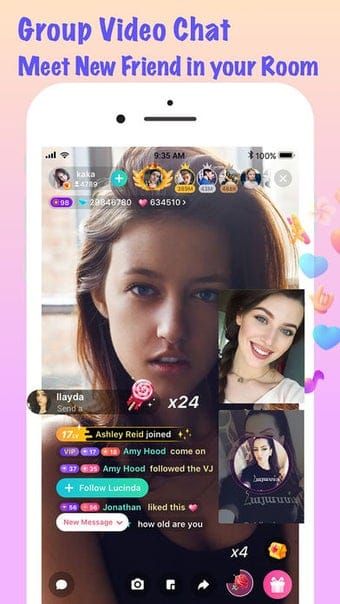
Content on Mico Live is split across three formats, each serving a distinct purpose for viewers and hosts.
Solo Live Streams
Solo broadcasts center on an individual host performing, gaming, or chatting. Viewers send chat messages, share stream links, and gift items. High gift volume pushes solo streams to the top of the Explore feed.
Multi-Guest Party Rooms
Party rooms host up to 9 simultaneous video participants (one host and up to eight guest seats). Some documentation refers to these as 8-guest rooms, describing the open seats beside the room owner.
Party rooms are the most effective format for new users. Sitting on a guest panel removes the pressure of solo hosting while exposing your profile to multiple audiences at once.
The Moments Feed
The Moments feed operates as an in-app social timeline. Creators post photos, video highlights, and stream schedules here to retain viewer engagement between live broadcasts.
Level 4 Unlocked: Transitioning from Viewer to Broadcaster
Reaching Level 4 activates the live broadcast button on your bottom navigation bar.
Keep initial broadcasts between 1 and 3 hours daily. Shorter streams fail to trigger exploration recommendations, while excessively long sessions cause creator fatigue before establishing a regular audience.
PK Battles pit two live broadcasters against each other in a timed competition. Viewers vote by sending gifts and tapping the screen.

PK battles accelerate early channel growth:
- Audience cross-pollination: The opponent's viewers watch your stream for the duration of the match.
- Increased room energy: The countdown timer turns passive viewers into active chatters.
- Algorithm visibility: Rapid gift spikes during PK matches push your stream up the regional leaderboard.
Understanding the Virtual Economy: Coins, Beans, and Diamonds
Mico Live separates viewer spending from creator payouts through a multi-currency model.
Viewers buy Mico Coins to send gifts. When received during a stream, gifts convert into Beans and Diamonds in the host's wallet. Hosts then withdraw Diamonds for real currency.
If you want to speed up early leveling through gifting, purchasing a Mico Coins top up using only your UID is the standard method.
The table below details how currency conversion and withdrawal thresholds function across the app.
| Platform Metric | Official Standard / Benchmark | Operational Notes |
|---|
| Diamond Cashout Rate | 476 Diamonds : $1 USD | Standard conversion baseline for creator earnings |
| Minimum Cashout Amount | ~$10 USD (or 1,000 units) | Minimum balance required before requesting payout |
| Cashout Processing Time | 3 to 7 Business Days | Standard verification and transfer settlement window |
| Event Bonus Boost | 10% to 50% Earnings Boost | Applied during seasonal ranking challenges and contests |
Takeaway: Diamond conversions require reaching minimum balance thresholds, with agency events offering substantial percentage boosts to base earnings.
Agency creators convert earnings at the baseline rate of 476 diamonds per $1 USD. Contracts may include additional monthly base pay or tier bonuses.
Seasonal contests and ranking events provide 10% to 50% earnings multipliers. Check the Events tab before starting a stream to see active promotions.
Strategic Progression: 7-Day Action Plan
This day-by-day roadmap takes a fresh account from initial setup to active broadcasting in seven days.
Day 1: Account Setup and Exploration
- Complete registration, verify your 18+ age status, and select your correct home region.
- Copy your numeric Mico UID from the Me tab.
- Browse 5 solo streams and collect your Day 1 attendance bonus.
- Spend 15 minutes watching Level 20+ hosts to study how they manage chat and gifts.
- Collect the daily check-in bonus.
- Post your first photo on the Moments feed.
- Join multi-guest party rooms and test the 16-language translation tool in chat.
- Follow 10 creators producing content in your target niche.
Day 3: Reaching the Level 4 Milestone
- Complete the daily task list for remaining EXP.
- To accelerate progress with small gifts, you can compare packages and complete a Mico live coins recharge using only your UID.
- Verify that your account has reached Level 4 to unlock broadcasting.
Day 4: Your First Test Broadcast
- Check your lighting, audio, and internet connection.
- Run a 60-minute solo stream.
- Welcome incoming viewers by name to encourage chat activity.
- Post a follow-up message on Moments thanking viewers who joined.
Day 5: Multi-Guest Collaboration
- Host a 9-seat party room instead of a solo broadcast.
- Invite users met earlier in the week to fill guest panels.
- Panel conversations keep stream energy high during chat lulls.
Day 6: Launching PK Battles
- Stream for 90 minutes and initiate 2 to 3 PK battles with other hosts.
- To support partner creators or win matches, grabbing a cheap Mico recharge provides immediate coins for battle gifts.
- Engage both your own audience and your opponent's chat during matches.
Day 7: Reviewing Metrics and Setting Schedule
- Open your profile wallet to inspect Beans and Diamonds earned.
- Identify which broadcast times produced peak viewership.
- Publish a weekly streaming schedule on your Moments feed.
Coin Bundles and Resource Management
Selecting the right coin bundle prevents unnecessary spending while funding gifts and battle participation.
Mico Coin bundles span a wide spectrum of catalog sizes across regional servers. The table below breaks down the typical pack sizes and their practical use cases.
| Bundle Tier | Coin Denomination Range | Primary Strategic Use Case |
|---|
| Micro Starter | 88 - 500 Coins | Testing small animated gifts and early profile leveling |
| Supporter Tier | 1,100 - 2,200 Coins | Mid-tier stream gifts, room entry badges, daily challenges |
| Host / VIP Tier | 11,000 - 55,000 Coins | Major PK battle pushes, high-tier gifts, event leaderboard climbs |
Takeaway: Smaller coin packs are sufficient for early account leveling, while larger denominations cater to competitive PK battles and creator support.
Target gifts toward active hosts or collaborative events. Gifting in rooms with thousands of viewers rarely yields profile visits, whereas supporting mid-sized creators builds direct networking opportunities.
Account Security and Essential Profile Settings
Configuring account privacy and security safeguards your profile data and streams.
Follow these security rules:
- Never share passwords: Recharges require only your numeric UID. Requests for passwords, phone codes, or verification pins indicate account theft attempts.
- Manage location data: Disable precise GPS sharing in device settings while preserving your broad country region.
- Use moderation tools: Mute or kick disruptive users immediately to protect room atmosphere.
To permanently delete an account:
1. Tap Me in the bottom right corner.
2. Tap Settings (gear icon).
3. Select Account and security.
4. Tap More.
5. Select Delete Account and confirm the verification prompts.
Frequently Asked Questions
What level do I need to start broadcasting on Mico Live?
You must reach account Level 4 before the platform allows you to start your own live stream. You can gain the required EXP through daily account interactions, receiving messages, or sending gifts.
What is the age requirement to use Mico Live?
Users must be at least 18 years old to create an account and access Mico Live features. Accounts found to belong to minors are subject to permanent suspension.
How do virtual gifts convert into real money for creators?
Viewers send gifts bought with Mico Coins, which convert into beans or diamonds in the host's wallet. Hosts can then cash out these diamonds for real currency once meeting the withdrawal threshold.
What is the cashout conversion rate for diamonds on Mico Live?
The platform benchmark conversion is 476 diamonds to $1 USD. Payout totals may also include base agency salaries or bonus multipliers depending on host contracts.
How many participants can join a multi-guest party room?
Mico Live multi-guest party rooms support video and voice chat for up to 9 participants simultaneously.
You only need to provide your public Mico User ID (UID). You should never share your account password or private login details.
How long do withdrawals take to process on Mico Live?
Withdrawals typically take between 3 and 7 business days to reach your linked payment account. First-time cashouts may require government ID verification.
Final Verdict on Mico Live Progression
Early growth on Mico Live relies on a clear split between viewer tasks and host mechanics. Daily check-ins, Moments updates, and chat participation unlock Level 4 without mandatory spending. Once broadcasting opens, build your audience through 1 to 3 hour daily streams, 9-seat party panels, and scheduled PK battles.








Comments