
Identity V Echoes Top Up on VGTopup
Echoes serve as the core premium currency in Identity V, NetEase's 1v4 asymmetrical survival game. Whether you play as a Hunter stalking survivors through the Manor or as a Survivor working to decode cipher machines and escape, Echoes grant direct access to the game's most sought-after content. From opening seasonal Essences and obtaining crossover skins to securing the latest character releases and room decorations, having Echoes ready ensures you never miss time-limited event drops.
VGTopup provides an efficient, direct IDV recharge service. By entering your numerical User ID (UID) and selecting your server region, your Echoes are credited straight to your game profile without requiring password sharing or account handovers. Check the live product catalog on VGTopup to view available Echoes bundles and current pricing.
How to Top Up Identity V Echoes on VGTopup
Recharging your Identity V account takes only a few quick steps on VGTopup:
- Select Your Echoes Package: Browse the available Echoes denominations on the live checkout screen and pick the quantity you need.
- Enter Your UID: Input your numerical in-game User ID into the "UID" box.
- Select Your Server: Choose either Asia or NA / EU from the dropdown menu to match where your character is registered.
- Complete Payment: Select your preferred payment option and finalize the purchase.
- Receive Echoes: Open Identity V on your device to confirm that your Echoes balance has updated.
How to Locate Your Identity V UID and Server
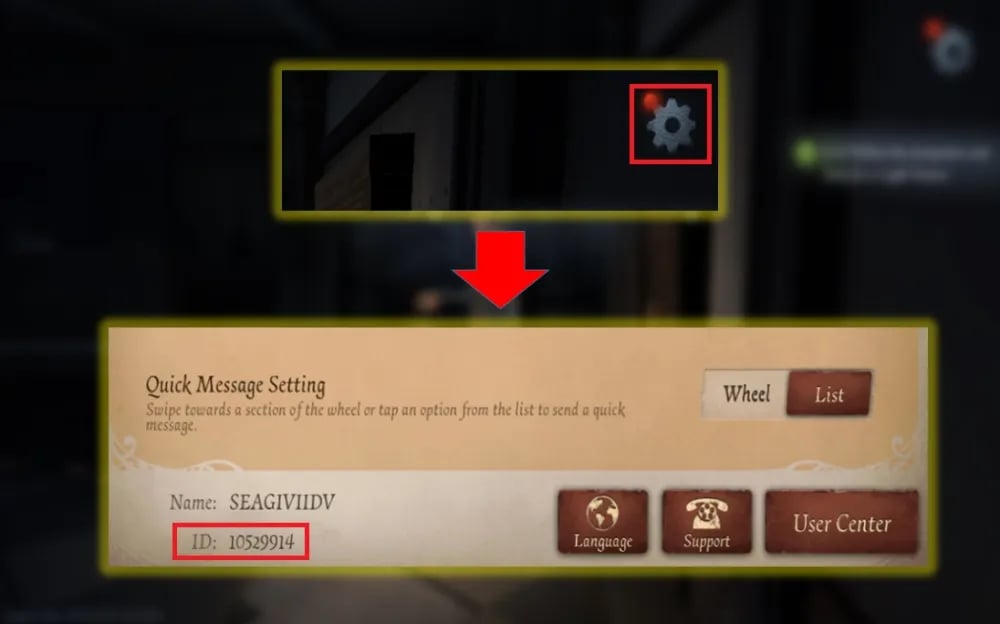
Your User ID (UID) is a unique number tied to your specific game profile. To avoid delivery delays, ensure you copy the exact number from your in-game profile.
- Launch Identity V on your mobile device or PC.
- On the title screen, check your active server region displayed near the start button (Asia or NA / EU).
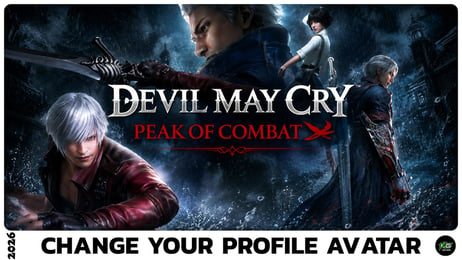
- Enter the Manor lobby and tap the Profile Avatar located in the top-right corner of the screen.
- In the Personal Info / Profile window, find your numerical User ID displayed below your player name.
- Tap the copy icon next to your UID to copy the digits directly to your clipboard.
Always double-check both your UID digits and your server selection before submitting your order on VGTopup.
Supported Identity V Servers: Asia and NA / EU
Identity V separates its global player base into two primary server environments. Account progression, friend lists, and character data do not transfer across these servers. When purchasing Echoes, matching your UID with the correct server is mandatory.
| Server Option | Regional Coverage | Account Binding | Delivery Method |
|---|---|---|---|
| Asia | East Asia, Southeast Asia, Oceania | Isolated to Asia Server | Direct UID Credit |
| NA / EU | North America, South America, Europe | Isolated to NA / EU Server | Direct UID Credit |
If you play on the Asia server but select NA / EU during checkout, your transaction cannot complete successfully, or currency might be sent to an unintended account sharing the same UID on the opposite server. Always confirm your server selection prior to payment.
Identity V Echoes Utility: Characters, Costumes, and Essences in 2026
Echoes are essential for accessing high-tier customization and accelerating your progression through the Logic Path in 2026. Here is how players utilize their Echoes:
Season Essences and Memory Spheres
Every competitive season introduces exclusive Essences containing limited S-tier, A-tier, and B-tier costumes, accessory items, unique standby motions, and custom graffiti. Echoes allow you to purchase additional Essences to reach pity thresholds and secure coveted character skins.
Exclusive Crossovers and Collaborations
Identity V regularly hosts major anime, gaming, and cultural crossover events. Collaboration items, including crossover Essences and shop-exclusive costume bundles, often require Echoes. Because crossover events run for a limited time and rarely return, stocking Echoes in advance guarantees you can pull or purchase your desired crossover outfits before the event window closes.
Instant Character Unlocks
While characters can be bought with Clues accumulated through playing matches, new Hunters and Survivors can be unlocked immediately using Echoes. This allows competitive players to practice new character kits in custom and ranked matches right on release day without depleting their saved Clue reserves.
Illusory Hall Shop Items
The Illusory Hall features permanent and limited-time S-tier costume packages, dynamic accessories that change character ability effects, pets, room music, and interactive furniture for custom rooms. Many of these items are purchasable exclusively with Echoes.
Monthly Cards and Logic Path Boosters
Players looking to maximize daily rewards can use Echoes to purchase the 30-Day Dice Enthusiast pass, granting extra daily Logic Path dice to accelerate progress toward seasonal Logic Path costumes and rewards.
Why UID-Only Top Up Keeps Your Identity V Account Safe
Account safety is a major priority for mobile and PC gamers. VGTopup uses a direct-to-UID delivery method that guarantees complete security for your Identity V profile:
- No Passwords Required: You never need to reveal your game password, email login, or linked social media credentials (such as Google, Apple ID, Twitter/X, or Facebook).
- Zero Account Takeover Risk: Because no login access is granted to any third party, your account remains entirely in your control at all times.
- Direct Delivery: Top-ups are processed externally through official delivery channels using only your public player identifier and server designation.
- Protection Against Device Flags: Third-party logins from unfamiliar IP addresses can trigger security locks or verification holds on your NetEase account. UID recharges eliminate this risk completely.
Identity V Echoes Delivery Time and Troubleshooting
Echoes ordered on VGTopup are processed promptly once your payment is confirmed. In rare instances of network delays or maintenance periods, follow these troubleshooting steps:
- Restart Your Game Client: Fully close the Identity V app, clear the game from your background tasks, and re-open it to refresh your server connection.
- Check Your In-Game Mail: Some promotional or supplementary items arrive via the in-game mailbox located near the Manor mirror. Check your inbox for delivery notices.
- Verify Your Order Details: Check your VGTopup order confirmation to ensure you submitted the correct UID and did not accidentally select the wrong server.
- Contact VGTopup Support: If your balance has not updated after restarting your client, reach out to VGTopup customer support with your order number, UID, and server selection for immediate assistance.
Frequently Asked Questions
How can I recharge my Identity V Echoes?
To recharge your Identity V Echoes, select your desired package on VGTopup, enter your in-game UID, choose your server (Asia or NA / EU), and complete the payment. Your Echoes will be credited directly to your account.
Where can I find my Identity V UID and server?
Open Identity V and view your server region on the title screen. After entering the game, tap your profile avatar in the top-right corner of the lobby. Your numerical UID is displayed directly below your player name.
Do I need to share my Identity V account password to top up?
No. VGTopup only requires your in-game UID and your server selection. You should never share your account password or login credentials.
Which servers are supported for Identity V Echoes recharge?
VGTopup supports both major global servers: the Asia server and the NA / EU (North America / Europe) server. Make sure to pick the server where your character profile is active.
How long does it take for Echoes to arrive in Identity V?
Orders are fulfilled rapidly after payment confirmation. Once the transaction is finalized, simply restart your game client to see your updated Echoes balance.
What should I do if my Identity V Echoes are not credited?
First, restart the Identity V client to force a server refresh. If the Echoes still do not appear, verify the UID and server on your order receipt and contact VGTopup customer support with your order details.
Select Denomination
Tax, payment fees and eligible coupons are calculated at checkout.
| Package | Price |
|---|---|
| 60 + 6 Echoes | USD 0.79 |
| 185 + 18 Echoes | USD 2.41 |
| 305 + 30 Echoes | USD 4.04 |
| 690 + 69 Echoes | USD 8.09 |
| 2025 + 202 Echoes | USD 24.11 |
| 3330 + 333 Echoes | USD 40.51 |
| 6590 + 659 Echoes | USD 81.04 |