Handing the order to your friend's phone
The in-store crowd has a genuinely good point, so I'll give it the strong version. Buy inside the app on the recipient's own device and there's no UID field to mistype, no server dropdown to fumble, no question about which account collects the goods. It lands on whatever's logged in right there. Apple or Google billing handles the charge, the receipt drops in their inbox, the Dreamgems hit the bound account. For somebody who's never gifted before and is sweating the whole thing, watching the balance climb in front of you is honest reassurance. You see it happen.
There's a quieter second point too. Accounts are bound to the server they were created on, per the same FAQ, which separates the Live Test Server from the Official Launch Server and notes you log in with a different account to bounce between them. Buying in-app skips server selection cold, because the logged-in client already knows where it lives. No dropdown. No mismatch. That's not nothing.
But the argument springs a leak right about here.
Why my card never touches another person's phone
The in-app route makes you handle your friend's logged-in account, and that's a worse swap than the wrong-field danger it's supposedly fixing. To buy in-app for someone, you either need their phone physically in your hand or their login. And the second anyone's thinking about logins, somebody floats the password question.
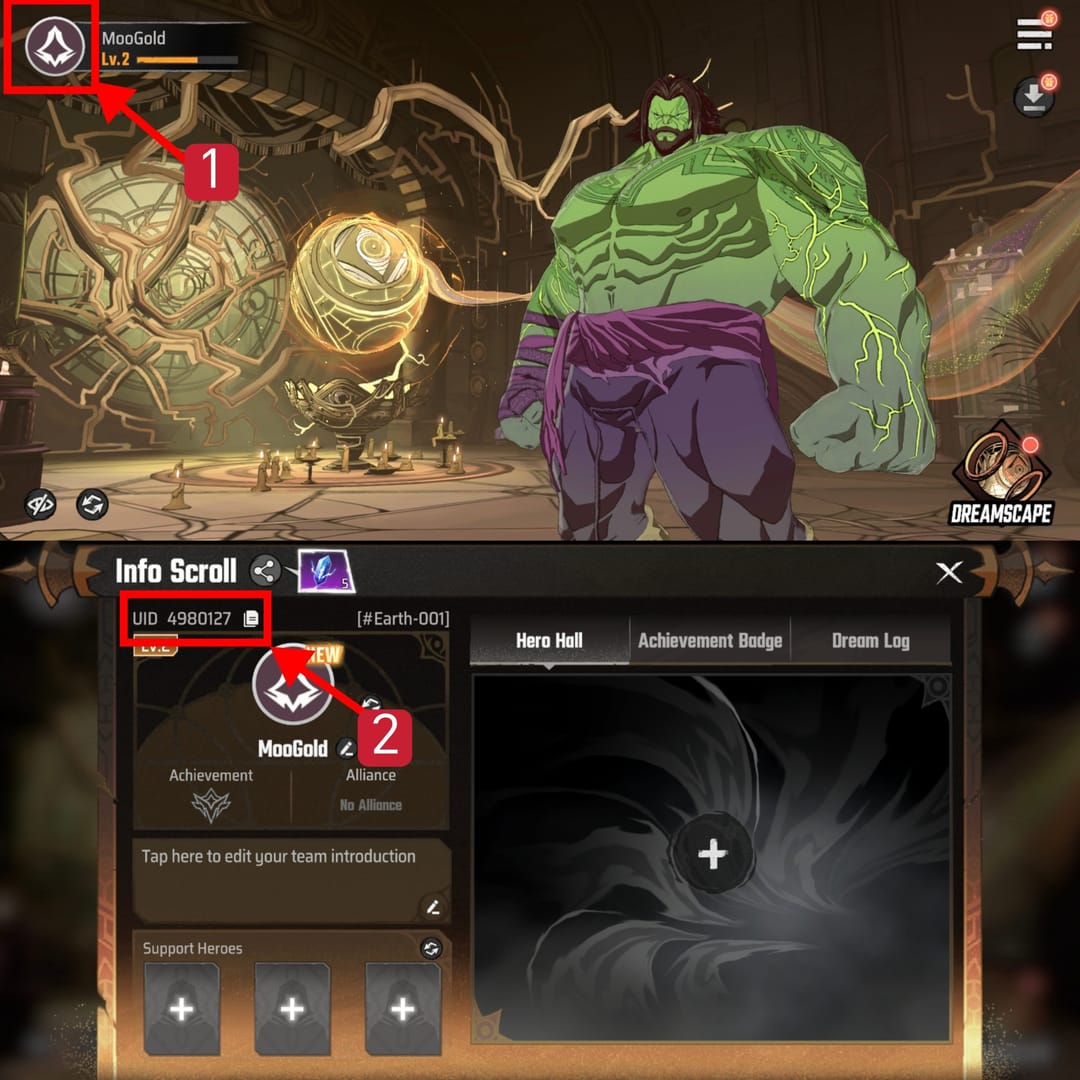
Say no. Don't share it, don't take it. You do not need a friend's password to gift Dreamgems, and calling it a "shortcut" is a security downgrade wearing a convenience costume. Linked logins hook into Apple, Google, or email. Hand those over and you've exposed way more than a currency stash. The whole beauty of UID gifting is that it's a no-login deal: your friend's account stays sealed, their credentials never leave their hands, and the only thing crossing the table is a run of digits and a server name.
So if not in-app, then what? Web top-up by UID. And that's precisely where the other side parks its best objection. The typo.
The wrong-account slip-ups that actually empty wallets
Almost every "my Dreamstone went to the wrong person" tale boils down to one of two causes, and both are dead-easy to prevent. Most general recharge guides skip this, because they teach you the buying flow and never touch the friend-gifting failure modes.
Cause one: the hand-typed UID. Punch a long player ID in manually and eventually you'll swap two digits or lose one. The currency then sails off to a real, valid, different account, which is the cruel twist. The system won't reject a wrong-but-valid ID. It just delivers, happy as you like. Nothing bounces back.
Cause two: the silent server mismatch. This one's nastier, because it strikes even with a "correct" ID. Since accounts lock to their birth server, a UID string can look identical to one parked on another realm. Pick the wrong region in the dropdown and you've paid an account that isn't your friend's. Same digits, wrong world. No error popup. Your money's gone to whatever stranger shares that ID on the server you chose. I'd rank it above the typo for sheer sneakiness, because the UID looks dead right the entire time.
Here's the verification ritual I'd run every time. Ten seconds, tops.
| Field to confirm |
Where to confirm it |
The mistake it kills |
| Player ID (UID) |
Friend's in-game profile/settings, copied — not dictated |
Transposed or dropped digits from manual entry |
| Server / region |
Same profile screen, named explicitly |
Paying an identical UID on the wrong server |
| Recipient, not display name |
UID string, never the nickname |
Sending to a duplicate username |
Source: server-binding and account rules per MARVEL Mystic Mayhem Global Launch FAQ (2025); UID location per a 2025 community YouTube tutorial.
The highest-payoff habit in that table: grab a screenshot of your friend's profile instead of a UID read aloud. Numbers spoken over voice chat get a digit wrong constantly. A screenshot can't. The Player ID sits in-game in the profile or settings menu and copies straight out, per a 2025 community YouTube walkthrough. So have your friend copy it, paste it to you, and you paste it into the order. Type by hand anywhere in that chain and you've reinvited the exact risk you were trying to engineer away.
Forget the nickname while you're at it. Display names duplicate across accounts. They're never a safe pointer. Only UID plus server lands on one specific human's account. If a top-up flow ever wants you to name the recipient by username alone, that's a flare going up. Back out.
The first-purchase bonus most gifters fumble
Before grabbing a pack, check whose bonus you're about to spend, because the best-value buy hinges on the recipient's status, not yours. This is gifting-specific logic almost every "cheapest pack" guide gets flipped around.
The launch FAQ shows how plump the early bonuses ran. Dreamgems bought during Closed Beta Test 2.0 came back in full at Global Launch with an extra 50% bonus, capped at 10,000 bonus Dreamgems. The worked example is concrete: a $1 top-up during CBT2.0 returned 60 Dreamgems plus a 30 bonus, landing at 90 at launch. That's the shape of first-purchase and promo multipliers stacking. They reward the account that receives them, and they're usually one-and-done per tier.
Two things follow:
- First-purchase double bonuses run per-account and per-pack-tier. If your friend's first-purchase bonus is still sitting unused, gifting them the cheapest pack torches that one-time multiplier on the tiniest base imaginable, throwing away most of its worth. For a returning player gifting a new friend with an untouched bonus, the smart play is spending it on a higher tier where the multiplier has actual room to swing.
- The bonus belongs to whoever receives. Your own first-purchase status doesn't count for anything when you're the gifter. Build around their account's bonus state, confirmed before you pay, or you're optimizing the wrong ledger flat out.
A returning player who's burned their own bonus and shrugs "I'll just grab the value pack I always buy" can hand a newcomer a worse deal than a careful rookie who checks the recipient first. The value goes to whoever bothered to ask.
Confirming it landed, and what counts as proof
Once the order confirms, Dreamgems reach the bound account fast, and your proof is the transaction record. Treat that record like the single most valuable thing you walk away with. Keep the transaction ID. Toss it and you've ditched the only leverage you'd hold if anything needs escalating.
To confirm delivery the right way:
- Save the order receipt / transaction ID the second it shows up. Screenshot it. Don't trust future-you to dig it up later.
- Have your friend check their in-game mail/inbox, the usual drop point, and confirm the balance moved.
- Match the receipt's server and ID against the profile screenshot you opened with. If both line up and the balance climbed, you're done.
That third step closes the loop. The same UID and server you checked going in should show up coming back out. If they don't, you've caught the problem while the receipt's still warm, which is exactly when support stands the best shot at helping.
If you'd rather gift by Player ID and never go near your friend's login, Marvel Mystic Mayhem top up through a no-login UID flow is one route that keeps their credentials sealed. Just confirm the UID and server against their profile before you commit, same as anywhere. (Disclosure: VGTopup publishes this article; the verification advice above holds for any channel you pick, official or not.)
Where the two camps land
For gifting specifically, no-login web top-up by UID is the lower-risk default, but only if you actually run the verification ritual. Skip it and the in-game route genuinely wins on safety. The web route's whole risk surface is two fields you can pin down in ten seconds with a screenshot. The in-app route's risk surface is handling another person's logged-in account, which is broader, fuzzier, and keeps dangling that password shortcut you should always wave off.
The refund reality is what tips it for me. No documented official path guarantees a refund for currency sent to the wrong account. Searches across the FAQ and community channels in 2025–2026 turned up no published gifting or wrong-account recovery mechanism, per the official site. So once Dreamgems land on a valid-but-wrong account, getting them back is a hope, not a policy. That gap is the entire argument. Verification is cheap and certain; recovery is pricey and a gamble. Put every ounce of effort on the front end.
For a first-time gifter, that's one rule above all the rest: paste, never type, and screenshot the profile. For a returning player gifting a newcomer, tack on a second: check the recipient's first-purchase bonus before you settle on a tier. Do both and you've wiped out the failures that genuinely cost people cash.
Frequently Asked Questions
How do I find a friend's Player ID in Marvel Mystic Mayhem?
It sits in their in-game profile or settings menu, where it copies directly, per a 2025 community tutorial. Have your friend copy and paste it to you rather than rattling it off out loud, because voice-dictated digits are where transposition slips creep in. Bonus: a screenshot of that profile screen also grabs their server in the same frame, which you'll want regardless.
Can I top up Dreamstone for a friend without their password?
Yes, and you should never use it even when it's offered. UID-based web top-up identifies the account by Player ID plus server alone, no login needed. Sharing a password cracks open the linked Apple, Google, or email account, which holds way more than a currency balance. So treat any "just give me your password" nudge as your cue to switch to the no-login route instead.
What happens if I top up Dreamstone to the wrong account?
The currency delivers to whatever valid account matches the UID and server you punched in. The system won't bounce a wrong-but-real ID. No official wrong-account recovery path shows up across the FAQ or community channels per 2025–2026 searches, so a refund is a hope, not a guarantee. That's exactly why front-end verification beats any post-purchase rescue plan.
Does the first-purchase bonus apply when gifting Dreamstone?
It applies to whichever account receives the top-up, and it's per-account and per-pack-tier. The launch FAQ's bonus structure, like the 50% extra on returned CBT2.0 purchases, shows the multipliers rewarding the receiving account, not the buyer. So gifting a friend who still has an unused first-purchase bonus a tiny pack wastes that one-time multiplier. Spend it on a higher tier where it actually compounds.
Why does a friend's top-up ask me to select a server?
Because accounts bind to the server they were created on, per the official launch FAQ, which separates the Live Test Server from the Official Launch Server. An identical-looking UID can exist on a totally different server, so the dropdown isn't a formality. Pick the wrong region and Dreamgems sail off to a stranger sharing that ID. Confirm the server from the same profile screenshot you used for the UID.











Comments