Delivery Timelines and Conflicting Storefront Claims
If you ask third-party merchants how long delivery takes, you get conflicting answers. Marketing pages frequently promise instant delivery within 1 to 3 minutes, or claim orders complete in 15 to 20 minutes. Yet technical documentation and support desks tell a different story: delivery processing delays can take up to 72 hours to resolve.
Why the huge gap? Merchant automated systems flag orders for risk screening, bank networks hold payments in clearing queues, and regional servers occasionally drop transaction notifications. If a vendor runs out of digital package stock or their automated API hits rate limits, orders queue up quietly. Unresolved top-ups require official escalation only after 72 hours have elapsed without the currency arriving.
| Purchase Channel | Advertised Speed | Realistic Processing Window | When to Contact Support |
|---|
| In-Game Client | Instantaneous | 5 to 15 minutes | After 24 to 72 hours |
| Web Top-Up Portal | Instantaneous | 5 to 30 minutes | After 72 hours |
| External Merchant | 1 to 20 minutes | 15 minutes to 2 hours | After 72 hours |
Takeaway: Treat advertised "instant" claims as best-case estimates; payment processors and risk checks can legitimately delay delivery up to 72 hours.
If you want smooth digital deliveries without platform headaches, check your account UID and order directly through vgtopup Genshin Impact top-up options to ensure proper server routing.
One of the most frequent reasons players think their currency disappeared is cross-save segregation. The game allows cross-save between PC, mobile, and PlayStation consoles, but paid currencies follow strict platform licensing rules.
Genesis Crystal balances are strictly segregated between PlayStation Network and PC or mobile. Crystals bought through PC or mobile payment processors will not show up on your PSN account balance. If you purchased crystals while logged into your phone, then booted up your PlayStation 5 to roll for your character, your crystal counter will read zero.
Your crystals are not gone; they are stored in your mobile or PC balance. Third-party storefronts route deliveries to mobile and PC ecosystems rather than PlayStation wallets due to Sony's closed billing terms.
Convert those Genesis Crystals to Primogems on PC or mobile first. Converted Primogems pool across all linked platforms at a 1:1 ratio, making them immediately spendable once you log back onto your console.
UID Mistakes and Server Region Mismatches
Did you enter your UID by hand? A single transposed digit sends your crystals to someone else, or causes the transaction to fail outright. Accounts are strictly tied to specific regional servers, and selecting the wrong region guarantees delivery failure.
Every UID has a prefix that identifies its native server cluster. If your UID starts with a digit that does not match the server you selected at checkout, the billing API cannot locate the recipient profile.
| UID Initial Digit | Assigned Server Region | Cross-Region Portability |
|---|
| 1 | Asia | Locked to Asia server |
| 2 | Americas | Locked to Americas server |
| 3 | Europe | Locked to Europe server |
| 4 | TW / HK / MO | Locked to TW/HK/MO server |
Takeaway: Double-check that your server dropdown matches your UID prefix before paying; a prefix 2 UID will fail or misdirect on an Asia server order.
If you sent crystals to an incorrect but active UID, recovery is exceptionally difficult. Support cannot easily strip currency from an uninvolved third party. Always copy and paste your UID directly from the in-game Paimon pause menu to eliminate typing slips.
Device Registration Lockouts and Web Bypass
A bizarre error trips up PC players who initially created their accounts on iOS or Android: "Please register on the device used to register this account."
HoYoverse requires in-game purchases to run through the storefront of the device type where you registered the account. Trying to purchase directly in the PC client when you originally signed up on mobile triggers an immediate error.
The official web Top-Up Center bypasses this hardware lock completely. Logging into the web portal lets you credit Genesis Crystals directly to your UID without triggering original-device restrictions.
Blessing of the Welkin Moon: Rules and Caps
Missing Welkin purchases carry their own quirks. A Blessing of the Welkin Moon delivers 300 Genesis Crystals immediately and 90 Primogems daily over 30 days. That adds up to 2,700 daily Primogems across 30 days of active logins, for a total equivalent value of 3,000 Primogems.
If your Welkin did not seem to credit, check these specific mechanics:
- The 180-Day Stack Limit: You cannot stack active Welkin Moon duration past 180 days. If you buy a Welkin pass while your remaining duration sits between 181 and 210 days, the subscription will not extend. The purchase refunds 330 Genesis Crystals directly to your balance instead.
- AR 5 Visibility Cap: Accounts below Adventure Rank 5 cannot view remaining Welkin Moon duration. The interface simply hides the active counter until you reach AR 5.
- Forfeited Logins: Unclaimed daily login Primogems cannot be refunded or reclaimed. The 90 daily Primogems require logging in every single day. If you missed a day, that 90 Primogem payout is permanently lost.
When buying passes, make sure your balance has room. If you want hassle-free delivery for your monthly pass, secure your Blessing of the Welkin Moon recharge with precise UID targeting.
Double Crystal Bonuses and First-Time Purchase Resets
Sometimes players believe their crystals are missing simply because they received fewer crystals than anticipated. This confusion stems from first-time buyer bonuses versus standard recurring purchases.
First-time crystal purchases double the base quantity across all tiers. Once you consume that initial double bonus, subsequent purchases award a smaller fixed bonus instead. These first-time double crystal bonuses reset annually during anniversary events, which leads returning players to mistakenly expect double crystals on every major patch.
| Crystal Bundle Tier | Standard Cost (USD) | First-Time Purchase Yield | Recurring Purchase Yield |
|---|
| 60 Crystals | $0.99 | 120 Total Crystals | 60 Total Crystals |
| 300 + 30 Crystals | $4.99 | 600 Total Crystals | 330 Total Crystals |
| 980 + 110 Crystals | $14.99 | 1,960 Total Crystals | 1,090 Total Crystals |
| 1,980 + 260 Crystals | $29.99 | 3,960 Total Crystals | 2,240 Total Crystals |
| 3,280 + 600 Crystals | $49.99 | 6,560 Total Crystals | 3,880 Total Crystals |
| 6,480 + 1,600 Crystals | $99.99 | 12,960 Total Crystals | 8,080 Total Crystals |
Takeaway: Standard repeat purchases yield significantly fewer bonus crystals than the first-time double tier; check your receipt before assuming crystals were deducted.
Notice the top tier. Some third-party guides state a $100 purchase yields around 6,480 Primogems by miscalculating standard conversion rates. In reality, official bundle breakdowns award 8,080 crystals on recurring top-ups (6,480 base plus 1,600 bonus) and 12,960 crystals on first-time purchases. Genesis Crystals convert into Primogems at a direct 1:1 ratio, meaning those 8,080 crystals equal exactly 8,080 Primogems.
The Lethal Mistake: Why You Must Never Chargeback
If 24 hours pass and your crystals have not arrived, your immediate instinct might be to call your credit card company and dispute the charge. Do not do it.
Initiating a chargeback can trigger negative Primogem balances and account bans. When a bank claws back payment, billing security detects the unbacked balance and automatically deducts the equivalent currency from your account.
If you already spent any of those Primogems, your balance plunges below zero. HoYoverse gives accounts in deficit a brief window to repay the balance by purchasing legitimate crystals. If that window expires without repayment, the ban becomes permanent. Exhaust official customer support before ever contacting your bank.
How to Submit an Unresolved Support Ticket
Once 72 hours elapse with a cleared bank charge and no delivered crystals, file an official recovery ticket. Avoid submitting before that 72-hour window closes; billing support routinely advises players to wait out standard banking queues before investigating.
Gather your documentation before contacting support. A generic "I did not get my crystals" message gets tossed to the bottom of the queue.
Prepare the following proof:
- Your Account Data: Complete 9-digit UID and exact Server Region (Americas, Europe, Asia, or TW/HK/MO).
- Official Transaction ID: The digital invoice number from your payment receipt (Google Play, Apple App Store, or direct merchant invoice).
- Bank Timestamp: The exact date, time, and timezone when the funds cleared your bank account.
- Uncropped Proof of Purchase: A clean screenshot of your transaction receipt showing the merchant name, date, order number, and total charged.
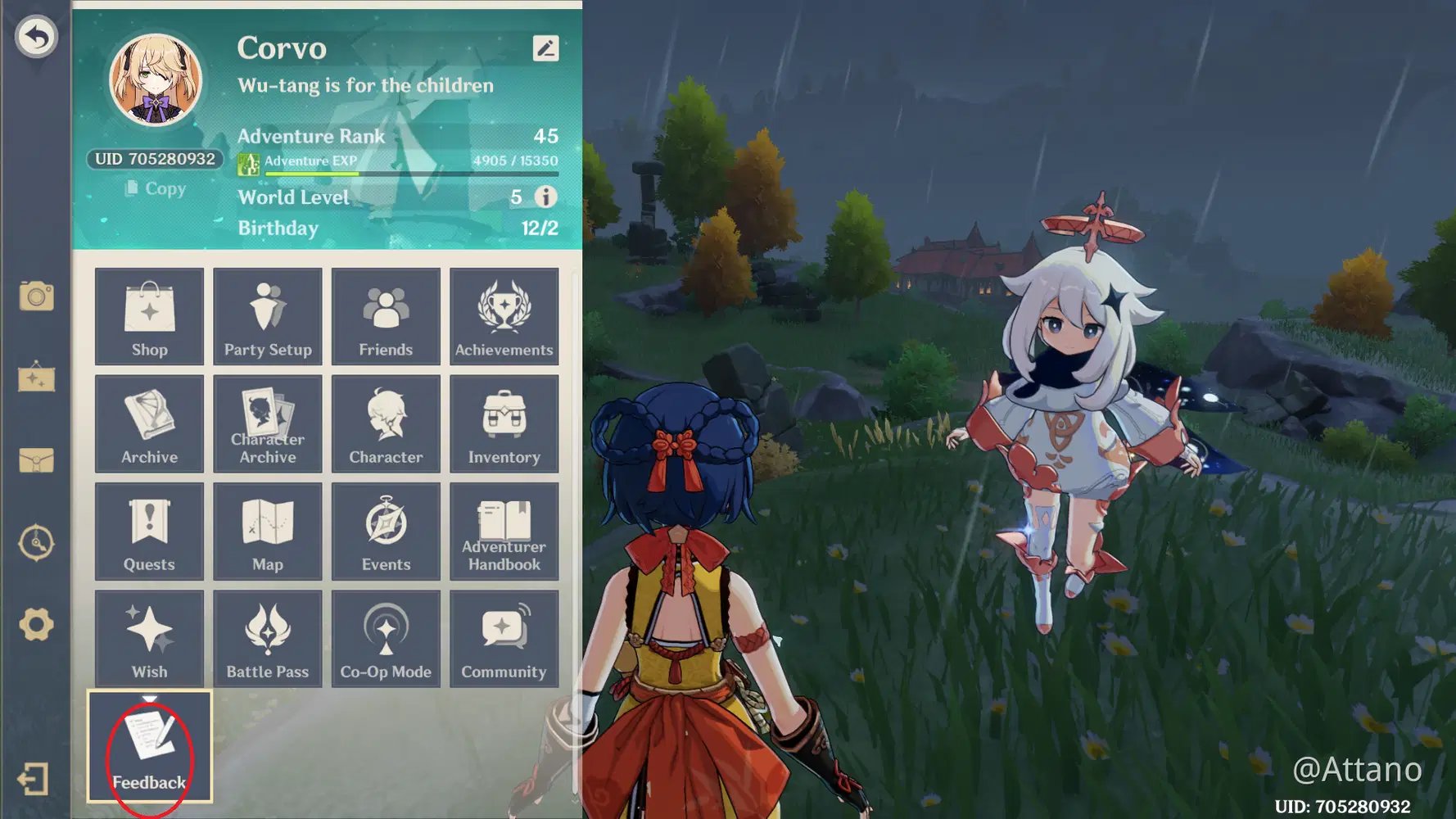
To file your ticket, press Escape or tap the Paimon icon in-game. Select Feedback, open the service interface, and click Submit Feedback. State clearly that your payment cleared, your UID was confirmed, and provide the uncropped payment invoice. If you cannot open the game, email official support with your UID and server clearly labeled in the subject line.
Choosing the Right Spender Path
Not every player needs to drop $100 on the largest bundle. Matching your spending habits to your account goals prevents buyer regret and overspending.
- F2P / Low Spender: Stick exclusively to the Blessing of the Welkin Moon. For $4.99, getting 3,000 total Primogem equivalent value over 30 days is mathematically unbeatable. Avoid raw crystal packs completely; buying the $0.99 60-crystal tier is terrible value unless you are short exactly one pull on the final hour of a banner.
- Mid Spender: Snag the Welkin Moon and pick up the higher crystal tiers only while the annual first-time double bonus is active. Focus on the $14.99 (1,960 crystals) or $29.99 (3,960 crystals) bundles to grab desired five-star character constellations without paying standard recurring rates.
- Heavy Spender: If you regularly pull five-star weapons and C6 characters, buy the $99.99 pack (6,480 + 1,600 bonus crystals). Avoid buying multiple mid-tier packs. The largest pack yields 80.8 crystals per dollar on recurring buys, whereas the $4.99 pack drops to roughly 66.1 crystals per dollar after your first-time bonus is spent.
Whenever you plan to stock up ahead of a major release, you can buy Genesis Crystals online with direct delivery to your UID to avoid client device locks.
Top-Up Safety: Legitimate vs Scam Services
Scam sites prey on players dealing with payment frustrations by offering impossibly cheap currency. Knowing what a safe top-up requires protects your account from theft.
- Legitimate Platforms: Ask only for your UID and Server Region. They never ask for your password, email verification codes, or social media logins. Legitimate recharge services route purchases through official game merchant APIs.
- Scam Services: Request your HoYoverse account login, password, or two-factor authentication (2FA) codes. They often claim they need to "log into your account directly" to apply cheap regional pricing. Handing over your credentials results in hijacked accounts, stolen artifacts, or fraudulent purchases that trigger account bans.
FAQ
Why haven't my Genesis Crystals appeared after payment?
Delivery delays typically occur due to bank processing latency, temporary server traffic spikes, or entering an incorrect UID or server region. Relaunch your game client completely and inspect your in-game mailbox after waiting 5 to 15 minutes. If the currency has not arrived after 72 hours, open a ticket with customer support.
What happens if I purchase a Welkin Moon with over 180 days remaining?
The active subscription period will not extend past the strict 180-day cap. The game will instead automatically convert that purchase into an immediate grant of 330 Genesis Crystals. Your remaining daily countdown will stay unchanged.
How do I bypass the registered device error when topping up?
You can bypass this restriction by using the official web top-up portal instead of the in-game client. Logging into the web portal allows you to complete purchases directly for your UID without triggering original-device locks. This completely resolves the mobile registration mismatch on PC.
Can I recover missed daily Primogems from Blessing of the Welkin Moon?
No, daily Welkin Moon Primogems require logging in every single day to be claimed. Any missed daily allocation of 90 Primogems is forfeit and cannot be retroactively recovered or refunded. The 300 upfront Genesis Crystals remain unaffected.
Should I file a credit card chargeback if my crystals do not show up?
No, filing a payment chargeback can cause a negative Primogem balance and a permanent account ban. HoYoverse automatically claws back unpaid currency, and failing to clear the resulting deficit leads to account termination. Always resolve delivery failures through support tickets with your invoice in hand.
Why do Genesis Crystals bought on PC not show up on PlayStation?
Genesis Crystal balances are segregated between PlayStation Network and PC or mobile due to platform store agreements. Crystals purchased outside PSN remain accessible only on PC and mobile devices. Once you convert those crystals to Primogems, however, they become available across all linked platforms.
How long should I wait before opening a support ticket for missing crystals?
You should allow up to 72 hours for international banking networks and merchant verification checks to clear before submitting a formal ticket. If crystals remain missing after 72 hours, submit your UID, server name, and uncropped payment receipt through the in-game feedback menu.
Final Verdict
When Genesis Crystals fail to appear, do not hit buy again. Check platform rules first: crystals bought on mobile or PC will not display on PlayStation until converted to Primogems. Confirm your UID prefix matches your server region, allow a 15-minute buffer for payment queues, and never issue a chargeback that could trigger a negative balance ban. If 72 hours pass without delivery, submit an in-game support ticket with your uncropped receipt.









Comments