
Genshin Impact Top Up: Genesis Crystals and Welkin Moon
Topping up your Genshin Impact account provides the essential in-game currencies required to pull featured event characters, obtain signature five-star weapons, and acquire exclusive character outfits. On VGTopup, you can complete a Genshin Impact top up directly to your account using only your User ID (UID) and server region.
Every transaction is fulfilled via direct server delivery. You do not need to share account passwords, email verification codes, or personal third-party login credentials. Simply pick your item package, enter your UID, select your regional server, and check the live pricing on the checkout screen to finalize your purchase.
How to Top Up Genshin Impact Using UID and Server
To recharge your account on VGTopup, follow this quick guide:
- Choose Your Item: Select the Blessing of the Welkin Moon or any denomination of Genesis Crystals.
- Enter Your 9-Digit UID: Type your in-game UID into the designated field.
- Select Your Server: Choose the exact server where your character data is hosted: Asia, America, Europe, or TW, HK, MO.
- Review Live Checkout Pricing: View the active price and available payment options shown on the interface.
- Confirm and Pay: Complete your transaction. The purchased Genesis Crystals or Welkin Moon days will credit directly to your in-game mailbox or balance.
How to Find Your Genshin Impact UID and Server Region
Your Genshin Impact UID is a permanent 9-digit number that identifies your character profile across your regional server. You can locate your UID and active server on PC, iOS, Android, and PlayStation systems.
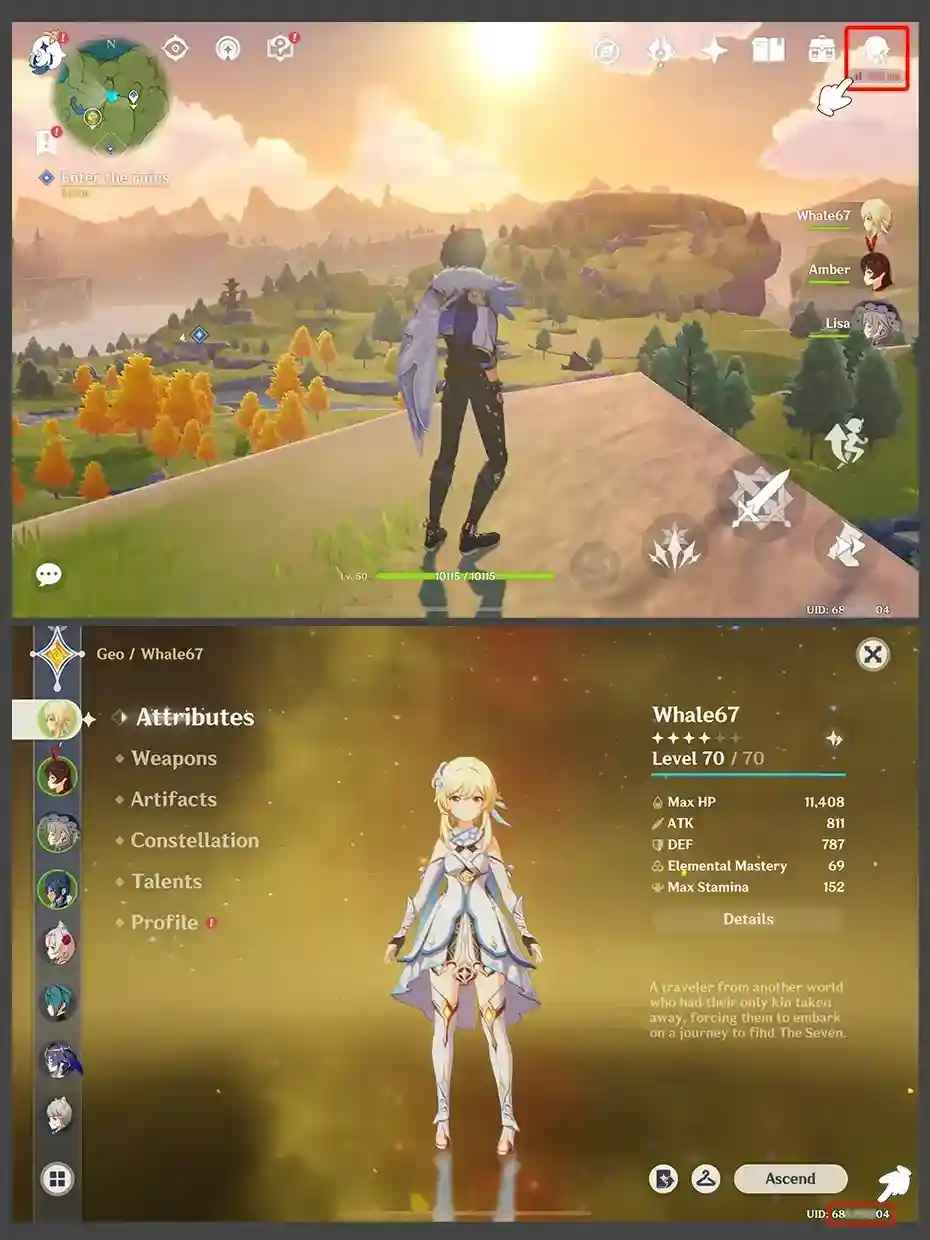
- Open Genshin Impact and log in to your account.
- Check the bottom-right corner of the active game screen. Your 9-digit UID is permanently displayed during gameplay.
- You can also open the Paimon Menu (press Esc on PC, tap the Paimon icon in the top left on mobile, or press the Options button on console).
- Look directly below your character nickname and avatar to see your UID.
- Identify your server on the game start screen prior to clicking to enter the world.
Server UID Identifier Guide
Each regional server uses a distinct starting digit for player UIDs:
- America Server: UID begins with 6
- Europe Server: UID begins with 7
- Asia Server: UID begins with 8 or 18
- TW, HK, MO Server: UID begins with 9
Matching your selected server on VGTopup with your UID prefix prevents processing delays and ensures the items reach the correct account.
Genesis Crystals Packages and First Top-Up Bonus Guide
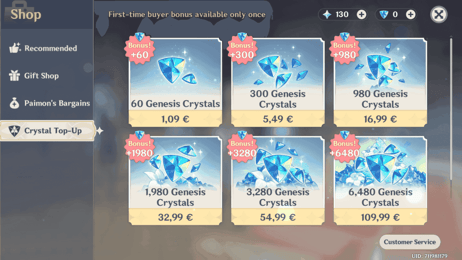
Genesis Crystals serve as the primary paid currency in Genshin Impact. The game provides a First Top-Up Double Bonus for every individual package tier. When you purchase a specific crystal pack for the first time, you receive double the base amount of crystals. Once consumed, subsequent purchases of the same pack award the standard bonus amount instead.
| Package Tier | First Top-Up Amount | Standard Repeat Amount |
|---|---|---|
| 60 Genesis Crystals | 120 Total Crystals | 60 Total Crystals |
| 300 + 30 Genesis Crystals | 600 Total Crystals | 330 Total Crystals |
| 980 + 110 Genesis Crystals | 1,960 Total Crystals | 1,090 Total Crystals |
| 1,980 + 260 Genesis Crystals | 3,960 Total Crystals | 2,240 Total Crystals |
| 3,280 + 600 Genesis Crystals | 6,560 Total Crystals | 3,880 Total Crystals |
| 6,480 + 1,600 Genesis Crystals | 12,960 Total Crystals | 8,080 Total Crystals |
The First Top-Up bonus resets during major annual game version updates. If your account currently has active first-top-up bonuses available in-game, purchasing through VGTopup will trigger and apply that double bonus automatically.
Blessing of the Welkin Moon Rules, Duration, and Stacking Cap
The Blessing of the Welkin Moon is a 30-day subscription pass that provides daily Primogems along with an instant Genesis Crystal drop.
- Immediate Reward: 300 Genesis Crystals credited upon purchase.
- Daily Log-in Reward: 90 Primogems every day for 30 days (2,700 Primogems total per pass).
- Total Value: 3,000 combined Primogems and Genesis Crystals across the full 30-day duration.
180-Day Stacking Limit
You can purchase multiple Blessing of the Welkin Moon passes to extend your remaining active duration. However, the system imposes a strict 180-day cap:
- If your remaining Welkin duration is 180 days or fewer, purchasing another pass adds 30 days to your remaining total and gives 300 Genesis Crystals immediately.
- If your remaining Welkin duration is greater than 180 days, purchasing an additional pass will not extend your duration. Instead, the game automatically converts the purchase into 330 Genesis Crystals directly, and your daily timer remains unchanged.
To maximize your purchase, always verify that your active Welkin duration is under 180 days before ordering extra passes on VGTopup.
Converting Genesis Crystals to Primogems and Intertwined Fates
Genesis Crystals can be converted directly into Primogems or spent on exclusive cosmetic items inside the in-game shop:
- Primogem Conversion: 1 Genesis Crystal converts directly into 1 Primogem (1:1 ratio). You can perform this exchange inside the Paimon Shop or automatically when making Wishes on character and weapon banners.
- Wish Fates: 160 Primogems can be exchanged for 1 Intertwined Fate (used for limited Character Event and Weapon Event Wishes) or 1 Acquaint Fate (used for Standard and Beginner Wishes).
- Character Outfits: Genesis Crystals can be spent directly in the Character Outfits shop for special skins and wardrobe cosmetics without converting to Primogems.
Supported Server Regions: America, Europe, Asia, and TW/HK/MO
Genshin Impact divides player data across four primary global servers. Because character progression does not transfer between regions, selecting your accurate server on VGTopup is essential:
- Asia: Serves players in Japan, South Korea, Southeast Asia, and surrounding territories.
- America: Serves players in North America, Central America, and South America.
- Europe: Serves players located across European countries, Russia, the Middle East, and Africa.
- TW, HK, MO: Serves players in Taiwan, Hong Kong, and Macau.
VGTopup supports all four official global server options with immediate UID validation.
Safe Checkout: Why Passwordless UID Top-Ups Protect Your Account
Account security is the most critical factor when purchasing gaming currencies online. VGTopup operates entirely through passwordless UID top-ups:
- No Login Information Required: You never provide your HoYoverse password, linked email address, or third-party authenticator codes.
- Zero Account Takeover Risk: Because transactions rely purely on your public UID and server, unauthorized parties cannot access your personal data, inventory, or linked payment methods.
- Direct Server Injection: Funds are credited directly to your character ID through official distribution pipelines.
- Transparent Pricing: All product prices and available regional payment options are displayed directly on the live checkout interface.
Frequently Asked Questions
How do I find my Genshin Impact UID and server?
Open Genshin Impact and view the bottom-right corner of your screen during gameplay to see your 9-digit UID. You can also press Esc or tap the Paimon icon in the top-left corner to view your UID below your avatar. Your server is chosen on the main title screen before entering the game world.
Do I need to provide my HoYoverse login password to top up?
No. VGTopup only requires your 9-digit in-game UID and your server region. We will never ask for your account password, email access, or verification codes.
How does the Blessing of the Welkin Moon 180-day cap work?
You can hold up to 180 days of active Welkin Moon duration. If you purchase another Welkin pass while your remaining duration is below 180 days, it extends your duration by 30 days and gives 300 Genesis Crystals immediately. If you purchase a pass when your active balance exceeds 180 days, you receive 330 Genesis Crystals immediately, and your duration does not increase.
Will I receive the First Top-Up double bonus on Genesis Crystals?
Yes. If your account has not yet purchased a specific Genesis Crystal tier, or if HoYoverse has reset the first-purchase bonuses during a major update, purchasing that tier on VGTopup will grant the full double bonus.
What should I do if I entered the wrong UID or server?
Verify your UID and server carefully before confirming your purchase. Once an order is processed, credits are delivered immediately to the UID entered. If you notice an error prior to completion or encounter an issue, contact VGTopup customer support with your transaction details.
How do Genesis Crystals convert into Primogems in-game?
Genesis Crystals convert to Primogems at an exact 1:1 ratio. You can convert them manually inside the in-game Shop menu, or allow the game to convert them automatically when you attempt to purchase Wishes or replenish Original Resin.
Select Denomination
Tax, payment fees and eligible coupons are calculated at checkout.
| Package | Price |
|---|---|
| Genshin Impact-60 Genesis Crystals | USD 0.91 |
| Genshin Impact-Blessing of the W-Moon | USD 4.55 |
| Genshin Impact-300+30 Genesis Crystals | USD 4.55 |
| Genshin Impact-980+110 Genesis Crystals | USD 13.62 |
| Genshin Impact-1980+260 Genesis Crystals | USD 27.23 |
| Genshin Impact-3280+600 Genesis Crystals | USD 46.53 |
| Genshin Impact-6480+1600 Genesis Crystals | USD 90.76 |
| Genshin Impact-All-In-One Bundle | USD 183.94 |