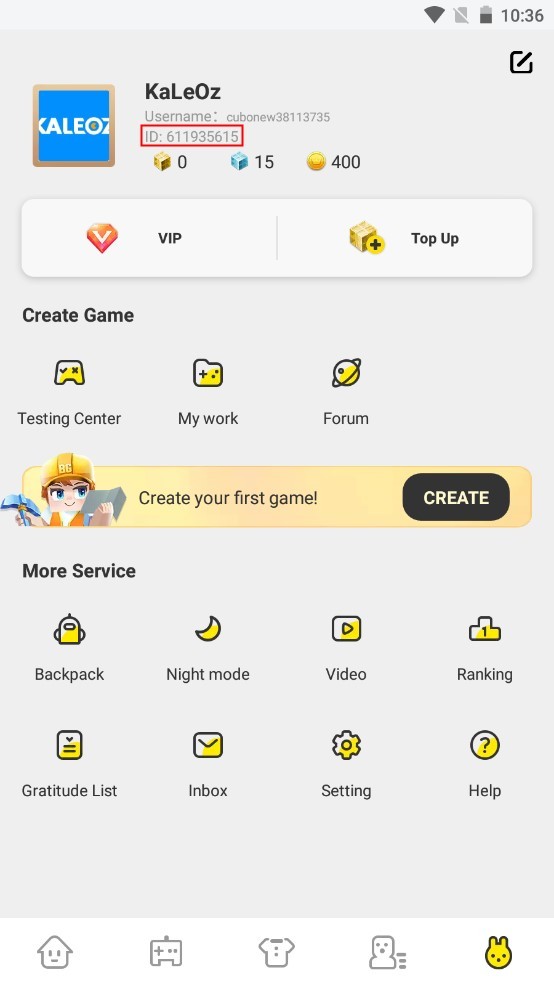
To find your Blockman Go User ID on Android, open the game to the main lobby, tap your character avatar located in the top-left corner of the screen to enter the Personal Center, and locate the numeric sequence displayed directly beneath your player nickname. Tap the small copy icon beside these digits to copy your unique numerical account identifier directly to your device clipboard, as documented on VGTopup.
Step-by-Step: Locating and Copying Your User ID on Android
Finding your account ID takes only a few taps from the home screen. Follow these steps within the mobile client:
- Launch the Blockman Go application on your Android device and let the game load into the main lobby.
- Tap your character avatar in the top-left corner of the lobby screen.
- Wait for the Personal Center profile window to appear.
- Look directly below your character's display name to find the numeric string labeled ID or User ID.
- Tap the copy icon placed right next to the numbers to save the ID to your clipboard.

Tapping the copy icon avoids manual typing errors. Transcribing long number strings by hand often causes missed digits, which delays friend requests and account management.
Why Your Numeric User ID Differs From Your Display Nickname
Blockman Go is an expansive sandbox platform featuring hundreds of multiplayer minigames where players rely on GCubes as the primary premium in-game currency. Because millions of players customize their characters across these minigames, distinguishing between a nickname and a true account ID is essential.
Your display nickname is cosmetic. Players can alter their nicknames over time, and display names are not unique identifiers across the game's internal database. Because several players might share similar names or change them frequently, the backend system does not rely on nicknames for account-level actions.
| Identifier Type | Can It Be Changed? | Unique Across System? | Required for Critical Services? |
|---|
| Numeric User ID | No (Permanently assigned) | Yes | Yes (Direct fulfillment, profile verification) |
| Character Nickname | Yes (Customizable) | No | No (Cosmetic only) |
Third-party platforms and direct services—including Jubaly, KALEOZ, MooGold, SEAGM, and VGTopup—require the exact numeric User ID. Submitting a nickname instead of the numeric ID prevents external platforms from routing items or processing profile requests accurately.
Navigating Conflicting UI Guides on Android
Community walkthroughs sometimes show conflicting directions for opening your profile summary. Understanding why this happens saves time when navigating the menus.
Sources like VGTopup and Jubaly specify tapping the avatar icon situated at the top-left corner of the lobby screen to access the Personal Center profile. In contrast, older platform guides such as KALEOZ instruct players to click an icon in the bottom-right corner of the main screen.
If your lobby layout does not show an active profile trigger in the bottom-right corner, use the top-left avatar route. The top-left avatar remains the standard entrance to the Personal Center on modern mobile client builds.
To ensure your profile loads smoothly without interface glitches in the Personal Center, keep the application updated through supported Android environments.
- Operating System Requirement: Running the client requires Android 6.0 or higher, as noted by Uptodown's technical listing.
- Recent Client Versions: Version 3.29.1, released on September 22, 2026, enforces these operating system standards.
Devices running operating systems older than Android 6.0 may fail to render the lobby interface elements or experience crashes when opening the Personal Center overlay.
Account Recovery: Finding Lost IDs via BG Portal
If you cannot launch Blockman Go or lost your login credentials following a patch, retrieving your ID from the lobby is impossible. In this situation, rely on the official recovery tool.
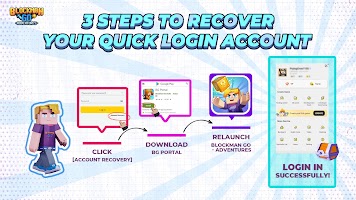
BG Portal serves as an official recovery gateway for lost accounts, as documented by BlueStacks. The companion app is built specifically to help players reconnect and retrieve their account data when login issues occur after major version updates. Installing the BG Portal application lets you authenticate ownership and restore access to your profile data without starting a new character from scratch.




Comments