ExitLag Top Up: What It Is and How Multipath Routing Works
An ExitLag top up provides prepaid access to specialized network routing software built specifically for competitive online gaming. Standard Internet Service Providers (ISPs) often send game data across crowded, indirect pathways that introduce latency spikes, jitter, and packet loss. ExitLag resolves this by utilizing proprietary Multipath Connection technology.
Multipath routing maps and transmits your game packets across multiple server routes simultaneously in real time. If one route encounters congestion or packet loss, the system instantly processes the data through the next fastest route without interrupting your active game session. To keep these optimized pathways active on your account, you need an active subscription tier.
Recharging your ExitLag subscription ensures continuous access to global routing nodes, automated traffic shaping, and dedicated FPS boosting tools designed to stabilize frame times and reduce game ping.
Available ExitLag Subscription Plans and Duration Options in 2026
ExitLag offers several duration options to fit different gaming schedules and budgets. Choosing a prepaid plan through VGTopup allows you to secure access without committing to recurring credit card charges.
| Plan Duration | Access Type | Billing Type | Ideal For |
|---|---|---|---|
| 1 Month | Full Global Network | One-Time Prepaid | Testing ping improvement on a specific game or tournament |
| 3 Months | Full Global Network | One-Time Prepaid | Competitive ranked seasons and quarterly play |
| 6 Months | Full Global Network | One-Time Prepaid | Extended multiplayer campaigns and regular players |
| 12 Months | Full Global Network | One-Time Prepaid | Long-term dedicated players wanting the best overall value |
All durations grant identical software capabilities, including uncapped access to over 1,700 supported games, multi-internet bonding, and worldwide server routing nodes.
How to Recharge ExitLag Subscription Online on VGTopup
Adding subscription time to your account through VGTopup takes only a few quick steps:
- Select your preferred subscription duration from the available options on this page.
- In the player details section, enter your registered ExitLag account Email address accurately.
- Verify your order details and current pricing on the live checkout interface.
- Choose your preferred local payment method and complete the transaction.
- Your account subscription time will be credited or your prepaid activation code will be delivered directly to your VGTopup order history.
Finding Your Account Email and Profile Details
To ensure your order processes without delay, submit the exact email address associated with your registered ExitLag account.
- Launch the ExitLag software on your PC or visit the official ExitLag web portal.
- Click on the profile icon located in the upper corner of the dashboard.
- View the email address displayed under your profile summary.
- Copy that email address into the input field on VGTopup before checking out.
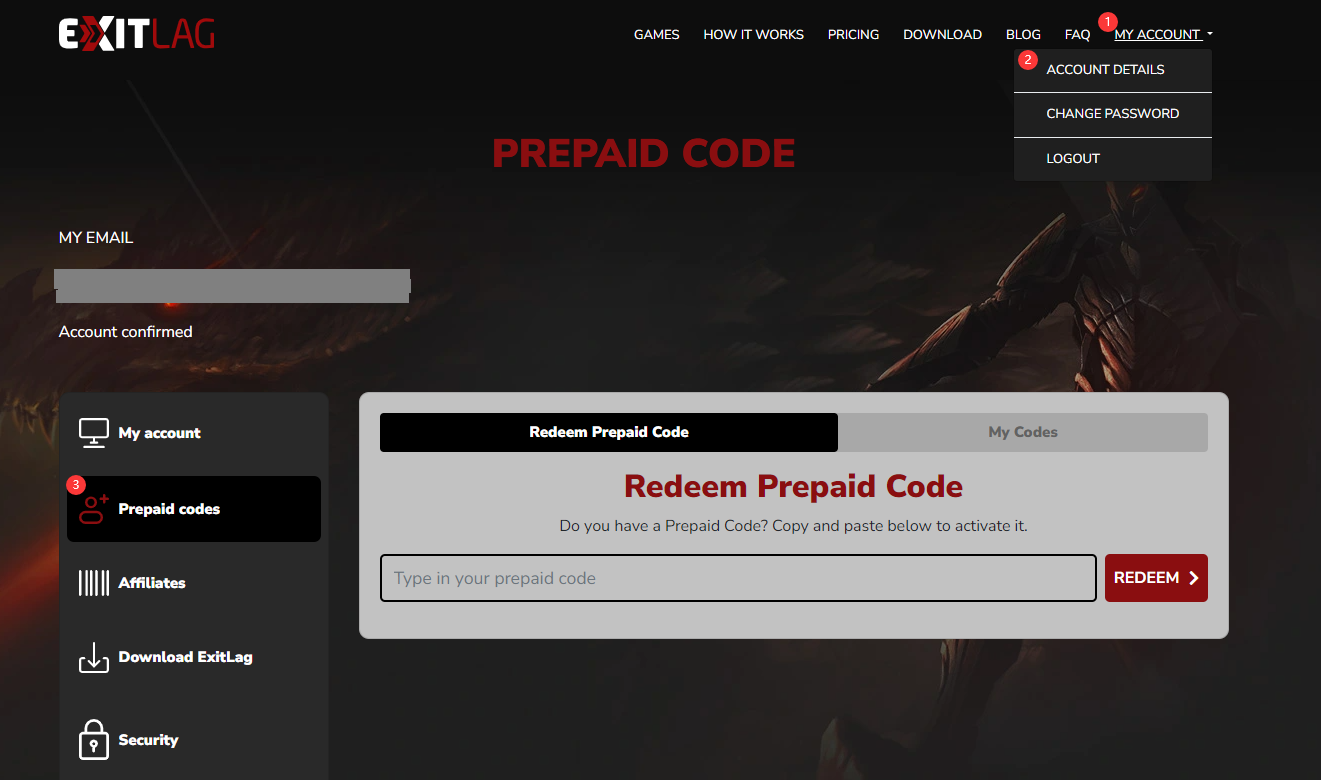
Always double-check spelling before finalizing payment so your account updates immediately.
Step-by-Step Guide: Redeeming and Activating ExitLag Prepaid Codes
If you receive a digital prepaid key from your VGTopup order, follow these activation steps:
- Open your web browser and navigate to the official ExitLag website.
- Log into your existing ExitLag account.
- Navigate to My Account and locate the Prepaid Code or Redeem Code tab.
- Copy the digital code from your VGTopup order confirmation.
- Paste the code into the text field and click Apply Code.
- Open or restart the ExitLag desktop application. Your updated expiration date will display instantly on the main client window.
Account Safety: Why Password-Free Email Checkout Protects Gamers
Account safety is essential when purchasing digital services online. VGTopup uses a password-free checkout system for all ExitLag orders:
- No Passwords Required: You only need to provide your registered account email or redeem a delivered key code. You never share your account login password.
- Zero Account Sharing: Your personal login credentials, saved payment records, and account settings remain completely private under your control.
- Direct Code Delivery: Prepaid license keys are generated digitally and delivered straight to your customer dashboard, removing any third-party access risks.
- Encrypted Checkout: Transactions are processed using strict end-to-end data encryption across certified payment processors.
Supported Games, Platforms, and Global Server Coverage
ExitLag maintains a proprietary network spanning hundreds of servers across North America, South America, Europe, Asia-Pacific, and Oceania. This coverage ensures stable routes regardless of where game publishers host their match servers.
Supported categories and major titles include:
- Tactical Shooters & Battle Royales: Valorant, CS2, Apex Legends, Rainbow Six Siege, Fortnite, Call of Duty: Warzone.
- MMORPGs: Final Fantasy XIV, World of Warcraft, Lost Ark, Black Desert Online, Guild Wars 2.
- MOBAs & Strategy: League of Legends, Dota 2, Teamfight Tactics.
- Fighting & Sports Games: Street Fighter 6, Tekken 8, EA Sports FC, Rocket League.
In addition to game traffic routing, ExitLag supports software-level optimization for popular voice communication tools like Discord, ensuring team comms stay clear during high-bandwidth match play.
Troubleshooting Common ExitLag Connection and Activation Issues
If you encounter any issues during activation or network setup, use these troubleshooting steps:
Code Activation Errors
- Invalid Code Error: Verify there are no accidental spaces before or after the code when pasting. Ensure every character matches the code shown in your VGTopup order dashboard.
- Already Used Notice: Refresh your account page. In many cases, the subscription time has already updated on the backend.
Connection and Routing Issues
- Routes Not Applying: Run the ExitLag application as an administrator. Some custom firewall configurations block routing hooks unless administrative permissions are granted.
- Ping Display Shows No Change: Close the game, launch ExitLag first, select your game title, click Apply Routes, and then launch the game client.
- Account Shows Inactive After Top Up: Log out of the ExitLag desktop client completely and log back in to force a profile synchronization with the license server.
Frequently Asked Questions
How to get ExitLag cheaper in 2026?
Selecting longer duration prepaid options such as 6-month or 12-month plans through VGTopup offers lower effective monthly costs compared to short recurring cycles. Prepaid purchases also prevent unexpected auto-renewals.
Is ExitLag worth buying for competitive gaming?
ExitLag is highly effective if you play on distant regional servers, suffer from unstable ISP routing, or experience frequent packet loss. Its multipath engine searches for optimal paths in real time, stabilizing connection consistency.
Do I need to share my ExitLag password to recharge?
No. You never need to share your account password. VGTopup processes your order using only your registered email address or delivers an activation code for direct redemption on the official website.
How do I activate my ExitLag prepaid subscription code?
Log into your account on the official ExitLag website, open the My Account section, paste your digital code into the Prepaid Code redemption box, and click submit.
Can I use one ExitLag subscription across multiple devices?
You can install ExitLag on multiple PCs using one subscription; however, active routing can only run on one computer at a time per single user license.
What payment methods can I use to buy ExitLag?
VGTopup supports various local and international payment methods. You can review all available payment options directly on the live checkout page before placing your order.