What her aptitudes are really telling you
Read her aptitude grades correctly and they're basically a build brief in disguise. GameTora's character page has her at Turf A, Medium A, Long A, Front Runner A, then she falls off a cliff everywhere else: Mile C, Short E, Dirt G. That spread isn't an open door to experiment. It's a fence with barbed wire.
The Medium A / Long A pairing should steer every choice that comes after. She isn't some flex unit you drop into whatever banner race happens to be live. She's a long-distance anchor whose home turf is Tenno Sho Spring, Arima Kinen, the URA Finals long routes, and Champions Meeting long, going by the race targets cited across 2026 community guides. Stick her in a mile and you're wrestling against her own grade ceiling.
Her training bonuses say the same thing out loud: +20% Speed and +10% Stamina. Stamina is baked into her identity, not some afterthought you bolt on during the last few turns of a career run.
The stamina math that decides her races
Here's the core of this whole build. Most beginner Kitasan runs don't crater because Speed sat too low. They crater because Stamina gassed out in the final 200 meters of a long race. Game8's guide is blunt: over-investing Speed while neglecting Stamina means running dry over long distances, and that same source tells you to carry two gold-tier recovery skills for exactly this reason.
The trade-off worth understanding is between raw stamina and recovery skills. With strong recovery skills equipped, you can survive on a smaller stamina pool than the headline number suggests, because recovery placement does more work above a survival floor than another 100 base points ever will. That's the lever nobody points at. Dump everything into the Stamina stat while skipping green skills and you've wasted training twice over.
So the real floor for her actual race targets sits around Stamina 900–1000 with recovery skills, not "as much stamina as humanly possible." Drop below that in a 3000m+ race and you're gambling on a clean run with zero positioning shuffle. And Kitasan, by design, claws for the front, where pace runs hottest and fuel burn is brutal.
| Stat |
Career / URA Target |
Team Trials / CM Target |
| Speed |
1200 |
1200 |
| Stamina |
800–1000 |
1000 |
| Power |
800 |
800–900 |
| Guts |
500 |
500 |
| Wit |
600–1000 |
1000 |
Source: Game8 / LDShop (2026)
Look at Power for a second. It's the stat that quietly hands away winnable races. A Front Runner short on Power gets bumped off the rail and out of position on the corners, and if she's not sitting top-two when Victory Cheer! checks her spot, the skill just doesn't fire at full strength. I treat 800 Power as non-negotiable, never an "if there's room left" stat. Wit is the other sleeper number. In long races where positioning never stops shifting, higher Wit cuts down on whiffed skill activations, so the 1000 Wit target in the CM column isn't filler. It's the insurance policy that makes her unique actually go off.
The recommended shape is a 2 Speed / 1 Stamina / 2 Wit / 1 Pal deck, per Game8's Trackblazer build (May 2026), and LDShop lists the exact same layout. The SSR core most guides land on: Kitasan Black's own SSR (speed), Super Creek SSR (stamina/recovery), and Symboli Rudolf SSR (stamina), going by multiple 2026 build guides referencing those staples.
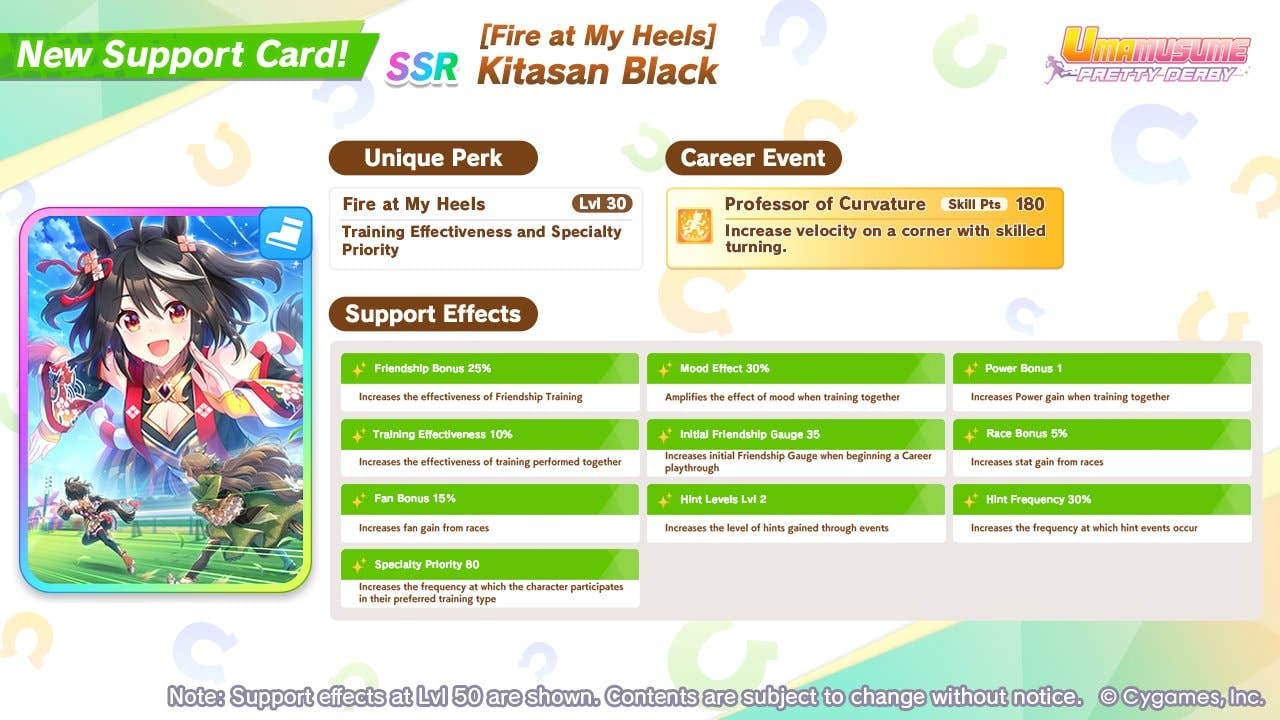
Her own SSR, "Fire at My Heels," is a genuinely cracked speed card. GameTora's support page gives it training effectiveness +5% and high specialty priority, with the support-card rating clocking its specialty priority at 100 at max limit break. It's a Speed-specialty card you'd happily slot on most Front Runners, not just Kitasan.
Now I'm going to step off the auto-include train. Her SSR is not mandatory. If all you've pulled is a low-limit-break copy, the value nosedives. Community testing on a 2025 Steam discussion put that card's specialty priority at 68 at 3LB and 116 at 4LB, which means the shiny "100 priority" headline only describes the max-LB version, and a single unbroken copy is a far weaker card than the tier lists let on. Two strong stamina supports will often beat forcing in a thin Kitasan SSR.
| Setup |
Composition |
Best for |
| Spd-Sta-Wit |
2 Speed, 1 Stamina, 2 Wit, 1 Pal |
Long races / Champions Meeting |
| Speed-Stamina |
3 Speed, 2 Stamina, 1 Pal |
Alternative stable build |
| Trackblazer (MANT) |
2 Speed / 2 Power / 2 Wit |
Trackblazer scenario runs |
Source: Game8 / Lootbar (2026)
The F2P path: you can clear URA on Kitasan with zero limited speed SSR. Borrow a friend's max-LB Kitasan SSR as your rental, build around free or low-rarity stamina/recovery supports (Super Creek is the community-favorite stamina anchor), and target the low end of the stat numbers, per Reddit community guidance in 2026. This works for the same reason the build is stamina-first: solid recovery skills mean you don't need a 1200 raw Speed ceiling to survive and lead a long URA route. The limited card lifts your CM ceiling. It doesn't gate the campaign clear.
Run her in the Trackblazer (MANT) scenario when you can. Game8 recommends it for pushing higher overall stat totals, which matters way more for the Champions Meeting version of this build than for a plain URA clear.
Skill priority: what earns its points, what doesn't
Spend skill points in this order, and treat it as a hierarchy rather than a shopping list:
- Victory Cheer! (her unique) — first, always, no exceptions.
- Recovery green skills — Swinging Maestro, Restless, and the gold-tier recoveries flagged for her. Two gold recoveries is the goal.
- Speed skills — only once the above are locked in.
The order Game8's skill-priority guidance gives for her is exactly that: unique, then green recovery, then speed. The number-one reason F2P runs blow up in her long races is skipping the recovery greens to hoard points for some flashier speed skill. Don't do it. You'd be spending your budget on the chunk of the race you were already going to win, while starving the part where she actually loses.
About the unique itself, and this is the mechanic most guides shove into a footnote. Victory Cheer! has two activation triggers. There's a velocity boost when she's positioned toward the front at the third corner in the back half of the race, or a hard forward kick when she's toward the front on the backstretch late-race. Both branches lean on one condition. She has to be near the front. That isn't flavor text, it's a build constraint, and it's why Power and Wit matter (holding position, dodging a missed trigger) and why her running style isn't up for debate.
Why Front Runner is the only style that fits

Run her as a Front Runner. Her unique fires best from the top-two slots, dishing out velocity and acceleration in long races, and that's the consensus across multiple YouTube guides and Game8 in 2026.
The trap worth yelling about: a 2026 YouTube Champions Meeting guide flagged that running Pace Chaser weakens her front-dependent unique. Easy mistake to make, too. Pace Chaser is a strong, safe style on loads of trainees, so people default to it on autopilot. On Kitasan it sabotages her kit. Chasing from mid-pack means Victory Cheer!'s position check fails or fires limp, and congrats, you've built a worse version of a generic stamina runner. As the build authors put it, she "excels as Front Runner in long races with Speed-Stamina focus." Style and stat plan are one decision here, not two.
Inheritance factors that raise her ceiling
Prioritize blue factors for Long distance and pink factors for Front Runner, per LDShop's March 2026 build notes, and ceiling those two aptitudes before anything else. The logic's simple. Her grades already sit at A in Long and Front Runner, but factor inheritance is how you shove the effective ceiling past the base grade, wringing out the extra performance that decides tight Champions Meeting matches.
White skill factors are the second layer. Inheriting recovery and speed whites hands you a head start on the exact skills you were going to buy anyway, freeing up points for more recoveries. For a CM-focused Kitasan, I'd tilt inheritance toward stamina and recovery whites over speed, since her speed ceiling is the easier number to reach through training and her own SSR.
Who this build is for, plus the TW rate quirk
Kitasan Black gets wildly overrated as a do-everything sprinter and badly underrated as a stamina-anchored long runner. If you're aiming to clear URA and fight in Champions Meeting long, she's a strong Front Runner pick, and Game8 plus YouTube CM guides both rate her there once the stamina and recovery skills are in place. Hoping to flex her into mile races to dodge a banner? Don't bother. Her C-grade mile aptitude isn't worth the fight.
One regional note that genuinely matters for TW players: a 2026 Steam discussion with a rates screenshot reported the Mycard TW gacha rate on her banner at 0.75%, versus 0.5% on JP/Global. The build advice stays server-agnostic. Stats, deck, and skills are identical everywhere, as the standard guides confirm. But that higher pull rate does make landing her SSR more reachable on TW. My read: the meta holds steady, the odds don't, and that's a real (if modest) edge when you're weighing whether to roll for the speed core there.
If you decide the stamina-and-speed support core is worth hunting and you're topping up to roll, VGTopup has a straightforward Mycard(TW) top up option. Disclosure: that's an affiliate channel, and it changes nothing about the build math above.
Frequently Asked Questions
Can I clear URA with Kitasan Black without her limited speed SSR?
Yep. Borrow a max-limit-break Kitasan SSR as your rental, build around free stamina/recovery supports like Super Creek, and aim for the lower stat band (Stamina ~800, Speed ~1100), per community guidance in 2026. The limited speed card raises your Champions Meeting ceiling; it doesn't gate the campaign clear. Solid recovery green skills matter more here than a maxed Speed stat.
What stamina number do I actually need for Tenno Sho Spring?
Shoot for roughly 900–1000 Stamina with two gold-tier recovery skills equipped (per Game8's recovery emphasis). Those recoveries let you survive on a smaller raw pool than the distance alone implies, since placement above a survival floor does more for you than another 100 base Stamina. Skip them and even 1000 Stamina can gas out late.
Is her own SSR worth pulling, or is it a luxury?
Strong at max limit break (100 specialty priority per Game8), but a single unbroken copy is far feebler. Community testing on Steam pegged it around 68 priority at 3LB. If you can't get it high-LB, two good stamina supports usually beat jamming a thin copy into the deck. Borrow a maxed one instead.
Why does everyone say Front Runner and not Pace Chaser?
Because Victory Cheer! checks her position late-race and only fires at full value from the top two spots. That 2026 YouTube CM guide specifically flagged Pace Chaser weakening this front-dependent unique. Running her from mid-pack turns her into a worse generic stamina runner, so the style and her kit are the same decision.
Does the TW server change how I build her?
No. Stats, deck composition, skills, and inheritance are identical across servers per the standard build guides. The only gap is accessibility: that 2026 Steam report put the TW banner pull rate at 0.75% versus 0.5% on JP/Global, so landing her SSR is a touch easier there. The build plan you run is the same everywhere.











Comments