If the error popped up mid-checkout, suspect your Apple settings before the game
Most "payment failed" messages on iOS trace back to your own account configuration, not a server outage. Apple Support lists the common triggers for a declined iPhone purchase: a rejected card, a region mismatch between your Apple ID and your payment method, Screen Time restrictions, Family Sharing approval routing, and a billing address that no longer matches your card on file.
Most troubleshooting guides skip two of those, Screen Time and Family Sharing. Check them first.
- Screen Time → Content & Privacy Restrictions can block in-app purchases and surface only a generic failure. You get no "this was blocked by Screen Time" banner, only a dead checkout. If you (or whoever set up the phone) ever locked down purchases, start here.
- Family Sharing's "Ask to Buy" routes the purchase to an organizer's device for approval. On the child account, the unapproved request reads like a payment failure while it waits.
- A region/locale mismatch blocks you when your Apple ID country doesn't line up with your payment method's country. Travel, a moved SIM, or an old VPN-era account change can desync these.
Rule out the three things you control before you touch the game.
Recommendation for this profile: if you got a generic failure with a working card, check Screen Time and Family Sharing first. That's the 5-minute fix most people walk past.
If you want to keep buying in-app, here's the Apple-side repair order
You can unstick App Store checkout in under five minutes without contacting Apple. "Just contact Apple Support" is bad first advice. You own most of these settings.
Work the list in order, cheapest fix first:
- Re-add your payment method. Per Apple Support, go to Settings > [your name] > Payment & Shipping, add a fresh payment method, then remove the old one. Re-adding forces a re-authorization and clears most stale-card declines.
- Sign out, restart, sign back in. A full restart between the sign-out and sign-in clears the StoreKit session holding the bad state.
- Verify region and date. Confirm your Apple ID country matches your card's country, and set the device date/time to automatic. A wrong locale or clock breaks the purchase handshake.
- Audit restrictions. Disable or whitelist purchases under Screen Time, and on a managed account check whether an "Ask to Buy" approval is pending.
I keep this symptom-to-fix map in my head:
| Symptom / behavior |
Likely cause |
First action |
Rough time to resolve |
| "Your payment method was declined" |
Stale/expired card, billing mismatch |
Re-add payment method |
~2 min |
| Generic failure, card works elsewhere |
Screen Time restriction |
Disable Content & Privacy Restrictions |
~2 min |
| Purchase "waiting"/nothing happens (child account) |
Family Sharing Ask to Buy |
Approve on organizer device |
depends on approver |
| "Cannot connect to iTunes Store" |
Region/date/locale desync |
Fix region + auto date |
~3 min |
| Charge shows pending, no coins |
Normal pending state |
Wait, don't dispute yet |
up to 24–48h |
Source: Apple Support (2025).
One trap worth naming: don't keep mashing the buy button. Per Apple Support, retrying a blocked App Store purchase can rack up duplicate authorizations, so one "failed" attempt becomes several pending holds on your card. Retrying feels productive. It hands you a refund headache instead.
Recommendation for this profile: if you're committed to the App Store, run steps 1–4 once, in order, and stop after each to retest. Don't loop the buy button.
If you're tired of the App Store entirely, the web route is the smarter default
Skip the App Store and top up through a verified web channel using your player ID, and you'll usually pay less for the identical coins. That isn't a coupon gimmick. Here's the math.
Apple charges a standard 30% App Store commission on in-app purchases, per Apple Developer policy (2026). (Smaller developers under $1M in proceeds pay 15% under the Small Business Program, and China mainland standard IAP dropped to 25% as of March 15, 2026 per Apple Developer News, but the headline rate most apps pass through is 30%.) That cut doesn't vanish. Developers bake it into the sticker price of in-app coin bundles. Web top-ups bill you direct through a payment gateway, so there's no Apple toll to pass on.
The numbers are concrete. Apple's own listing prices a 67,500-coin bundle at $9.99. The same tier shows up on the web around $7.64 in an Enjoygm example (Feb 2026), a gap of roughly 23.5% on one bundle.
| Bundle |
App Store price |
Web example |
Savings |
| 67,500 Coins |
$9.99 |
$7.64 |
~23.5% |
| 33,500 Coins |
$4.99 |
— |
— |
Source: Apple App Store and Enjoygm (2026).
The first time I lined those two prices up, that 23.5% gap stopped me buying in-app on reflex. For a one-off $0.49 starter bundle the difference is rounding error. Top up the $9.99-and-up tiers with any regularity, though, and that spread compounds fast.
The web route also solves a second problem: regional payment limits. Per Apple Support and partner channels (2026), an App Store region mismatch can block you outright, while a web top-up keyed to your numeric player ID bypasses some of those iOS-side restrictions. If your failed payment was a locale problem, the web channel costs less and fixes the block.
Recommendation for this profile: regular spenders who buy the mid-to-large bundles should make web top-up the default, not the fallback. The Apple tax is real money.
If you've never used your player ID, here's the full no-App-Store top-up
Topping up off the App Store takes five steps once you have your player ID, and delivery is fast. The partner channels work direct with Mobile Alpha Limited, the entity behind Xena Live's coin economy. Codashop states it plainly, per Codashop (2026): "Codashop has partnered with Mobile Alpha Limited to offer official XENA LIVE items top ups!" Xena's own terms confirm coins can come through Apple's iOS Store or third-party providers, per Xena Terms.
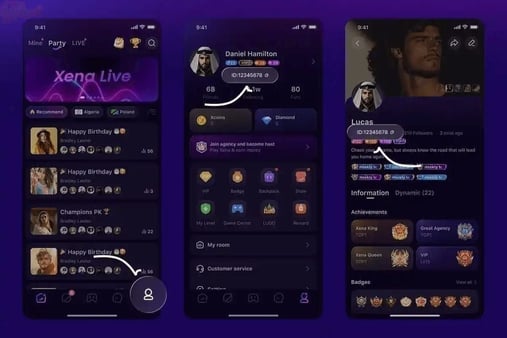
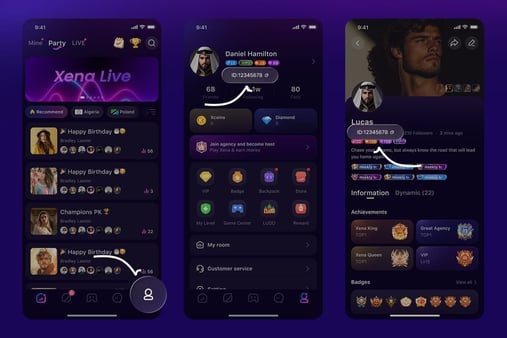
First, find your player ID (UID):
- Open Xena Live and log in.
- Tap your profile icon (bottom-right).
- Your UID appears under your username, or in ME > Personal Information.
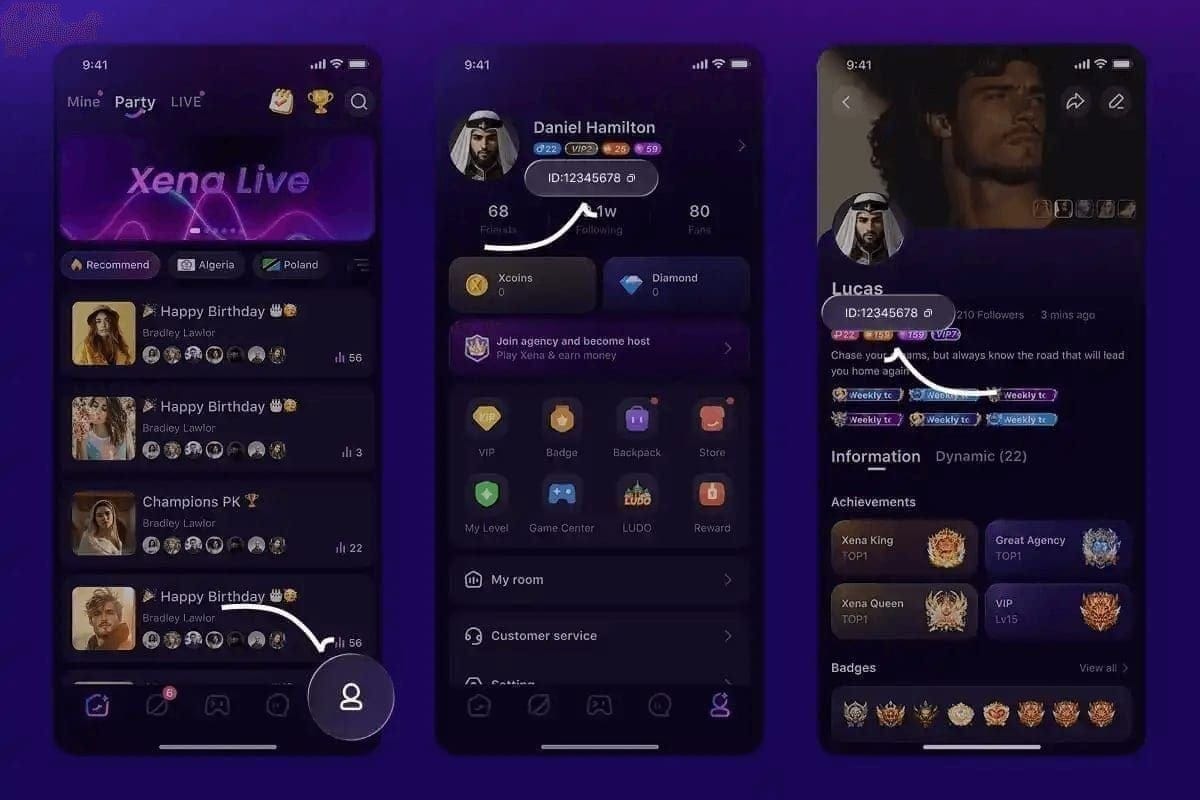
Run one check before you paste it anywhere. Per BitTopup (Mar 2026), your UID is a numeric string of 5–20 characters, not your "Show ID." A display name in place of the numeric UID is the most common reason coins land in the wrong place. Copy the numbers, not the handle.
Then the top-up itself:
- Visit a verified partner site.
- Select your coin package.
- Enter your numeric UID.
- Pay through the web gateway.
- Wait for delivery, and confirm in-app.
Delivery is quick by design. Codashop delivers right after payment, and Enjoygm web top-ups land within a few minutes; per BitTopup, the window runs under five minutes. If your coins haven't shown after that, refresh the app and re-check your balance before assuming anything broke.
For transparency: VGTopup, which publishes this article, is one such verified web option that recharges Xena Live coins from your player ID alone. Before you commit, do what I'd do regardless of brand: pull up your Xena Live Coins top up price for the exact bundle you want and lay it next to your in-app price. Let the number decide.
Recommendation for this profile: first-timers, run one small web top-up to learn the flow before moving your regular spend over. Keep the transaction receipt.
If money left your account but coins didn't arrive, don't panic-dispute
A charge with no coins is usually a recoverable pending state, not a scam. Disputing it too fast costs you. Your recovery path depends on which channel you used.
App Store side: a pending Apple transaction can auto-resolve within roughly 24–48 hours. Per Apple ecosystem guidance (2026), disputing a pending charge too early can void the eventual coin delivery, because you cancel the very transaction about to complete. Check the transaction status in your Apple account first. Wait the window out.
Web top-up side: recovery runs faster. If money left your account but coins didn't credit, contact the top-up site's support with your transaction reference and UID. They reconcile direct UID deliveries on their end. One thing trips people up here: "Restore Purchases" in the App Store does nothing for a web top-up. Restore only re-syncs Apple-side purchases; web channels deliver straight to your UID. Per BitTopup, people waste hours hammering Restore Purchases for a transaction Apple never processed.
The decision tree is short:
- Pending Apple charge? Wait up to 24–48h, then check status. Don't dispute first.
- Failed (not pending) Apple charge? The hold drops off on its own; that money wasn't captured.
- Web charge, no coins? Contact site support with your receipt, and leave Restore Purchases alone.
Recommendation for this profile: screenshot the charge, identify pending vs failed vs web, and route to the right support. Patience beats a premature chargeback here.
If you're nervous a top-up site is a scam, here's the line that settles it
One rule protects you: any site that asks for your Apple ID password is fraud. A legitimate UID top-up never needs your Apple credentials, because it delivers to your numeric player ID through its own gateway, not through your Apple account. Per Apple's ecosystem guidance, never enter Apple ID credentials on an unverified top-up site; that's textbook phishing.
Green flags of a channel worth trusting:
- It states an official partnership with the game's operator (Mobile Alpha Limited for Xena Live), and you can verify that claim on the partner's own page.
- It asks only for your numeric UID and a payment method, never your Apple or game password.
- It lists a real delivery window (instant to a few minutes) and a support contact for failed deliveries.
Red flags to walk away from:
- Requests for your Apple ID login or game account password.
- No support channel, no partnership statement, prices that look too good with no named operator.
- Pressure to "log in with Apple" to receive coins. Coins go to a UID, not an Apple sign-in.
The whole safety model is UID delivery versus credential entry. Learn that distinction and the "is buying outside the App Store safe?" question mostly answers itself.
Recommendation for this profile: never trade your Apple password for coins. A real channel needs your UID and nothing more sensitive.
The fastest reliable route, by who you are
| Your situation |
Do this |
Why |
| Generic failure, card works fine |
Check Screen Time / Family Sharing first |
Silent restriction blocks, not a game bug |
| Declined card, want to stay in-app |
Re-add payment method, fix region |
Clears stale authorization in ~2 min |
| Regular mid/large-bundle spender |
Use verified web top-up via UID |
Avoids Apple's 30% cut; ~23.5% cheaper on the 67,500 tier |
| Region-locked at App Store checkout |
Web top-up via UID |
Bypasses iOS region mismatch |
| Money taken, no coins (Apple) |
Check status, wait 24–48h |
Disputing early can void delivery |
| Money taken, no coins (web) |
Contact site support, skip Restore Purchases |
Restore doesn't cover UID deliveries |
Source: Apple Support, Apple Developer, Enjoygm, Codashop, BitTopup (2025–2026).
My read after working through all of it: the App Store is the familiar default, not the safe one. Your real risk is an unverified site you hand your Apple password to. A verified web top-up, keyed to your UID, costs less on bigger bundles and gives you the cleaner fix when iOS billing fights you. Repair the App Store route if you must; replace it if you spend regularly.
Frequently Asked Questions
Why does my Xena Live payment keep failing on iPhone even though my card works elsewhere?
A card that works everywhere else points away from the bank and toward an iOS-side block, most often Screen Time's Content & Privacy Restrictions, which can stop in-app purchases while showing only a generic error. Check that first, then confirm your Apple ID region matches your card's country. Per Apple Support (2025), locale mismatches and restrictions are common silent culprits.
How long do web top-up Xena Live coins take to arrive?
Under five minutes. Codashop delivers right after payment, and Enjoygm web top-ups land within a few minutes (Feb 2026). If nothing shows after that window, refresh your in-app balance before contacting support, and have your transaction reference and numeric UID ready, since that's what reconciles a delayed delivery.
Is it cheaper to buy Xena Live coins on the web than in-app?
On larger bundles, yes, by a meaningful margin. The 67,500-coin tier runs $9.99 on the App Store versus about $7.64 on the web, roughly 23.5% less (Apple listing and Enjoygm, 2026). The driver is Apple's 30% in-app commission (per Apple Developer, 2026), which web checkouts don't pass on. On a $0.49 starter bundle the gap is trivial; on repeated mid-tier buys it adds up.
What if money was deducted but coins never arrived?
Identify the channel first. An Apple charge showing "pending" can auto-resolve within 24–48 hours, and disputing it early can void the eventual delivery (Apple ecosystem guidance, 2026), so wait and check status. A web top-up that charged without crediting is fixed by contacting that site's support with your receipt and UID; skip Restore Purchases, which only covers Apple-side purchases.
Can Family Sharing cause what looks like a payment failure?
Yes, and it fools a lot of people. On a child or managed account, "Ask to Buy" routes the purchase to an organizer's device for approval, and the unapproved request can read like a declined payment while it waits. Check with whoever organizes your Family Sharing before assuming the card or app is broken.









Comments