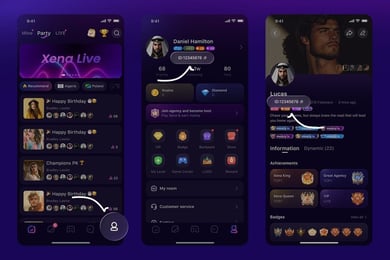

Mico Live Coins Top Up: Quick UID Recharge Guide
Getting a Mico Live Coins top up allows you to participate in live broadcast interactions, send custom virtual gifts, and support your favorite creators across the globe. Mico Live is an international social networking and live-streaming platform where users connect through real-time video, audio parties, and chat features. Coins serve as the platform's primary digital currency, giving you access to premium interaction features without interruption.
VGTopup provides a direct recharge system that credits coins straight to your account using only your numeric User ID. You do not need to share login credentials, passwords, or personal third-party tokens. Choose your required coin package, verify your UID, and complete your payment to get your balance updated.
What Are Mico Live Coins and Their Uses
Mico Live Coins provide direct utility inside the app. They power the social economy of the platform and allow viewers to actively engage with streamers during public streams, group calls, and talent showcases.
Here is how you can use Mico Live Coins:
- Virtual Gifting: Send standard and animated dynamic gifts to live broadcasters during their streams. Gifts help creators earn income and boost their visibility in regional and global talent rankings.
- PK Battle Support: Boost your favorite streamer during head-to-head live PK competitions against other broadcasters. Coin-based gifts contribute directly to PK battle score points.
- Exclusive Chat & Audio Rooms: Join private audio party rooms, multi-guest video chats, and VIP discussion groups that require coin entry or in-room tips.
- Profile Customization & Entrance Effects: Purchase special entrance animations, high-tier avatar frames, and colorful chat bubble effects that display whenever you enter a broadcast room.
- Direct Creator Interactions: Send special broadcast messages and priority requests to creators during active streams.
Step-by-Step Guide: How to Top Up Mico Live Coins
To ensure your balance is credited accurately, follow these straightforward steps when placing an order on VGTopup:
- Select Your Coin Amount: Review the available Mico Live Coin packages and select the quantity you wish to purchase. Real-time pricing, currency options, and payment selections are clearly displayed on the live checkout interface.
- Enter Your Mico User ID: Type or paste your unique numeric Mico ID into the User ID field. Ensure no accidental spaces or letters are included.
- Confirm Order Details: Verify that the entered User ID matches your active Mico account profile to avoid misdirected deliveries.
- Complete Payment: Choose your preferred payment method on the secure checkout page and finalize the transaction.
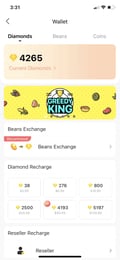
- Check In-App Balance: Open your Mico Live app, visit your wallet page, and confirm that your new coin balance is ready to use.
How to Locate Your Mico Live User ID
Your Mico Live User ID is a unique numeric identifier linked directly to your profile. You only need this number to complete a top-up on VGTopup.
Follow these steps to find your ID:
- Open the Mico Live app on your iOS or Android device.
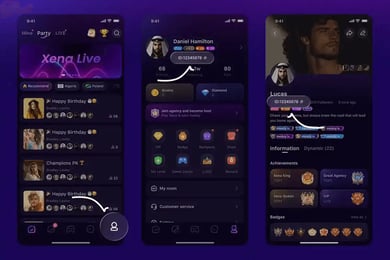
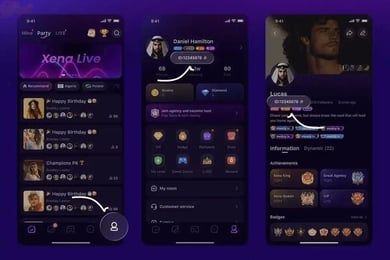
- Tap the Profile tab (marked as Me) in the bottom-right corner of the main screen.
- Look directly beneath your profile picture and display nickname at the top of the screen.
- Locate the numeric string labeled ID.
- Tap the Copy icon next to the number to copy your UID directly to your clipboard.
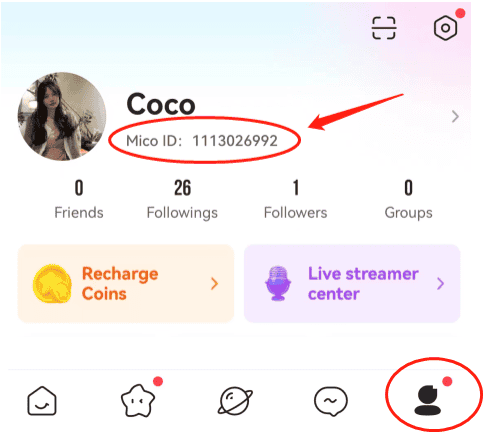
Past the copied number into the User ID field on VGTopup before proceeding to checkout.
Regional Compatibility and Account Guidelines for Mico Live
Mico Live operates across multiple server regions, including Global, Middle East & North Africa (MENA), Europe (DE, FR, UK), Southeast Asia, and Latin America. User accounts are bound to specific regional profiles created upon registration.
| Account Region | ID Compatibility | Balance Utility | Transferability |
|---|---|---|---|
| Global / North America | Direct UID Top Up | Live gifts, audio rooms, PK battles | Non-transferable |
| MENA Region | Direct UID Top Up | Live gifts, audio rooms, PK battles | Non-transferable |
| Europe (DE / FR / UK) | Direct UID Top Up | Live gifts, audio rooms, PK battles | Non-transferable |
| Southeast Asia / LATAM | Direct UID Top Up | Live gifts, audio rooms, PK battles | Non-transferable |
Because coins are directly bound to the specific User ID provided at the time of purchase, they cannot be transferred between different accounts or refunded across regional variations once delivered. Always verify that your account is active and able to receive direct balance refills.
Safety and Passwordless UID Top-Up Security
Account safety is essential when purchasing digital currencies online. VGTopup operates on a passwordless delivery system. You only need to provide your public Mico User ID to receive your coins.
- No Account Sharing: You never need to hand over your login credentials, linked email addresses, Apple ID, or Facebook logins.
- No Verification Codes: VGTopup will never ask for your SMS one-time passwords (OTP) or authentication codes.
- Secure Transaction Gateway: All checkout transactions are processed through encrypted payment channels.
- Safe Delivery: Coins are deposited directly through standard account crediting mechanisms without risking account bans or policy flags.
Troubleshooting Missing or Delayed Coins
If your coins do not appear in your in-app wallet immediately after completing your order, use the following troubleshooting checklist:
- Refresh the App: Completely swipe away and close the Mico Live application on your mobile device, then reopen it. Head to your profile wallet to refresh the cached balance.
- Check Your User ID: Review your order confirmation on VGTopup to verify that the User ID you entered matches the ID on your profile screen. A single incorrect digit can route coins to a different profile.
- Review Payment Status: Check your VGTopup order history to make sure the payment status is marked as successful. If a payment is pending review by your payment provider, processing will complete once verified.
- Contact Customer Support: If your payment is completed and your balance has not updated after a short wait, reach out to VGTopup customer support. Provide your VGTopup Order ID, your Mico User ID, and a screenshot of your in-app profile for fast resolution.
Frequently Asked Questions About Mico Live Coins
Where can I buy Mico coins online?
You can buy Mico Live Coins directly on VGTopup. Select your desired package, input your numeric User ID, and proceed through checkout using the available payment options displayed on the live platform.
What is MICO recharge used for?
A MICO recharge adds virtual coins to your account balance. These coins are used to send animated live gifts to broadcasters, access exclusive private chat rooms, participate in PK battle ranking contests, and unlock custom profile badges and entrance animations.
How do I find my Mico Live User ID?
Open the Mico Live app and tap the Me icon in the bottom-right corner. Your numeric User ID is displayed directly below your profile photo and username. Tap the copy icon next to the number to copy it to your clipboard.
Do I need to share my Mico account password to top up?
No. VGTopup uses a direct UID top-up system. You only need to provide your public User ID. You never need to share passwords, social login details, or SMS verification codes.
Can Mico Coins be transferred between different regional accounts?
No. Mico Live Coins are permanently bound to the specific User ID to which they are credited. Coins cannot be transferred between separate user accounts or converted back into real-world currency.
What should I do if my Mico Live Coins have not arrived?
First, restart the Mico Live app and check your wallet balance again. If the balance remains unchanged, verify the UID submitted on your VGTopup order confirmation. If the details are correct and your transaction is confirmed, contact VGTopup customer support with your Order ID for prompt assistance.
Select Denomination
Tax, payment fees and eligible coupons are calculated at checkout.
| Package | Price |
|---|---|
| 352 Coins | USD 0.56 |
| 88 Coins | USD 0.68 |
| 445 Coins | USD 0.68 |
| 100 Coins | USD 0.77 |
| 102 Coins | USD 0.79 |
| 605 Coins | USD 0.93 |
| 900 Coins | USD 1.38 |
| 1,760 Coins | USD 2.69 |
| 2,500 Coins | USD 3.82 |
| 500 Coins | USD 3.85 |
| 510 Coins | USD 3.92 |
| 2,730 Coins | USD 4.17 |
| 3,520 Coins | USD 5.37 |
| 1000 Coins | USD 7.70 |
| 5,200 Coins | USD 7.94 |
| 1,100 Coins | USD 8.46 |
| 5,580 Coins | USD 8.51 |
| 1,140 Coins | USD 8.77 |
| 6,500 Coins | USD 9.92 |
| 7,500 Coins | USD 11.44 |
| 8,550 Coins | USD 13.04 |
| 10,560 Coins | USD 16.11 |
| 2,200 Coins | USD 16.92 |
| 2,260 Coins | USD 17.38 |
| 15,600 Coins | USD 23.80 |
| 3,300 Coins | USD 25.38 |
| 3,390 Coins | USD 26.07 |
| 21,120 Coins | USD 32.21 |
| 4,400 Coins | USD 33.83 |
| 26,250 Coins | USD 40.04 |
| 5,500 Coins | USD 42.29 |
| 5,700 Coins | USD 43.83 |
| 31,500 Coins | USD 48.04 |
| 31,680 Coins | USD 48.32 |
| 6,600 Coins | USD 50.75 |
| 7,700 Coins | USD 59.21 |
| 8,700 Coins | USD 66.90 |
| 8,800 Coins | USD 67.66 |
| 9,040 Coins | USD 69.51 |
| 47,700 Coins | USD 72.75 |
| 53,000 Coins | USD 80.83 |
| 11,000 Coins | USD 84.58 |
| 11,100 Coins | USD 85.35 |
| 11,500 Coins | USD 88.43 |
| 108,000 Coins | USD 164.71 |
| 22,000 Coins | USD 169.16 |
| 22,200 Coins | USD 170.69 |
| 22,800 Coins | USD 175.31 |
| 162,000 Coins | USD 247.06 |
| 33,000 Coins | USD 253.74 |
| 33,900 Coins | USD 260.66 |
| 275,000 Coins | USD 419.39 |
| 55,000 Coins | USD 422.89 |
| 56,500 Coins | USD 434.42 |