What the "failed" message is really telling you
A "payment failed" screen does not prove your money is safe. That message can land after your bank already approved the charge, with the in-game delivery just running behind. Payment threads and walkthrough videos floating around since 2026 keep flagging the same thing: pending charges often read as "failed" in-game, then reverse themselves within days. Dispute the instant you see red and you've made the wrong first move.
So step one is figuring out which state you're in, not acting. Three states. They demand opposite responses.
| State |
What you see |
What's actually true |
First move |
| Failed |
Error in-game, no charge on bank app |
Transaction genuinely rejected |
Fix the cause, retry once |
| Pending |
"Failed" in-game but a hold on your bank |
Authorized, delivery lagging or reversing |
Wait — do NOT retry |
| Successful |
No error, balance updated |
Done |
Reconcile receipt |
| Source: community payment troubleshooting guides on YouTube / r/marvelrivals (2026–2026) |
|
|
|
Open your bank or wallet app before touching anything. No pending line? That's a true decline, head to the fixes. A pending hold sitting there means you're in row two, and buying again is the dumbest thing you can do. Card authorization reversals usually clear inside a few business days with no manual refund, so waiting costs you nothing. A panic-retry costs you a doubled hold.
State identified. Now, which of the four causes are you actually looking at? The fix for a 3D-Secure block does precisely nothing for a region clash.
The four causes, ranked by how often they show up
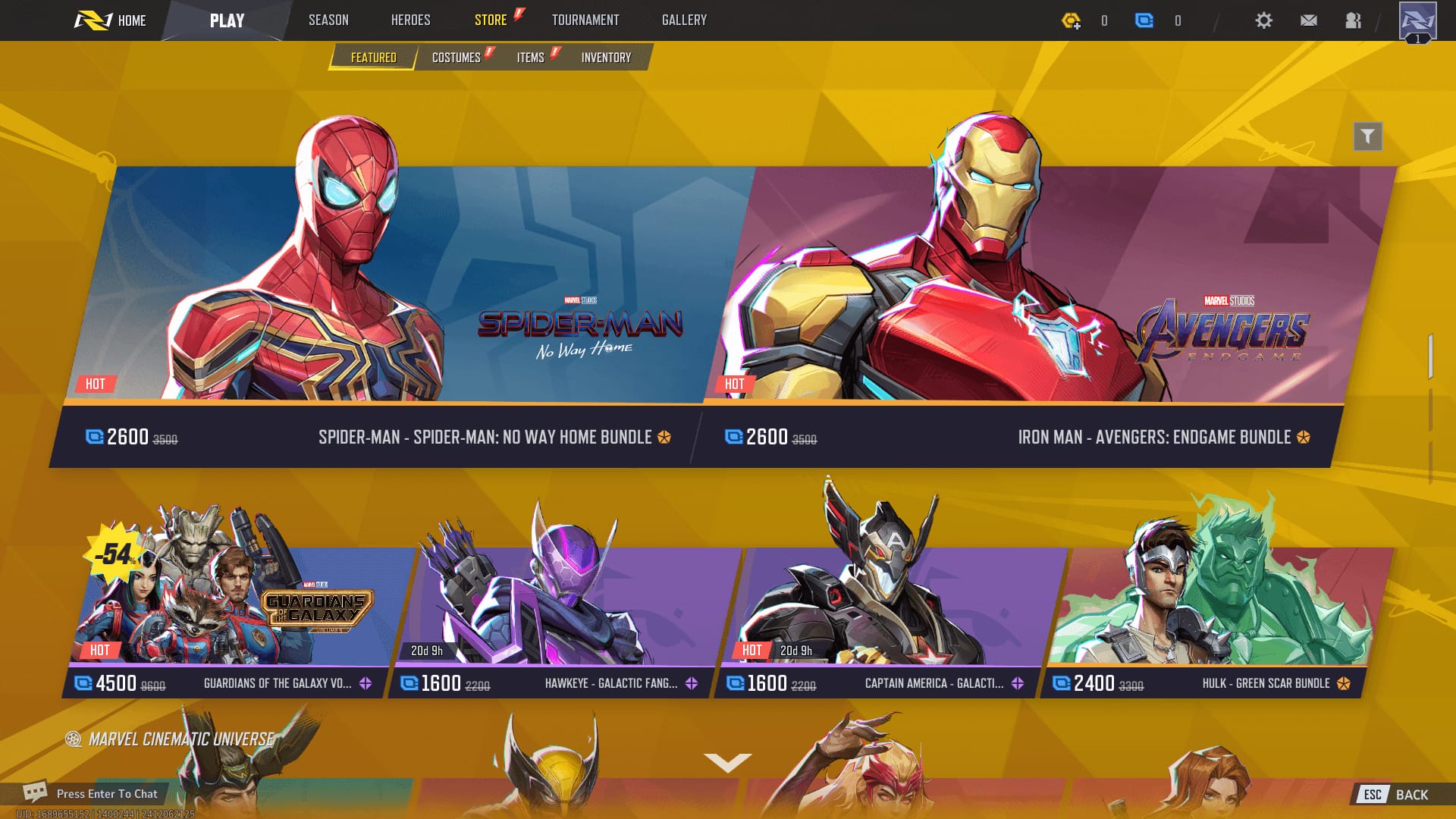
After watching these threads pile up, my read is simple: most "Marvel Rivals payment error" reports are bank-side, not game-side. Players skip that diagnosis because blaming the game feels nicer than phoning your bank. Here's the cause-to-fix grid I'd work down.
| Symptom |
Most likely cause |
First action |
| Charge declined instantly, bank app shows nothing |
Card / 3D-Secure block |
Approve in bank app, check limits |
| "Region not supported" / wrong currency |
Store region ↔ account mismatch |
Match store region, drop the VPN |
| Store won't load, all purchases fail |
Platform-side outage (Steam/PSN/Xbox) |
Wait, check status, restart client |
| Buy button does nothing, old prices |
Stale client cache / outdated build |
Update + restart, re-login |
Card, bank, and 3D-Secure declines. The big one. Modern cards push online game buys through 3D-Secure, and if you don't tap the verification prompt in your banking app quick enough, the charge dies quietly. International merchant flags, daily spend caps, and "suspicious activity" auto-blocks on digital goods all live in this bucket too. Check the bank app first. It'll save you hours of restarting a client that was never broken.
Region and currency mismatch. The most overlooked culprit, and it chews up travelers and VPN users worst. The official NetEase top-up page takes Visa, Mastercard, and PayPal, plus local rails like PIX in Brazil at a minimum of just BRL 0.80, per the NetEase pay site. But when your store region, your card's billing country, and your VPN exit node all disagree, the processor smells fraud and declines. That pattern shows up across payment guides repeatedly. The cure is to line your store region up with your card, not to pile on more masking.
Platform store errors. Steam, PlayStation, and Xbox each broker the transaction before NetEase ever sees a cent, so an outage on their end reads as a Lattice failure to you. On PC, a switched-off Steam Overlay keeps coming up, since the overlay is part of how the purchase confirmation draws on screen.
Stale client or cache. An old build or a cached store state can leave the buy button dead, or showing prices the backend no longer recognizes, which it then rejects.
Cause is half the fight. The other half is platform-specific, because the click path to a working fix really is different on each box.
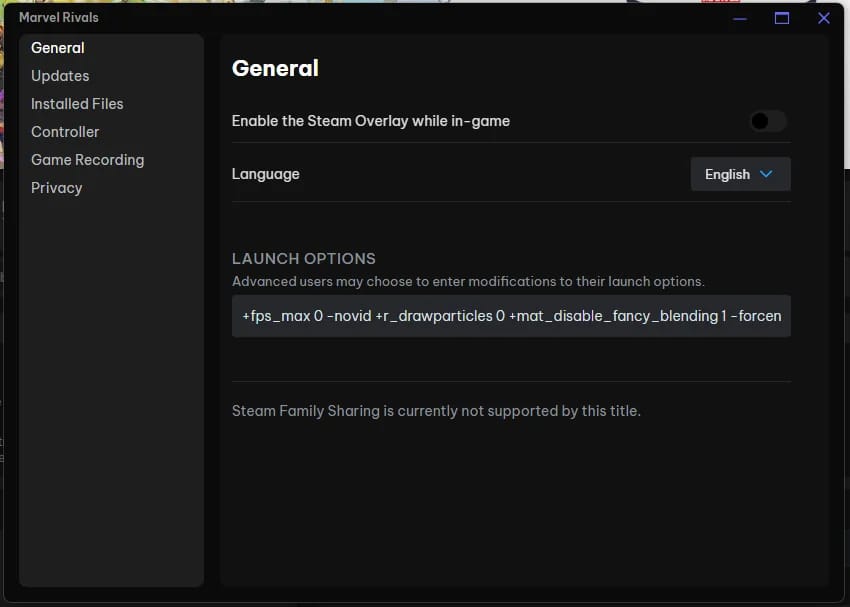
The quickest documented PC fix happens to be the least obvious one: switch the Steam Overlay back on. Per The Game Post, close Marvel Rivals and Steam completely, wait 30 seconds, restart Steam, relaunch the game. If that alone doesn't do it, enable the overlay by hand: open Steam, go to Library, right-click Marvel Rivals, hit Properties, then toggle Steam Overlay on under the General tab. That one surfaces over and over across r/marvelrivals and Steam threads through 2026.
- PC / Steam: Full restart of game and client (30-second wait), then confirm the Steam Overlay is on. Check that your Steam Wallet region matches your card. That clears most "Lattice won't buy on Steam" cases.
- PlayStation 5: Confirm the card on file in your PSN account is valid and region-matched, restore licenses, and rebuild from a clean app launch. A PSN-side billing block shows up in-game as a Lattice failure, so check your PlayStation Store payment status, not only the game.
- Xbox: Verify the payment method in your Microsoft account and that your console region lines up with your billing country. A mismatched Microsoft Store region is the usual trigger.
- Mobile: Match your app-store account region to your payment method, clear the store cache, and make sure the client's on the current build.
One rule holds on every platform. Retry once after a fix. Never repeatedly. Mashing the button is the documented number-one route to a duplicate authorization hold, and it turns a recoverable glitch into a "why am I charged twice" ticket. If one clean retry still fails, stop and reconcile instead of spamming.
Reconciling is exactly where the next mess lives. The charged-but-no-Lattice case that drags players into early dispute mode.
Charged but no Lattice showed up
Wait before you panic, and never dispute first. A charge that posts while your balance stays flat is usually the lag-not-loss situation from earlier. Bank approved, delivery's catching up, and the hold might reverse on its own. The reconciliation routine the top-up guides agree on is plain: check your in-game balance after buying, then match it against the receipt from your platform store or NetEase. If the receipt confirms a completed charge and the balance is genuinely gone once things settle, then you escalate.
Escalation means official channels, nothing else. Contact whoever processed the money (Steam, PSN, Xbox, or NetEase) with your transaction ID, going by the consensus across r/marvelrivals refund discussions (2026). And here's the one habit that pays off big: screenshot the order ID the second a purchase completes. A refund request with a transaction ID moves. One without it sits.
What drags the most false alarms here is the auto-reversal window. Pending card authorizations commonly clear themselves within roughly 3–7 business days, drawn from how processors handle unsettled holds. File a dispute on day one and it can crash into a reversal already underway, tangling both. Give it the window.
There's a quieter suspect too. Lattice and Units aren't interchangeable, and some store items only take one of them. If a buy looks like it "failed" but your money's untouched, you might just be trying to grab a Units-priced item with the wrong currency. That distinction is the whole reason for the next section.
Lattice, Units, and the currency mix-up that fakes a failure
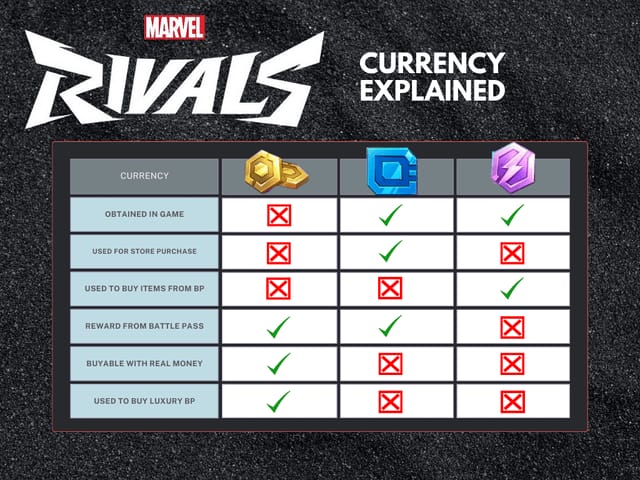
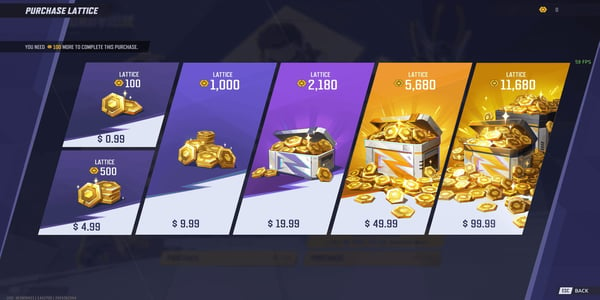
Lattice is the premium currency you can only buy with real money, and it converts 1:1 into Units, the secondary currency behind most store cosmetics. Both confirmed by the Marvel Rivals Wiki. Chrono Tokens, which feed Battle Pass rewards, also convert 1:1 from Lattice or drop from in-game rewards.
| Currency |
How you get it |
What it's for |
| Lattice |
Real-money purchase only |
Convert to Units / Chrono Tokens, buy cosmetics & Battle Pass |
| Units |
Convert from Lattice, or earn from rewards |
Main store currency for cosmetics |
| Chrono Tokens |
Rewards or Lattice conversion |
Battle Pass rewards |
| Source: Marvel Rivals Wiki – Fandom (2026) |
|
|
Here's why it matters for a "failed" buy. If an item costs Units and you've only purchased Lattice, the store can reject the action in a way that mimics an error instead of a currency mix-up. Convert first, then buy. Once it clicks that Lattice is the only real-money layer and everything else flows out of it, the smart play for anyone who keeps hitting card walls gets obvious. Skip the card.
Topping up with your UID, the safe way
The cleanest way out of card-decline hell is a UID-based top-up, and its whole safety pitch is that it never asks for your password. You hand over only your public User ID, and the Lattice drops onto your account. The consensus across r/marvelrivals top-up threads (2025–2026) is blunt: third-party UID top-ups run cheaper but carry no official guarantee, so the line you don't cross is never share your login, only your UID.
That credential-safety angle is the part most guides gloss over, and it's the whole argument. Any method that wants your account password is handing you risk a UID-only flow simply can't. The UID can't log anyone in. Your password can.
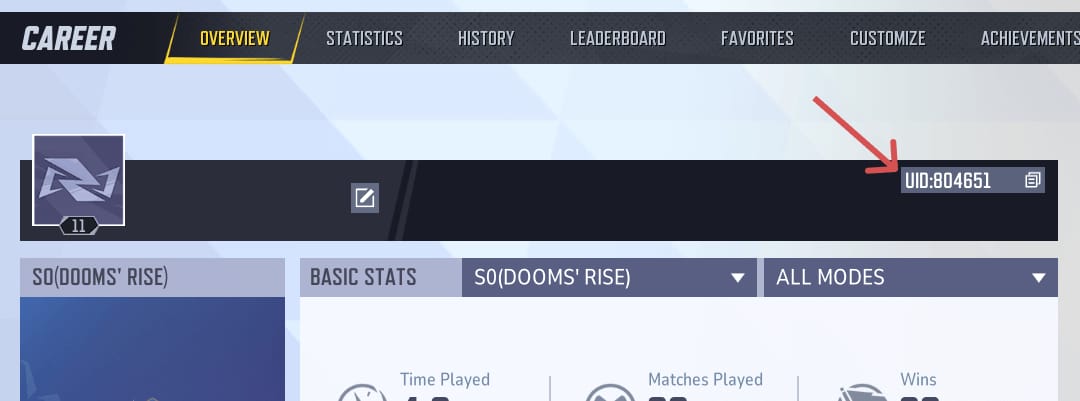
Finding your UID. Log in, tap the avatar icon top-right on the main screen, and your UID shows on the overview page, per SEAGM (2025). It also appears on your Career Overview page and bottom-left of the screen, according to rivalsmeta.com (2026). Copy it exactly. One wrong digit and your Lattice lands on a stranger.
The flow itself. On a UID top-up site you key in the User ID, pick the Lattice amount, choose a payment method, and finish. That's the whole thing, per Lootbar and SEAGM guides (2025–2026). No login screen for your game account should ever pop up.
Before you pay anywhere, run this trust checklist:
- The site asks for your UID only, never a password or login.
- Your payment runs through a recognizable processor, not a manual transfer to someone's personal account.
- The seller's reputation is verifiable.
- You can reconcile the delivery against your in-game balance right after.
Where to actually buy: the official NetEase store and platform wallets win on credential safety and dispute recourse. UID resellers exist because they're often cheaper, and if you go that way, the disclosure here is that this piece is published by VGTopup, itself a UID-only top-up service, so weigh that like any vendor. The neutral point holds no matter who you pick. A service that only ever needs your Marvel Rivals top up UID, never your login, is the safer setup. Decide on that, not on a few cents of price gap.
What I'd avoid, and where the "rules" worry is overblown
The traps that actually drain your wallet are behavioral, not technical:
- Retry spam. One retry after a real fix is fine. Repeated retries on a "failed" screen are the documented number-one cause of duplicate authorization holds. Diagnose the state first.
- Login sharing. No price justifies handing your password to a top-up route when UID-only methods exist to dodge exactly that exposure.
- Premature disputes. A chargeback on a pending hold that's already auto-reversing tangles both transactions. Respect the few-business-day window.
- VPN-for-cheaper-region. Chasing regional pricing with a VPN is the fastest way to trip a fraud decline, since your exit node, store region, and card country stop agreeing. Does it risk a ban outright? That's more feared than documented, but the decline risk alone makes it a lousy trade for most players.
The anxiety I'd put down: UID top-up isn't some shady exploit. The currency definitions are official, the UID is a public identifier by design, and the real risk sits entirely in vendor choice and credential handling, not in the act of topping up by ID. Pick a UID-only flow, screenshot every order ID, retry once and only once, and most "payment failed" headaches never reach a support ticket. Store and payment systems get patched, so the exact click paths will drift. But "diagnose the state, check the bank first, never share your login" keeps holding.
Frequently Asked Questions
Why does my Marvel Rivals Lattice payment keep failing even though my card works elsewhere?
Game-store buys route through extra fraud checks your everyday shopping never triggers: 3D-Secure prompts, international-merchant flags, digital-goods limits. A card that handles groceries fine can still get auto-blocked on a Lattice charge. Approve the verification push in your bank app, and confirm your issuer hasn't capped online or foreign transactions for the day.
Give it the full reconciliation window. Check your in-game balance against the platform or NetEase receipt, and remember pending card holds commonly auto-reverse within roughly 3–7 business days with no manual refund needed. If the receipt confirms a settled charge and Lattice is still missing after that, escalate to whoever processed payment (Steam, PSN, Xbox, or NetEase) with your transaction ID.
Does topping up by UID require my account password?
No, and that's the entire point. A UID-based top-up uses only your public User ID, found via the avatar icon on the main screen or your Career Overview page. Any top-up route asking for your actual game login is the riskier method by design. The consensus across community top-up threads is to share the UID and nothing else.
I bought Lattice but still can't buy the cosmetic I wanted — is that a payment error?
Probably not a payment problem at all. Lattice converts 1:1 into Units, and some store items only take Units, not raw Lattice, so a rejected purchase can look like a failure when it's really a currency mix-up. Convert your Lattice to Units first, then buy.
Is using a VPN to get cheaper Lattice pricing in another region safe?
It's the most self-inflicted decline cause out there. When your VPN exit node, store region, and card billing country stop agreeing, the processor reads fraud and rejects the charge. The outright ban risk is more feared than confirmed, but the decline headache alone makes region-mismatched buying a bad deal. Match your store region to your card instead.









Comments