
MyCard TW Top Up: What is MyCard Taiwan and Supported Games
MyCard is one of the most widely used prepaid digital entertainment currencies across Taiwan, Hong Kong, and Macau. Published by Soft-World, MyCard points allow players to purchase premium currencies, battle passes, monthly subscriptions, and exclusive items across hundreds of online titles, mobile games, and digital media platforms.
A MyCard TW digital card provides direct access to Taiwanese game servers and regional distribution networks. Many developers release dedicated Taiwan/Hong Kong/Macau (TW/HK/MO) game builds or standalone Android APK versions that support third-party billing through MyCard. Instead of being restricted to standard app store payment channels, players use MyCard to fund their game accounts directly at standard regional exchange values.
Popular titles and platforms supporting MyCard Taiwan points include:
- PC Online & MMORPGs: Ragnarok Online, Lineage series, Moonlight Blade, Black Desert Online (TW server), Final Fantasy XIV (regional distribution portals), and various classic Chinese RPG titles.
- Mobile Titles & APK Editions: Fate/Grand Order (TW), Tower of Saviors, Blue Archive (TW billing), Genshin Impact and Honkai: Star Rail (via official web payment centers supporting MyCard TW), and Garena-distributed titles.
- Digital Platforms & Web Portals: KKBOX, Webtoons, Bilibili comics, and various Asian entertainment streaming services.
Taiwan Region Compatibility and Restrictions Explained
When purchasing MyCard points, selecting the correct regional currency is critical. Soft-World issues distinct codes for Taiwan (TW) and other Southeast Asian regions. A MyCard TW code is denominated in New Taiwan Dollars (TWD / NTD) and functions specifically on Taiwan-region billing systems, Taiwan MyCard member accounts, and TW-based game servers.
Attempting to redeem a MyCard TW code on a SEA (Southeast Asia) specific server or a global platform that strictly accepts MyCard Malaysia/Singapore points will result in a regional mismatch error. Before buying, verify that your target game account or top-up portal is set to the Taiwan/Hong Kong/Macau region or accepts standard MyCard Taiwan Point Card (MyCard 點數卡) redemption.
| Feature | MyCard Taiwan (TW) | MyCard SEA / Global |
|---|---|---|
| Base Currency | New Taiwan Dollar (TWD / NTD) | Multi-Currency (SGD, MYR, USD) |
| Target Servers | Taiwan, Hong Kong, Macau (TW/HK/MO) | Southeast Asian & Global game servers |
| Member Wallet | Taiwan-registered MyCard Accounts | SEA Regional Member Accounts |
| Primary Usage | TW official web top-up pages & standalone APKs | Regional SEA game portals |
Direct Game Top-Up vs MyCard Member Wallet Storage
MyCard TW offers two distinct methods for utilizing your purchased points: Direct Top-Up and MyCard Member Wallet deposits. Understanding the difference helps you choose the best redemption route for your specific game.
1. Direct Game Billing (點數卡儲值)
Direct Top-Up is the fastest method if you only play one specific game and want to convert your entire card value immediately into in-game currency. You do not need to register a separate MyCard member account.* Visit your game's official web payment center or open the billing screen in the game's official APK.* Select MyCard Point Card (MyCard 點數卡) as the payment method.* Enter your Card Number (卡號) and Card Password (密碼).* Confirm your Character ID, Server Name, and UID to receive your items instantly.
2. MyCard Member Wallet Storage (會員扣點 / 點數儲值)
If you purchase a high-value card or want to split points across multiple titles, you can deposit the card value into a personal MyCard Member Account on the official MyCard portal.* Log into your registered MyCard member account on the official portal.* Choose Member Top-Up and enter your digital serial number and authentication password.* The full TWD point balance is added to your account wallet.* When making purchases in supported games, select MyCard Member Transfer / Member Deduction (會員扣點) to spend custom increments of points while saving the remaining balance for future transactions.
How to Recharge MyCard TW Points: Step-by-Step Guide
Getting your MyCard TW digital code on VGTopup is simple and requires only your email address for direct code delivery. Follow these straightforward steps to complete your purchase and redeem your points.
Step 1: Place Your Order on VGTopup
- Select your required MyCard TW point denomination on the product page.
- In the player field, enter your valid Email Address where you want the digital code delivered.
- Review the live checkout total. Current rates and payment options are clearly shown on the live checkout interface.
- Complete your payment. Once processed, your MyCard TW Serial Number and Authentication Password will be displayed on your order screen and sent directly to your email inbox.
Step 2: Locate Your Redemption Details
Your digital delivery contains two essential strings of alphanumeric characters:* Card Number / Serial (卡號): The primary identifier for your digital voucher.* Card Password / Auth Code (密碼): The secure key required to authorize point transfer.
Step 3: Redeem Points to Your Game or Account
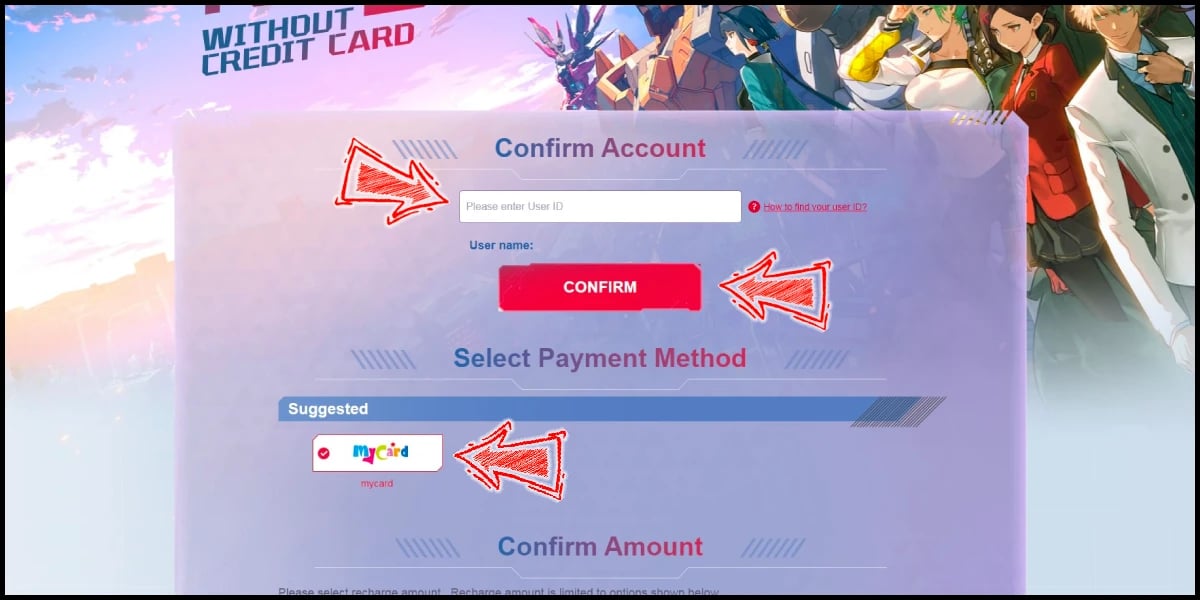
- Open your target game's official top-up portal (or the official MyCard website).
- Select Point Card Top-Up (點數卡儲值).
- Input your Card Number in the first field and your Card Password in the second field.
- Click Confirm / Submit.
- Log into your game client or check your member balance to verify your credited points.
Troubleshooting Common MyCard TW Activation and Serial Errors
If you encounter an issue while redeeming your digital code, consult these common solutions before requesting support:
- Invalid Card Number or Password: Verify that no accidental spaces were copied before or after the code strings. MyCard serials are case-sensitive. Pay close attention to characters that look similar, such as the number
0and capital letterO, or the number1and capital letterI. - Regional Mismatch Error: If the billing portal states that the card cannot be used in your region, confirm whether the game server requires a Taiwan (TWD) code or an International/SEA card. Games distributed strictly on global servers outside Taiwan cannot process TW point cards.
- Card Already Redeemed: If a network timeout occurs during redemption, the system may have completed the transaction in the background. Check your in-game mailbox or MyCard transaction history to see if the points were credited before attempting to enter the code again.
- Server Maintenance: During major update windows or server maintenance on the game publisher's side, third-party billing APIs may temporarily freeze. Wait until the scheduled maintenance concludes and re-attempt redemption.
Safe and Reliable MyCard TW Recharge on VGTopup
VGTopup provides an efficient, transparent, and secure solution for gamers purchasing MyCard TW digital codes in 2026.
- Password-Free Delivery: You never have to share your game login credentials, Apple ID, or Google account passwords. VGTopup delivers the digital serial number and password directly to your email address for self-redemption.
- Guaranteed Taiwan Region Codes: All digital codes in this category are genuine Taiwan (TW) point cards, ready for immediate activation on supported games and official portals.
- Live Checkout Clarity: See exact pricing and supported payment options upfront on the live checkout interface without hidden processing fees.
- Responsive Customer Support: If you ever need guidance finding your digital serial details or verifying redemption procedures, dedicated customer service is available to help resolve your order questions.
Frequently Asked Questions
What is MyCard Taiwan and which games support it?
MyCard Taiwan is a prepaid digital gaming currency published by Soft-World. It is accepted across hundreds of Asian PC MMORPGs, mobile titles (especially standalone APK builds), and entertainment portals operating in Taiwan, Hong Kong, and Macau. Supported games include Ragnarok Online, Lineage series, Fate/Grand Order (TW), Tower of Saviors, and official web top-up portals for major global anime titles.
Can I use a MyCard TW code on SEA or Global game servers?
No. MyCard TW codes are denominated in New Taiwan Dollars (TWD) and are locked to Taiwan, Hong Kong, and Macau server billing systems or Taiwan-registered MyCard member accounts. If your game account is hosted on a Southeast Asian (SEA) or Global server that uses MyCard SEA/Global, a Taiwan code will return an invalid region error.
How do I redeem my MyCard TW serial number and password?
Go to your game's official web payment portal or the MyCard member website. Select "MyCard Point Card" as your payment method, enter the Card Number (卡號) and Card Password (密碼) received in your VGTopup delivery email, and confirm the transaction. The points or in-game currency will credit instantly.
Do I need to share my game account password to buy MyCard TW on VGTopup?
No. VGTopup operates with zero account sharing. You only need to enter your email address during checkout. We deliver the digital card serial and password directly to you, allowing you to complete the redemption on your own terms.
What should I do if my MyCard TW code displays an error during redemption?
First, check for accidental whitespace or typing errors in the serial and password fields. Ensure you are redeeming on a Taiwan-compatible billing page. If the issue persists, capture a full screenshot of the error message along with your order number and contact VGTopup customer support for verification.
Can I use MyCard TW points through mobile apps on iOS and Android?
Due to platform billing policies, in-app top-ups within standard Google Play or iOS App Store downloads may not show third-party card options. However, you can redeem MyCard TW points directly through the official web top-up centers of supported mobile games, or via the publisher's official standalone Android APK version that includes direct MyCard billing.
Select Denomination
Tax, payment fees and eligible coupons are calculated at checkout.
| Package | Price |
|---|---|
| mycard TW 30 | USD 0.77 |
| mycard TW 50 | USD 1.27 |
| mycard TW 90 | USD 2.29 |
| mycard TW 150 | USD 3.82 |
| mycard TW 170 | USD 4.32 |
| mycard TW 300 | USD 7.63 |
| mycard TW 500 | USD 12.72 |
| mycard TW 750 | USD 19.07 |
| mycard TW 1000 | USD 25.43 |
| mycard TW 1150 | USD 29.24 |
| mycard TW 1490 | USD 37.88 |
| mycard TW 1690 | USD 42.97 |
| mycard TW 2000 | USD 50.85 |
| mycard TW 2500 | USD 63.57 |
| mycard TW 3000 | USD 76.28 |
| mycard TW 3290 | USD 83.65 |
| mycard TW 5000 | USD 126.45 |
| mycard TW 10000 | USD 252.90 |