The in-app crowd has a point, even if I don't agree with their conclusion
Pay in-app and you delete a whole category of things that can go wrong. No wrong server. No stranger near your account. No staring at the screen wondering where your Jade went. That argument carries weight, because the regrets people actually post about cluster around outside-portal slip-ups.
Two mistakes show up over and over. The first is sending Jade to the wrong place: pick the wrong server or fumble a digit in your UID, and the payment still clears, just on somebody else's profile, per r/Bleach_SoulResonance. The second is theft: hand your login to a "top-up helper" promising a discount, and that's how a drained account happens, per the same thread. Both are real. Both are dodgeable. And neither is the portal's doing. They're errors on your end that the in-app route simply never gives you the chance to make.
So calling the purist stance paranoid would be unfair. It's an honest trade: pay a little extra, shrink the area where things can blow up.
Why the value side wins once you count the pesos
The trouble with that little extra? It's roughly a third of your spend, every single time, forever. Third-party sites advertise around 35% savings on Spiritual Jade against the official store, per Gamsgo and LDShop listings (2026). Knock that number down hard for marketing fluff and it's still real, and the reason is structural. App Store and Google Play take their slice, while a web portal billed in pesos doesn't owe anyone that toll.
Published prices tell the same story. A starter 60-Jade pack runs from about $0.81, and the heavyweight 6,480-Jade pack from $81.28, per Joytify. Work the per-dollar out: 60 Jade at $0.81 lands near 74 Jade per dollar, while 6,480 at $81.28 comes to around 80. The big pack is a hair more efficient, sure. But that gap is too thin to drive your decision. What should drive it is the first-purchase bonus (more on that shortly).
| Pack Size |
Price (USD, third-party) |
Approx. Jade per $ |
| 60 Jade |
$0.81 |
~74 |
| 300 Jade |
$4.02 |
~75 |
| 6,480 Jade |
$81.28 |
~80 |
Source: Joytify (2026) [tier5] — third-party pricelist, May 2026.
The first time I held a web portal up next to the in-app sticker, that ~35% gap is what caught my eye. Then I looked at the delivery window. Three to ten minutes for GCash is no slower than waiting on an app-store receipt to settle, which quietly took the convenience argument away from the in-app side. The price difference is structural, not a fluke, and you're not trading speed to capture it.
For players in the Philippines, this is genuinely the easiest road. PH gets native GCash right at checkout on portals like Richman Shop, while the rest of Southeast Asia leans on local e-wallets or cards, per Richman Shop and Enjoygm listings (2026). Singapore, Malaysia, Indonesia? You can still top up, just through your own regional wallet, since GCash is a Philippine product and won't show for you. If you're outside PH hunting for "GCash top-up," you're chasing a rail that isn't yours. Use the local equivalent on the very same portal.
The four moves both sides actually agree on
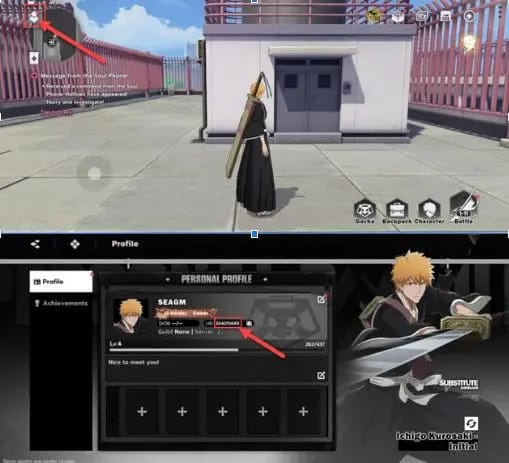
The mechanics barely take a minute. Nail these four and your failure rate drops to basically nothing, per the Joytify (2026) top-up flow:
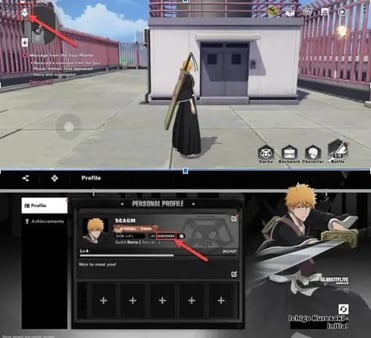
- Find your Player ID. It sits near your avatar on the in-game profile page, per Lootbar (2026). Copy it digit for digit. This one little field is where most disasters begin.
- Type the User ID into the portal and confirm the server matches your account.
- Choose your Spiritual Jade pack and select GCash at checkout.
- Pay from your wallet, and the Jade drops into your account on its own.
Two habits separate the people who never have trouble from the ones writing panicked threads at 2am. Confirm the server before you confirm the payment. Wrong-server selection is the silent killer behind "orbs not received," because the charge genuinely goes through, it just lands on a profile that isn't yours. And screenshot the transaction ID. Most people skip this right up until they need to file a dispute, and at that moment the receipt is the only leverage they've got.
Here the in-app folks are dead right about one thing: never share your game login. A legitimate portal only ever wants your public Player ID. No password. No verification code. If a "helper" asks to log in on your behalf, you've found the scam. So the rule that protects you is short: confirm the server, save the receipt, guard your login.
Pay from the wallet balance, not the linked card
Reach the GCash screen and you'll usually see two doors: pay from your wallet balance, or pay via a card linked inside GCash. Take the wallet. The linked-card route tacks on a second authorization step that fails quietly more often, and a silent failure is worse than a clean rejection because you can't tell whether to try again. Wallet-balance payment either clears or bounces with a reason attached. When Jade's on the line, that clarity is worth more than it sounds.
It matters for a reason most players never consider until it stings. GCash's Fully Verified daily transaction ceiling sits at PHP 100,000, per GCash Help Center. For one Jade pack, irrelevant. But stack a big pack onto a day where you've already covered rent, bills, and a couple of transfers, and you can slam into the wall mid-checkout. The game looks broken. It isn't. Your wallet just hit its daily cap. The fix: check that ceiling first, and if you're close, split a big purchase across two days.
When it fails: the checklist that stops the spiral
Most "GCash payment failed" and "top up not received" complaints are user-side, not platform faults, and they sort out faster than the player's panic lets them believe. Before you double-buy (the second-priciest mistake, right behind wrong-server), run through this:
| Symptom |
Most likely cause |
Fix |
| Payment declined instantly |
Insufficient GCash wallet balance |
Top up the wallet, or pick a smaller pack |
| Payment declined on a big pack despite balance |
Daily transaction limit hit |
Check the PHP 100,000 ceiling; split across two days |
| Payment succeeded, no Jade after 10+ min |
Wrong server/UID — Jade went elsewhere |
Verify your Player ID and server; contact portal support with the transaction ID |
| Linked-card payment stuck/silent |
Card authorization handshake failed |
Retry from GCash wallet balance instead |
Source: causes and timing cross-referenced from r/Bleach_SoulResonance (2026), GCash Help Center (2026), and Richman Shop (2026).
Row three is the one to burn into memory. If the charge cleared but no Jade showed, your gut screams buy it again. Don't. Not for at least 10–15 minutes. Normal delivery sits inside that 3–10 minute band, and a slow-but-correct order will still arrive. Double-buying takes a non-problem and makes it a real one, because now you've paid twice and maybe only one order reached the right account. If Jade truly never lands, the wrong-server diagnosis is almost always the culprit, and that screenshotted ID is what gets it untangled. So when nothing arrives: wait, don't rebuy, then check the server.
The first-purchase bonus is the one buy no spender should skip

Spending a single peso on this game? Spend it on the first-purchase double-value offer before anything else. That's not me being edgy, it's just where the peso efficiency actually lives: a one-time multiplier layered on top of an already-discounted web price. Combine the ~35% portal savings with a first-buy doubling and a small starter pack turns into the most peso-efficient Jade you'll ever touch, comfortably beating any matching in-app purchase.
There's a quiet wrinkle worth knowing. First-purchase bonuses in games like this usually fire per pack tier, which means a small pack and a larger one can each trigger their own separate doubled reward instead of one global bonus. If your store works that way, the smart play isn't "buy the biggest pack to max the bonus." It's grabbing the first-buy reward at the tiers you'll genuinely use. Read your in-game store wording before you assume there's just one global bonus.
For people who keep spending, value drifts toward recurring packs. Low-spenders pull the best daily Jade rate from monthly cards or beginner packs, per Bluestacks Spending Guide. And Spiritual Jade is the premium currency feeding gacha pulls and packs, per the same guide, so this is the money deciding your roster, not cosmetic fluff. Sorted by spender type:
- F2P testing the waters: Hold off. Bank free codes and event Jade until the game's actually got you hooked. Your first purchase is worth more later, once you know which banner deserves it.
- Low-spender, one-and-done: The first-purchase pack via GCash is your single highest-value spend. Buy it, then take stock.
- Mid-spender: Stack a monthly card on top of the first-buy bonus. That daily drip beats lump-sum pack rates over the card's lifespan.
So the actionable line: take the first-buy bonus before any other purchase, then match recurring packs to how much you'll really play.
Where the evidence actually lands
The in-app crowd is right about the danger and wrong about what to do with it. The risks are genuine, since wrong-UID misdelivery and password-sharing theft both have documented casualties in the community. But they sit entirely in your hands, and the premium you pay in-app to dodge them eats roughly a third of every transaction. A reputable GCash web portal gives you more Jade per peso at the same actual safety level, as long as you never share your login and you double-check the server. That condition is the entire argument.
Full transparency: this guide is published by VGTopup, which is itself a third-party top-up portal, so weigh that as you read. The neutral facts hold on their own regardless. Whichever GCash-supported portal you land on, the logic doesn't change: dodge the app-store cut, protect your password, confirm the server, save the receipt. If you'd rather skip those app-store fees, you can complete a Bleach: Soul Resonance SEA Top Up top up via GCash with nothing more than your Player ID in hand.
My read, after weighing both sides honestly: pay from your GCash wallet, grab the first-purchase bonus before anything else, and never let a 10-minute delay talk you into buying twice.
Frequently Asked Questions
How long does a GCash top-up take to show up in Bleach: Soul Resonance?
Usually 3–10 minutes for GCash payments through a web portal, per Richman Shop (2026). If it's been over 15 minutes and the payment cleared, stop refreshing and go check your server and Player ID. A successful charge with no Jade almost always means the order went to a different account, not that it's still cooking.
Why is my GCash top-up for Bleach: Soul Resonance not working even though I have money?
The most overlooked culprit is GCash's PHP 100,000 daily transaction limit, per GCash Help Center (2026). A large Jade pack gets blocked if your day's other transfers already chewed through the ceiling, so the game looks broken when the cap is really to blame. Split the purchase across two days, or pay from wallet balance instead of a linked card to get a clear decline reason.
Is it safe to top up Bleach: Soul Resonance with GCash through a third-party portal?
It's safe when you treat your login as private. Reputable portals only ask for your public Player ID, never a password or OTP, and community advice is blunt that handing credentials to "top-up helpers" is how accounts vanish, per r/Bleach_SoulResonance (2026). The portal touching your account isn't the risk. You giving away your password is.
Can I top up without an Apple or Google account?
Yes, and that's the whole point of the GCash web-portal route. You pay in pesos straight from your wallet, no Apple ID or Google Play account anywhere in the loop, which is exactly why you sidestep the app-store cut and usually walk away with more Jade per peso. All you need is your in-game Player ID, sitting near your avatar on the profile page, per Lootbar (2026).
I'm in Singapore or Malaysia — can I still use this method?
Not GCash itself, since it's a Philippine e-wallet. Other SEA players use local e-wallets or cards on these same portals, per Richman Shop and Enjoygm listings (2026), and some portals also handle options like ShopeePay for instant SEA delivery, per Enjoygm (2026). The steps and the value logic don't budge. Only the payment rail at checkout changes.










Comments