Play 1: Lock down your real reset moment, not the in-app countdown
Most late-buy regret traces back to one thing: misreading the clock. The in-game countdown is your headline figure, sure, but it's the season window that decides whether your money does anything at all.
A full Bleach: Soul Resonance season runs 25-plus days and is clearable in under 24 using weekly and season quests, per a YouTube Exchange Shop Guide walkthrough from May 2026. Treat that ~25-day length as your planning anchor. A fresh season hands you a comfortable runway. Catch one with 3 days left, though, and roughly 88% of your earning time has already evaporated before you ever logged in.
Here's the execution:
- Open the Battle Pass tab from the main lobby. The season timer lives at the top of that screen.
- Note the displayed days/hours, then sanity-check against the launch cadence. The SEA client went live on Nov 21, 2025 at 8:00 AM GMT+7 for Thailand, Vietnam, and Indonesia, according to a Times of India launch report. Useful for seeing how SEA windows pin to GMT+7 rather than whatever your phone shows.
- PH players (GMT+8) and anyone further east: the countdown reads correct to the minute, but the reset action fires on server time. Mentally write off the last displayed hour.
This works when you read the timer before spending a cent. It fails when you trust a rounded "2 days left" banner and lose your final evening to a server-side rollover.
Play 2: Fund the account and buy the pass without overspending
The cleanest order has always been the same: top up the exact premium currency you need, then buy the pass in-client. Don't flip those steps, and don't grab an oversized currency pack you can't possibly burn before reset.
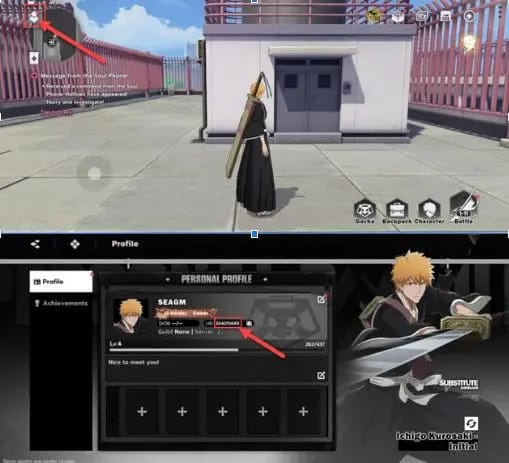
For SEA accounts, third-party UID top-up is the main funding lane. The flow, per the LDShop Top Up Guide, goes:
- Confirm your game version first. The Crunchyroll/A PLUS client distinction matters here, so pick the matching product.
- Find your UID by opening your in-game profile near the avatar, where the top-up identifier sits, per the LootBar Top Up Guide.
- Select the currency product, punch in the UID, complete payment.
- Hop back into the game, go to the Battle Pass tab, buy the paid tier.
The premium currency here goes by Spiritual Jade / Spirit Coins, funded through UID for SEA accounts, per a SEAGM Top Up Page listing. SEA top-ups run through a dedicated payment link; global players route through the official webshop instead.
A bit of transparency, since this piece runs on VGTopup, itself a third-party service: fund only what the pass costs, nothing extra. If all you need is the pass currency and the clock's breathing down your neck, you can top up Spirit Orbs and go straight to checkout. Low fuss when minutes are tight. Whatever channel you pick, the discipline holds: size the top-up to the pass, not to some flashy bonus pack you'll walk away from at reset.
It works when you buy currency to match the pass price and stop there. It falls apart when you grab a $49 event-sized pack to "save on the next one." There is no next one before this season dies.
Play 3: Cheaper paid tier beats the expensive one, almost every time
Skip the pricier flavor. The pass ships in two paid versions: a cheaper one (phase training) and a costlier one (extreme training) that tacks on a nameplate plus a few extra paid gems, per that same walkthrough. The base paid tier already carries everything meaningful, paid gems included.
| Tier |
Cost level |
What it unlocks |
| Free |
$0 |
Base reward track, clearable F2P via daily/weekly/season quests |
| Phase Training (cheaper paid) |
Low |
Base rewards + some paid gems |
| Extreme Training (pricier paid) |
Higher |
Nameplate + extra paid gems + more rewards |
Source: YouTube Exchange Shop Guide (2026) [community]
Content creator Athr0 said it bluntly (YouTube, 2026): "Buy the cheapest battle pass version; expensive one only adds unnecessary nameplate." That's my read too. You're handing over a premium for a cosmetic and a slim gem bump. Unless the nameplate itself is the thing you're chasing, the upgrade is dead weight.
On exact pricing, I won't fabricate a figure. There's no published official number across SEA currencies I'd stake my name on, so I'm not inventing one. What is on record is the wider store layout: beginner value packs sit in the $2–$9 band, monthly cards $5–$15, event packs $10–$49, per the BlueStacks Spending Guide from November 2025. A standard pass in titles built this way usually lands near the monthly-card range, which makes the cheaper tier a low-double-digit call in USD-equivalent terms. Convert to your SGD/PHP/MYR/THB/IDR at the in-store rate at checkout, since the storefront localizes on its own.
And here's a mechanic that quietly reshapes the whole value question: buying the paid pass retroactively unlocks the premium rewards for every tier you already hit as a free player. So whatever you banked while free doesn't go to waste. It converts the instant you pay. Which is exactly why a mid-season buyer with solid progress walks away with far more value than a day-one buyer holding nothing.
This works when you treat the cheaper tier as default and the pricier one as a cosmetic splurge. It fails when you assume "Deluxe = better value" without checking that the extra is just a nameplate.
Play 4: Run the can-I-finish numbers before a late buy
Settle one question before paying anything in the final stretch: can you actually reach the rewards you want with the time on the clock?
Good news for procrastinators. A late buy stays viable if 25-plus days haven't burned through, and weekly quests dump bulk XP without the daily slog, per the same walkthrough. F2P players can even clear the entire track purchase-free with daily, weekly, and season quests, the paid pass simply layering bonus rewards over the top. The lever people miss: weekly missions often bank more XP in one clear than several days of dailies stacked together, which means a player with 4–5 days left isn't automatically toast if a full weekly set sits uncleared.
Run this quick sequence:
- Open the Battle Pass screen, note your current tier against the milestone reward you're after.
- Count how many weekly and season quests stay unclaimed. Those are your bulk-XP reserves.
- Estimate whether clearing them closes the gap before time's up. If yes, buy the cheaper pass and grind. If the distance is huge and only dailies remain, the purchase likely nets you a partial track.
- Only after that, consider tier skips, and only as a last resort.
Where I land on tier skips: they're a catch-up tax, not value. If the gap can be closed by clearing weeklies you haven't touched, paying to skip is cash set alight. Reserve skips for the narrow case where the milestone reward genuinely outweighs the skip cost and the quests physically can't cover the distance in time.
It works when the gap calculation vetoes an impulse buy first. It breaks when you buy the pass, then panic-purchase skips to "finish," and end up paying twice for rewards the quests would've handed you free.
Play 5: Claim before the reset, or your purchase evaporates
You can buy the pass, hit the tiers, and still lose the lot. The most under-covered mechanic in this whole conversation: earned tiers need a manual claim, and forgetting to claim before reset voids paid battle pass tiers. Nothing collects itself, per a Reddit battle pass thread in the SEA community.
If you're buying late, sit with that. The purchase deadline isn't the real deadline. It's the claim deadline trailing right behind it that actually torches people's rewards. I've watched this exact slip cost players the character shards they paid for, not because they missed the buy window, but because they figured unlocked tiers would just mail themselves out.
Your last-day checklist:
- Buy the pass (if you're buying) with enough buffer that the purchase confirms. Don't leave it to the final minutes.
- Clear every remaining weekly and season quest to push tiers.
- Open the reward claim screen and manually collect every earned tier, free and paid.
- Double-check the claim screen shows nothing pending before the timer dies.

Skip step 3 and everything from the sections above collapses to zero. Nothing torches a purchase faster than buying the pass and letting the rewards lapse unclaimed.
This holds when claiming is the last thing you do every session in the final week. It collapses when you treat "I bought it" as "I have it."
Troubleshooting: pass or top-up not showing after purchase
If the pass or your currency doesn't surface after payment, work through these in order:
- Top-up failed or restricted at source. Country restrictions and payment failures on the Play Store or official site are documented, and the standard fix is third-party UID top-up, per Facebook group posts in the SEA community. If the official storefront bounces your card by region, the UID route sidesteps the block.
- Wrong client. Topped up but nothing landed? Confirm you picked the right version (Crunchyroll/A PLUS). Currency credited to the wrong product won't show in your client.
- UID mistyped. One wrong digit ships your currency to a stranger. Re-verify the UID from your profile screen before assuming delivery failed.
- Pass bought, rewards "missing." Nine times out of ten that's not missing, it's unclaimed. Hit the claim screen first.

Refunds and rollbacks on any of this aren't something I'd bank on, so prevention beats the chase: right client, right UID, claim promptly.
Should you buy this close to the end?
For an active SEA player mid-season, the cheaper paid pass is an easy yes. It's reasonably priced against the store's monthly-card range, and that retroactive unlock means your free progress flips to paid value the second you pay.
For a late-joiner sitting on a thin track with under three days showing, my call is don't. Not unless the Play 4 numbers confirm uncleared weeklies can carry you to the rewards you actually care about. Bought blind on the final day with a near-empty track, the paid pass is a guaranteed partial loss, you're handing over full price for a sliver of the rails. That's the bit worth chewing on: the usual "always buy Premium" advice quietly assumes you've got time to finish, and a day-three buyer usually doesn't.
By spend profile:
- F2P weighing one late purchase: Only if a full batch of uncleared weeklies can reach a milestone you genuinely want. Otherwise stay free. The track finishes without paying.
- Low-spender, one pass per season: Buy the cheaper tier early next season instead of scrambling. Same cost, full value.
- Late-joiner / returning player: Crunch the gap before anything. If skips are the only way across, the honest answer is usually "wait for next season's clean run."
Whatever you decide, the rule that protects the most money isn't about whether you buy. It's remembering to claim manually before reset. That's where the value quietly leaks out.
Frequently Asked Questions
When does the Bleach Soul Resonance Battle Pass season end?
Each season runs 25-plus days and finishes in under 24 with weekly and season quests, per the YouTube Exchange Shop Guide (2026). There's no fixed calendar date, so check the in-game Battle Pass timer for your current season. Remember SEA resets fire on server time (GMT+7 was the original launch reference), so don't lean on that final displayed hour.
Why is my Battle Pass not showing after I topped up?
Usually it's the wrong client or an unclaimed reward, not a genuine failure. Confirm you funded the matching version (Crunchyroll/A PLUS) and typed the UID correctly. If the official store blocked your payment by region, switch to third-party UID top-up, the documented workaround for SEA country restrictions per community posts.
Do unclaimed Battle Pass rewards expire at reset?
Yes, and it nails paying players too. Earned tiers want a manual claim, and forgetting before reset voids them, paid tiers included, per the SEA Reddit thread. The system won't auto-mail anything, so sweep the claim screen clean before the timer ends.
Can I buy tier skips on the last day to finish?
You can, but I'd treat it as a last resort. If uncleared weeklies can still close the distance, skips are wasted cash since those quests hand out bulk XP free. Only pay to skip when the milestone reward truly outvalues the skip cost and the remaining quests physically can't get there in time.
Is the premium pass worth buying late with low progress?
Honestly, for a near-empty track under three days from the end, no. You'll touch only a fraction of the rewards and still pay full freight. The retroactive unlock that makes the paid pass shine rewards existing progress, so it pays for mid-season buyers, not day-three late-joiners holding nothing.











Comments