How to Copy Top War UID on iOS Using Menus and Touch Gestures
Standard iOS text selection fails inside Top War's custom engine. Tapping and holding the numbers does nothing; the interface relies entirely on its dedicated copy button.
Once you paste the string into an iOS-native app, system gestures take over. A three-finger pinch inward copies highlighted text. A three-finger pinch outward drops those digits wherever your cursor sits.
[Main Base Island Screen]
         │
         ▼  (Tap top-left avatar portrait)
[Player Profile Overview]
   ├── Commander Avatar & Level
   ├── Server Warzone ID (e.g., W1234)
   └── User ID: 1234567890 ──>[Tap Copy Icon] ──> iOS Virtual Memory (1 item)
The native iOS clipboard holds only one item at a time. Copy an alliance coordinate, a chat line, or a Safari link, and your Top War UID is overwritten immediately. Apple's sandboxing also blocks background apps from reading clipboard buffers without direct interaction, meaning no third-party tool can silently log your ID history.
The following reference table outlines the physical parameters and touch requirements governing iOS data handling and base interactions.
| Interaction Type | System Parameter | Operational Limit | Mechanical Function |
|---|
| Native iOS Clipboard | System Virtual Memory | 1 item limit | Holds single string; overwritten on copy or device reboot |
| Universal Clipboard | Continuity Protocol | 30 feet (10 meters) | Syncs copied string across devices on same Apple Account |
| Native Touch Gesture | 3-finger pinch | Inward / Outward | Executes instantaneous copy or paste without menu taps |
| Showcase Assignment | Touch duration | Exactly 0.4 seconds | Hold requirement to slot base decorations into showcase |
Verifying Clipboard Data and Checking for Truncated Digits
iOS provides no built-in clipboard history drawer. If the in-game tap suffered micro-stutter, you might paste a stale chat link or coordinate instead of your account digits.
Test the copied string in Apple Notes before pasting it into forms or spreadsheets:
- Swipe up from the bottom of your screen to open the App Switcher.
- Launch Notes and create a blank note.
- Tap the page and select Paste, or pinch outward with three fingers.
- Confirm the string contains only digits—no rogue spaces, trailing letters, or cut-off ends.
For a faster check, open the native iOS Shortcuts app, search the Gallery, and add Adjust Clipboard. Tapping it launches a prompt showing the exact raw characters cached in memory. You can inspect the UID and strip accidental spaces before handing it to alliance leadership.
When purchasing Top War Gold Bricks online to accelerate building merges, confirming this UID string guarantees resources land on the correct base without customer support tickets.
Pasting Your Top War UID to Mac and iPad via Universal Clipboard
Discord rosters, battle trackers, and alliance coordination sheets frequently run on an iPad or Mac while you play on your phone. Apple's Universal Clipboard bridges that gap, pushing text copied on your iPhone directly to nearby hardware.
Transmission requires both devices to sit within 30 feet (10 meters), share the same Apple Account, and maintain active Bluetooth and Wi-Fi.
Network configurations can trigger silent sync failures. While Apple's documentation only specifies that Wi-Fi must remain active, real-world testing shows handshakes frequently break when devices sit on different router bands—such as an iPhone on 5 GHz and a MacBook on 2.4 GHz.
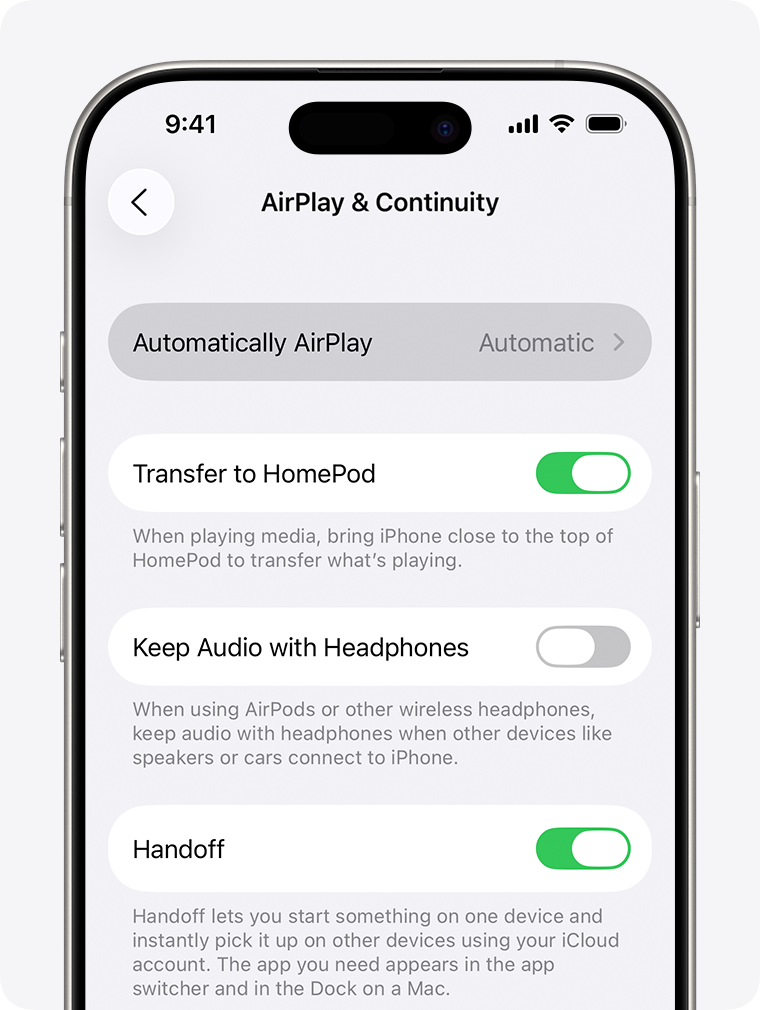
If you tap copy in Top War on your iPhone but your Mac refuses to paste the UID, reset the continuity pipeline with this sequence:
- Open your iPhone Settings.
- Tap General, then select AirPlay & Continuity.
- Locate the Handoff toggle switch.
- Flip Handoff off, wait five seconds, and switch it back on.
- Repeat the toggle on your Mac or iPad to purge the local discovery cache.
The specifications below detail the exact conditions required for Universal Clipboard continuity to function.
| Protocol Element | iOS Requirement | Mac / iPad Requirement | Primary Failure Point |
|---|
| Apple Account | Signed into primary iCloud | Identical Apple Account | Mismatched secondary Apple IDs |
| Wireless Radius | Bluetooth enabled | Bluetooth enabled | Distance exceeding 30 feet (10 m) |
| Wi-Fi Frequency | Active connection | Active connection | 2.4 GHz versus 5 GHz band splits |
| Handoff Protocol | Settings > General > AirPlay | System Settings > General | Stale discovery cache in iOS |
Toggling Handoff flushes out stale discovery caches. If synchronization still stalls, drop the UID into an iCloud Note on your iPhone; it syncs via server and bypasses local Bluetooth handshakes completely.
Troubleshooting Top War User ID Not Showing on iPhone
A blank User ID field, missing numbers, or clipped UI elements usually stem from display scaling, unlinked guest profiles, or incomplete asset downloads.
Hardware notches and the Dynamic Island frequently clash with custom game layouts. If iOS Display & Brightness is set to "Larger Text", the game's profile card can shift upward, shoving the UID string directly behind the camera cutout or into the upper bezel.
Check for these specific friction points if your ID is missing:
- Unlinked Guest Accounts: Skipping the Apple ID or Game Center link leaves your account with a provisional session token. Bind the account under game settings to generate your permanent numeric UID.
- Asset Streaming Hangs: Following a game update, profile UI assets may still stream in the background. Force-quit Top War through the App Switcher, verify your connection, and restart.
- Micro-Touch Timing Conflicts: Base-merge background routines can cause menus to drop rapid taps. For example, assigning base decorations to the Showcase module requires a strict 0.4-second hold. Tapping the copy icon mid-animation often registers as a dead tap.
If the digits still refuse to show, take an uncropped screenshot showing your Commander Name, base level, and Warzone badge. Customer support can track down your profile with those details even when the UID string fails to render.
Server Warzone IDs and Account Verification for Alliance Events
Confusing your User ID with your Server ID breaks tournament rosters and top-up deliveries. Your User ID is a permanent personal identifier across the global database. Your Server ID pins your base to an active Warzone map.
Competitive events—such as weekly Capital Throne Showdowns, Server v Server (SvS) wars, and the 8-server Eternal Land brackets—require alliance leaders to submit both values. Gems speed up unit merges and base rebuilds during these events, but administrative errors can sideline you before combat begins.
[Cross-Server Bracket: Eternal Land (8 Servers)]
   ├── Warzone 1042 (Your Home Server)
   │     └── Commander UID: 884920194 ──>[Account Verified]
   ├── Warzone 1043
   ├── Warzone 1044
   └── Warzone 1045 ... to 1049
Listing an outdated Server ID after an interstate transfer causes automatic tournament disqualification. Standardize your alliance registrations using the format [Server ID] - [Commander Name] - [User ID] to prevent roster sync errors.
When buying discounted Top War gems and bundles to skip timer bottlenecks, entering the correct Warzone alongside your UID prevents delivery routing failures. Resources cannot credit an account if the server points to an opposing zone.
Securing Account Identification for Hero Upgrades and Merges
High-tier hero investments carry heavy costs, making account recovery vital. Merge mechanics bypass build times for low-tier units, but late-game hero upgrades take months to assemble.
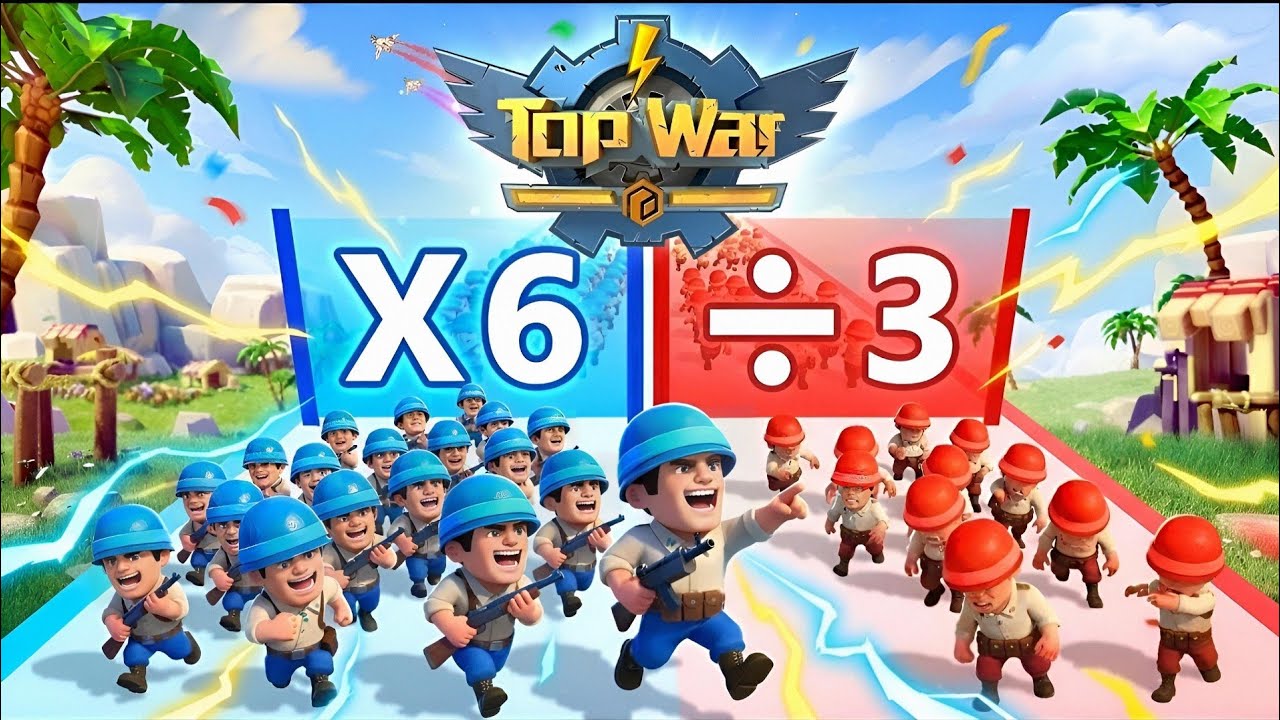
Promoting an SSR hero from 1-star to 5-star costs 440 orange hero shards, with the final 4-to-5-star leap consuming 240 shards alone. In combat, an optimized tank rally running Marvy, Quilly, and Binary reaches a 71.6% march efficiency rating. Misplacing your account credentials risks stranding those investments permanently.
The table below details the progression milestones, upgrade requirements, and promotional inputs tied directly to account identification.
| Game Mechanic | Component / Cost | Strategic Output | Account Requirement |
|---|
| Complete Hero Cap | 440 Orange Shards | 1-Star to 5-Star Maximum | Permanent UID linked to prevent data loss |
| Final Star Rank Jump | 240 Orange Shards | 4-Star to 5-Star Final Tier | Exact server matching for shard claiming |
| Optimized Tank Rally | Marvy / Quilly / Binary | 71.6% March Efficiency | Alliance roster verification for rally leads |
| Promo Code Pack | Codes topwar888 / TOPWAR666 | 200 Gems each (Mailbox) | Profile gift redemption window input |
| Cross-Server Bracket | 8-Server Matching | Eternal Land War bracket | Synchronized Server ID and UID registration |
Support tickets for missing items, migration bugs, or prize payouts always require your raw numeric UID. Before stocking up on Top War war packs and resources for your next base push, ensure your profile data matches your alliance records.
Frequently Asked Questions
Where do I locate my Top War User ID on an iPhone?
Tap your player avatar in the top-left corner of the main base screen. Your numeric User ID and Server Warzone ID appear on the profile card right below your commander name.
Can I copy my Top War User ID directly to the iOS clipboard?
Yes. Tap the copy icon directly beside your User ID in the profile window. A brief banner will confirm the numbers were copied to your iPhone clipboard.
How can I check what is currently copied to my iPhone clipboard?
Open Apple Notes, tap a blank page, and select Paste to review the digits. You can also run the Adjust Clipboard workflow in the native iOS Shortcuts app to inspect raw clipboard data.
Why is my copied Top War ID not pasting onto my Mac or iPad?
Universal Clipboard requires both devices to use the same Apple Account, enable Bluetooth and Wi-Fi, and sit within 30 feet (10 m). If it stalls, toggle Handoff off and on under iOS AirPlay & Continuity settings to reset the cache.
Does my Top War User ID change if I switch servers?
No. Your User ID remains permanent across the life of your account. Only your Server ID updates when you migrate to a new Warzone. Provide both values for server transfers, tournament rosters, and support tickets.
Can I use gestures to copy and paste text on my iPhone?
Yes. In supported iOS apps, pinch inward with three fingers to copy highlighted text, and pinch outward with three fingers to paste it into any active text field.
Final Verification Rules for iPhone Commanders
Never memorize your Top War credentials. A single miscopied digit sends top-up currency, bracket entries, or support resolutions to another player's base.
Keep your UID and Warzone number pinned in Apple Notes. When high-stakes competitions like the 8-server Eternal Land championship or weekly Capital Throne battles kick off, having confirmed credentials on hand keeps your account secure and tournament-ready.









Comments