Baseline Android OS Limits and Engine Demands
Hardware limitations dictate whether an Android device survives initial asset decompression. Knives Out maps measure 6.4 km by 6.4 km for 100 concurrent players, triggering an aggressive memory allocation phase the second the splash screen appears.
The game requires Android 5.0 or higher. Anything older lacks the API levels to run the client. But the OS version alone will not protect you if local storage runs tight.
The table below outlines the core hardware specifications and system requirements necessary to prevent startup engine aborts.
| Requirement Parameter | Minimum Threshold | Impact on Game Startup |
|---|
| Operating System | Android 5.0 (Lollipop) | Prevents immediate API incompatibility aborts on launch |
| Free Internal Storage | Minimum 10% free space | Allows unpacking of temporary run-time files and patches |
| Map Asset Overhead | 6.4 km x 6.4 km island terrain | Demands rapid RAM allocation during splash screen auth |
| Concurrent Player Data | 100-player lobby profile | Triggers initial network handshake and server authentication |
| File Directory Access | /Android/obb/ access | Loads primary texture archives and base game packages |
Storage headroom matters. When internal flash memory dips below 10% free space, Android restricts apps from creating write caches. If Knives Out cannot unpack temporary runtime files, it terminates instantly.
Step-by-Step Fix Order for Android Startup Crashes
Avoid reinstalling right away. Re-downloading several gigabytes does not fix corrupt system components or locked storage permissions. Run through these steps in order.
The table below details the exact primary actions required to resolve startup failure points.
| Fix Action | Navigation Path | Core Technical Benefit |
|---|
| Update Android System WebView | Google Play Store > My Apps & Games | Fixes web-wrapper rendering failures during splash phase |
| Refresh Google Chrome | Google Play Store > Search Chrome | Resolves shared rendering library faults on modern Android |
| Purge Game Cache | Settings > Apps > Knives Out > Storage | Clears corrupt temporary update fragments without data loss |
| Free Up Local Storage | Device Storage Manager (10% free) | Provides necessary disk write buffer for unpacking assets |
| Grant Storage Permissions | Settings > Apps > Permissions | Unblocks access to internal OBB expansion archives |
| Execute Hardware Restart | Hold Power + Volume Down (10s) | Flushes stuck RAM cycles and deadlocked background tasks |

Step 1: Update Android System WebView and Google Chrome
Android games frequently run startup notices, account login fields, and patch notes through system web controls. If Android System WebView is outdated or bugged, the game drops before rendering any 3D assets.
- Open the Google Play Store.
- Tap your profile icon in the upper right corner and select Manage apps & device.
- Under Updates available, locate Android System WebView.
- Tap Update and wait for the installation to finish.
- Find Google Chrome in the list and update it too.
Chrome matters because modern Android builds share rendering components between Chrome and WebView. If an update desyncs the two, WebView breaks. If the crash persists after updating, disable Google Chrome temporarily in your device's app settings to force Android into its standalone WebView provider.
Step 2: Clear Knives Out Application Cache
When NetEase pushes hotfixes, an unstable local connection can corrupt downloaded asset fragments. The next time the client runs an integrity check on startup, it crashes.
Clearing cache purges corrupt temporary data without touching your account progress or downloaded maps:
- Open device Settings.
- Go to Apps (or Apps & Notifications).
- Tap Knives Out from the list.
- Select Storage & cache.
- Tap Clear Cache.
Do not tap Clear Storage (or Clear Data) just yet. Wiping data deletes your downloaded map packs, custom layouts, and sound assets. Test the game with only the cache cleared first.
Fixing Broken OBB Directories and Android Permissions
When the splash screen aborts with a failure notice during resource loading, Android is blocking access to local expansion data. Knives Out isolates its core textures, terrain models, and audio packages inside separate OBB files.
Repair Storage and File Permissions
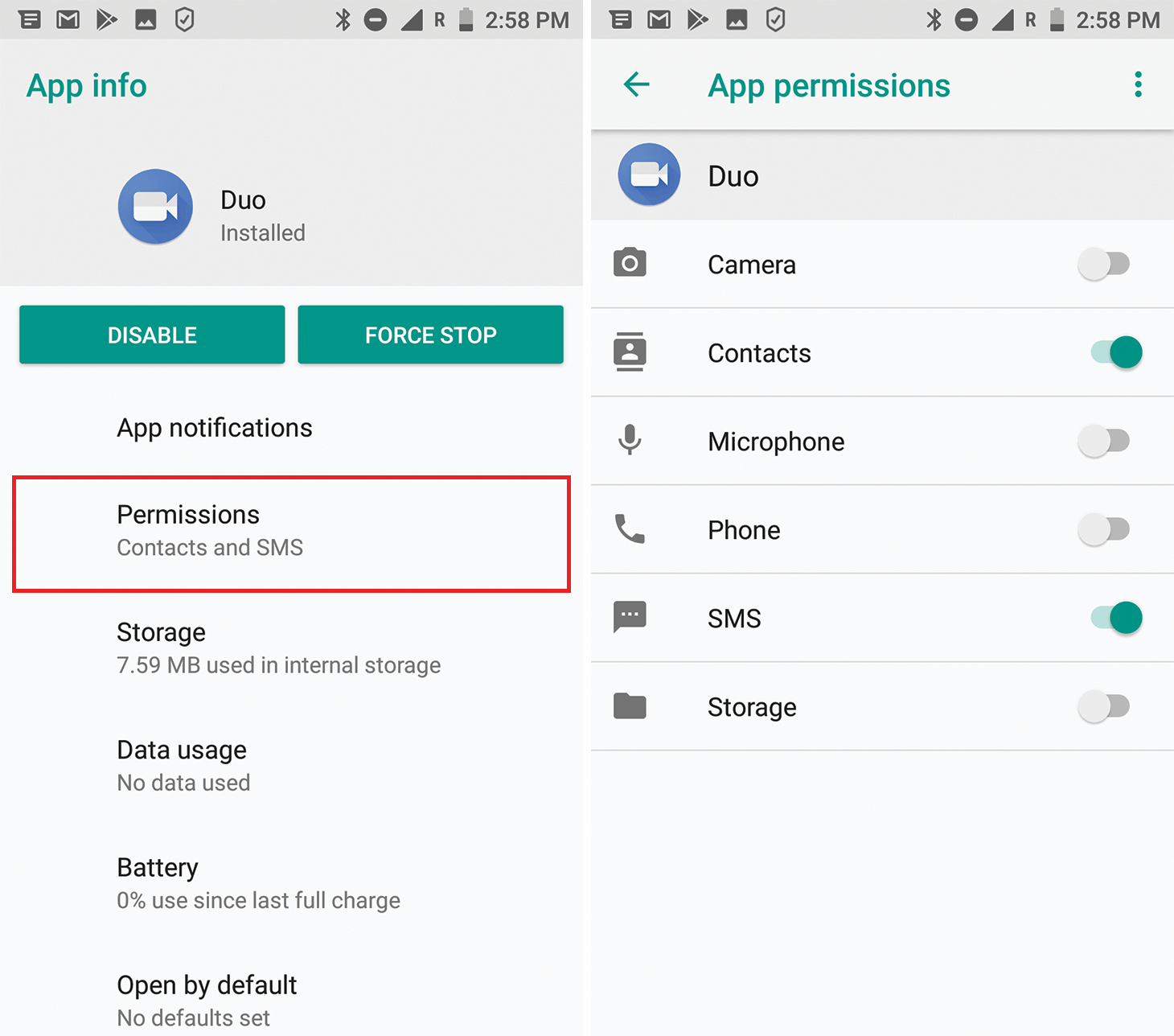
Modern Android handles file authorization dynamically. Denying file access during initial installation blocks the game from reading its own resource folders.
- Go to Settings > Apps > Knives Out.
- Tap Permissions.
- Select Files and media (or Storage on older Android versions).
- Set the rule to Allow management of all files or Allow access to media only.
- Relaunch Knives Out.
Verify the OBB File Directory Structure
Interrupted updates frequently leave incomplete or zero-byte archive files behind. The engine expects its expansion packages in an explicit path:
/Android/obb/[package_name]/
Open your device file manager and check that directory. If the folder is empty or contains broken partial downloads, the game crashes on launch when verifying assets. Deleting the empty package folder under /Android/obb/ triggers a clean, complete asset download from NetEase servers on the next boot.
Wipe Google Play Services and Download Manager Cache
A simple reboot will not resolve a stalled system download pipeline. Modern Android releases require manually purging the background download services that write to the OBB directory.
To reset the pipeline:
1. Go to Settings > Apps > See all apps.
2. Tap the three-dot menu and select Show system.
3. Open Download Manager, select Storage & cache, and tap Clear Cache.
4. Repeat for Google Play Services.
This flushes stuck background downloads so expansion files unpack without corruption.
Network Interferences, Firewalls, and Memory Clears
Knives Out pings NetEase authentication servers during the splash screen. If that handshake drops or gets redirected, the client freezes and crashes back to desktop.
Turn Off Active VPNs and Ad Blockers
VPN routing and DNS-level ad blockers frequently disrupt login handshakes. VPN servers can drop UDP/TCP packets during authentication, while ad blockers often flag login telemetry domains as tracking scripts.
Disable active VPNs and background ad blockers before launching the game. If the client connects normally once they are off, add Knives Out to your VPN's split-tunneling whitelist.
Selecting 'Restart' from the power menu rarely flushes hung memory. Most Android builds run fast-boot routines that store active kernel states in flash storage, carrying software deadlocks right through a reboot.
To execute a true hardware restart:
1. Hold Power and Volume Down at the same time.
2. Keep holding for 10 seconds.
3. Release when the phone vibrates or displays the manufacturer logo.
This cycle wipes volatile memory registers and kills stuck background services, freeing RAM for Knives Out's asset allocation phase.
Advanced Workarounds: Split-Screen Triggers and System Recovery
If the screen stays pitch black while audio runs in the background, your device's graphics surface failed to build. This display desync commonly hits Samsung Galaxy and high-refresh-rate Android displays.
The Android Split-Screen Surface Rebuild Trick
Forcing Android into split-screen mode triggers the graphics compositor to destroy and rebuild the active rendering surface on the fly.
- Open Knives Out and wait for the black screen with audio.
- Open the Recent Apps view.
- Tap the Knives Out icon on the preview card.
- Tap Split screen.
- Select a simple app (such as Calculator or Settings) for the bottom half.
- Watch the Knives Out window—the display surface should flash and load the lobby interface.
- Drag the screen divider to the bottom to restore full-screen view.
This bypasses the frozen render buffer without dropping your active game session.
Wiping the Android System Cache Partition
Corrupt OS files left over from system updates can disrupt memory calls. Clearing the system cache partition flushes this residual data without touching personal photos, apps, or game saves.
- Turn the phone off.
- Hold Volume Up and Power until the phone boots into Recovery Mode (certain devices need a connected USB cable).
- Use volume keys to navigate to Wipe cache partition.
- Press Power to select.
- Select Reboot system now.
This cleans out obsolete OS fragments that interfere with memory-heavy engine startups.
Android Environment Comparisons: Where Crashes Hit Hardest
Different Android versions crash for completely different reasons. Legacy operating systems run out of physical RAM, whereas modern builds struggle with scoped storage rules and graphics synchronization.
The table below contrasts how legacy and modern Android environments handle Knives Out stability.
| Operating Environment | Primary Crash Cause | Best Resolution Order | Recovery Complexity |
|---|
| Android 5.0 - 9.0 (Legacy) | System RAM shortages & stale WebView | Force restart (10s), update WebView, clear app cache | Low: straightforward file system access |
| Android 10 - 12 (Transition) | Scoped storage locks & corrupted OBB | Verify app permissions, clear Download Manager cache | Medium: requires manual storage permission checks |
| Android 13 - 15+ (Modern) | Background process caps & Chrome links | Update Chrome/WebView, rebuild split-screen surface | High: complex security and background task limits |
| Custom Android Skins (Galaxy/MIUI) | Display surface failures (sound with black screen) | Trigger split-screen mode, wipe system cache partition | Medium: relies on graphics compositor bypass |
Once the client boots cleanly to the main lobby, the in-game store functions normally. Check the catalog for game vouchers for Knives Out to review seasonal bundles and prepare for the drop.
FAQ
Knives Out typically crashes on startup due to an outdated Android System WebView component or corrupted local cache files. Updating WebView in the Google Play Store and clearing the game's cache in your device settings will resolve most crashes.
Does clearing the cache of Knives Out delete my game account?
No. Clearing app cache only wipes temporary runtime files. Your account login, rank, and cosmetics remain untouched unless you choose Clear Data.
How much free storage does my Android phone need for Knives Out?
Keep at least 10% free internal space. If storage drops below this threshold, Android blocks the runtime write permissions Knives Out needs to unpack assets.
Why do I see a black screen with background sound after the splash screen?
This occurs when the graphics surface fails to compile or the engine cannot access its OBB files. Resetting storage permissions or toggling split-screen mode resolves the desync.
Can an active VPN make Knives Out crash during startup?
Yes. VPNs and local DNS ad blockers often interrupt initial authentication handshakes with NetEase servers. Disable them or add the game to your VPN's split-tunnel whitelist.
What is the minimum Android version required to run Knives Out?
Knives Out requires Android version 5.0 or higher. Running the game on an outdated or unsupported operating system version causes immediate startup failure.
Why did a simple phone restart fail to fix my resource loading crash?
Standard restarts often preserve running kernel states and do not unblock stalled download services. You must manually clear the cache for Download Manager and Google Play Services to repair corrupted OBB pipelines.
The Real Verdict: Stabilizing Knives Out for the Long Run
Startup crashes look fatal, but they rarely mean your hardware cannot run the title. The vast majority of boot aborts stem from three bottlenecks: outdated Android System WebView components, missing OBB directory permissions, or storage space dipping under 10%.
For instant boot crashes, update WebView and Chrome. For black screens with running audio, trigger the split-screen shortcut to force the display compositor to rebuild. Keep your storage headroom above 10% so NetEase's engine can unpack patches without write errors.
After clearing major updates, purge the game cache to keep asset directories clean. Once your client reaches the lobby reliably, check the catalog via vgtopup Knives Out vouchers for current bundles and drop into your matches without launch errors.








Comments