Where the number actually lives, and why the field next to it will burn you
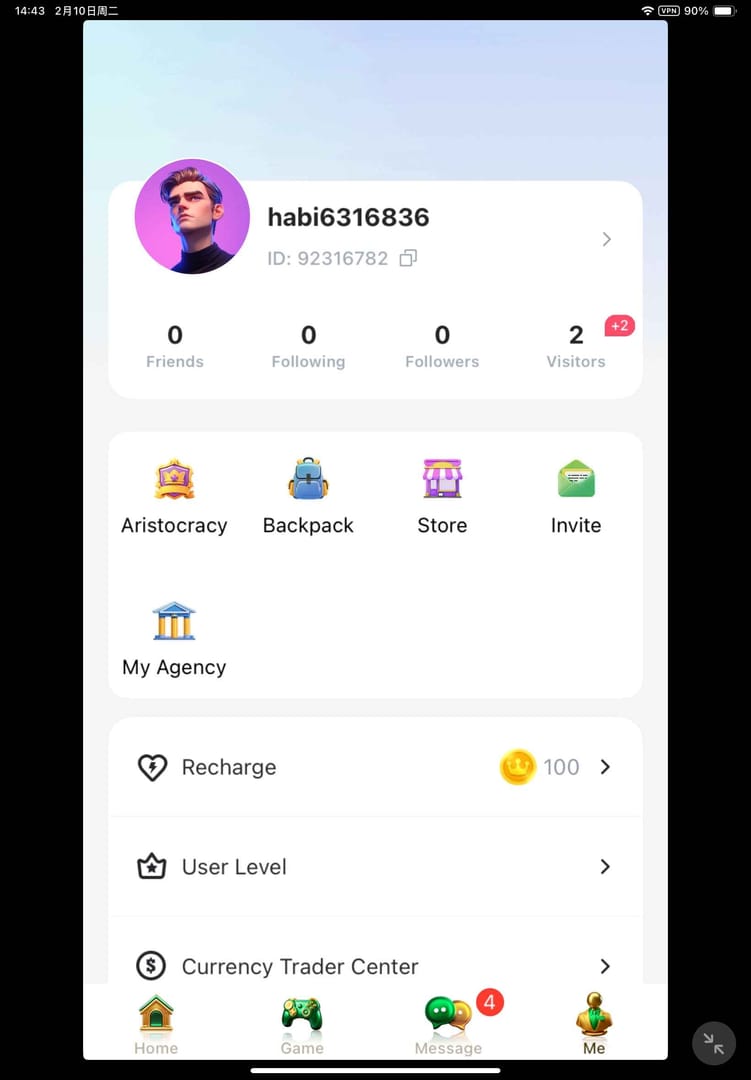
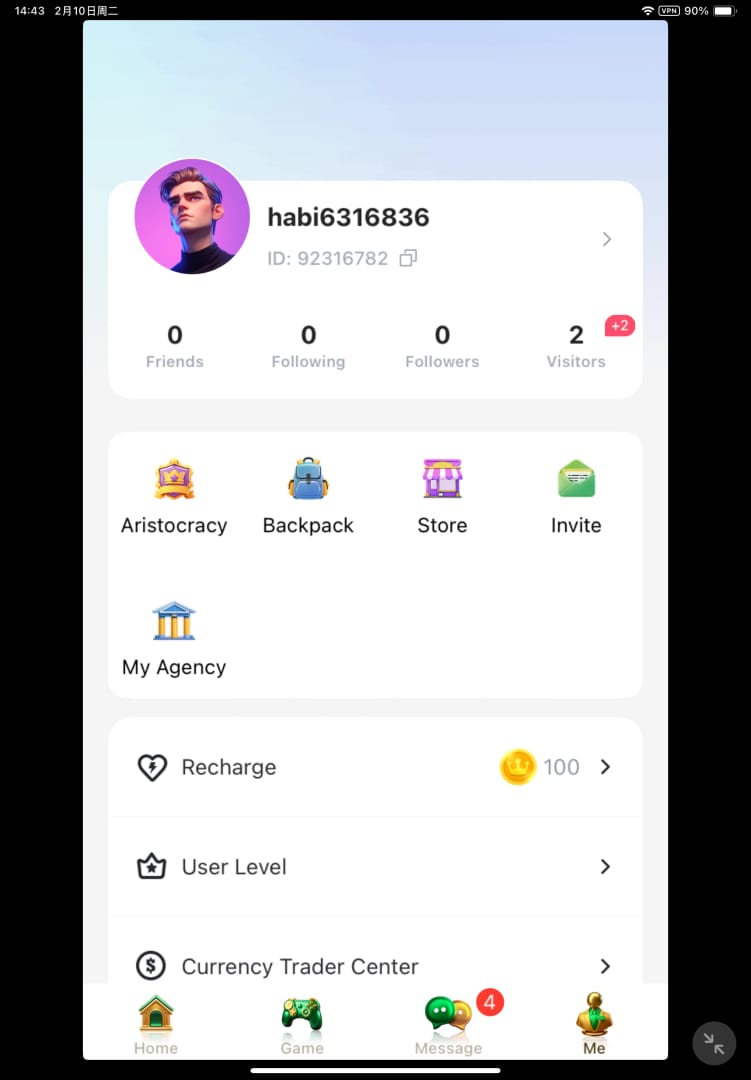
Open Habi, tap Me or Mine down in the bottom menu, and look just below your nickname. The 8-digit User ID is sitting right there, per the Enjoygm Habi Recharge Guide. Done. No settings rabbit hole, no buried submenu. Finding it was never the issue. The issue is that two other chunks of text hang out in the same spot and look every bit as fill-me-in.
So what's the distinction most walkthroughs smear into mush? This table:
| Identifier |
Where it shows |
Use for top-up? |
Changeable? |
| User ID (8 digits) |
Below nickname in Me/Mine profile |
✅ Yes — the only field that routes coins |
Treated as fixed account identifier |
| Username / nickname |
Top of profile, in chat, on your card |
❌ No — display only |
Editable cosmetic label |
| Server / region |
Account info / region selector |
Pairs with the ID |
Tied to where the account lives |
Source: Enjoygm Habi Recharge Guide (2026); VGTopup Habi Blog (2026)
The username is just a label. The User ID is the unique numeric address a recharge fires at, and punching in the nickname instead sends your coins exactly nowhere useful, per the VGTopup Habi Blog. My blunt read, after seeing this happen on repeat: the fields sit too close, they're styled too alike, and plain old overconfidence finishes the job. You glance, you assume, you type the wrong one. And the app won't lift a finger to stop you.
First habit to drill, then. It's mechanical, not clever. When a top-up page asks for your ID, you're hunting for digits only. If the thing you're about to paste has a letter in it, you grabbed the wrong string.
The 60-second check that makes the rest of this article optional
Before you pay a cent, run a short, dull little checklist. None of these moves is impressive. Stacked together, though, they catch almost everything.
- Open Me/Mine and read the number off your live profile, not your memory, not some old note. The number under your nickname is the truth.
- Confirm your active server/region matches. The pre-payment checklist on the Topuplive Habi ID Guide flat-out tells you to verify the server lines up with the ID and to make sure no auto-saved old ID from a previous account is squatting in the field. This is the step people breeze past, and honestly it's the sneakiest failure of the bunch. More on that in a sec.
- Copy the ID cleanly. A trailing space or one swapped digit is plenty to misfire.
- Screenshot the profile screen showing the ID below your nickname before you transact. The VGTopup blog frames this as proof you'll want in your back pocket, and it's exactly the document support asks for when things go sideways.
Type that ID by hand and you reintroduce the precise typo risk the screenshot exists to insure against. Copy-paste wins, but only if you respect what copy-paste can quietly slip into a string.
The whitespace trap nobody documents
Here's a wipeout I almost never see written down anywhere: trailing whitespace. Copy an ID out of a chat message, a notes app, or the auto-grabbed text off a shared screenshot, and you might drag an invisible space along for the ride. Pasting an ID with a trailing space, or a swapped digit, ships your coins to an incorrect account, per Topuplive Habi ID Guide (2026). You can't see the space. The field usually won't flag it. And depending on how the entry gets parsed, it either bounces outright or, worse, resolves to some other perfectly valid ID.
The fix is dead simple. After pasting, tap to the very end of the field and check the cursor's sitting flush against the last digit. Count the characters, too. Habi IDs run 8 digits. If you've got 9 "characters" but only 8 visible numbers, something invisible hitched a ride.
How wrong-account top-ups actually happen
Forget hackers. The real threat to a top-up is your own hand, and it clusters in three spots.
The username substitution. Drop in the username instead of the numeric User ID and your coins route to the wrong account. The Enjoygm guide is dead direct about it: always copy the 8-digit number exactly. This is the heavyweight of the three, because the username feels like the right answer when you're rushing.
The one-digit typo or swap. Manual entry, or a paste that ate or scrambled a character. Some accounts share similar leading digits, so eyeballing the first three or four numbers and going "yep, that's me" is precisely how a near-miss turns into a clean hit on somebody else's account. Verify the whole string, every digit, not just the front end.
The right ID on the wrong server. This one gets its own callout because it cooks people who nailed everything else. A valid ID stuck on a mismatched server/region still fails, and because the ID itself is genuinely correct, players sit there staring at it dead sure nothing's off. ID-only verification hands you false confidence. The server field is part of the address, not some footnote you can ignore.
Gifting to a friend doubles every risk
Topping up someone else's account? Every trap above still applies, except now it's a number you can't pull off your own live profile. The correct play, per the Enjoygm guide, is to have your friend open the app, hit Me/Profile, screenshot their exact numeric ID, and send you that image. Not rattle it off from memory on a voice call. Not "it ends in something-something." A screenshot of their live profile, or it doesn't count.
My own rule for gifting: I want the recipient's ID as a picture, the number visibly parked under their nickname, and I confirm the server out loud before my thumb goes anywhere near a payment screen. Reading a digit string aloud is exactly where a 7 morphs into a 1 and your money disappears. Make them send the picture.
Confirming it actually landed
The order-confirmation screen, not the payment button, is your true last line of defense. On the recharge page, after you paste the ID and pick a bundle, the order confirmation screen flashes the exact ID before final payment. Read it. That half-second exists specifically so you can yank a mistake back while it's still free to fix. Skim past it and you've waived your last veto.
After paying, peek at your in-game mailbox or profile balance within a few minutes for delivery confirmation, per the VGTopup blog. Delivery's usually fast, so a balance that hasn't budged after a couple minutes is your earliest hint that something (the ID, the server, the order) deserves a second look.
For first-timers, this is where you slow down instead of celebrating. The flow rewards one last glance:
- First-time top-up: read the confirmation ID character-by-character against your screenshot, then babysit the mailbox.
- Gifting: confirm the ID on the order screen matches your friend's screenshot, then ask them to confirm receipt. You can't see their balance.
- Multi-account / multi-device user: this is your riskiest profile by a mile. Verify no auto-saved old ID is pre-filled, because the field might still remember a previous account.
That last bullet earns some weight. Leaning on an auto-filled or remembered ID is genuinely dicey after you switch accounts or devices. Convenience here is a liability wearing a time-saver costume. The field "remembering" your ID only helps if it remembered the right one.
There's also a quieter account-type wrinkle worth knowing before you ever top up: a numeric ID survives across devices only if the account's linked, and unlinked guest IDs may reset on reinstall, per VGTopup Habi Blog (2026). If you're on a guest account you haven't linked, the ID you so carefully verified today isn't guaranteed to be the same one after a reinstall. Link first, top up second.
Once your ID and server both check out, you can wrap up the purchase on a platform whose flow bakes in that explicit re-check. VGTopup's order screen, for one, surfaces the exact ID one more time before you pay, and if you want to handle the Habi Coins top up there, treat that confirmation screen as your mandatory final read, not a formality you click through on autopilot.
If the coins went to the wrong account
Honest answer up front: recovery isn't guaranteed. The realistic route, per the Enjoygm guide, is to hit up platform support with your transaction ID and a proof screenshot, and even then it might mean a fresh ticket and a wait, with zero promised outcome. Anyone selling you on "wrong-account top-ups are easy to reverse" is overselling.
This is exactly why the proof you gathered before paying matters more than the ID itself once a problem already exists. Notice the asymmetry here:
| Scenario |
Realistic recovery odds |
What support needs from you |
| Typo'd ID, you have order ID + pre-payment screenshot |
Better, but still not guaranteed |
Transaction/order ID, proof screenshot of intended ID |
| Username entered, coins went to a real other account |
Difficult — coins reached a valid third party |
Order ID, screenshots, timing details |
| Correct ID, wrong server |
Case-by-case |
Order ID, server details, account proof |
| No screenshot, no order ID saved |
Weakest position |
You're reconstructing from memory |
Source: Enjoygm Habi Recharge Guide (2026); VGTopup Habi Blog (2026)
The pattern across that table is brutal and clarifying both: your leverage is documentation. Saving the order/transaction ID counts for more than saving the User ID once something breaks, because the order ID is what ties your payment to a specific misroute support can actually chase down. Screenshot the profile before, keep the order confirmation after. Those two artifacts are the gap between a fightable ticket and a shrug.
On sharing your ID publicly, and the auto-save debate
Two recurring worries that deserve a straight answer.
Is it safe to share your User ID to get a gift? Sharing the numeric ID is literally how gifting works. A friend needs it to send you coins, and the documented best practice is to hand it over as a screenshot of your live profile. The ID is a top-up address, not a password. The caution I'd tack on is judgment, not panic: share it on purpose with whoever's gifting you, rather than blasting it into open channels where you've got no clue who's reading.
Auto-saving your ID, convenient or liability? Both, and which one wins comes down entirely to whether you've swapped accounts since it got saved. On a single, stable account, a remembered ID is fine. The instant you switch accounts or devices, that saved value flips into the most dangerous field on the page: pre-filled, confident, possibly dead wrong. The Topuplive checklist's instruction to verify no auto-saved old ID is lurking exists for exactly this. My stance? Clear it and re-paste from your live profile every single time you've touched a different account. The five seconds you save trusting auto-fill is the same five seconds that misroutes the payment.
Screenshot the profile, read it back, then pay
If you walk away with a single thing: screenshot your live profile ID, then read it back against the order-confirmation screen before you pay. Not the username. Not a number from memory. Not an auto-filled field you never bothered to verify. The profile screenshot proves what you meant; the confirmation screen is your last shot at catching the gap between intention and entry. Together they cover the username swap, the typo, the trailing space, and most of those server-mismatch surprises in one boring, repeatable motion.
Everything else in this guide is a footnote to that one move. The players who get burned aren't unlucky. They're the ones who decided the field was too obvious to check.
Frequently Asked Questions
Where exactly is my Habi user ID in the app?
Tap Me or Mine in the bottom menu, open your profile, and read the 8-digit number directly below your nickname, per Enjoygm Habi Recharge Guide (2026). If all you see is your nickname and no number, you're probably on a guest/unlinked account. Link it first, since unlinked guest IDs can reset on reinstall.
Is the Habi user ID the same as my username?
Nope. The username is an editable display name; the User ID is a fixed 8-digit numeric account identifier, and it's the only one that routes a top-up. Enter the username instead and your coins land in the wrong place. When a recharge field asks for your ID, you're entering digits only. If there's a letter in there, it's the wrong string.
What do I do if I topped up to the wrong Habi account?
Contact the platform's support with your transaction/order ID and a proof screenshot, per the Enjoygm guide. But recovery isn't guaranteed and may need a fresh ticket. Your odds ride entirely on documentation: a pre-payment screenshot of your intended ID plus the saved order ID give support something concrete to dig into. Without either, you're arguing from memory.
Does the server or region matter if my ID is correct?
It does, and this is the trap that fools careful players. A correct ID on a mismatched server still fails, which is why the Topuplive checklist tells you to confirm the active server/region matches the ID before paying. An ID-only check hands you false confidence. Treat the server field as part of the delivery address, not an afterthought.
How can I copy my ID without introducing an error?
Paste it, then tap to the very end of the field and confirm the cursor sits flush against the last digit, and count that you've got exactly 8 numbers. A trailing space or swapped digit ships coins to an incorrect account, per Topuplive Habi ID Guide (2026). Invisible whitespace dragged in from chat or notes is the failure nobody sees coming, so verify the full string, not just the first few digits.











Comments