Play 1: the 5-minute reload that solves most "missing" cubes
Costs nothing, beats every ticket, and it's the move the threads keep relearning the hard way. A "charged but no Ultracubes" status is, nine times out of ten, a display or sync hiccup. Not a vanished payment. Run it first, no exceptions.
- Force-close Path to Nowhere completely (swipe it out of recents, don't just background it).
- Reopen and let the title screen finish loading. The recharge handshake fires here.
- Open both your in-game mailbox and the recharge/top-up tab. This matters more than it sounds.
- Pull down to refresh the mailbox if your client supports it.
And here's the quirk rushed players keep blowing past: cubes from a successful charge sometimes drop into the mailbox instead of the wallet. So the recharge tab still reads like nothing happened while your currency sits one screen over, unclaimed. The top-up threads on r/PathToNowhere surface this constantly. Half the people screaming "I lost a pack" had it parked in mail the whole time. Check both before the meltdown.
This works when the payment cleared and the client just hadn't redrawn your balance. It fails when the charge is still pending (Play 3) or you logged into the wrong account (Play 2).
Play 2: same UID, same server — check before you cry to support
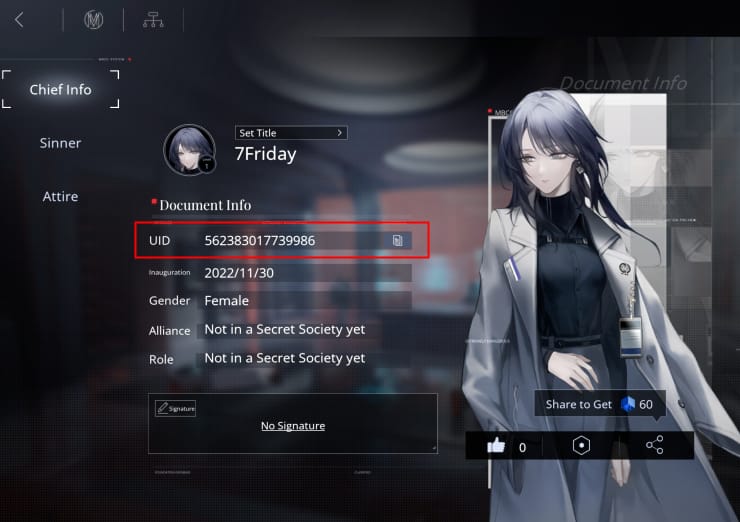
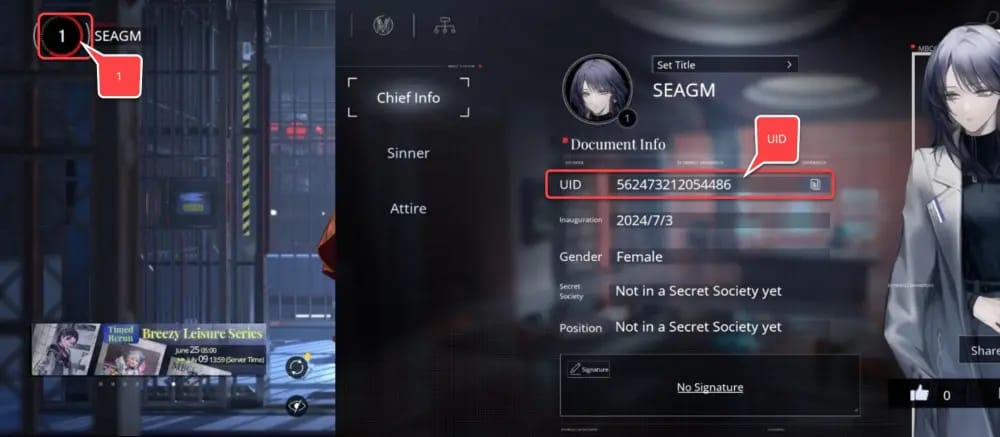
A delivered pack looks completely gone if you're staring at the wrong account. This is the second-biggest false alarm in the megathreads, and few things sting more than a ticket that resolves itself the second you notice the cubes were always sitting there.
Three things to confirm:
- Your player UID matches the one you paid against. Third-party top-ups in particular bind delivery to a specific UID.
- You're on the same server region you used at purchase. Hop regions and delivered cubes drop out of view until you switch back. They aren't gone, they're routed to the account-region you bought on.
- You didn't fat-finger your way into a guest account or a second profile after buying.
For store purchases via Google Play or Apple, delivery follows whichever in-game account was live at checkout. For UID-based top-ups, the cubes land on the exact UID you typed. One transposed digit ships them to a stranger, which is precisely why screenshotting your UID at purchase isn't optional.
This works if you've ever touched more than one account or jumped servers. It fails when you genuinely run a single account and never budged. Then the trouble's upstream and you're off to Play 3.
Play 3: pending isn't paid — read the charge state before disputing
This is where most people set their own case on fire. A pending bank or store charge is not a completed payment. It's an authorization hold, and those drop off quietly without ever delivering a thing. Disputing it, or assuming you "lost" the money, jumps the gun, and the Google Play policy pages flag this exact mistake: treating a pending charge as final and disputing early.
Reading the state:
- Pending — shows as "processing," "authorization," or a greyed line in your bank app. No cubes yet is normal. Sit tight.
- Completed — the charge has posted/settled and you've got a receipt or order confirmation. Now the delivery clock starts.
- Double charge — two completed, identical transactions for one purchase. Almost always reversible, never a write-off.
Only a completed, settled charge with no delivery counts as a real problem. Even then, the first stop is the game, not your bank. Why that sequence matters comes down to ban risk, which lands in Play 6.
This works when you actually check the transaction state instead of just clocking "money gone." It fails when you panic at a pending hold and dispute it, which can flag your account over a charge that never even completed.
Play 4: send the complaint to the right party (publisher vs store vs UID seller)

Speed depends entirely on where you paid. Fire the right complaint at the wrong party and that's why your ticket sits. Three lanes, zero overlap.
If the cubes are still missing about 24 hours after a completed charge, here's who owns what:
| Where you paid |
First contact |
What they can do |
Ban risk if done right |
| In-game store via Google Play / Apple |
In-game CS, then platform store |
Re-credit verified order; store can refund undelivered charge |
None |
| In-game CS directly (billing issue) |
Publisher email ptnsupporten@ziyitech.net |
Re-deliver verified failed order |
None |
| Third-party UID top-up |
That seller's 24h support |
Re-push to UID or refund |
None |
Source: Path to Nowhere Google Play listing (2026); Google Play refund policy (2026); Codashop (2026).
For store and in-game billing snags, the publisher support address off the Path to Nowhere Google Play page is ptnsupporten@ziyitech.net. That's your billing lifeline when the game didn't honor a charge. In-game customer service is the best opening stop because it can re-credit a verified failed order without ever dragging a refund into it, so you keep the cubes you actually paid for.
UID-based top-ups, third-party services included, deliver into your recharge tab or mailbox once payment clears, per Codashop's own instructions, and those sites quote anywhere from seconds to 30 minutes. If nothing's arrived, the seller's 24-hour support owns the fix. The publisher can't re-push an order it never processed in the first place. Knowing which lane you're in saves days.
This works when you nail your payment channel. It fails when you email the publisher about a third-party UID order they have no record of. Dead end, instantly.
Play 5: build a ticket support can't bounce

Incomplete tickets cause most of the delay people blame on "slow support." The proof you attach is the single biggest lever on how fast this resolves. Send the lot up front and you skip the back-and-forth that bleeds days.
Your proof checklist, whatever the channel:
- Player UID (the account that should receive the cubes)
- Transaction ID (from the store receipt or seller confirmation)
- Receipt / order confirmation screenshot
- Server / region
- A one-line note on what you bought and what's missing
A copy-paste template mirroring the fields standard billing forms ask for:
Subject: Charged for Ultracubes pack — not delivered (UID [your UID])
Hi, I purchased the [pack name / monthly card] on [date/time] and was charged, but the Ultracubes have not been added to my account.
UID: [your UID]
Server/Region: [region]
Transaction ID: [ID from receipt]
Payment method: [Google Play / App Store / other]
Amount: [amount + currency]
Attached: receipt screenshot, payment confirmation, in-game purchase screen.
The mailbox and recharge tab are both empty. Please re-credit or advise. Thank you.
Different channels lean on different proof. Platform refund flows care most about the transaction ID and receipt. The in-game/publisher route wants UID plus transaction ID so it can match the order to your account. Hand over both sets and no lane gets to reject you for missing info.
On timelines: no specific official refund window for the publisher's billing tickets turned up in 2026, so I won't slap a fake number on it. Read it as "days, not minutes," and lean on the channel SLAs you can verify. Google Play refunds are possible within 48 hours of purchase depending on the details, and after that window you're routed to contact the developer directly, per Google's 2026 policy. Apple's request runs through reportaproblem.apple.com inside its own policy window. The honest read is that your refund speed hangs far more on the payment channel than on the game's support staff.
This works when you front-load every proof field. It fails when you fire off "I didn't get my cubes" with no UID, no transaction ID. That one gets parked or tossed.
Play 6: chargeback first is the fastest way to lock your own account
Filing a bank or app-store chargeback before you've even contacted the game is the worst opening move for most people, and I'll plant a flag right there. The consensus across mobile-game communities, and the r/PathToNowhere top-up threads echo it, is blunt: dispute before talking to support and you risk account trouble, up to and including a lock or ban on the very account that's owed the cubes.
The logic's simple. A chargeback is an adversarial bank action. The publisher watches a payment get forcibly yanked, and the standard reflex is to claw back or freeze the account tied to it. You can win the dispute and lose the account, which is a net loss when an in-game ticket would've re-credited you in days at zero risk.
The contrarian bit worth burning into memory: the popular "just request a Google Play refund right away" advice can permanently strip already-delivered items and flag you in the process. If those cubes quietly landed in your mailbox back in Play 1 and you refund anyway, you've now taken both the goods and the money back. That's the exact pattern enforcement exists to catch.
So when is a dispute actually fair? After the official channels have genuinely failed. A verified, completed, undelivered charge that support won't fix, or a clear unauthorized transaction. And even then, the platform refund flow (Google/Apple) is the measured route, not a raw bank chargeback. Double charges almost always reverse through normal channels, so never waste the nuclear option on one of those.
This works when official channels have truly run dry. It fails when it's day one and you haven't even opened your mailbox. That's how people eat a ban over a sync delay.
Routing by buyer type, and dodging the next failed delivery
Two profiles cover nearly everyone in these threads.
Store buyers (Google Play / Apple). Delivery rides the platform's payment sync, so a brief stall is routine. Keep the platform refund flow as your backstop, but always run the in-game ticket first so you hang onto the cubes instead of reversing the charge. Screenshot the receipt and transaction ID at purchase, before a problem even exists. That habit is the gap between a same-day fix and a week of emails.
Direct / UID top-up buyers. Delivery binds to the UID you enter and lands in the recharge tab or mailbox, usually within minutes. Your support lane is the seller's, not the publisher's. Prevention rule: triple-check that UID before paying and confirm the server region lines up.
For store buyers sick of payment-sync roulette, topping up straight to your UID sidesteps the platform middle-layer entirely. VGTopup, which publishes this guide, delivers Ultracubes to your UID as one transparent Path to Nowhere Top Up recharge option among others. Disclosure, not a directive. The analysis above holds whichever channel you pick, and the right move is always the same: verify delivery, keep your receipt.
So here's my actual read, across both profiles. The quickest path to your cubes is almost never a refund. It's a reload, a mailbox check, and a complete ticket, in that order. Refunds are the fallback, chargebacks are the last resort, and that receipt screenshot you grab at purchase is the cheapest insurance in the whole game. Grab it every single time.
Frequently Asked Questions
How long should Ultracubes take to show up after I pay?
Once the payment genuinely clears, think minutes. Third-party UID top-ups advertise seconds to 30 minutes, per Codashop and similar sites (2026). Store purchases can lag on platform sync. The escalation line sits around 24 hours after a completed charge. A pending charge that hasn't delivered is normal and not yet a problem.
Can I get a refund if my Path to Nowhere top up failed?
Yes, but route it correctly. Google Play refunds are possible within 48 hours of purchase depending on the details, after which Google hands you off to the developer, per its 2026 policy. Apple uses reportaproblem.apple.com inside its window. For a genuinely undelivered charge, hit in-game support first so they can re-credit the cubes rather than you reversing the payment.
Why was I charged twice for one Ultracubes pack?
Usually a duplicate-order glitch where the client retried the transaction. Double charges almost always reverse, so don't write one off. File a ticket with both transaction IDs and your UID. The publisher can match them and pull back the extra without touching your account standing.
Is it safe to file a chargeback for missing cubes?
It's the riskiest move on the board. Consensus on r/PathToNowhere is that disputing before contacting support invites account locks or bans. You can win the bank fight and lose the account that owes you the cubes. Exhaust in-game CS and the platform refund flow first, and save a raw chargeback for unauthorized charges only.
Where do purchased Ultracubes actually appear?
The recharge/top-up tab is the default, but a successful charge sometimes deposits into your in-game mailbox instead, where it sits unclaimed and looks missing. Check both. And if you switched servers or accounts after buying, the cubes are tied to the original UID and region, so switch back to see them.











Comments