Master how to change cue sensitivity in 8 Ball Pool using touch zones, fine-tune wheels, and high-aim cue stats to stop overshooting high-stake shots.
Every mobile pool player knows the heartbreak. You are sitting on a table in Berlin or Mumbai with tens of millions of coins on the line. You have a straight cut shot into the side pocket, but when you tap your screen to line up the ghost ball, your cue swings wildly past the target angle. You try to nudge it back a single millimeter, and the stick jumps two inches in the wrong direction. The shot timer runs down, you panic, shoot off-center, and scratch.
Controlling your aim speed is the single most critical mechanical skill in the game. If you cannot stop your aiming line from jittering, you will never climb past the mid-tier tables.
The Real Aim Sensitivity System in 8 Ball Pool
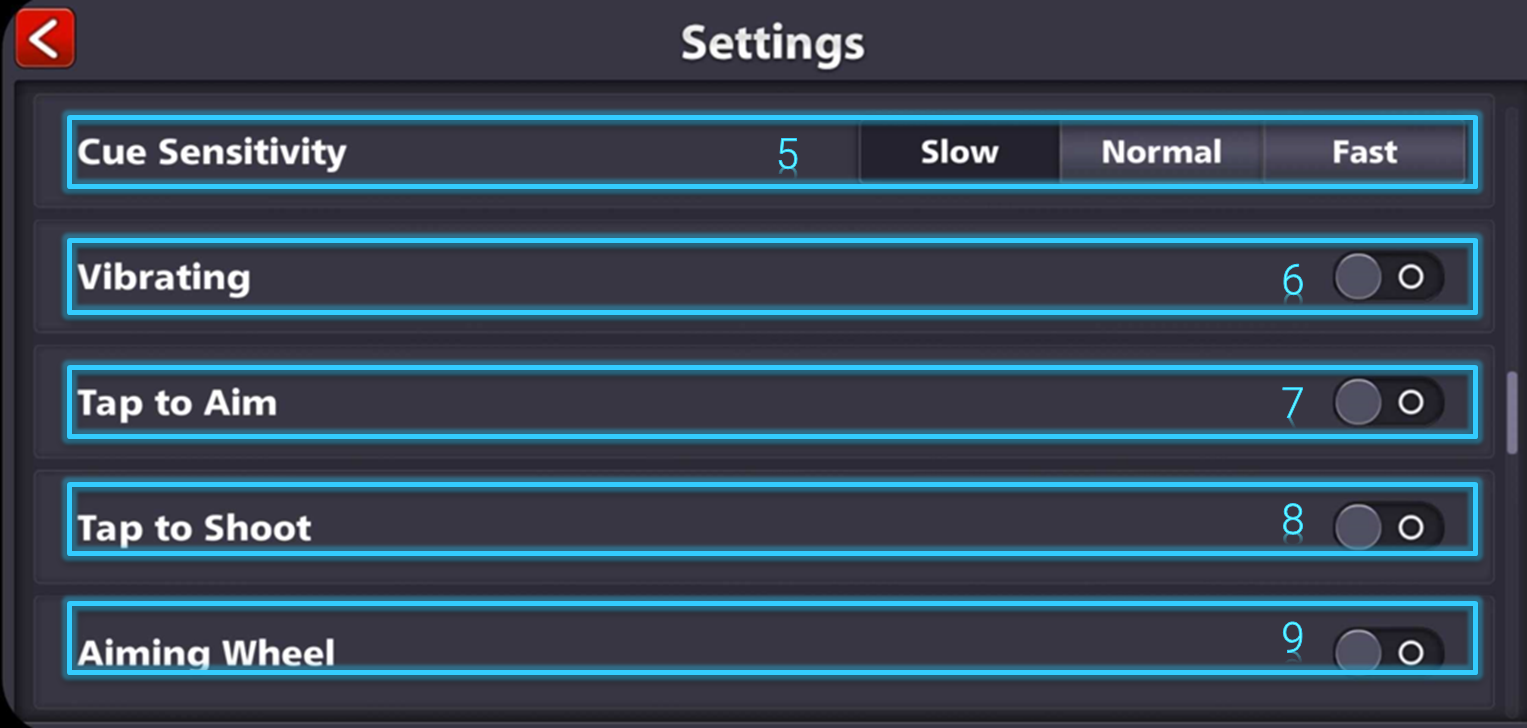
New players spend hours digging through the settings menu searching for a raw "Sensitivity: 1 to 100" slider. You will not find one. Miniclip built the game engine around a context-sensitive touch system rather than a fixed velocity toggle. Aim speed is dictated entirely by where your finger makes contact with your mobile screen relative to your cue stick.
Dragging your finger across the open green felt in front of the cue tip or anywhere across the general table surface registers wide, sweeping inputs. This macro-aiming zone accelerates cue rotation around the cue ball so you can flip your shot 180 degrees in a fraction of a second. It is built for speed, not precision.
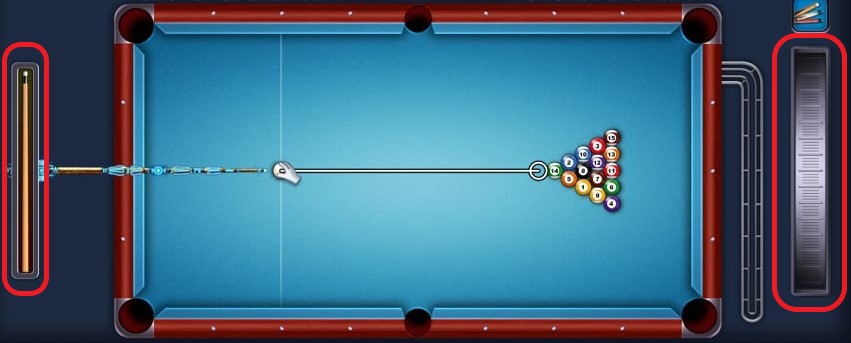
Granular aiming requires shifting your contact point directly to the cue stick handle or the fine-tuning aiming wheel on the side of your display. Dragging on the cue stick itself drastically cuts the angular velocity per pixel of finger movement. A two-centimeter drag on the open felt might rotate your line 45 degrees, whereas that exact same two-centimeter drag on the cue stick handle shifts your aim by less than two degrees. Mastering this physical split between table dragging and handle dragging is the foundation of high-level pocketing.
Step-by-Step Calibration: Setting Up Your Aim Controls
Lock in your control layout and physical touch zones with this sequence:
- Open your 8 Ball Pool app and tap the gear icon in the bottom-left corner of the main lobby to access the Settings menu.
- Locate the Tap to Aim toggle and enable it. This setting allows you to tap near an object ball to snap your cue's initial angle close to the pocket line immediately, cutting down on excessive screen dragging.
- Verify your Aiming Wheel or Fine Tune Control setting is active. This places an interactive dial on the side of your screen during active turns.
- Enter an offline practice match or a low-stake table like London Pub to test touch zones without shot clock pressure.
- Align your general shot by tapping the felt near your target ball to instantly place your cue within a 10-degree window of the pocket.
- Move your thumb away from the table surface and place it on the fine-tune wheel or directly onto the back handle of the cue stick.
- Drag slowly up or down along the cue stick axis to nudge the trajectory line pixel-by-pixel until the visual guide connects squarely with the pocket center.
- Pull back your power meter on the left side of the screen and release to execute the shot without touching the aiming field again.
This two-phase routine—macro-aiming via felt taps followed by micro-aiming via the cue stick handle—removes touch jitter completely.
Fine-Tuning Shots with the Spin Indicator and Trajectory Lines
Digital 8 Ball Pool physics handle spin (English) differently from real billiards. In real life, heavy side spin deflects or "squirts" the cue ball, curving its initial path before contact.
In 8 Ball Pool, cue ball spin does not alter pre-impact trajectory. The aim line stays locked straight regardless of applied side English. You never need to compensate for squirt or adjust your aim sensitivity before contact.
To calibrate your spin cleanly:
- Tap the cue ball interface located in the top-right corner of your match display.
- Drag the red contact marker vertically to set topspin (dragging upward for forward follow-through) or backspin (dragging downward to draw the cue ball backward after impact).
- Drag horizontally for side English to alter post-cushion angles.
- Return your attention to the cue stick handle for your final fine-tune check.
Because spin only takes effect after contacting an object ball or cushion rail, your primary sensitivity focus should remain on lining up the ghost ball guide. Never try to "aim off" to account for spin before contact.
How Cue Aim Stats and Collection Power Fix Sensitivity Issues
Even with disciplined touch habits, a low-stat cue makes fine aiming frustrating. Every cue stick in the game features four base attributes capped at a maximum value of 10: Force, Aim, Spin, and Time. The Aim attribute directly governs your visual margin of error.
A cue with an Aim stat of 2 or 3 projects a short guideline that barely reaches past the target ball, forcing you to guess where contact angles lead. A cue with an Aim stat of 8, 9, or 10 projects an extended guideline across the entire length of the slate, making even a fraction of a degree in over-aim visible before you strike.
The Cue Collection Power system permanently boosts stats across every cue in your inventory as you collect and upgrade gear, up to a cap of +3 bonus points per attribute:
| Collection Tier | Collection Rank Requirement | Attribute Bonuses Unlocked | Practical Impact on Aiming Sensitivity |
|---|
| Brass | Rank 5 | +1 Force | Increases break power; no aim guideline change |
| Silver 1 | Rank 25 | +1 Force, +1 Aim, +1 Spin | Extends guideline length, allowing easier micro-adjustments |
| Gold 1 | Rank 40 | +1 Force, +1 Aim, +1 Spin, +1 Time | Adds extra turn clock time to deliberate on fine angles |
| Amethyst 3 | Rank 65 | +2 Force, +2 Aim, +2 Spin, +1 Time | Significant guideline boost; bank shots become easier to verify |
| Black Diamond | Rank 100 | +3 Force, +3 Aim, +3 Spin, +3 Time | Maximum achievable stat bonus applied to every cue owned |
Upgrading cues to reach ranks like Amethyst 3 and Black Diamond requires a substantial supply of in-game currency. Players looking to accelerate their cue collection power often refill your Pool Cash on vgtopup to purchase boxes and upgrade lower-tier cues for permanent stat bonuses.
Standard vs Legendary Cue Aiming Margins and Costs
Standard and promotional cues carry recurring maintenance costs that eat away match earnings. Standard cues require a currency recharge every 50 shots using Pool Coins. Legacy and promotional cues come with fixed recharge rates that scale based on rarity—ranging between 100 Coins, 200 Coins, 400 Coins, 800 Coins, and 900 Coins per 50 shots. Special evolving cues, such as the Pool Chronicles Evolving Cue which caps out at level 41 with all base stats at 10, demand a steep recharge fee of 5,000 Coins every 50 shots.
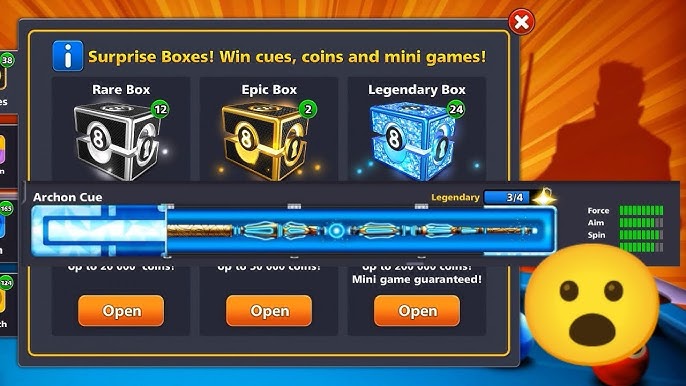
Legendary cues feature maxed or near-max Aim lines, charge zero Pool Coins or Cash for 50-shot recharges, and grant a coin payback perk that refunds 30% or more of your match entry fee if you lose.
To unlock Legendary cues, open Legendary Surprise Boxes, priced at 33 Cash for a single box or 89 Cash for a 3-box bundle:
| Cue Name | Base Aim Stat (Out of 10) | Box Drop Rate | Shot Recharge Cost | Special Match Perks |
|---|
| Archon Cue | 9 to 10 | 1.39% | 0 Coins (Free) | Up to 30%+ match entry fee payback |
| Archangel Cue | 10 | 0.88% | 0 Coins (Free) | Up to 30%+ match entry fee payback |
| Valkyrie Cue | 9 to 10 | High Tier Pool | 0 Coins (Free) | Up to 30%+ match entry fee payback |
| Pool Chronicles (Lvl 41) | 10 | Progression Track | 5,000 Coins per 50 shots | Evolving visual frame; no coin payback |
| Standard Country Cue | 4 to 6 | Direct Purchase | Pool Cash / Variable | Basic guideline; standard table usage |
Because drop rates for top cues like the Archon (1.39%) and Archangel (0.88%) are low, players building a competitive inventory often acquire Legendary Surprise Boxes in 3-box bundles to piece together full cues efficiently.
Aim sensitivity handles differently on mobile touchscreens compared to desktop web browsers. Mobile players utilize touch zones, while PC web players manage mouse tracking and keyboard shortcuts.
On mobile, broad thumb drags across the slate handle macro rotation while the aiming wheel handles micro adjustments. On PC, players use the mouse cursor to drag the stick and keyboard arrow keys for fine-tuning. Browser focus can drop if you interact with window shortcuts.
| Platform | Primary Macro Aim Method | Micro-Aim / Fine Tuning Method | Common Sensitivity Disruptions |
|---|
| Android / iOS | Screen drag on open felt surface | Cue handle drag or Aiming Wheel | Screen oil, moisture, or high touch polling jitter |
| PC Web Browser | Left-click drag on table area | Left/Right keyboard arrow keys | F11 (fullscreen) or F12 (dev tools) breaking keyboard focus |
| Tablet (iPad / Android) | Multi-finger screen drag | Extended aiming wheel dial | Overshooting due to larger physical screen travel distance |
If you play in a web browser and suddenly find your arrow keys or spin interface unresponsive, you likely hit Shift, F11, or F12, which breaks input focus from the game canvas. Clicking the center of the felt once restores keyboard sensitivity immediately.
Account Progression and Control Troubleshooting
High-tier match play leaves zero room for aiming slip-ups. As your account scales through the 15 distinct ranking brackets—from Beginner (levels 3 to 5) through Hustler (levels 15 to 20), Master (levels 66 to 77), Grand Master (levels 78 to 90), and Pool Emperor (levels 137 to 150)—opponents rarely miss open run-outs.
If your aim controls feel sluggish or your app fails to register fine movements, work through these troubleshooting checks:
- Screen Cleanliness and Moisture: Touchscreen digitizers register micro-sweat and finger oil as continuous drag inputs, causing the cue to snap back to an old angle. Wipe your display down with a microfiber cloth before high-stake sessions.
- Promotional Code Locks: Miniclip servers limit promotional code redemptions to 5 coupons per 24-hour rolling window. Exceeding 5 claims will temporarily lock reward processing and can cause settings UI lag until the timer resets.
- Bankroll Protection via Mini-Games: If erratic aiming caused you to lose your coin balance on high tables, do not risk your last coins. Use the Golden Shot mini-game, which offers payouts of up to 100 Cash for a center ring strike, along with legendary cue pieces, to rebuild your balance safely.
When your cue collection needs a boost to bridge the gap between basic cues and competitive legendary gear, you can utilize 8 Ball Pool recharge services to top up your account and grab the equipment necessary for top-tier aiming precision.
FAQ
How do you change cue sensitivity in 8 Ball Pool?
8 Ball Pool does not have a dedicated numerical sensitivity slider in its settings menu. You modulate sensitivity by dragging on the open table surface for rapid turning, then dragging the cue handle or using the aiming wheel for precise micro-adjustments.
Why does my cue overshoot or move too quickly when aiming?
Overshooting happens when dragging too close to the cue tip or swiping broadly across the screen felt. To make fine angle adjustments, place your finger on the cue stick handle or wheel rather than the table.
How does the Aim stat on cues impact aiming difficulty?
Higher Aim stats extend the length of the visual trajectory guideline on the table. A longer line makes small angle errors visible before shooting, eliminating the need for difficult manual sensitivity guesses.
Yes, increasing your account's Cue Collection Power adds up to +3 bonus Aim points to whichever cue you equip. Reaching ranks like Silver 1 (+1 Aim) or Black Diamond (+3 Aim) permanently extends your aim guide.
Why are Legendary cues recommended for difficult shots?
Legendary cues offer near-max Aim and Spin stats alongside free shot recharges and match coin payback of 30% or more. Their extended guidelines eliminate guesswork on tight bank shots and long cuts.
Does adding spin curve your cue ball before hitting the object ball?
No, spin in 8 Ball Pool only alters the cue ball's path after making contact with another ball or a rail cushion. The pre-impact trajectory remains a straight line regardless of the English applied.
The game restricts players to 5 promotional coupon redemptions per 24-hour rolling window. Trying to enter more than 5 codes in a day will result in an error until the window resets.
Final Aim Setup Verdict for High-Stake Tables
Winning consistently on tables like Rome, Berlin, and Venice requires mechanical discipline rather than searching for non-existent sensitivity sliders. Enable Tap to Aim in your settings, use the table felt strictly for rough alignment, and rely on the cue stick handle or aiming wheel for millimeter adjustments.
Pair this touch technique with a cue carrying an Aim stat of 8 or higher, or push your Cue Collection Power toward Black Diamond rank to max out your guideline length. When your guide covers the table and your fingers switch touch zones smoothly, overshooting stops being an issue.








Comments