
How to Top Up Ragnarok M: Eternal Love Big Cat Coins on VGTopup
To complete your Ragnarok M: Eternal Love top up on VGTopup, follow these steps:
- Enter Your User ID: Input your numerical Ragnarok M User ID into the designated field.
- Select Your Server: Choose your active server from the dropdown list (Eternal Love, Midnight Party, Memory of Faith, Valhalla Glory, or Port City).
- Select Your Big Cat Coins Package: Pick the amount of Big Cat Coins (BCC) or the bundle you want to purchase.
- Check the Live Price & Select Payment: Review the real-time localized price shown on the checkout screen and pick your preferred payment option.
- Complete Checkout: Finalize your transaction. Your Big Cat Coins will be credited directly to your character in Midgard.
How to Locate Your Ragnarok M User ID and In-Game Server
Providing the exact User ID and matching server is necessary for your Big Cat Coins to arrive without delay. You do not need to share passwords or login credentials.
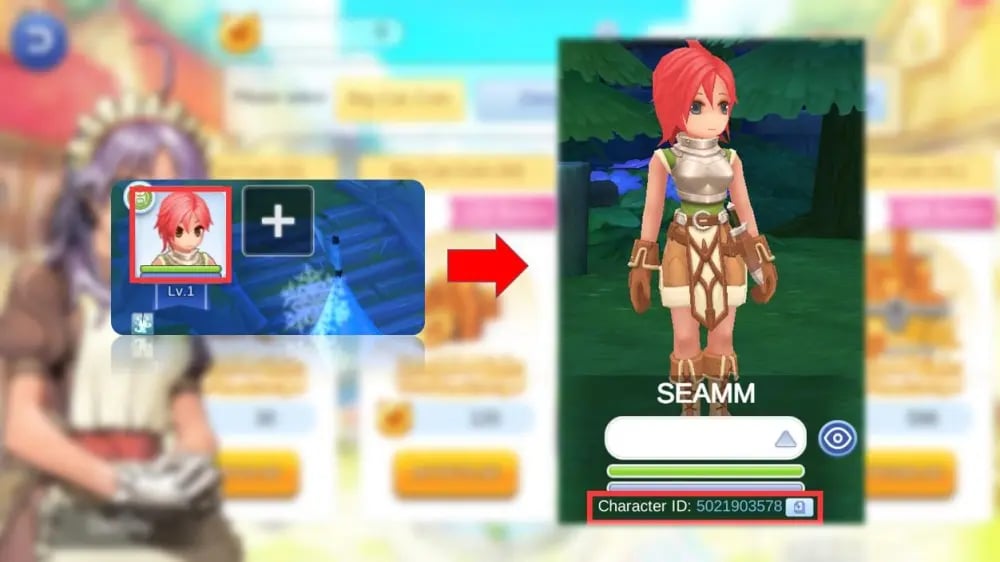
Follow this guide to copy your ID directly from the game:
- Launch Ragnarok M: Eternal Love on your mobile device or emulator.
- Tap your Character Avatar located in the top-left corner of the main screen.
- The character profile window will open. Your User ID is the numerical sequence displayed beneath your character name.
- Tap the Copy icon next to your ID to avoid typing errors.
- To confirm your server, look at the server name displayed on the initial login screen before entering Midgard, or check your character selection menu.
Supported Servers on VGTopup
VGTopup supports direct account crediting across all primary official regional servers. Make sure your server selection matches where your character resides.
| Server Name | Server ID Code | Region / Architecture |
|---|---|---|
| Eternal Love | 90001 | SEA / Global Main Server |
| Midnight Party | 90002 | SEA / Global Expansion |
| Memory of Faith | 90002003 | Regional Group Server |
| Valhalla Glory | 90002004 | Regional Group Server |
| Port City | 90002005 | New World Server |
Selecting the correct server ensures that the recharge engine routes the BCC directly to your active character profile.
Ragnarok M Big Cat Coins (BCC) Uses: Gacha, Premium, and Gear Upgrades
Big Cat Coins (BCC) serve as the premium currency in Ragnarok M: Eternal Love. Purchasing BCC gives you access to essential progression items, cosmetic bonuses, and quality-of-life perks:
- Monthly Premium Card: Activating a monthly Premium grants valuable account perks, including increased base and job EXP rates, extra daily combat stamina, expanded bag storage, and exclusive monthly deposit headwear that boosts handbook stats.
- Feast and Costume Gacha: Spin the Fantasy Generator machines in Prontera to acquire seasonal costumes, wings, and back headwear that provide cumulative Atk, M.Atk, and Max HP deposits in your Adventure Handbook.
- Card Gacha and Card Re-roll: BCC allows you to participate in card draw events to acquire rare MVP cards, Mini-boss cards, and specific racial/elemental damage modifier cards.
- Zeny Conversion and Refinement: Convert BCC into Zeny or use premium bundles to acquire Refinement materials, Mora Coins for advanced enchanting, and Memory Gems for ancient gear tuning.
- Valkyrie's Guidance & Job Unlocks: Accelerate secondary job unlocks and purchase gold medals or contribution packs to expand your Rune / Aesir Monument grid quickly.
First Top-Up Double BCC Bonus Mechanics Explained
The in-game recharge system in Ragnarok M: Eternal Love features a First Top-Up bonus for each coin tier. Here is how this mechanic works:
- Tier-Specific Bonus: Each individual Big Cat Coin denomination (such as 30 BCC, 120 BCC, 300 BCC, or 600 BCC) features a one-time 100% bonus on its initial purchase.
- Independent Triggers: Buying one tier for the first time consumes the double bonus only for that specific tier. All other unpurchased tiers retain their first-recharge double bonus status until used.
- Annual and Event Resets: During major expansion updates and anniversary patches in 2026, the game developers occasionally reset the First Top-Up double bonus for all accounts, allowing players to benefit from the 100% extra coins again.
- Direct Delivery Application: If your account is eligible for a first-top-up double bonus in-game, the extra bonus coins will be added automatically to your delivery upon completing the order.
Safe Account Processing: Why UID Checkout Protects Your Account
Security is paramount when buying digital currencies online. VGTopup uses a direct UID-based recharge system that provides absolute security for your game profile:
- Zero Password Requirements: You never have to share your Google, Apple ID, Facebook, or TapTap login credentials. The recharge process only requires your public User ID and Server name.
- Protection Against Account Hijacking: Because no third party logs into your device or game profile, your personal data, bound email accounts, and equipment stay safe from unauthorized changes.
- Official API Delivery: Orders are processed through direct server-side crediting protocols. Your account balance updates instantly inside the official game database.
Order Verification and Troubleshooting Delivery Issues
If you have completed your purchase and want to check your balance, follow these verification steps:
- Check Your In-Game Bag & Recharge Interface: Tap the "Recharge" button in the top menu of Ragnarok M. Your updated Big Cat Coin balance will display in the upper-right corner.
- Check the In-Game Mailbox: Certain promotional items or bundled bonus tokens may be sent directly to your character's mail system rather than the raw coin counter.
- Perform a Quick Relog: If the coins do not display immediately, return to the character select screen or restart the application to refresh your server connection.
- Verify UID Accuracy: Double-check your order receipt to confirm that the User ID and server match your active character profile.
- Customer Support Assistance: If your transaction was confirmed but your coins have not reflected after a short period, reach out to VGTopup customer support with your order number and character details for immediate verification.
Frequently Asked Questions
Where can I find my Ragnarok M: Eternal Love User ID?
Tap your character avatar in the upper-left corner of the screen. Your User ID is the number shown right under your character name. Tap the copy button next to it to paste it into the order field on VGTopup.
Which servers are supported for Ragnarok M top-ups on VGTopup?
VGTopup supports all primary servers, including Eternal Love, Midnight Party, Memory of Faith, Valhalla Glory, and Port City. Choose your exact server from the dropdown during checkout.
Do I need to share my Ragnarok M password to receive Big Cat Coins?
No. You never need to share your password, login tokens, or account linking details. VGTopup only requires your User ID and server selection to send Big Cat Coins directly to your account.
How does the Ragnarok M: Eternal Love First Top-Up Bonus work?
When you purchase a specific BCC denomination for the first time, you receive double the amount of coins for that tier. Once a tier's double bonus is used, subsequent top-ups for that package deliver the standard coin amount until an official in-game reset occurs.
What can I buy with Big Cat Coins (BCC) in Ragnarok M: Eternal Love?
Big Cat Coins can be used to buy monthly Premium cards, roll for rare headwear and costumes in the Fantasy Generator Gacha machines, draw cards, exchange for Zeny, reset skill/stat builds, and purchase gear upgrading materials.
How long does it take for Big Cat Coins to reflect in my game balance?
Transactions on VGTopup are processed instantly once payment is confirmed. In most cases, Big Cat Coins appear in your game balance immediately. A quick game restart or map change will force your client to update its display.
Is Ragnarok M: Eternal Love pay to win?
While Big Cat Coins accelerate character progression, unlock monthly deposit stats, and give access to premium Gacha gear, player power also depends heavily on game knowledge, Rune optimization, party coordination, and active participation in PvE instances and Guild Wars (WoE/WoC).
Select Denomination
Tax, payment fees and eligible coupons are calculated at checkout.
| Package | Price |
|---|---|
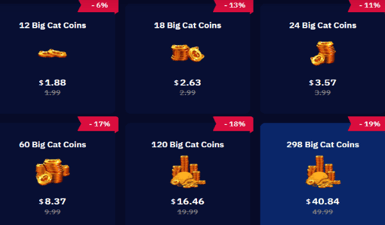
| 18 + 3 Big Cat Coins | USD 2.23 |
| 24 + 4 Big Cat Coins | USD 3.01 |
| 30 + 6 Big Cat Coins | USD 3.71 |
| Limited Special Gift | USD 5.89 |
| 60 + 12 Big Cat Coins | USD 7.28 |
| 120 + 25 Big Cat Coins | USD 14.32 |
| 298 + 75 Big Cat Coins | USD 35.56 |
| 598 + 150 Big Cat Coins | USD 71.07 |
| 1196 + 300 Big Cat Coins | USD 143.02 |
| 2990 + 750 Big Cat Coins | USD 356.36 |