
Hatsune Miku Colorful Stage Crystals Top Up and In-Game Uses
Crystals serve as the primary premium currency in Hatsune Miku: Colorful Stage! (Project SEKAI COLORFUL STAGE! feat. Hatsune Miku). Whether your goal is pulling limited-edition 4-star cards of your favorite Virtual Singers and original unit members or competing for top ranks in weekly event leaderboards, maintaining an active balance of Crystals is essential.
Primary Uses for Crystals in Colorful Stage
- Gacha Scouting: Crystals allow you to pull on standard character banners, limited-time Event banners, Birthday banners, and special Colorful Festival (ColorFest) double-rate banners.
- Live Bonus Energy Refills: Tiering high in competitive events requires Live Bonus stamina. Crystals can be converted directly into Live Bonus energy when bonus drink supplies run low.
- Costume and Accessory Crafting: Premium outfits and character alternate colors in the Costume Shop require specific materials and Crystal resources.
- Music Shop Purchases: Expand your playable track library by unlocking new Vocaloid covers, original commissioned tracks, and classic rhythm charts.
- Virtual Live Interactivity: Spend Crystals during virtual live concerts after events to send special effects, avatars, and cheer items to the stage.
Difference Between Paid Crystals and Free Crystals in Project Sekai
Hatsune Miku: Colorful Stage! makes a strict operational distinction between Paid Crystals and Free Crystals. Understanding this separation helps you plan your banner pulls and resource investments efficiently.
| Feature / Benefit | Paid Crystals | Free Crystals |
|---|---|---|
| Standard & Event Gacha Banners | Yes | Yes |
| Daily Discount Single Pull (60 Crystals) | Yes | No |
| Guaranteed 4-Star Select Gacha Banners | Yes | No |
| Paid-Only Outfit Sets | Yes | No |
| Live Bonus Energy Refill | Yes | Yes |
| Source | Top-up / Direct Purchase | In-game clears, stories, login bonuses |
Free Crystals
Free Crystals are earned organically through gameplay achievements. Completing main unit stories, reading card side stories 1 and 2, achieving S-ranks on song charts, reaching Full Combo milestones on Hard, Expert, and Master difficulties, and logging in during special celebration campaigns all award Free Crystals. Free Crystals are consumed first whenever you roll standard gacha banners or refill Live Bonus stamina.
Paid Crystals
Paid Crystals are acquired strictly through real-money purchases and top-up services such as VGTopup. Certain premium banners—including guaranteed 4-star gacha pools, special anniversary selection tickets, and the discounted 60-crystal daily pull—specifically require Paid Crystals. When you purchase Crystals on VGTopup, the base crystal amount delivers directly to your Paid Crystal total.
How to Find Your Hatsune Miku: Colorful Stage Player ID
VGTopup uses a direct Player ID delivery system. You never need to share your account login credentials, transfer passwords, or linked social media accounts. Follow these steps to locate your exact Player ID in the game client:
- Launch Hatsune Miku: Colorful Stage! on your mobile device.
- From the main title or home screen, tap the Menu icon (three horizontal lines) located in the upper-right corner.
- Tap the Profile button to view your public player card.
- Locate your Player ID string displayed directly below your player username.
- Tap the small Copy icon next to the number sequence to copy your ID directly to your device clipboard.
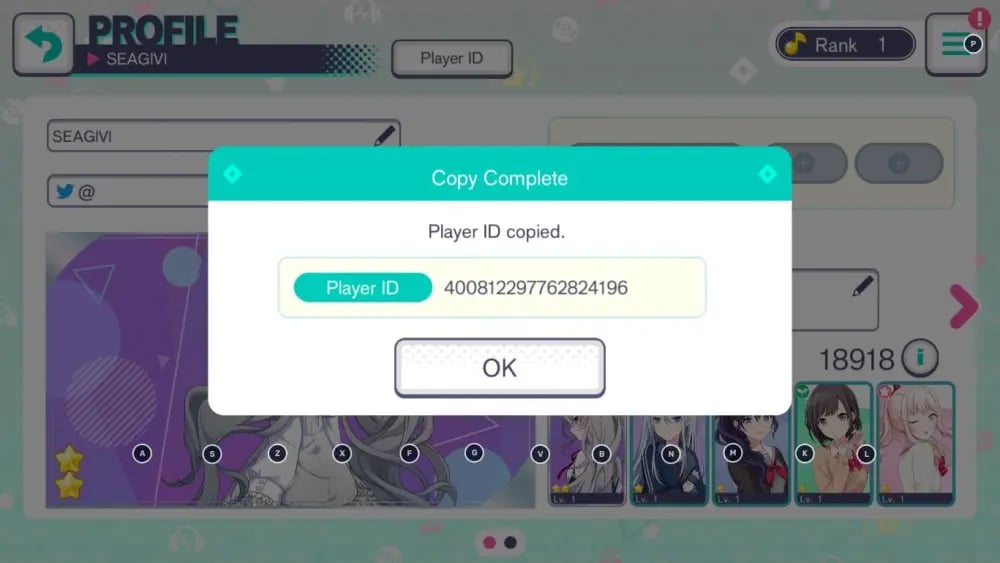
Always copy and paste the ID string directly into VGTopup rather than typing it manually to prevent typos.
Step-by-Step Guide: How to Top Up Hatsune Miku Crystals on VGTopup
To complete your Hatsune Miku Colorful Stage Crystals top up, follow this walkthrough:
- Select Your Crystal Package: Choose the Crystal pack denomination you wish to purchase from the product catalog.
- Enter Your Player ID: Paste your copied 16-to-19 digit Player ID into the designated input field on the page.
- Confirm Account Region: Ensure your game installation matches the Global (EN) edition supported by this service.
- Proceed to Checkout: Review your order summary. Check the real-time pricing and available payment methods displayed directly on the live checkout interface.
- Complete Payment: Finalize your transaction through your selected payment method.
- Receive Your Crystals: Once the transaction processes, the purchased Crystals are credited directly to your in-game profile without any manual code redemption.
How to Claim Your Crystals from the In-Game Gift Box
Once your transaction completes on VGTopup, open your Hatsune Miku: Colorful Stage! app:
- Check the Present Box (Gift Box icon) located on the right side of the main menu.
- Open the Present Box and verify the incoming Crystal balance notification.
- Tap Accept All or claim the specific Crystal pack entry.
- Your total Crystal counter at the top of the home screen will update instantly.
Note: If you are currently logged into the game while completing your order, return to the title screen or restart the game app to refresh your data connection with the server.
Why Choose VGTopup for Safe ID-Only Crystals Top Up
- Zero Password Risk: VGTopup requires only your public Player ID. Your account login credentials, passwords, and linked authentication accounts remain completely private.
- Direct Present Box Delivery: No complicated digital codes or gift cards to manually enter. Crystals route directly to your account.
- Transparent Live Checkout: Check exact package prices, local currency options, and transaction details on our live checkout screen before you pay.
- Dedicated Support Assistance: If you ever enter an incorrect digit or have questions regarding your order status, our customer service team is ready to assist you.
Frequently Asked Questions
What is the difference between paid and free crystals in Project Sekai?
Free Crystals come from completing songs, reading unit stories, leveling up character ranks, and logging in daily. Paid Crystals come exclusively from direct purchases. Paid Crystals give you access to exclusive daily discount pulls, guaranteed 4-star selection banners, and premium costume sets that do not accept Free Crystals.
How do I find my Hatsune Miku: Colorful Stage Player ID?
Open the game, tap the Menu icon in the top right, select Profile, and look below your player name. Tap the copy icon next to the numeric ID sequence to copy it to your clipboard.
Do I need to provide my account login or password to top up on VGTopup?
No. VGTopup operates entirely through Player ID top-ups. You never have to share your Google Play, Apple ID, Facebook, Twitter/X, or Game Center login information.
Where will my purchased crystals appear in the game?
Your purchased Crystals arrive directly in your in-game Present Box (Gift Box). Open the Present Box on the main screen and tap claim to add them to your active balance.
What should I do if my Crystals do not appear immediately after purchase?
First, close the Hatsune Miku: Colorful Stage! app completely and relaunch it to refresh your server connection. Check your Present Box history tab to see if the item was already claimed. If the balance still has not updated, verify that your order status is marked complete on VGTopup and contact customer support with your Order ID and Player ID.
What can I purchase with Crystals in Hatsune Miku: Colorful Stage?
Crystals can be used to scout on gacha banners for 2-star, 3-star, and 4-star character cards, refill Live Bonus energy for event tiering, buy live concert items, purchase music cards in the Music Shop, and unlock exclusive outfits in the Costume Shop.
Select Denomination
Tax, payment fees and eligible coupons are calculated at checkout.
| Package | Price |
|---|---|
| 110 Crystals | USD 0.63 |
| 350 Crystals | USD 1.94 |
| 950 Crystals | USD 5.09 |
| 1,800 Crystals | USD 9.81 |
| 3,060 Crystals | USD 15.72 |
| 5,000 Crystals | USD 25.58 |
| 10,500 Crystals | USD 51.19 |