The Core Steam Wallet Spending Order
Dividing your first month into four distinct buying phases prevents wasted funds. Do not skip phases or jump straight to luxury purchases.
Phase 1: High-Priority Wishlist Triggers (20%+ Discounts)
Never browse the store aimlessly with an active balance. Populate your wishlist first. Steam automatically sends email alerts whenever watchlisted titles hit discounts of 20% or higher. Adding twenty or thirty prospective titles lets Valve's automated system track deals for you. Buy only when that notification fires.
Phase 2: Complete-the-Set Bundles
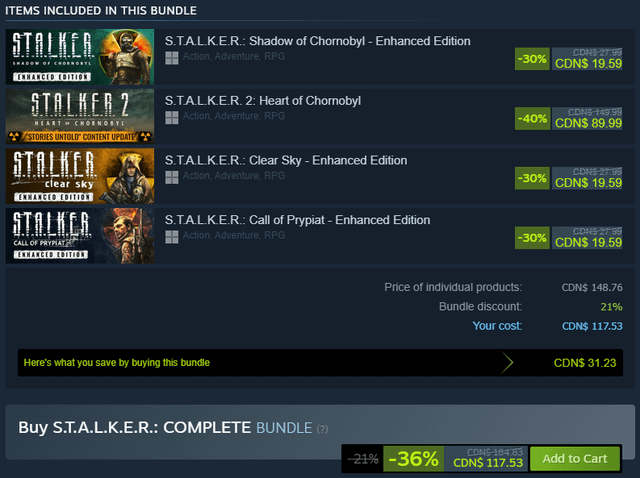
Once you own one or two base titles from a franchise, target dynamic bundles. Steam's Complete-the-Set mechanic automatically detects games already in your library, removes their cost, and applies an extra package discount on the remaining unowned items. This lowers the entry price for the rest of the series.
Steam lets you sell trading cards, cosmetic drops, and crate items on the Community Market. Reinvesting small drops earned from your initial base games generates additional wallet credit for future sales events.
Phase 4: Long-Tail Software and Expansion Content
Save DLC, expansions, and utility software for the final week of your first month. Expansions rarely deliver good value until you confirm that you actually play the base game.
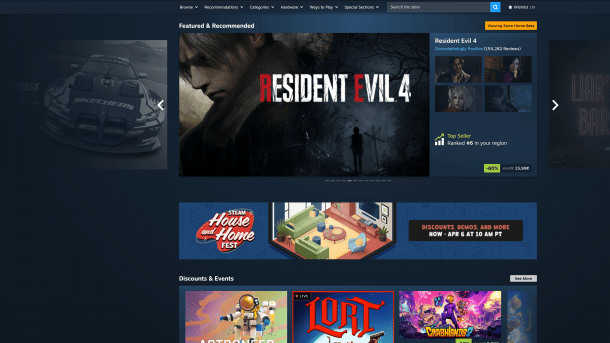
Review storefront discount schedules before spending anything. The table below outlines how Steam formats promotions throughout the calendar year.
| Promotion Type |
Discount Duration |
Homepage Visibility |
Key Store Mechanic |
| Daily Deal |
7 to 14 days |
24-hour spotlight |
Rotates daily at 10 AM Pacific with 2+ slots |
| Midweek Deal |
3 to 14 days |
72-hour spotlight |
Runs Monday 10 AM to Thursday 10 AM Pacific |
| Weekend Deal |
4 to 14 days |
96-hour spotlight |
Runs Thursday 10 AM to Monday 10 AM Pacific |
| Launch Discount |
7 to 14 days |
Varies |
Capped at a maximum discount of 40% |
| Seasonal Sale (Spring/Autumn) |
Approximately 7 days |
Storewide takeover |
Exempt from standard 30-day discount cooldowns |
| Seasonal Sale (Summer/Winter) |
Approximately 14 days |
Storewide takeover |
Major event featuring the deepest catalog cuts |
Takeaway: Timed promotional windows rotate on fixed schedules, meaning you should never buy during off-peak weekend gaps without an active deal flag.
Steam Sale vs Regular Price Priority: Understanding the Rhythm
Valve regulates discount behavior with strict rules. Developers cannot set discounts below 10% or above 95%. When a new game launches, introductory launch discounts are capped at 40% for their 7 to 14-day duration.
Developers must also observe a mandatory 30-day cooldown between standard discounts. If a game leaves a sale today, it cannot run another discount for 30 days. It also cannot run a discount within 30 days of release or a base price hike.
The primary exceptions are Valve's four official seasonal sales: Spring, Summer, Autumn, and Winter. These events bypass the 30-day discount-to-discount cooldown. Summer and Winter sales run for roughly two weeks with storewide catalog cuts. Spring and Autumn sales run for roughly one week.
Do not wait for "flash sales" or fluctuating daily discounts during seasonal events. Valve removed flash sales years ago. Every sale price remains fixed from the first minute of an event to the final second.
| Discount Trigger Level |
Platform Rule / Mechanic |
Strategic Buying Action |
| 10% to 19% |
Minimum allowed developer discount |
Skip unless critical; does not trigger wishlist email |
| 20% to 39% |
Triggers automatic wishlist email notification |
Good entry point for modern or AA titles |
| 40% |
Maximum legal launch discount cap |
Strongest allowable introductory deal for new releases |
| 50% to 95% |
Deep catalog promotional range |
Highest priority tier for back-catalog classics |
| Dynamic Bundle Tier |
Extra ~10% off remaining unowned items |
Always buy packages after securing one base title |
Takeaway: The 20% discount mark is the minimum threshold for active wishlist alerts, while 50% or higher represents the ideal sweet spot for catalog purchases.
Complete-the-Set Bundles: Stacking Unfair Discounts
Dynamic bundles offer an overlooked structural advantage over standard storefront pricing. Steam categorizes bundles into distinct formats, but Complete-the-Set packages offer the highest mathematical return.
When you open a Complete-the-Set bundle, Steam scans your library. It subtracts the cost of every game, soundtrack, or DLC you already own, then applies an additional bundle discount (typically 10%) exclusively to the remaining items.
[Standard Store Purchase]
Unowned Game A ($20) + Unowned Game B ($20) = $40 Total

[Complete-the-Set Mechanic]
Owns Game A ($0) + Unowned Game B ($20) - 10% Bundle Modifier = $18 Total
You can also gift these bundles. Steam recalculates the price based on what the recipient owns, dropping registered titles from the total as long as your friend keeps their library visibility public. Combining a 50% seasonal discount with an extra 10% dynamic bundle deduction yields the cheapest route to expanding a collection.
Steam Beginner Spending Mistakes to Avoid
Avoid these common account traps during your first thirty days:
- Buying Base Games at Full Retail: Unless you plan to play immediately upon download, avoid full retail prices. Promotional discount rules mean most catalog games go on sale multiple times per year.
- Spending Wallet Funds on Profile Cosmetics: Steam grants Points automatically whenever you spend wallet balance. You can redeem Points for profile backgrounds, avatar frames, stickers, and badges. Spending actual cash on items that Points cover for free wastes capital.
- Ignoring Currency Matching on Code Redemption: Steam gift codes are currency-locked. If your account uses USD and you attempt to redeem a code denominated in an incompatible foreign currency, Steam declines the redemption. Always match the code currency to your account region. Unified zones, such as the Eurozone, share cross-border compatibility.
- Hoarding Microtransactions in Live-Service Games: Dumping a balance into gacha pulls or battle passes leaves zero permanent library value if game servers close. Allocate funds to permanent base titles first.
If you plan to top up before a major seasonal event, grabbing a discounted Steam Wallet code ahead of time locks in your balance before storefront traffic spikes.
Budget Allocation Strategy by Spender Tier
Match your spending plan to your actual balance rather than buying reactively. Here is the breakdown across three player categories:
The Budget Conscious Player ($10 to $25 Balance)
- Priority 1: Buy 1 or 2 indie classics during a 50%+ seasonal sale or Weekend Deal.
- Priority 2: Collect trading cards from playing those titles and sell them on the Community Market.
- Priority 3: Reinvest the penny-drops into dynamic bundles or sub-$5 expansions.
- Avoid: Any game under a sub-20% discount.
The Mid-Tier Explorer ($50 to $100 Balance)
- Priority 1: One major headline game at a 30% to 50% discount.
- Priority 2: Two Complete-the-Set bundles to round out beloved franchises.
- Priority 3: Hold $15 in reserve for unexpected Midweek or Daily Deals that hit your wishlist.
- Avoid: Buying launch-week titles with shallow 10% introductory cuts.
The Heavy Collector ($150+ Balance)
- Priority 1: Focus entirely on seasonal Summer or Winter sales where catalog discounts hit 75% to 90%.
- Priority 2: Sweep entire franchise packages using dynamic bundles.
- Priority 3: Supplement remaining unowned DLC collections.
- Avoid: Microtransactions and individual DLC purchases outside of Complete-the-Set collections.
Steam Wallet Safety: Currency Matching and Red Flags
Account security begins before entering a redemption code. Steam's backend verifies currency authentication upon entry. If a code's currency mismatches your account's regional wallet currency, the platform blocks the transaction.
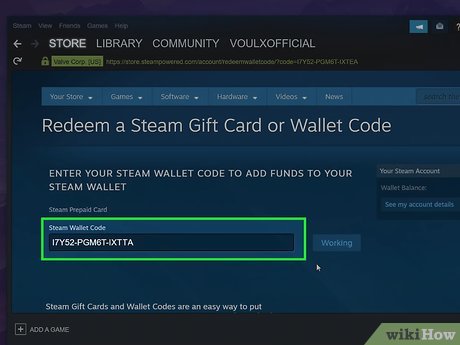
Legitimate redemption only requires pasting a code directly into the client redemption page. It never requires personal account credentials or third-party web access. When securing a digital Steam gift card, verify that the currency code matches your account profile before completing checkout.
| Verification Metric |
Legitimate Digital Code Top-Up |
Account Scam / Fraud Red Flag |
| Required Information |
Standard alphanumeric wallet code only |
Demands Steam username, password, or Guard code |
| Platform Redemption |
Client redemption screen (/account/redeemwalletcode) |
Directs you to third-party web portals for login |
| Balance Credit |
Instant, unexpiring wallet funds |
Delayed delivery requiring external software install |
| Currency Check |
Enforces native currency matching |
Claims cross-currency bypass methods |
Takeaway: Legitimate Steam code redemption happens entirely within the official Steam client interface without ever sharing login passwords.
Frequently Asked Questions
Do Steam gift card codes or wallet balances expire?
No, Steam Wallet codes and credited balances do not carry an expiration date. Once redeemed, the funds remain in your account until you choose to spend them on games, DLC, software, or the Community Market.
Can I redeem a Steam gift card bought in a different currency?
No, Steam requires the gift card currency to match your account's set store currency. If the currency of the digital code differs from your wallet's native currency, Steam will decline the redemption.
How do Complete-the-Set bundles save money on Steam?
Steam detects the items you already own in your library and subtracts their cost from the bundle. It then applies an extra bundle discount, usually around 10%, to the remaining unowned items.
Why are there no flash sales during major Steam events?
Steam permanently removed flash sales in favor of flat, consistent pricing across the entire promotional event. A game's sale price remains static from the first day of a seasonal sale to the last.
What discount percentage triggers an automatic Steam wishlist email?
Discounts set at 20% or higher automatically trigger email alerts to users who have the game on their wishlist. Discounts below 20% will not generate an automatic notification.
Final Thirty-Day Buying Playbook
Treat your balance like working capital rather than a ticking clock. The best steam wallet spending order requires patience, structure, and wishlist monitoring.
Spend your first week building your wishlist. Let the 20% discount alerts guide your timing, purchase core games during Daily, Midweek, or Weekend promotions, and finish franchise catalogs using Complete-the-Set dynamic bundles. Save your leftover cash, let trading cards accumulate Community Market funds, and keep your balance ready for the next seasonal sale.









Comments