Learn how to do a Blockman Go top up safely, locate your numeric User ID in seconds, and pick the right GCube bundle for Bed Wars and VIP perks.
Direct player recharges rely on a single numeric identifier tied to your profile. Enter it right, and GCubes hit your account in minutes. Enter it wrong, and your money credits a total stranger.
Here is how to locate your User ID, select the right bundle, avoid account scams, and verify your balance.
Where to Find Your Blockman GO User ID (UID Finder)
Your User ID (UID) is a fixed numeric code assigned at account creation. Unlike your display name, this number never changes. Third-party top-up providers use it to route GCubes straight to your inventory without requiring your account password.
Finding it takes four quick steps:
- Launch Blockman GO on your mobile device or PC client.
- Tap your Avatar icon in the top-left corner of the main lobby, or tap the Me tab on the bottom-right bar.
- Locate the numeric sequence printed directly beneath your display name.
- Tap the copy icon beside the digits to copy your UID.
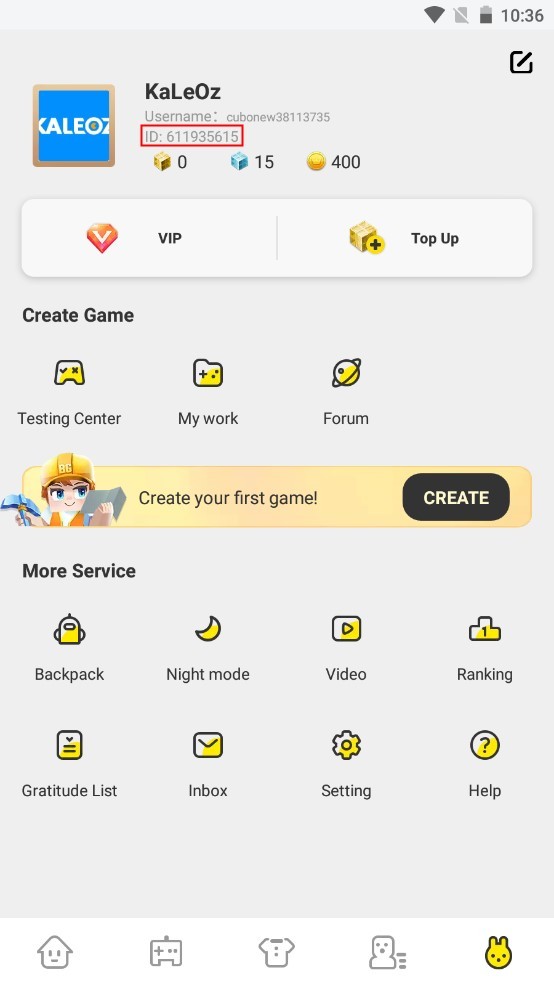
Always tap the copy button instead of typing the sequence by hand. Transposing two digits or confusing a zero (0) with the letter O sends your balance to another player, and processed recharges cannot be refunded or reversed.
Understanding GCubes, Gold, and Coupons
Blockman GO uses a three-tier currency system. Spending real money on the wrong asset is an easy mistake if you do not know the boundaries of each token.
The table below outlines how each currency functions and where it applies across mini-games:
| Currency |
How You Get It |
Primary Purpose |
Key Limitation |
| GCubes |
Direct real-money top up |
Universal premium currency; revives, VIP status, exclusive gear |
Paid currency only |
| Gold |
Playing mini-games & daily gifts |
Basic items, standard entry perks, basic upgrades |
Cannot buy premium VIP or store exclusives |
| Coupons |
Seasonal events & promotions |
Select avatar customizations |
Restricted strictly to cosmetic shop items |
GCubes anchor the entire economy. While Gold accumulates naturally through matches, you cannot convert Gold into GCubes. Coupons only redeem select avatar cosmetics. For functional combat perks, VIP rank, and high-tier gear, GCubes remain the only currency accepted.
Standard GCube Bundles: Sizing Up the Options
Recharge tiers are identical across Android, iOS, and PC. Checking the exact bundle sizes beforehand prevents buying excess balance.
The standard bundle tiers available for account recharges include:
| Bundle Tier |
GCube Amount |
Practical Use Case |
| Tier 1 |
300 GCubes |
Quick top-ups, small cosmetic items, or emergency revives |
| Tier 2 |
600 GCubes |
Basic avatar sets and entry-level mini-game perks |
| Tier 3 |
1650 GCubes |
Seasonal passes, mid-tier sets, and event packages |
| Tier 4 |
3600 GCubes |
High-tier weapon skins, rare cosmetics, and competitive gear |
| Tier 5 |
8400 GCubes |
Long-term stockpiling and full store collection purchases |
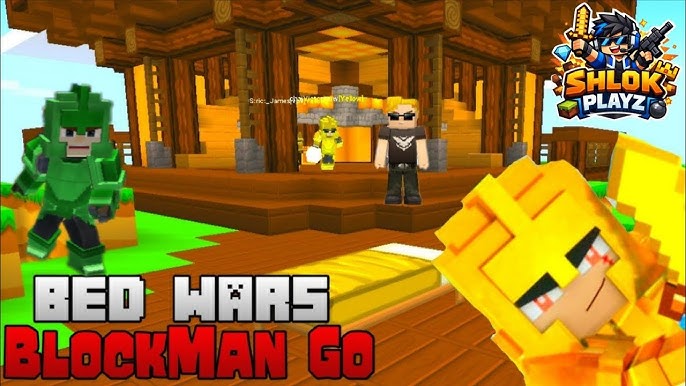
Active Bed Wars players usually get the best mileage out of the 1650 or 3600 packs. The 300 GCube tier works for an emergency revive, but disappears quickly in competitive lobbies. Compare real-time rates through a secure Blockman Go top up before selecting your tier.
Step-by-Step Walkthrough to Buy Blockman Go GCubes
Keep your game client running in the background so you can grab your UID and verify the balance immediately after checkout.
Step 1: Copy Your Numeric ID
Open Blockman GO, tap the Me tab, and copy your numeric User ID directly beneath your display name.
Step 2: Choose Your Package
Head to the store to buy Blockman Go GCubes directly. Choose any denomination from 300 up to 8400 GCubes.
Paste your numeric User ID into the Player ID box. Enter your email address to receive your order receipt and transaction confirmation.
Step 4: Complete the Checkout
Check the numeric string for unintended spaces or missing digits. Pick your payment method and confirm the charge.
Step 5: Verify Your In-Game GCube Balance
Return to Blockman GO. If your top-bar balance has not updated, close the app fully from your task manager and relaunch it to refresh your profile.
Spender Guide: Maximizing Your Budget in Bed Wars and Beyond
Blind spending drains GCubes fast. With rotating banners, subscriptions, and randomized drops sharing the shop floor, spending systematically yields more items per dollar.
Free-to-Play & Minimal Spenders
Rely on Gold from daily matches and claim mailbox event rewards. If you make a one-time purchase, a 300 or 600 GCube pack covers a key weapon skin or emergency revives without recurring costs.
Low to Mid Spenders
If you log in multiple times a week, subscription structures beat raw bundle purchases:
- VIP Membership: Provides a 20% discount on decorations and cosmetics, daily gold payouts, increased gold gain rates, and custom entry effects.
- Monthly Subscription Cards: The Dazzling Monthly Card and Gold Monthly Card grant daily reward drops over a 30-day window on Android and iOS.
Combining the VIP 20% discount with monthly card payouts reduces the net cost of cosmetic purchases while accumulating Points Mall currency for bonus shop redemptions.
Heavy Spenders
For full cosmetic collections and top weapon tiers, buy the 3600 or 8400 GCube packages. Note the crate mechanics: certain store banners use randomized drop rates rather than guaranteed unlocks. Always check the drop table before committing large sums of GCubes to a crate.
Direct UID Top-Up vs Account Sharing Scams
Phishing and account theft are frequent threats in sandbox games. Fraudulent sites advertise fake currency generators or request direct account logins to steal player inventories.

Legitimate UID recharges never compromise login credentials:
- Legitimate Top-Up Requirements: Your numeric User ID and a receipt email address.
- Scam Red Flags: Requests for your account password, Google/Facebook login tokens, SMS two-factor codes, or security recovery questions.
Authorized providers push currency through the recharge API using only your public User ID. If any service demands your password during a blockman go recharge GCube page purchase, exit immediately.
Technical Requirements and Delivery Troubleshooting
Payment processing is typically instant, but technical hiccups can stall your balance update.
App Compatibility and System Specs
Verify that your hardware supports the current game client:
- Android Devices: Android 6.0 or higher is required for active store server synchronization.
- PC Client: Windows 7 or newer, an Intel or AMD processor, 4GB RAM, and 5GB free storage.
Dealing with Delivery Delays
Network congestion between payment gateways and game servers can extend delivery times up to 30 minutes during peak hours.
If your GCubes do not show up within 10 minutes:
- Force-close Blockman GO and relaunch the application.
- Open the Me tab to refresh your GCube balance.
- Check your Points Mall balance to confirm whether transaction loyalty points registered.
- Verify the User ID on your email receipt matches your in-game profile number.
Frequently Asked Questions
Where can I find my Blockman GO User ID?
Open the profile page by tapping your avatar in the top-left corner or tapping the "Me" tab on the bottom menu. Your numeric User ID sits directly below your display name.
What can I purchase with GCubes in Blockman GO?
GCubes purchase VIP subscriptions, character revives, Bed Wars upgrades, and exclusive store cosmetics. Unlike Coupons, GCubes work on functional gameplay items and premium passes.
Do I need to share my account password for a Blockman GO top-up?
No. Legitimate UID top-ups require only your numeric User ID. Never provide your password, SMS verification codes, or third-party login credentials.
What benefits come with a VIP membership?
VIP membership grants a 20% discount on cosmetics and decorations, boosted gold earn rates, daily gold claims, and unique chat and entry visual effects.
What is the difference between GCubes and Gold?
GCubes are the paid premium currency bought with real money for VIP status and premium items. Gold is earned by playing matches and covers standard in-game items.
Can I transfer GCubes between different Blockman GO accounts?
No. GCubes bind directly to the numeric User ID submitted at checkout. Processed transactions cannot be transferred or reassigned to another account.
Final Verdict: Smart Spending in Blockman GO
Topping up Blockman GO takes under two minutes once you copy your numeric User ID. Regular players get the highest return by prioritizing VIP status and Monthly Cards for the 20% store discount and daily bonuses. Always copy your UID straight from the profile tab and never share your account login credentials.







Comments