
Dragon Nest M Classic Cash Top Up on VGTopup
Cash serves as the primary premium currency in Dragon Nest M Classic, allowing you to acquire rare cosmetic outfits, mount eggs, Dragon Jade upgrade chests, and the seasonal DN Pass. Advancing through Saint Haven nest raids and PvP ladders requires consistent character progression, and topping up Cash gives you direct access to essential growth packs, stamina refreshes, and Mall exclusives.
VGTopup provides a direct top-up system for Dragon Nest M Classic that delivers Cash directly to your character using your User ID and Server ID. You never need to share account passwords or link third-party social logins. Browse available Cash denominations, check live pricing directly on the checkout screen, and complete your recharge with complete peace of mind.
How to Top Up Dragon Nest M Classic Cash Using User ID & Server ID
Refilling your Cash balance on VGTopup takes less than a minute. Follow these simple steps to ensure accurate delivery to your character:
- Select the Dragon Nest M Classic Cash denomination or bundle you wish to purchase from the product catalog.
- Enter your in-game User ID in the first player field.
- Enter your exact Server ID in the second player field.
- Confirm your character details to prevent misdelivery across regional servers.
- Select your preferred payment method displayed on the live checkout interface.
- Complete the checkout process.
- Open Dragon Nest M Classic on your mobile device. Your Cash will be added directly to your account balance or delivered via the in-game mailbox.
Where to Find Your Dragon Nest M Classic User ID and Server ID
To ensure your Cash reaches the right character without delay, you must provide your exact numerical User ID and the correct Server ID assigned to your account.
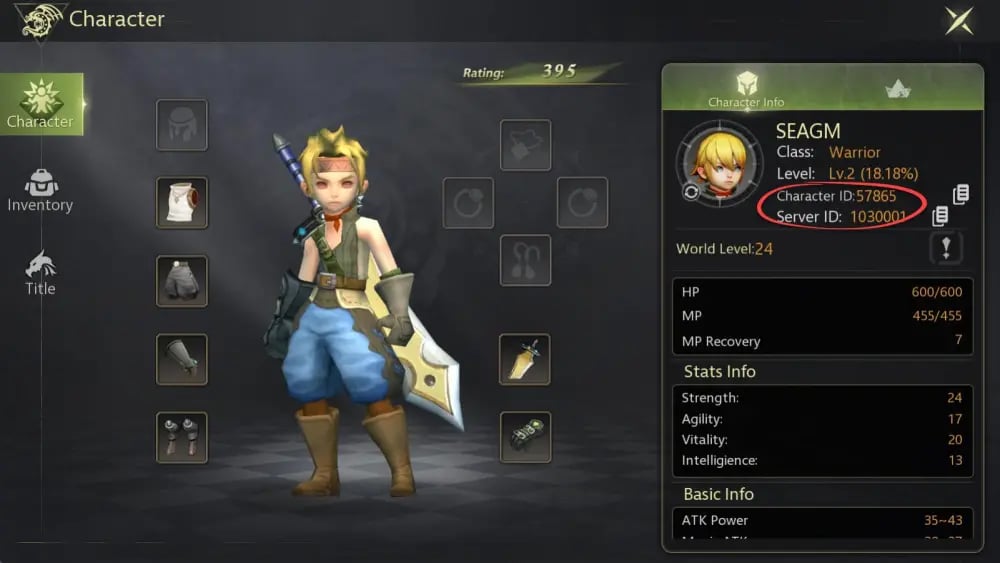
Follow these steps inside the game client to locate your credentials:
- Launch Dragon Nest M Classic and log in to your active character.
- Tap your Character Avatar located in the upper-left corner of the main screen.
- Open the Basic Info tab on the profile window.
- Locate your User ID, which is a numerical string displayed beneath your character name.
- Check the top of your login screen or character selection menu to confirm your assigned Server ID (for example: S1 - Saint Haven or S4 - Calderock).
- Copy or write down both IDs accurately before entering them on VGTopup.
Ensure you enter your specific Server ID rather than just the regional cluster name (such as SEA). This ensures your order routes directly to the correct character database without manual rerouting delays.
Dragon Nest M Classic Cash Denominations and Bonus Tiers
Dragon Nest M Classic offers multiple Cash tiers to match your specific in-game spending goals, whether you need a quick boost for daily dungeon entries or a major reserve for limited-time gacha banners.
| Cash Amount | Primary Recommended Use | Delivery Type |
|---|---|---|
| 300 - 600 Cash | Daily Stamina refills, Abyss Dungeon extra runs | Direct UID Credit |
| 1,200 - 3,000 Cash | Dragon Jade packs, Enhance Protection Jelly bags | Direct UID Credit |
| 6,000 - 9,900 Cash | Seasonal DN Pass Unlock, Mount Evolution items | Direct UID Credit |
| 15,000+ Cash | S-Rank Gacha Costumes, Limited Wings, Rare Mounts | Direct UID Credit |
Note: Exact base amounts, first-top-up double bonuses, and localized currency rates are displayed directly on the VGTopup live checkout screen prior to payment.
How to Unlock the DN Pass with Cash in 2026
The DN Pass represents the highest-value seasonal progression system in Dragon Nest M Classic. Unlocking the premium track grants access to exclusive wings, special titles, high-tier Dragon Jades, and upgrade materials across 50+ reward milestones.
Here is how to unlock and maximize your DN Pass in 2026:
- Check the Pass Cost: The standard premium DN Pass track generally requires 9,900 Cash. Confirm the exact activation requirement inside the in-game Events tab.
- Recharge Required Cash: Purchase the corresponding Cash denomination on VGTopup using your User ID and Server ID.
- Activate the Pass In-Game: Open the DN Pass menu, select Unlock Premium Pass, and confirm the transaction using your funded Cash balance.
- Complete Weekly Objectives: Clear Nest Raids, complete World Boss challenges, and finish daily guild quests to accumulate Pass XP and claim every reward before the season resets.
Best Uses for Cash: DN Pass, Costumes, Mounts, and Upgrade Items
Optimizing your Cash expenditure ensures steady Battle Power (BP) growth and keeps your character competitive in both PvE raids and PvP arenas. Focus your balance on these high-priority categories:
1. Seasonal DN Pass
Unlocking the premium DN Pass yields the highest return on investment. The milestone track provides cosmetic wings, rare mount tokens, and large quantities of Enhance Stones at a fraction of direct Mall purchase costs.
2. S-Rank Costumes and Weapon Skins
Outfits in Dragon Nest M Classic are not purely cosmetic; complete sets provide significant flat stat bonuses, including Physical/Magic Attack, Max HP, and Critical Strike rate. Investing Cash in limited-time costume sets directly bolsters your combat performance.
3. S-Tier Mounts and Wings
Mounts and back accessories grant passive stat multipliers that apply across your entire character profile. Mount evolution stones and wing refinement feathers purchased with Cash help raise your total power ranking quickly.
4. Dragon Jades and Enhance Protection Jellies
High-level Dragon Jades provide essential elemental attack and defense boosts. Combining Cash purchases for Jellies protects your high-tier weapons from breaking or degrading during high-level enhancement attempts at the Saint Haven Blacksmith.
Safe and Secure Cash Top-Up Without Sharing Passwords
Account security is essential when purchasing in-game currencies. VGTopup uses direct ID-based fulfillment protocols, which eliminate the risks associated with account-sharing methods.
- Zero Login Details Required: You only provide your public User ID and Server ID. Never enter your account password, email credentials, or verification codes.
- Official Server Delivery: Cash is credited straight to your character ID through standard server transaction channels, keeping your account fully compliant with game terms of service.
- No Risk of Account Takeover: Because your credentials remain entirely private, your account stays secure throughout the top-up process.
Frequently Asked Questions
How do I top up Cash in Dragon Nest M Classic?
Select your desired Cash package on VGTopup, enter your in-game User ID and Server ID, choose your payment method, and complete the order. The Cash is credited directly to your character upon successful payment processing.
Where can I find my Dragon Nest M Classic User ID and Server ID?
Tap your character avatar in the upper-left corner of the game screen to open the Basic Info menu. Your numerical User ID is listed under your name. Your Server ID is displayed on the main login screen or top of the server selection menu.
Do I need to share my game account password to buy Cash on VGTopup?
No. VGTopup only requires your User ID and Server ID. You never need to share passwords, secondary security codes, or social media login credentials.
How much Cash do I need to purchase the DN Pass in 2026?
The premium DN Pass unlock generally costs 9,900 Cash. Verify the exact requirement in the live in-game Pass interface before selecting your Cash pack on VGTopup.
What items can I buy with Cash in Dragon Nest M Classic?
You can spend Cash in the in-game Mall on the seasonal DN Pass, S-rank costume sets, mount chests, wing gacha boxes, Dragon Jade bags, Enhance Protection Jellies, and daily stamina refreshes.
What should I do if my recharged Cash does not reflect in-game immediately?
First, restart your Dragon Nest M Classic app and check your in-game mailbox as well as your top-bar balance. If your balance does not update within a few minutes, double-check your order status on VGTopup and contact customer support with your order number and User ID for prompt assistance.
Select Denomination
Tax, payment fees and eligible coupons are calculated at checkout.
| Package | Price |
|---|---|
| 626 Cash (600+26 Bonus) | USD 0.63 |
| 3,130 Cash (3000+130 Bonus) | USD 3.22 |
| 6,366 Cash (6000+366 Bonus) | USD 6.57 |
| 12,800 Cash (12000+800 Bonus) | USD 13.14 |
| 19,500 Cash (18000+1500 Bonus) | USD 19.71 |
| 32,900 Cash (30000+2900 Bonus) | USD 32.99 |
| 66,000 Cash (60000+6000 Bonus) | USD 66.36 |
| 132,000 Cash (120000+12000 Bonus) | USD 131.64 |
| 198,000 Cash (180000+18000 Bonus) | USD 196.39 |
| 264,000 Cash (240000+24000 Bonus) | USD 259.06 |
| 330,000 Cash (300000+30000 Bonus) | USD 319.55 |