How to Top Up Onmyoji Arena Jade on VGTopup
Getting Jade for your account takes only a few steps on VGTopup. Follow this quick guide to complete your order without sharing private account details:
- Select Your Jade Pack: Choose the amount of Jade you want to purchase from the available denominations shown on this page.
- Enter Your User ID: Type your numeric in-game User ID into the required field. Double-check your numbers to ensure accurate delivery.
- Proceed to Payment: Select your preferred payment method and click the checkout button.
- Receive Your Jade: Complete the payment. Once confirmed, your Jade will be credited directly to your Onmyoji Arena account balance.
Prices and available packages are displayed live on the checkout screen so you can pick the exact amount you need before confirming your purchase.
Step-by-Step Guide to Finding Your Onmyoji Arena User ID
Your User ID (UID) is the unique identifier assigned to your account. You do not need to provide your login email, social media login, or game password to purchase Jade.
Follow these steps to find your User ID in the game client:
- Launch Onmyoji Arena on your mobile device or tablet and log in to your account.
- In the main lobby screen, tap your Avatar icon located in the upper-left corner.
- Your profile screen will open, displaying your basic stats and character information.
- Locate your User ID (a string of numbers) displayed beneath your character name or in the profile overview box.
- Tap the Copy button next to your User ID to copy it to your clipboard.
- Paste your User ID directly into the input field on VGTopup.
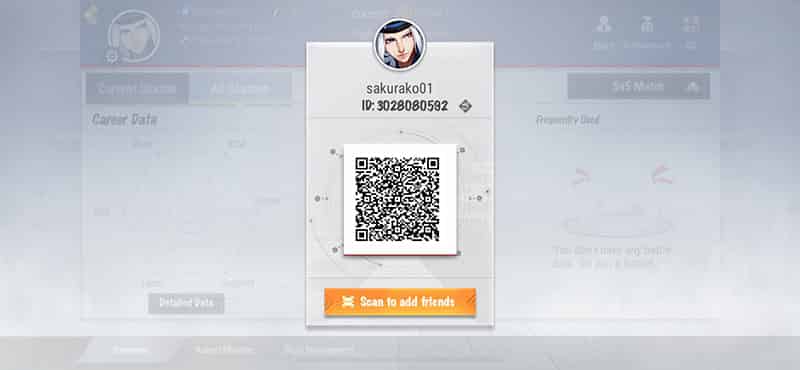
Always verify that your copied ID matches your in-game profile before placing your order. This guarantees that your Jade reaches your character without delay.
What You Can Unlock with Jade in Onmyoji Arena in 2026
Jade is the premium currency in Onmyoji Arena. Having a healthy balance of Jade allows you to access limited-time cosmetic items, speed up character progression, and unlock the latest battle pass content released in 2026.
| Item / Feature | Jade Utilization | Player Benefit |
|---|---|---|
| New Shikigami | Direct purchase or summon bundles | Access new combat roles and champions immediately |
| Premium & Royal Skins | Skin shop purchases and seasonal skin draws | Unique visual effects, voice lines, and recall animations |
| Battle Pass Upgrade | Basic Pass or Battle Pass Elite activation | High-tier cosmetic rewards, coins, and exclusive avatar frames |
| Daruma Blessings | Exchange for lucky amulets and treasure draws | Collect rare tokens to exchange for vaulted or legendary skins |
| Account Utilities | Name change cards, affinity gifts, and coin boosts | Customize profile presentation and increase Shikigami bonds |
Exclusive Shikigami Skins
New skin lines released in 2026 feature custom skill animations, specialized voice packs, and dynamic lobby artwork. Using Jade lets you buy these skins directly from the skin shop or participate in limited-time gacha events such as Daruma Blessings to collect rare dyed and royal editions.
Battle Pass Progression
Activating the seasonal Battle Pass using Jade grants access to exclusive seasonal skins, custom recall animations, pact vouchers, and rare upgrade materials that are not available through free progression tracks. Purchasing the Elite pass gives an instant tier boost to unlock the highest rewards faster.
Daruma Blessings and Lucky Tokens
Players who want vaulted or rare skins can spend Jade on Daruma Blessings. Opening Daruma gives you chances to pull premium skins directly or earn commemorative coins that can be redeemed in the exchange shop for exclusive cosmetics.
Password-Free Account Safety and Secure Checkout
Account safety is a top priority when purchasing in-game currencies. VGTopup operates on a 100% ID-only delivery model. This means you will never be asked for your game password, Google account, Apple ID, Facebook credentials, or verification codes.
- Zero Account Sharing: Your login credentials stay completely private on your own device.
- Direct In-Game Delivery: Top-ups are sent straight through the game server using only your public User ID.
- Encrypted Checkout: All payment transactions are processed using encrypted connections to safeguard your personal data.
- Safe for Guild and Friend Gifts: Because only the User ID is required, you can safely send Jade to friends, family, or guild members without touching their personal accounts.
Supported Payment Options and Instant Processing
VGTopup provides a streamlined checkout experience tailored to international and regional players. You can select from a wide variety of trusted global and local payment options during checkout.
Once your transaction completes, our automated fulfillment system processes the order and credits the Jade directly to the target User ID. You can monitor your order status in real time. If you experience any network disruptions or need assistance with your purchase, our 24/7 customer support team is available to help resolve your issue promptly.
Onmyoji Arena Jade Top Up FAQ
How do I find my Onmyoji Arena User ID?
Open the Onmyoji Arena game client, tap on your profile avatar in the top-left corner of the main screen, and look for your numeric User ID shown in the profile details. Tap the copy icon next to the number to paste it during checkout.
Do I need to share my account password to top up Jade?
No. VGTopup only requires your numeric User ID. You should never share your account password, email login, or verification codes with anyone.
What can I purchase with Jade in Onmyoji Arena?
Jade can be used to unlock new Shikigami, purchase normal and premium skins, activate the seasonal Battle Pass, buy Daruma Blessings, purchase rename cards, and obtain in-game gift packs.
Can I buy Onmyoji Arena Jade for a friend?
Yes. Since only the User ID is required, you can enter your friend's User ID into the input field, complete the payment, and the Jade will be sent directly to their in-game account.
How quickly will the Jade be added to my account?
Orders are processed through an automated system as soon as your payment is confirmed. In most cases, the Jade appears in your in-game balance shortly after checkout. You can restart the game client to refresh your balance.
What should I do if I entered the wrong User ID?
If you realize you entered an incorrect User ID, contact VGTopup customer support immediately with your order details. If the order has not yet been processed by the automated system, support can assist in correcting the information. If the order has already been completed and delivered to an existing account, completed transactions cannot be reversed, so always double-check your User ID before paying.