
Onmyoji Jades Top Up: Direct In-Game Recharge
Powering up your Shikigami team and summoning SSR or SP spirits in Onmyoji requires a consistent supply of premium resources. Performing an Onmyoji Jades top up on VGTopup gives you instant access to S-Jades and Jades without the friction of complicated app store payment setups or regional restrictions.
Whether you need S-Jades to unlock monthly event packages, obtain exclusive skins from the shrine, activate the Talisman Pass, or convert them into standard Jades for Mystery Amulet summons, VGTopup delivers resources straight to your game profile using only your User ID. You never have to share login passwords or grant account access to anyone.
How to Top Up Onmyoji Jades on VGTopup
Recharging your account is straightforward and requires only your in-game User ID. Follow these steps to complete your order:
- Select Your Package: Browse the available S-Jade and Jade denominations on this page and pick the pack that matches your summoning or progression goals.
- Enter Your User ID: Input your exact Onmyoji User ID into the required field. Double-check your numbers to avoid sending resources to another player.
- Proceed to Checkout: Click the purchase button to view live prices, regional currency conversions, and available payment methods on the secure checkout screen.
- Complete Payment: Choose your preferred payment option and finalize the transaction.
- Receive Your Jades: Your purchased Jades or S-Jades are credited directly to your in-game account. Open your game client to see your updated balance.
How to Find Your Onmyoji User ID
Your Onmyoji User ID is a unique numeric identifier linked directly to your server profile. You do not need to share your account email, Google Play login, Apple ID, or password.
To locate your User ID in the game:
- Launch the Onmyoji app on your mobile device or PC client.
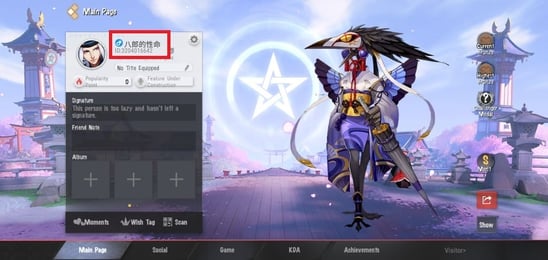
- On the main Courtyard screen, tap your Character Avatar located in the top-left corner.
- Open your profile page.
- Locate your User ID (Character ID) displayed directly below your player nickname.
- Copy the ID number or write it down carefully to paste into the checkout box on VGTopup.
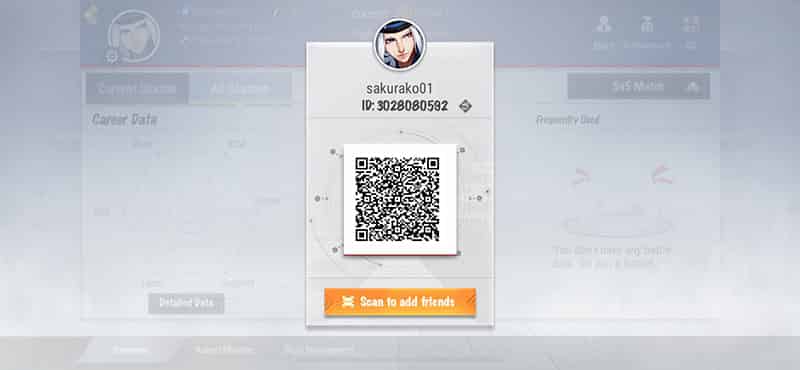
Tip: Always double-check your ID before submitting payment. Because top-ups are processed automatically to the specified account number, verifying your ID prevents accidental delivery to another summoner.
Understanding Onmyoji Currencies: S-Jades vs Jades
New and returning summoners often confuse the multiple currencies present in the Heian world. Understanding how S-Jades and standard Jades work ensures you get the exact items you need for your roster.
| Currency / Item | Acquisition Method | Primary Uses | In-Game Conversion |
|---|---|---|---|
| S-Jades (Paid Jades) | Direct purchase via VGTopup / In-game store | Limited-time gift packs, Talisman Pass upgrades, exclusive skins, monthly card activations | Converts 1:1 directly into regular Jades |
| Jades (Standard) | S-Jade conversion, daily quests, duel rewards, realm raids | Buying Mystery Amulets (Summoning), purchasing AP (Stamina), expanding soul storage, gold packs | 1,000 Jades can buy a pack of 11 Mystery Amulets in the General Shop |
| Mystery Amulets | Bought with Jades, event rewards, weekly share | Summoning Shikigami (R, SR, SSR, SP) during rate-up banners | Obtained directly or converted from Jades |
Onmyoji RPG vs Onmyoji Arena Disambiguation
This product page is exclusively for Onmyoji (the turn-based RPG). It is not compatible with spin-off titles such as Onmyoji Arena (MOBA), Onmyoji: The Card Game, or Onmyoji: King. Please ensure you are purchasing for the flagship RPG before completing your checkout.
How S-Jades Convert in the Shop
S-Jades are the cash-equivalent premium currency in Onmyoji. When you recharge S-Jades, you can spend them on direct value packages in the General Shop, such as:
- Talisman Pass Upgrades: Unlocks deluxe reward tracks and exclusive seasonal Shikigami skins.
- Summoning Supply Packs: Bundles containing Mystery Amulets, Skill Daruma shards, and EXP pills at discounted rates.
- Direct Jade Conversion: You can convert S-Jades into regular Jades at a direct 1:1 ratio at any time to buy standard Jade items, such as the 11-pack Mystery Amulet bundle in the Shop.
Safe Account Top-Up: Zero Password Sharing Required
Account safety is a top priority when purchasing in-game resources online. Many third-party sellers request sensitive login credentials or remote account access, putting your account at risk of theft, unauthorized purchases, or security bans.
VGTopup utilizes a direct-to-UID crediting system:
- No Passwords Needed: You never provide your login password, social login, or verification codes.
- No Account Takeovers: Your account stays logged into your device without interruption.
- Direct Delivery: Currency is credited directly through official server protocols using your public User ID.
- Protected Privacy: Your personal gameplay data, bound emails, and payment information remain confidential.
Why Choose VGTopup for Your Onmyoji Jade Recharge?
- Direct UID Processing: Enter your ID, pay, and receive currency straight in-game.
- Transparent Pricing: Review exact rates, fees, and currency conversions directly on the live checkout screen before completing payment.
- Global Payment Coverage: Access various international and regional payment methods tailored to players worldwide.
- Dedicated Support: If you encounter any issues with your order or have questions about currency delivery, the VGTopup customer service team is available to assist you.
Troubleshooting Delayed or Missing Onmyoji Jades
While most top-ups credit promptly, network lag or server sync delays occasionally happen during major summoning events. If your balance does not update right away, follow these troubleshooting steps:
- Restart the Game Client: Completely close the Onmyoji app, clear your background apps, and reopen the game. This forces your client to refresh its balance with the game server.
- Check Your In-Game Mailbox and Bag: Certain promo packs or converted bundles arrive as claimable items in your courtyard mailbox or appear directly inside your inventory bag.
- Verify Your Order Details: Check your VGTopup order receipt to confirm that the User ID entered matches your current profile ID exactly.
- Check Server Maintenance Status: During official game maintenance or major version updates, in-game deliveries may be paused until maintenance finishes.
- Contact Support: If your currency has not arrived after a short period, reach out to VGTopup customer support with your Order Number, User ID, and proof of payment. Our team will trace your transaction and resolve the issue.
Frequently Asked Questions
How do I top up Jades in Onmyoji?
To top up, select your desired Jade or S-Jade denomination on VGTopup, enter your in-game User ID, proceed to checkout, and complete the payment using your preferred payment method. The resources will be credited directly to your account.
Where can I find my Onmyoji User ID?
Open Onmyoji, tap your character avatar in the upper-left corner of the Courtyard screen to view your profile, and locate the numeric Character ID displayed directly beneath your nickname.
Do I need to provide my Onmyoji password to top up?
No. VGTopup requires only your public User ID. You should never share your account password, email login, or verification codes with any third party.
What is the difference between S-Jades and Jades in Onmyoji?
S-Jades are the premium paid currency used to buy special gift packs, monthly passes, and exclusive skins. Standard Jades can be earned through gameplay or converted from S-Jades at a 1:1 ratio to buy Mystery Amulets, AP, and regular shop items.
How long does it take for Onmyoji Jades to be credited to my account?
Top-ups are processed immediately upon payment confirmation. In most cases, resources appear in your account balance within a few minutes. If there is high server traffic, restarting your game client will refresh your balance.
What should I do if my Onmyoji Jade top-up has not arrived?
First, restart your game app and check your in-game mailbox. If the Jades are still not visible, verify the User ID on your order receipt and contact VGTopup customer support with your order number for fast resolution.
Select Denomination
Tax, payment fees and eligible coupons are calculated at checkout.
| Package | Price |
|---|---|
| 60 Jade | USD 0.82 |
| 300 Jade | USD 4.10 |
| 680 Jade | USD 8.20 |
| 1280 Jade | USD 16.40 |
| 3280 Jade | USD 41.02 |
| 6480 Jade | USD 82.04 |