
Kwai Top Up: How to Top Up Kwai Coins Online
Topping up Kwai Coins allows you to participate actively in live streams, send virtual gifts to your favorite creators, and unlock interactive community features. On VGTopup, the recharge process is direct, simple, and requires only your Kwai User ID (UID). You do not need to share your account login credentials or password.
Follow these steps to complete your order:
- Select Your Coin Amount: Browse the available Kwai Coin denominations listed on this page and choose the package that fits your needs. Live prices and package options are displayed on the checkout interface.
- Enter Your Kwai UID: Type or paste your Kwai User ID into the required account field. Double-check the numbers carefully to ensure the balance reaches your specific account.
- Proceed to Checkout: Click the purchase button and select your preferred payment method from the available local and international options.
- Receive Your Coins: Once payment processing is complete, your Kwai Coins are dispatched straight to your in-app wallet. Re-open or refresh your Kwai app to check your updated balance.
How to Find Your Kwai User ID (UID)
Locating your Kwai User ID takes only a few seconds inside the official mobile application. Because our top-up system operates exclusively via UID, retrieving the exact identifier is the key to a fast and error-free delivery.
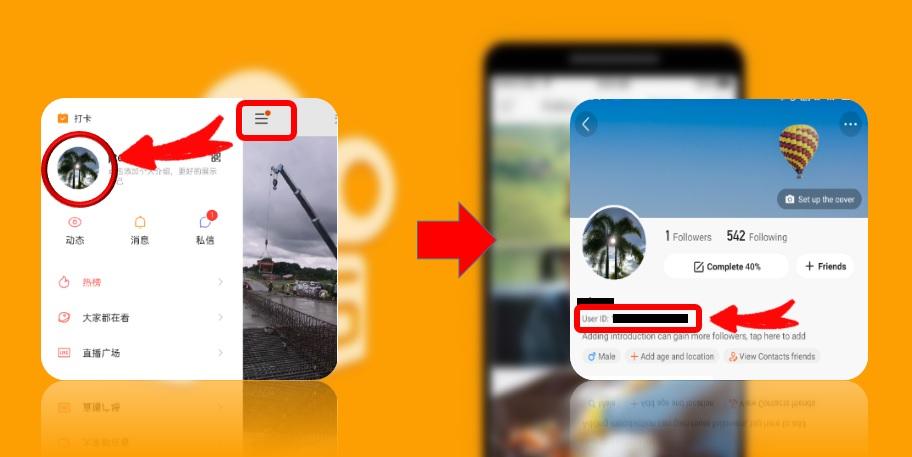
- Open the Kwai app on your iOS or Android device.
- Tap the Profile icon located at the bottom-right corner of the home screen.
- Look beneath your avatar image and display name. You will see your unique Kwai ID (or UID numbers).
- Tap the ID or copy button next to the numbers to copy your UID directly to your clipboard.
- Paste this number into the UID box on VGTopup before confirming your order.
Note: If you have set a custom alphanumeric username on Kwai, your profile also maintains an underlying numeric UID in your account settings. Pasting either your visible Kwai ID or numeric UID from your profile ensures accurate coin routing.
What Are Kwai Coins and How to Use Them
Kwai Coins serve as the primary in-app virtual currency across the Kwai short-video and live-streaming ecosystem. Once loaded into your account wallet, you can use these coins to engage with content creators and enhance your personal profile visibility.
Primary Uses of Kwai Coins
- Virtual Live Gifting: Send dynamic animated gifts (such as sports cars, crowns, fireworks, and roses) to creators during live broadcasts. Gifts help streamers climb creator rankings and convert directly into creator earnings.
- Interactive Live Effects: Trigger custom screen animations and broadcast alerts during live sessions to get noticed by the streamer and the chat audience.
- Creator Support and Badges: Sending gifts frequently during live rooms unlocks special fan badges, chat name colors, and VIP viewer placement in the broadcast room.
- Community Interaction: Use coins during interactive PK battles between two competing streamers to boost your favored creator's point total before the round timer ends.
Kwai Global vs. Kuaishou CN Accounts
It is essential to understand the platform distinction before purchasing. Kwai is the international version of the platform, while Kuaishou operates primarily within Mainland China. Coins purchased for international Kwai accounts apply to accounts registered on the global Kwai application. If your account was created on the domestic Kuaishou (CN) server, ensure your UID corresponds to that specific network, as cross-platform wallet transfers between international Kwai and mainland Kuaishou are not supported by the publisher.
| Feature / Utility | Kwai Coins (Global App) | Creator Impact |
|---|---|---|
| Live Stream Gifts | Animated 2D and 3D effects | Boosts streamer room ranking & revenue |
| Fan Badges | Room chat badge styling | Increases profile standing in stream chat |
| PK Battles | Real-time score contribution | Helps creators win live PK challenges |
| Account Security | Direct UID wallet crediting | Zero password input or sharing needed |
Safe & Secure Checkout: Why Passwords Are Never Required
Account safety is a core priority when purchasing digital currencies. VGTopup relies entirely on public UID routing for Kwai top-ups. This means you will never be asked for your Kwai password, email verification codes, SMS one-time passwords (OTP), or third-party login credentials (such as Google, Apple, or Facebook logins).
Keeping your password private protects your personal data, chat history, and uploaded content from unauthorized access. To complete a safe recharge, all our system requires is your public account identifier. As long as the UID is entered accurately, coins are credited directly to your in-app balance through secure payment channels.
Global Payment Methods Accepted for Kwai Recharge
VGTopup provides access to multiple payment solutions so you can purchase Kwai Coins conveniently from anywhere in the world. Depending on your region, you can complete your checkout using:
- Major credit and debit cards
- Regional digital wallets and local e-wallets
- Online banking and instant transfer systems
All transactions are encrypted with industry-standard security protocols. Exact prices, available regional currencies, and final checkout totals are clearly shown on the order confirmation screen before you complete payment.
Delivery Tracking and Troubleshooting Delayed Coin Top-Ups
Orders processed through VGTopup are dispatched automatically once your payment clears. In rare instances where you do not see your coins immediately, follow this troubleshooting checklist:
- Restart the Kwai App: Force-close the Kwai application on your device and launch it again. This forces the client to fetch updated balance data from the servers.
- Verify the UID on Your Invoice: Check the receipt sent to your email or order history on VGTopup. Confirm that the UID submitted matches your current Kwai profile exactly.
- Check Payment Confirmation: Ensure that your bank or e-wallet transaction has completed successfully and is not marked as pending.
- Contact 24/7 Support: If your payment went through and your coins have not arrived after refreshing your app, contact the VGTopup customer service team with your Order ID and UID. Our team is available around the clock to inspect transaction statuses and resolve any delivery holds.
Frequently Asked Questions
How do I top up Kwai Coins on VGTopup?
Select the number of Kwai Coins you wish to purchase on this page, enter your Kwai User ID (UID), and click checkout. Choose your preferred payment method and complete the payment. Your coins will be credited directly to your Kwai account balance.
Where can I find my Kwai User ID (UID)?
Open the Kwai app, tap your profile tab in the bottom-right corner, and find the Kwai ID or UID numbers displayed directly beneath your username and profile picture. Tap to copy the number.
Do I need to provide my Kwai password to recharge?
No. VGTopup never asks for your password, login codes, or linked social media details. The recharge process requires only your public Kwai UID.
What are Kwai Coins used for?
Kwai Coins are used to purchase live virtual gifts, support creators during live streams, trigger special visual animations, and participate in interactive PK battles.
Can I get a refund if I enter the wrong Kwai UID?
Because top-up deliveries are processed automatically once payment clears, coins sent to an existing, valid UID entered by mistake cannot be reversed or refunded. Please check your UID carefully before confirming your purchase.
How long does it take for Kwai Coins to be delivered?
Delivery is initiated automatically as soon as your payment is confirmed. Most orders reflect in your Kwai app balance shortly after payment completion. If there is any network delay, restarting your Kwai app will refresh your wallet balance.
Select Denomination
Tax, payment fees and eligible coupons are calculated at checkout.
| Package | Price |
|---|---|
| Kwai - Kwai*500 | USD 4.80 |
| Kwai - Kwai*1000 | USD 9.60 |
| Kwai - Kwai*2000 | USD 19.19 |
| Kwai - Kwai*5000 | USD 47.98 |
| Kwai - Kwai*10000 | USD 95.97 |
| Kwai - Kwai*15000 | USD 143.95 |
| Kwai - Kwai*20000 | USD 191.94 |
| Kwai - Kwai*25000 | USD 239.92 |
| Kwai - Kwai*100 | USD 0.96 |