
Hago Top Up: What Are Hago Diamonds and What Can You Buy With Them?
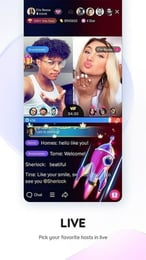
Hago is a popular social gaming platform connecting millions of players worldwide through live voice chat parties, 3D interactive spaces, and casual multiplayer mini-games such as Sheep Fight, Knife Hit, and Ludo. Note that Hago is purely a social interactive gaming application and is completely separate from third-party shipping or shopping services such as HagoBuy.
Diamonds serve as the primary premium in-app currency within Hago. By completing a Hago top up on VGTopup, you add Diamonds directly to your balance to access several premium features:
- Voice Room Virtual Gifts: Send animated gifts such as supercars, luxury yachts, crowns, and rockets to your favorite room hosts and creators to show support and boost room rankings.
- Mini-Game Entry and Items: Access competitive game modes, buy entry passes for special game channels, and acquire in-game items to gain a competitive edge.
- Profile Enhancements: Customize your user profile with animated avatar frames, exclusive chat bubbles, entry banner announcements, and distinct social badges.
- Social Gifting: Surprise friends directly inside party rooms or private chats to increase friendship levels and intimacy badges.
| Hago In-App Activity | Diamond Application | Primary Benefit |
|---|---|---|
| Voice Chat Party Rooms | Animated Virtual Gifts (Crowns, Supercars, Rockets) | Boost host popularity rankings and stand out in the room |
| Multiplayer Mini-Games | Entry Tickets, Game Continues, Match Stakes | Play ranked matches in Sheep Fight, Ludo, and Knife Hit |
| Profile Customization | Exclusive Avatar Borders, Entry Effects, Title Badges | Customize personal profile visual style and social status |
| Interactive Social Gifting | Direct Gift Exchanges and Tip Boxes | Build friendships and level up intimacy badges with friends |
Step-by-Step Guide: How to Top Up Hago Diamonds on VGTopup
Recharging Diamonds on VGTopup takes only a few quick steps. Because our system uses direct Player ID processing, you never have to redeem complex digital gift card codes or wait for voucher pins.
- Select Your Diamond Pack: Browse the live denomination list on VGTopup and choose the number of Hago Diamonds you want to purchase.
- Enter Your Hago Player ID: Type your numerical Hago Player ID into the required field.
- Verify Your Details: Double-check that your entered Player ID is accurate to prevent sending Diamonds to another user.
- Choose a Payment Method: Select your preferred payment option from our secure checkout system. Live prices and processing options display transparently at checkout.
- Complete Checkout: Finalize your payment. Once confirmed, your Hago Diamonds credit directly to your in-app account balance.
How to Find Your Hago Player ID
To ensure your Hago Diamond recharge arrives without delay, you must provide your permanent numerical Player ID rather than your custom screen nickname. Finding your ID takes only a few seconds:
- Launch the Hago application on your mobile device.
- Tap the Me icon located in the bottom-right corner of the home screen to open your user profile.
- Locate your numerical Player ID, which appears directly beneath your avatar and display name.
- Tap the copy icon next to the number sequence to copy your ID directly to your clipboard, then paste it into the Player ID box on VGTopup.
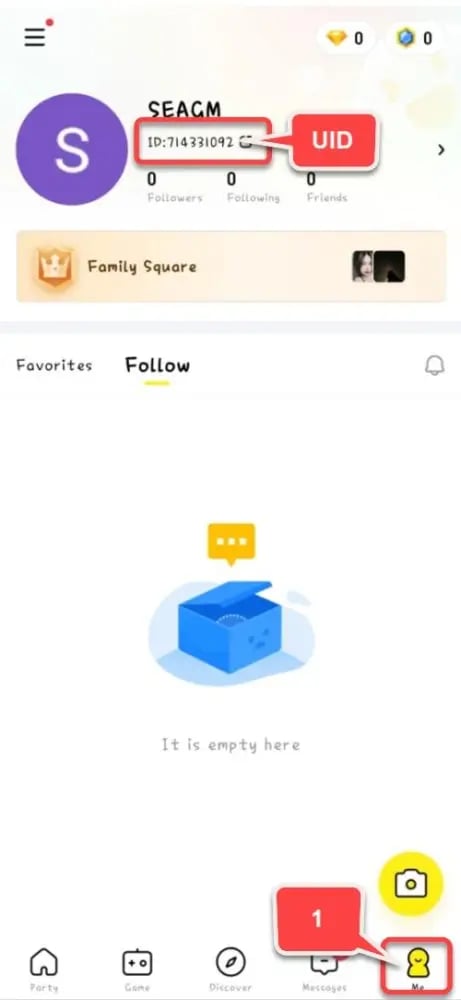
Make sure to enter the full numerical sequence without adding extra spaces or letters.
Can You Send Hago Diamonds as Gifts to Friends?
Yes, you can easily buy Hago Diamonds for friends, family members, or live room streamers on VGTopup. Because the order process only requires a numerical Hago Player ID, you do not need access to their personal login details.
To send Diamonds to another player:- Ask the recipient for their numerical Hago Player ID.- Input their Player ID on the VGTopup product page instead of your own.- Complete the payment. The Diamonds deposit straight into your friend's Hago wallet, allowing them to use their balance immediately for party room gifts and mini-games.
Secure Hago Recharge: Why Player ID-Only Top Up Protects Your Account
Account safety is essential when purchasing digital game currencies online. VGTopup enforces strict security standards to ensure your personal information remains safe at all times.
- Zero Password Sharing: We will never ask for your Hago password, linked social media credentials, or SMS verification codes. Entering only your public Player ID eliminates the risk of unauthorized account access.
- Direct In-App Delivery: Diamonds are credited directly through the platform's official ID system, ensuring your account balance updates correctly without violating game safety rules.
- Encrypted Checkout: All transactions on VGTopup are protected with industry-standard encryption protocols, keeping your payment details secure throughout the purchase process.
Troubleshooting Common Hago Top Up and Delivery Issues
If you experience any delay or issue with your Diamond top up, follow these practical troubleshooting steps:
- Refresh the App: Close the Hago application completely, reopen it, and check your Diamond balance under your profile wallet. Network latency can sometimes cause a brief display delay.
- Check Your Internet Connection: Ensure you have a stable Wi-Fi or mobile data connection so your in-app balance can sync properly with the game servers.
- Verify the Submitted Player ID: If Diamonds do not appear, check your order confirmation receipt on VGTopup to verify that the Player ID you entered matches your account ID. Submitting an incorrect numerical ID can cause funds to credit to a different user.
- Check Maintenance Announcements: Occasionally, Hago conducts server maintenance that temporarily delays in-game currency updates. Balances update automatically once server operations resume.
- Contact Support: If your balance does not update after checking these steps, contact the VGTopup customer support team with your order number and transaction details for prompt assistance.
Frequently Asked Questions About Hago Top Up
How do I find my Hago Player ID?
Open the Hago app, tap the Me tab in the bottom-right corner, and locate the numerical sequence displayed below your profile photo and nickname. Tap the copy button to copy the ID directly.
What can I buy with Hago Diamonds?
You can use Hago Diamonds to send animated virtual gifts in live voice chat rooms, purchase entry passes and continues for mini-games like Sheep Fight and Ludo, and unlock exclusive profile badges, chat bubbles, and avatar frames.
Can I play Hago games online with friends?
Yes. Hago offers a broad library of online multiplayer mini-games. You can create private game rooms, invite your friends, or match with global players in real time while using voice chat.
Can I recharge Hago Diamonds for a friend's account?
Yes. Simply enter your friend's numerical Hago Player ID in the Player ID field on VGTopup before completing checkout. The Diamonds will credit directly to their in-app wallet.
Do I need to share my Hago password to top up Diamonds?
No. VGTopup only requires your public numerical Hago Player ID. You never need to share passwords, email logins, or verification codes.
What should I do if my Hago Diamonds do not appear after purchase?
Restart your Hago app to refresh the wallet balance. If the Diamonds still do not show up, check your receipt to confirm you submitted the correct Player ID, then reach out to VGTopup customer support with your order number.
Select Denomination
Tax, payment fees and eligible coupons are calculated at checkout.
| Package | Price |
|---|---|
| Hago - Hago*30000 | USD 2.23 |
| Hago - Hago*50000 | USD 3.72 |
| Hago - Hago*70000 | USD 5.21 |
| Hago - Hago*100000 | USD 7.45 |
| Hago - Hago*200000 | USD 14.89 |
| Hago - Hago*500000 | USD 37.23 |
| Hago - Hago*700000 | USD 52.12 |
| Hago - Hago*1000000 | USD 74.46 |
| Hago - Hago*2000000 | USD 148.91 |
| Hago - Hago*5000000 | USD 372.29 |