Film preset values
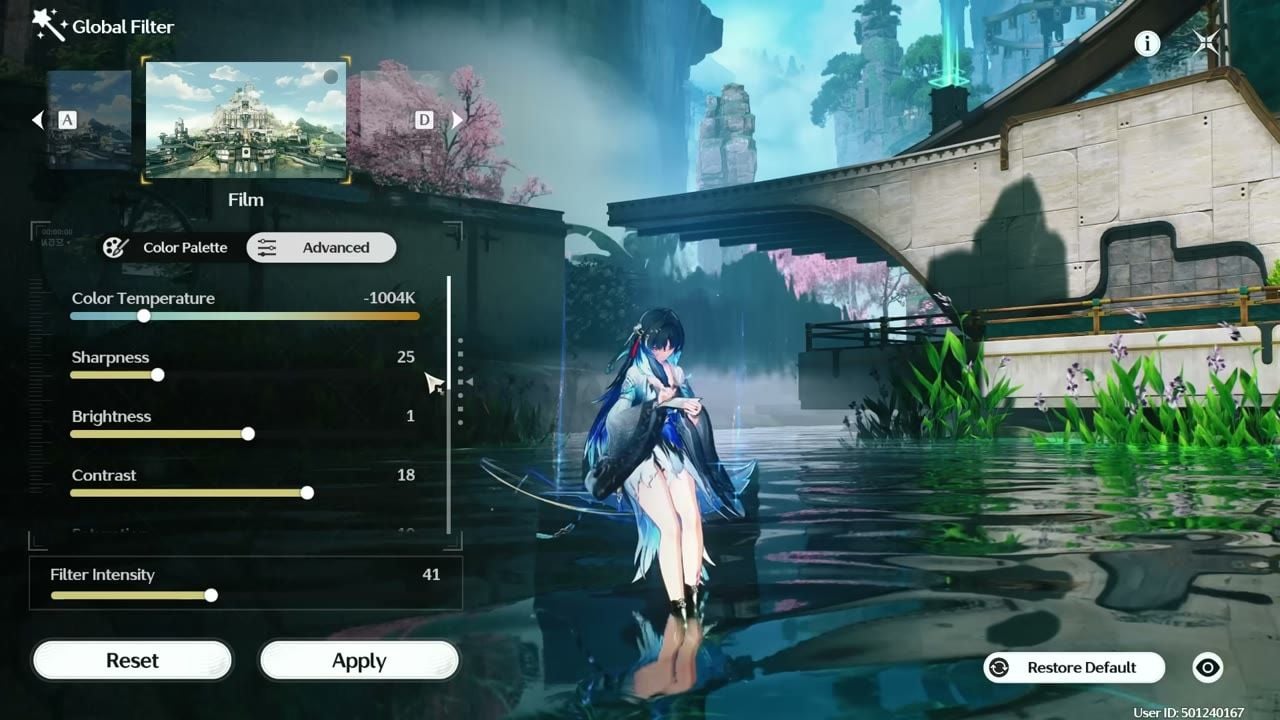
Fan-favorite clean grade. Cooler temperature, modest sharpness, bloom cut hard so highlights stay readable.
Slider | Value |
|---|
Color Temperature | -1004K |
Sharpness | 25 |
Brightness | 1 |
Contrast | 18 |
Saturation | 10 |
Grayscale | -24 |
Shadows | 13 |
Bloom | -75 |
Vignette | 0 |
Film Grain | 0 |
Filter Intensity | 41 (range 30–50) |
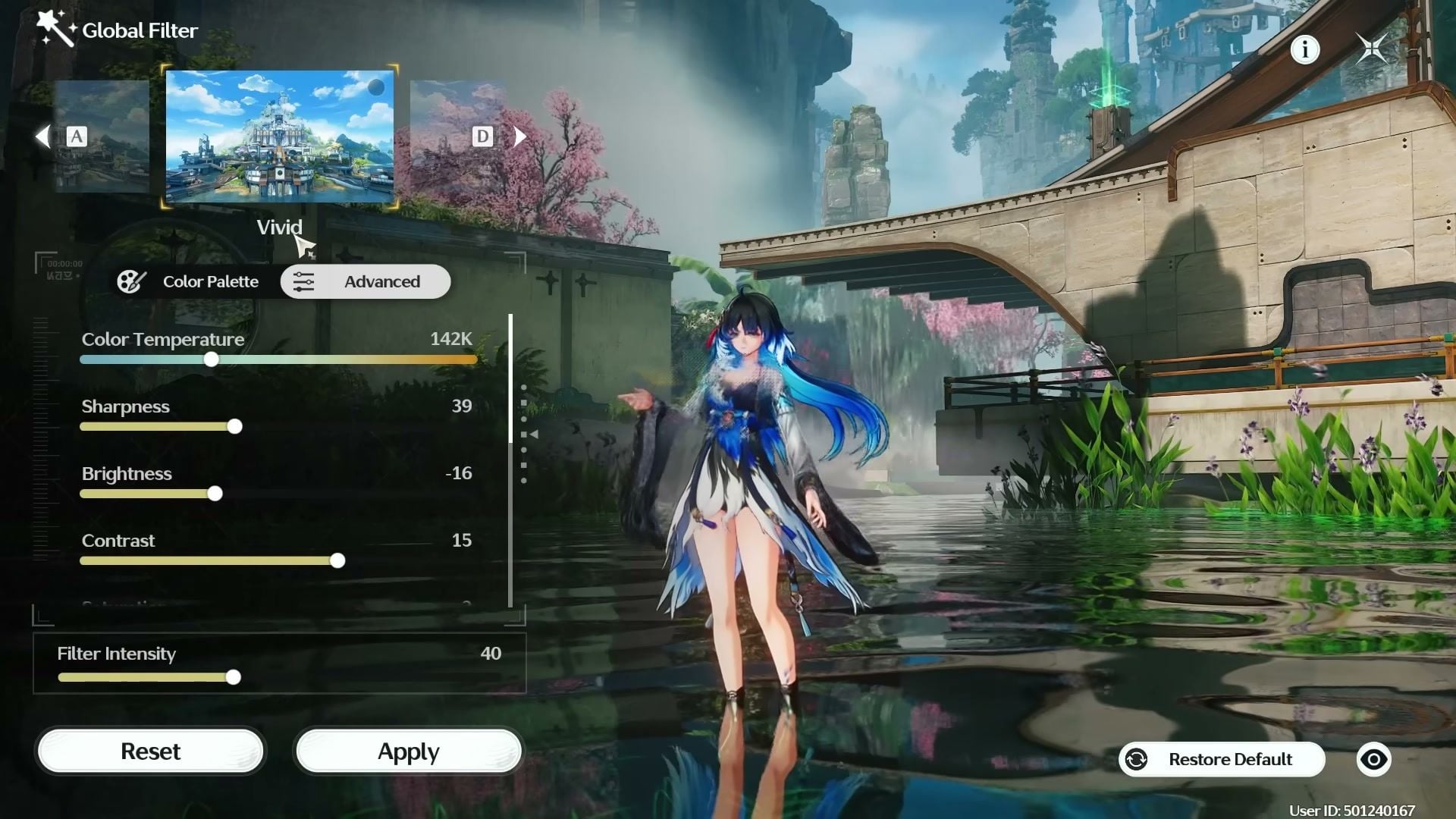
Vivid preset values
The saturated grade. Warm temperature, higher sharpness, light vignette. Drop intensity if skin turns too red.
Slider | Value |
|---|
Color Temperature | ~100–142K |
Sharpness | 39 |
Brightness | -16 |
Contrast | 15 |
Saturation | 3 |
Grayscale | -25 to -29 |
Shadows | 11 |
Bloom | -35 to -45 |
Vignette | 10 |
Film Grain | 0 |
Color Palette point | (1, 0) |
Filter Intensity | 40 (range 30–40) |
Default preset values (tweaked)
Stock Default keeps the washed haze. Cool the temperature, add a little sharpness, drop bloom. This grade works for long daily sessions.
Slider | Value |
|---|
Color Temperature | -400 to -500K (cooler / bluish) |
Sharpness | 29 |
Brightness | -12 |
Contrast | 12 |
Saturation | 10 |
Grayscale | -8 |
Shadows | -19 to -22 |
Bloom | 0 to -65 (0 if you want more glow) |
Vignette | 0 |
Film Grain | 0 |
Color Palette point | (3, -3) |
Sharpness above ~30 roughs up skill VFX. Keep a little bloom for Photo Mode; cut it for combat clarity.
How to Enable Global Filter
Open Settings → Graphics.
Set Image Display Mode to Global Filter (mutually exclusive with Eye Comfort).
Tap Adjust next to Global Filter.
Pick Film, Vivid, or Default, then open Color Palette and Advanced.
Enter the values above, set Filter Intensity, then Apply.
Cutscenes and UI ignore the filter. Only world and character rendering take the grade (Kuro 2.7 notes). Mobile, PC, PS5, and Mac all ship Global Filter.
Graphics Settings That Pair With Filters
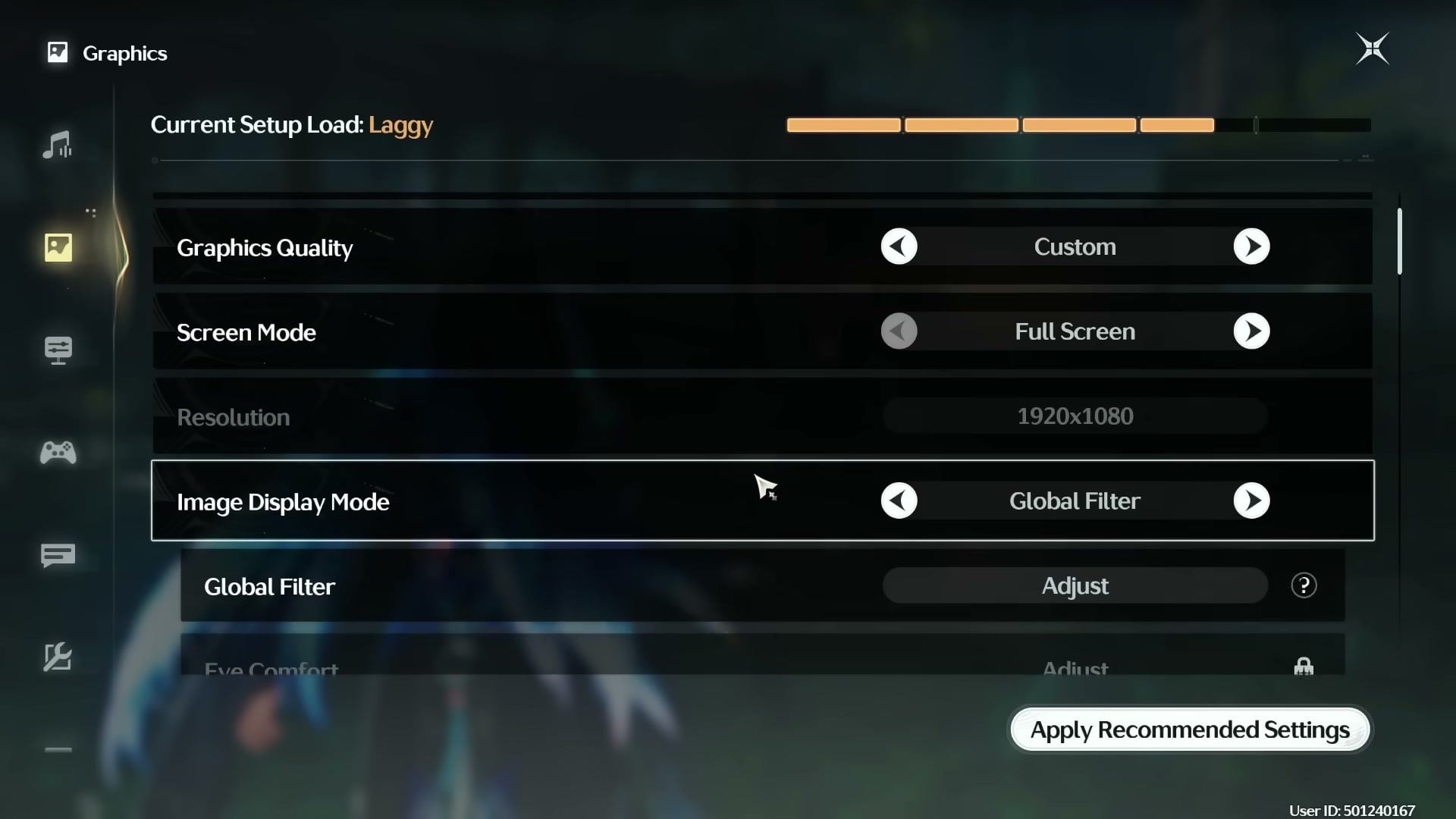
The filter carries the visual upgrade. Skip Ultra on every slider. Maxed setups often sit on Laggy in the load meter and buy little once Global Filter is tuned.
Setting | Recommendation | Why |
|---|
Graphics Quality | Custom | Lets you keep filter gains without maxing everything |
Screen Mode | Full Screen | Cleaner color path than borderless on many PCs |
Resolution | Native (e.g. 1920×1080) | Avoid upscaling blur before the filter |
Motion Blur | Off | Stops smear when you pan the camera |
Shadows | Medium / High | Low flattens the world; Ultra costs FPS for small gains |
Special Effects | High | Keeps combat VFX readable after bloom cuts |
DLSS / FSR | Quality (if available) | Stability without soft mush |
Image Display Mode | Global Filter | Required for the presets above |
Lower in-game brightness toward the mid-40s if the world still feels foggy after the filter.
Match Color Temperature to your monitor. Warm panels want more negative K; cool panels can stay nearer zero.
Retune when you enter a new region. Version 3.5 lighting reacts differently than older maps.
Skip third-party injectors if you only need color. Built-in Global Filter stays inside Kuro’s supported path.
NVIDIA Freestyle (Alt+F3) is optional on PC for extra sharpen / vibrance; stack it lightly or the image turns grainy.
Get More Out of Your Session
A cleaner picture pairs well with a finished roster. Use the same account plan you already track on VGTopup:
Need Lunites for a guarantee? Top up on VGTopup Wuthering Waves with UID only.
FAQ
What are the best Wuthering Waves filter settings right now?
Start with Film at intensity ~41 if you want a clean daily look. Use Vivid at ~40 for saturated outdoor shots. Use the tweaked Default table if you prefer a cooler, less stylized grade. Intensity is the first slider you should personalize.
Where is Global Filter in Wuthering Waves?
Settings → Graphics → Image Display Mode → Global Filter → Adjust. You cannot run Global Filter and Eye Comfort at the same time.
Do Global Filters work on mobile?
Yes. Kuro opened Global Filter on mobile in Version 2.7 alongside PC, PS5, and Mac. The same Color Palette and Advanced sliders apply.
Will custom filters get you banned?
No. Global Filter is an official display option. It does not change combat data. Cutscenes and UI stay unfiltered by design.
Why does the game still look gray after I raise graphics quality?
Default brightness and stock color grading keep a hazy cast. Switch to Global Filter, drop bloom, add a little contrast, and cool or warm the temperature to match your screen. Raising every quality slider leaves that haze in place.
Does Global Filter lower FPS?
In-game color grades cost almost nothing. Heavy Ultra shadows and effects cost more. Keep graphics on a stable Custom preset and let the filter handle the look.
Conclusion
Wuthering Waves best graphics and filter settings come from Global Filter first, GPU max-out second. Copy Film for a clean cinematic grade, Vivid for color pop, or the tweaked Default for cooler daily play, then park intensity where your monitor and taste agree. Come back when we refresh these tables after the next display update, and keep Lunites ready on VGTopup for the banner you already planned to finish.








Comments