The test: delay or genuine failure?
A charge with no diamonds collapses into exactly two states, and everything you do next hinges on which one you're staring at. The first is settlement lag: the money moved, the order's queued, the diamonds drop once the gateway confirms. The second is a real failure: the transaction errored, or the diamonds shipped somewhere they can't be pulled back from. People treat both as a five-alarm fire. They're nothing alike.
The cleanest tell is a bank authorization hold. It prints on your statement looking exactly like a finished charge, but it's not a settled payment. Standard payment-processor docs, cross-referenced in 2026 top-up guides, say these holds usually release on their own in 1–5 business days with no refund request filed. So a "pending" line on your card that hasn't matched an imo order yet is frequently money that was never really taken. Reserved, not spent. That one distinction, which most troubleshooting pages breeze right past, separates "wait calmly" from "torch a refund claim you never needed."
Run this decoder before you touch anything else:
| Status you see |
What it actually means |
Your next action |
| Pending / "processing" |
Order queued or auth hold placed; money may not be settled |
Wait, recheck balance in 10–15 min, then at the 24h mark |
| Failed / declined but money gone |
Likely auth hold or auto-reversing charge |
Wait 1–5 business days for reversal; don't re-pay |
| Successful + diamonds missing |
Settled payment, delivery gap or wrong target |
Capture proof now, then ticket / store refund |
Source: imo Terms + Google/Apple official support, payment-processor docs (2026)
Delivery is normally quick. A 2026 BitTopup fix guide pegs roughly 95% of imo diamond deliveries at under five minutes. That's a community-tier number, so treat it as a pointer, not gospel. The official ceiling is way looser: imo's own help docs say payments can take up to 3 working days to process, per the imo FAQ. My read is simple. Ten minutes into a quiet stretch and you're fine. Hit 24 hours and that's your cue to move, not your cue to keep mashing refresh.
Why the charge lands but the diamonds don't
Four mechanisms cause nearly every "money deducted but imo diamonds not received" story, and they are not equally recoverable. That recoverability gap is the bit guides bury, so I'm leading with it:
| Failure cause |
How common |
Recoverability |
Realistic fix |
| Gateway lag / processing queue |
High |
High |
Wait; usually self-resolves |
| Bank authorization hold |
High |
High (auto) |
Wait 1–5 business days |
| Double charge from re-attempts |
Moderate |
Moderate |
Refund one charge with proof |
| Wrong / mistyped account ID |
Lower |
Very low |
Often unrecoverable |
Source: synthesized from imo FAQ (2020) and BitTopup guides (2026)

Gateway lag is the dull, good-news culprit. During peak gifting hours and event spikes, processing queues clog and delivery that's usually instant drags. Typical triggers, per a 2026 BitTopup recharge guide, include connection drops and gateway slowdown. The move: restart the app, recheck your balance after 10–15 minutes. User reports across Facebook groups and Reddit threads in 2026 say the same thing, that a restart or plain patience clears a big share of not-received cases. Community-sourced, sure. But it tracks with how settlement actually behaves.
Bank authorization holds fool more people than anything else here. Your bank reserves the funds the second you tap buy. If the purchase doesn't fully settle, that reservation masquerades as a charge until it expires. No diamonds, money apparently gone, full panic mode, and then it quietly reverses. This is the single biggest reason I'd beg you not to dispute anything inside the first 24 hours.
Double charges trace back almost entirely to one self-inflicted habit: re-tapping buy during lag. Both the imo FAQ and BitTopup guides flag that re-attempting payment on a sluggish gateway can spawn multiple real charges. If attempt one was an auth hold and attempt two settled, congratulations, you've got two line items and an actual cleanup job.
Wrong account ID is the one that should genuinely rattle you. imo IDs run 7–10 digits, per the BitTopup recharge guide, and one fat-fingered digit can route diamonds straight into a stranger's real account. No delivery gap exists. The diamonds were delivered, just not to you. This is the least recoverable failure type going, and it deserves far louder warnings than it tends to get. Prevention is the only cure that actually works.
Recovery paths that actually work, in order
Gather proof first. This is the highest-leverage thing on the whole list, and it's the step folks skip while sprinting to fire off an angry message. Screenshots of the in-app purchase paired with the matching bank line resolve tickets dramatically faster than a paragraph of frustration, because support can match the order on sight instead of dragging the same details out of you across three replies.
Pull these three artifacts before you contact a soul:
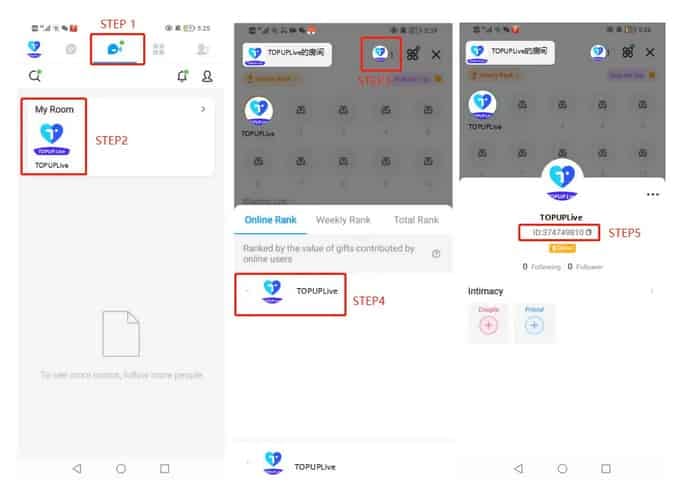
- Order ID / transaction reference — Google Play purchases live under your Activity at pay.google.com; App Store purchases at reportaproblem.apple.com; for direct payments, your bank statement carries the reference. (Locations per imo FAQ and store policies.)
- In-app purchase screenshot — the diamond pack, the amount, the timestamp.
- Bank statement line — the deduction, with its own timestamp.
A detail that genuinely speeds things up: order IDs are timestamped, and quoting the exact timestamp matches your case faster than quoting the amount. Amounts repeat across thousands of buyers in a single day. A precise timestamp is nearly unique. Lead with it.

imo's documented route is simple enough. Confirm your payment and imo ID, sit through the processing window, clear the Google Play cache if that's how you paid, then contact support with your transaction details, screenshots, and imo ID, per the imo FAQ. Don't pad the message. Attach the proof, quote the timestamp, done.
One expectation to set early. imo's Terms are blunt about purchased diamonds. The imo Terms of Service state, verbatim: "YOU UNDERSTAND AND AGREE THAT ALL SALES OF DIAMONDS AND/OR OTHER VIRTUAL ITEMS ARE FINAL AND IRREVOCABLE, AND WE DO NOT OFFER REFUNDS FOR ANY PURCHASED DIAMONDS." That clause covers delivered diamonds you regret, not diamonds you paid for and never saw. A true non-delivery is a fulfillment problem, which is a separate conversation from a refund request, and you'd be wise to frame your ticket that way.
Google Play and App Store refund routes
Paid through a store? That store, not imo, often holds the faster lever. For Google Play, request the refund within 48 hours through the Play Store; miss that window and you're punted to contact the developer, per Google Play Help. Once approved, processing runs 3–5 business days for credit and debit cards, occasionally stretching to 10. Apple plays it looser and case-by-case. Card refunds can take up to 30 days, while store-credit refunds land in roughly 48 hours, per Apple Support.
The chargeback warning nobody puts loud enough
Filing a bank chargeback before you've talked to support is a blunder, and it can cost you the account outright. Per the 2026 BitTopup refund guide, kicking off a chargeback before going through support risks imo account suspension. A chargeback is a hostile financial move from the platform's vantage point. It claws money back over their head, and platforms routinely freeze accounts that pull it. Treat it as the last resort after support and store routes are truly tapped out, never your opening gambit. Chargebacks crawl, too: 60–120 days is typical depending on your bank, so it's slow and dangerous.
One more edge case worth knowing. If your "failed" transaction already auto-reversed, filing a refund on top of it can later trigger a double-credit clawback. The platform reconciles, spots that you were paid twice, and yanks it back. Don't refund-request a transaction that already fixed itself.
What "getting your money back" realistically looks like

Set your clock by the channel, not by wishful thinking. Here's the honest spread, stitched together from each provider's own policy:
| Channel |
Request window |
Realistic processing time |
| Google Play |
Within 48h preferred |
3–5 business days (cards) |
| Apple App Store |
Case-by-case |
Up to 30 days (cards), ~48h (store credit) |
| imo official support |
None — sales final |
Up to 3 working days to process payments |
| Bank chargeback |
Varies by bank |
60–120 days typical |
Source: imo Terms (2026), Google Play Help (2026), Apple Support (2026)
Read it like a ranking. An auth hold that reverses itself is your quickest exit (1–5 business days, zero paperwork). A store refund's next fastest and most reliable when you're inside the window. Official support sits in the middle, and it's your lane for genuine non-delivery. The chargeback's the slowest, and the only one that can detonate your account. Order your actions to mirror exactly that.
Stopping this before it starts
Two habits kill off most of the misery. Verify the account ID before you confirm, every single digit, because the wrong-ID failure is the one route above with near-zero recoverability. And don't re-tap during lag. If the screen hangs, wait and check your balance instead of firing a second payment that turns into a second real charge.
Where you buy shapes how traceable a snag becomes, too. Third-party top-up routes credit fast, most orders landing within minutes of payment confirmation, per Enjoygm and Topuplive's 2026 figures, a community-tier claim, and a verified reseller hands you a clean order trail to point at if something stalls. If you'd rather dodge the in-app delivery-gap stress next time, you can run your imo Diamonds top up through a verified channel for traceable orders and clear receipts (disclosure: that's a third-party reseller, not the in-app store). The trade-off's honest. Official in-app purchases are non-refundable by policy but go straight to your account; a reseller's guarantee, where offered, covers their service, not imo's ledger.
So is it a delay or a dispute?
In the clear majority of "imo diamonds charged but not received" cases, you're looking at a delay or a self-reversing hold, not a scam. The mechanics vouch for it: settlement queues lag, banks place holds that mimic charges, and both clear unprompted. The real disputes cluster in two buckets, settled payments that never delivered and double charges, and those are precisely where your saved proof earns its keep.
The official-versus-reseller refund argument resolves cleanly. For an in-app purchase, imo's no-refund policy rules, and a reseller's money-back promise only ever touches the reseller's own transaction. They're not in conflict; they govern different things. So my verdict's the unglamorous one. Ride out the 24-hour window. Capture your order ID and screenshots. Use the store refund route if you're inside it, official support if you're not, and keep the chargeback as the emergency exit it is, because pulling that lever first is the one move that flips a missing-diamonds annoyance into a frozen account.
Frequently Asked Questions
Why was I charged for imo diamonds but didn't receive them?
Usually it's settlement lag or a bank authorization hold mimicking a real charge. Those clear inside 1–5 business days on their own, per standard processor docs. The minority that are real failures break down into settled-but-undelivered orders or double charges from re-tapping during lag. Check whether your status reads pending versus successful before you assume the worst.
How long should I wait before treating it as a real problem?
The 24-hour mark's your trigger. About 95% of deliveries wrap in under five minutes per BitTopup's 2026 number, but imo's official ceiling is up to 3 working days. Jumping in before 24 hours usually just buys you a "please wait" reply and weakens your case. Past 24 hours with a confirmed successful payment? Gather proof and open a ticket.
Can I recover imo diamonds sent to the wrong account ID?
Honestly, this is the one I'd brace you for. It's near-unrecoverable. The diamonds were delivered correctly to whatever 7–10 digit ID you typed; there's no system gap to refund, just a stranger's real account sitting on your purchase. Confirm every digit before paying, because no support process reliably reverses this.
Should I file a bank chargeback to get my money back faster?
No. Make it the last resort. A chargeback filed before contacting support risks imo account suspension per the 2026 BitTopup refund guide, and it's slow regardless at 60–120 days by bank. Exhaust official support and your store's refund route first; the chargeback only makes sense once those genuinely fail.
What proof do I need, and does the amount matter most?
Capture three things: the order ID, an in-app purchase screenshot, and the matching bank statement line. The detail that speeds resolution most isn't the amount, it's the timestamp on your order ID, since amounts repeat across thousands of buyers daily while a precise timestamp is nearly unique. Lead with it when you reach out to support.







Comments