Two routes, and most people back the wrong horse
Two legit ways exist to move GCash money into Mico Coins, and they trade off against each other in a way the average listicle squashes flat into "eh, just use the app."
In-app billing runs the buy through Mico's own store. You select a pack, GCash pops up as a payment method (sitting next to cards and the Google Play / App Store rails), you sign off with your MPIN, and the coins land on the account you're logged into. Its edge is trust plus bonus eligibility: the welcome bonus and event multipliers latch on here, and there's no second account number to fat-finger.
Web top-up routes you to a verified third-party channel where you type in your Mico User ID and pay, GCash included on the Philippine-facing listings, per Joytify MICO PH. Nothing complicated. Pull your UID from the app under Me > Profile, drop it on the site, pick a pack, settle up with GCash, and the coins hit that account. Its edge is the price tag. Third-party packs run somewhere around 17–29% cheaper than in-app on matching tiers, according to the BitTopup MICO Guide 2026.
So which one's correct? After pricing both myself, here's where I land. In-app is the right default for first-timers and anybody still owed a welcome bonus, because that bonus generally swamps whatever sticker discount the web route dangles on purchase number one. Once those one-time bonuses are burned, though, the web route's standing ~20% gap quietly becomes the smarter call on every refill after. Trouble is, most folks stay loyal to in-app out of pure muscle memory and overpay on every top-up past the first. And most guides never bother flagging the switch point.
Before you fire up either path, line up three things: a GCash account with enough balance and daily limit left (those aren't the same thing, hold that thought), your Mico login, and for the web route, your User ID copied dead-on. Done.
Doing the in-app GCash top-up cleanly
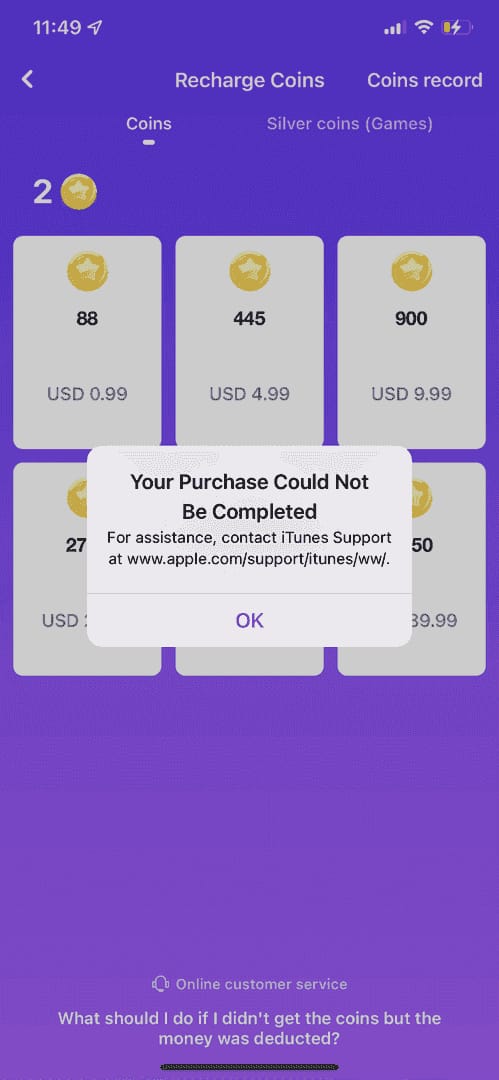
Open Mico, hit the Me tab bottom-right, tap Recharge Coins, and the pack grid loads up, which lines up with the flow walked through in a 2026 community video on YouTube (How to Recharge Coins on Mico?). Choose your pack, pick GCash, and you'll get kicked over to GCash to authorize with your MPIN.
Three spots worth easing off the gas:
- Settle the pack before you settle the payment. Bonus coins scale with how big the pack is, not as some flat promo sticker, so the larger packs carry a better effective per-coin rate (per pricing analysis in the 2026 top-up guides). Lock in the pack on value, then treat GCash as nothing more than the delivery rail.
- Make sure the MPIN screen actually loads. If GCash never opens at all, that's a limit or linking snag on its end, not a Mico glitch. Don't sit there mashing "buy" five times.
- Confirm the coins showed up. Glance at your balance under the Me tab. If it hasn't budged after a few minutes but GCash already shows the charge, do NOT pay a second time. Coins that haven't credited very often surface after a manual app restart and re-login, no support ticket required. That one reflex spares you the priciest blunder on this entire page: paying twice for a single purchase.
The honest weak spot of going in-app: GCash availability here is region-gated and patchy. Loads of Filipino players open Recharge Coins only to find GCash dimmed out or flat-out gone. Your account isn't busted. It's a routing limitation, and that's the precise moment the web route starts pulling its weight.
When in-app GCash is greyed out: the web route
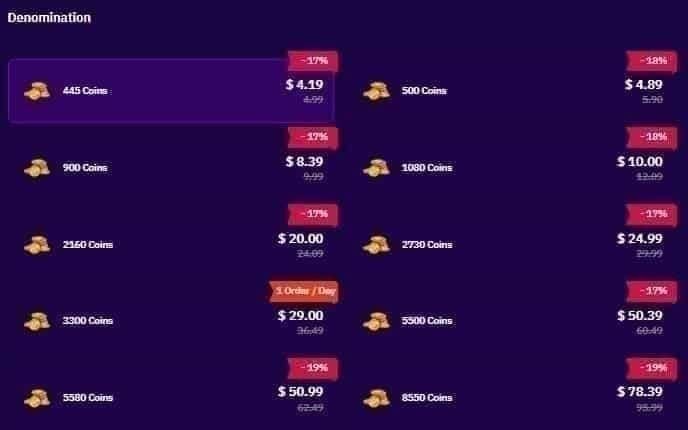
In-app GCash won't surface? You don't need a credit card, and you don't need to twiddle your thumbs waiting for it to come back. What you need is your User ID and a verified web channel.
Grab the ID under Me > Profile in the app. Copy it exactly, because one transposed digit ships your coins straight to a stranger's account, and good luck clawing those back. On a Philippine-facing top-up site, paste the UID, pick your pack, select GCash at checkout, authorize, and the coins deliver to that account, per the Joytify PH listing. GCash specifically rides as a payment option on PH-specific Mico pages, which is the entire reason this route exists for Filipino buyers who can't or flat-out won't touch cards.
Two safeguards I treat as non-negotiable on this path:
- Screenshot the GCash reference number the second the payment clears, before you even flip back to eyeball your balance. If something hangs, that reference is your whole argument with support. Uncredited coins minus a reference number make for a much uglier recovery.
- Stick to the UID flow, never a "send GCash to this number" DM. A real web channel takes your UID and credits the coins to it. Anyone telling you to GCash a personal number for "cheap coins" is the scam itself, not the merchandise.
Full transparency: this guide comes from VGTopup, which happens to be one of these web channels too. You enter your Mico User ID and pay with GCash, no card in sight. Treat that like you'd treat any commercial source. The neutral advice wrapped around it (price-check against in-app before you commit) is what guards your money, not the logo. If your in-app GCash is dead, you can top up Mico Coins with GCash by User ID, but cross-check it against the in-app pack first. Every single time.
What Mico Coins actually cost, and where the value hides
On Mico, sticker price and value are two different numbers, and the whole gap lives in the bonus tiers. Here's the published third-party pack lineup for 2026.
| Pack Size |
Approx Price (USD) |
Effective $/coin |
Best for |
| 445 |
$3.95–$4.65 |
~$0.0093 |
One-off small gift |
| 2,730 |
$4.85 |
$0.00178 |
Casual regular spender |
| 8,550 |
$15.20–$16.12 |
$0.00188 |
Moderate spender |
| 15,600 |
Higher tier |
$0.00183 |
Heavy spender |
Source: BitTopup MICO Guide 2026 (2026)
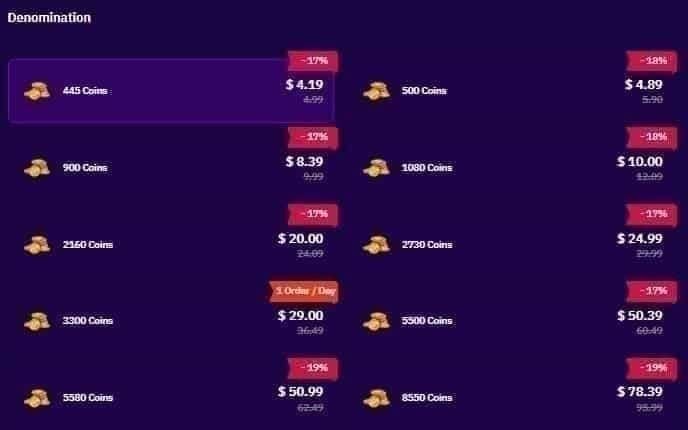
Read the per-coin column, ignore the price column. That 445 pack is the worst deal on the board and it isn't close, roughly five times the cost per coin you'd pay on the mid-tier packs. The sweet spot lands on the 2,730-coin pack at about $0.00178 per coin, the best per-coin rate under $10 through third-party, with the 8,550 trailing right behind for moderate spenders.
A shift you'll want on your radar: after Mico's v5.2 update in 2026, the global rate slid to roughly 94–99 coins per USD, down from somewhere near 110 before. Coins got a touch pricier across the board, which makes landing on the efficient tier count for more than it used to. The mid-tier packs swallowed that change the cleanest.
To get pesos out of it, run your bank or GCash USD rate against those dollar figures. At a ballpark ₱56–58 to the dollar, the 2,730 pack lands somewhere around ₱270–280, and the 445 one-off near ₱220–260. I'm calling those conversions rather than official PHP list prices on purpose, since the per-coin rates are the durable numbers while the peso figure jumps with whatever the exchange rate's doing the day you buy.
If you're a first-time buyer, the in-app welcome bonus is the one chunk of value I'd never walk past. It's the single best top-up you'll ever pull on this app, and it lives in-app, which is the main reason I route first purchases through in-app billing even though web wins on raw sticker. Spend that bonus down, and the calculus tips toward the web route's standing discount.
The "payment failed" panic is almost always a 60-second fix

Most failed Mico GCash top-ups aren't app bugs. They're limit or MPIN hiccups on the GCash side, and ruling those out first saves you a support ticket plus a whole lot of pointless re-tapping.
| What you see |
Most likely cause |
Fix |
Typical resolution |
| Charge declined instantly |
Daily transaction limit hit (not balance) |
Check GCash daily limits in app settings; wait for reset or raise limit |
Minutes, or next-day reset |
| "Insufficient balance" |
Actual balance shortfall |
Cash-in via bank/over-the-counter, retry |
Minutes |
| MPIN screen never loads |
GCash link/auth hiccup |
Re-open GCash, confirm it's logged in, retry purchase |
Under a minute |
| Charged but no coins |
Delivery lag |
Restart app, re-login, recheck balance before re-paying |
Seconds to a few minutes |
The quiet account-killer in that table is the top row. GCash's daily transaction limits, which have nothing to do with your available balance, rank among the leading reasons a top-up bounces while you're glaring at a wallet that obviously has cash in it. People figure "I've got ₱500, why won't ₱280 clear," never glance at the limit, and keep hammering retry until something looks genuinely broken. So check the limit first.
For the charged-but-no-coins scenario, the discipline's dead simple, and it bears saying twice because this is exactly where cash evaporates: don't pay again. Restart, re-login, recheck. If the coins still ghost you and GCash confirms the charge cleared, that screenshotted reference number is what gets the manual credit pushed through. The first charge almost always went fine. The coins just dragged their feet.
On refunds, I'll set the expectation straight. Once coins credit and you've blown them on gifts, a GCash-side reversal is basically off the table, since you're now disputing a delivered digital good. The one window where a dispute has any bite is a charge that genuinely failed to deliver coins, backed by your reference number. Which is why the screenshot habit isn't paranoia. It's the line between a recoverable case and a flat "sorry, nothing we can do."
Cheap-coin resellers aren't worth your account
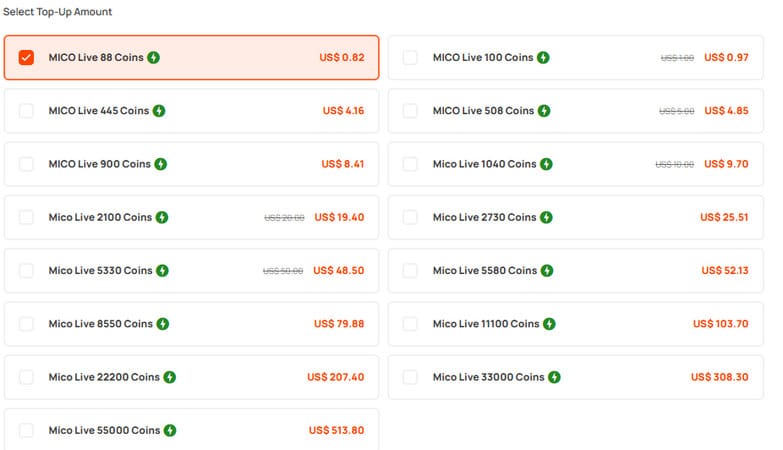
The savings on "discount Mico coins" from random social-media sellers look real, and the danger sitting behind them is real too: leaning on random resellers risks an account ban or a straight scam, so stick to verified platforms, per the TopUpLive safety guidance. That's not boilerplate hand-wringing. It's the lone pitfall on this whole topic that can cost you the account itself, not merely one top-up.
The warning signs stay consistent enough to commit to memory:
- They want you to GCash a personal number instead of entering your User ID on a checkout page.
- The price sits dramatically under the mid-tier per-coin rates above, way past the legit 17–29% third-party range.
- They ask for your Mico login, not just your UID. A genuine top-up never touches your password.
- Delivery's "manual," "after payment," over DM, with no instant UID-based crediting.
Stack it against the actual figures. The legit web route already shaves up to roughly 29% off in-app on equivalent packs. Reaching for an extra few percent from an unverified seller, against the threat of a banned account and zero recourse, is a false economy if there ever was one. The verified channels (in-app, or a proper UID-based web top-up) already pocket nearly all the savings on offer without staking your account on it. Almost nothing left to gain, everything to lose.
Which GCash route I'd actually use
First-time Filipino buyer? Go in-app and grab the welcome bonus. That bonus is the best single top-up value on the app and it only lives in-app, so the web route's sticker discount can't catch it on purchase one. After the bonus is gone, the picture changes: that standing 17–29% third-party discount makes the web route the smarter refill for ongoing spenders, especially anyone whose in-app GCash sits greyed out anyway.
Regular small spender? Quit buying 445 one-offs. Pile up the 2,730-coin pack for the best per-coin rate under $10, and buy it wherever it's cheaper that day. The coins you quietly forfeit by drip-buying small packs instead of one bonus tier add up quicker than any convenience is worth.
And for everyone, pick the route by where the value sits that day, not by reflex. The most common money leak on Mico isn't a scam or a botched payment. It's loyal in-app buyers handing over an extra ~20% on every refill once their bonus dries up, plus small spenders eating the 445-pack premium simply because it's the first tile their thumb finds. Both vanish with one decision.
Frequently Asked Questions
How long do Mico coins take to credit after a GCash payment?
Usually seconds to a few minutes on both in-app and verified web top-ups. If it's been longer and GCash confirms the charge cleared, restart the app and re-login before you do anything else, since uncredited coins routinely show up after a manual restart with no ticket needed. Keep that GCash reference number screenshotted, just in case.
Can I top up Mico coins without a credit card in the Philippines?
Yes, and that's the entire point of the GCash route. In-app billing takes GCash directly where it's offered, and verified web channels carry GCash as a payment option on PH-facing listings, per Joytify MICO PH, using nothing but your Mico User ID. No card on either path.
Where do I find my Mico User ID for a web top-up?
Open the app, tap the Me tab, then Profile, and your User ID is sitting right there. Copy it exactly before pasting into any web checkout, because one wrong digit ships coins to a different account with no easy fix. Never hand over your login password; a legit top-up only ever needs the UID.
Is the cheapest Mico coin pack the best value?
No, and it's nowhere near. The little 445-coin pack runs about five times more per coin than the mid-tier packs, per the 2026 BitTopup breakdown. The best per-coin value under $10 is the 2,730-coin pack at roughly $0.00178/coin. Always read the per-coin rate, never the sticker.
What's the minimum I need to top up, and why did my payment still fail with money in my wallet?
The minimum is basically the smallest pack on offer, but the more common Filipino-buyer headache is a decline despite a funded wallet, which usually traces back to your GCash daily transaction limit rather than your balance. Check the daily limit in GCash settings before you re-attempt; it resets, and it's the top silent cause of declined Mico top-ups.











Comments