Why both UID and server have to be right
The priciest misread in friend top-ups is treating the UID like a unique global key. It's not. That same UID can show up on several servers, and picking the wrong realm dumps diamonds into a different account even when your number's letter-perfect. That pattern's well documented in the King's Choice server-merge discussions on Facebook from 2026, where merges and parallel realms left players carrying identical IDs across different worlds.
Picture it as a two-part address. The UID's the house number, the server's the street. Loads of streets have a number 47. Type "47" by itself and the courier guesses, and the system's guess is whatever realm's sitting preselected in the dropdown, not whatever world your friend's actually living on.
This is the bit rushed tutorials shove to the bottom, if they bother at all. They hammer "enter the UID" and treat the server picker like garnish. From everything I've waded through in player reports, the silent server mismatch sinks more gift top-ups than fat-fingered numbers do, and it's precisely because it feels finished. You entered a real UID, payment cleared, the confirmation popped. Nothing flagged an error because, mechanically, nothing broke. The diamonds went exactly where the address you handed over pointed. So carry that into the next section: a successful order isn't the same animal as a correct one.
Finding the UID and reading the server name
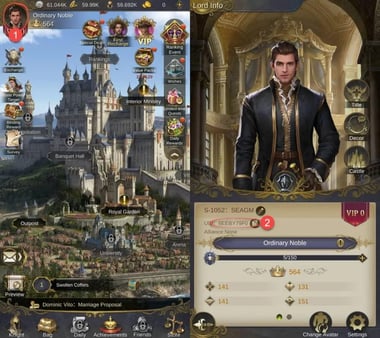
Locating the Player ID is the easy half, and it works the same for you and your friend. Log in, tap the avatar in the top-left corner to open the Lord page, and the UID's sitting right there. That's the path documented in the SEAGM User Guide from 2026. Your friend does the identical thing on their account and screenshots it.
One wrinkle worth knowing. The interface isn't the same across devices. On mobile the UID sits under the avatar on the Lord page; on a PC emulator it may show under the game window instead, per Facebook group UID posts from 2026. So if your friend plays on an emulator and tells you "it's not where you said," there's your answer. Have them scan the window frame, not just the avatar.

Reading the server is where folks get loose, and loose is what bleeds money. The server name has to be captured exactly as it shows in your friend's realm, because, as that same merge thread keeps stressing, checking the server against the current realm is the only thing standing between you and the multi-server UID conflict. SEA realms can run nearly twin names, sometimes off by one digit or a region tag. "S214" and "S241" are a single squint apart at arm's length.
|
UID / Player ID |
Server / Realm name |
| What it is |
The account's identifier number |
The world the account lives on |
| Where it's shown |
Lord page, under the avatar (tap top-left) |
Lord page / realm label in profile |
| Why it's required |
Points to a specific account |
Disambiguates the same UID across worlds |
| Failure if wrong |
Diamonds go to a different real account |
Diamonds go to a different real account |
Source: SEAGM User Guide (2026); King's Choice server-merge discussions (2025)
See how the last row reads the same for both? That's the entire point. UID and server are two locks on one door, and fumbling either one fails the same expensive way. So the next step is a verification ritual, not a hurried form-fill.
Topping up for a friend without sending diamonds to a stranger
Most guides hand you a three-line flow and stroll off. The flow itself is honestly simple, it's the confirmation wrapped around it that separates a clean gift from a regret thread.
Before any payment, run this checklist. I treat the screenshot as non-negotiable. I'd rather pester a mate by asking twice than swallow a charge I'll never see again.

| Verification item |
How to confirm |
Why it matters |
| UID |
Screenshot of friend's Lord page — not a number read aloud |
A transposed digit is unrecoverable |
| Server name |
Visible in the same screenshot, read character by character |
Same UID exists on other realms |
| Mobile vs PC source |
Confirm which device they screenshotted from |
UID location differs by platform |
| Order ID retention |
Save it the moment payment clears |
It's the only thread support can trace |
Source: r/kingschoice helping thread (2026); Facebook server-merge posts (2025)
The one rule I'd burn into this process: never top up from a verbally-relayed UID. Transposing a digit when a number gets spoken or hand-typed is a documented way to fund the wrong account, per r/kingschoice player discussions. Speech and memory both mangle numbers. A screenshot doesn't. Demand it, confirm the UID and the server name off it, and only then crack open the portal.
The actual top-up flow on a third-party portal is short. Pick the diamond denomination, enter the UID, choose the matching server, check out with your payment method, and the diamonds land on the account. That sequence is laid out on the SEAGM King's Choice page for 2026. When you hit the server dropdown, ease off the gas. Match it character-for-character against the screenshot, not against whatever you think you remember.

Quick note on where to do this. Several portals run the same UID-based flow with instant delivery, so the real differences come down to payment options and how clearly the server field is laid out. As a transparency note, this piece is published by VGTopup, itself one of those portals; the buying logic works the same wherever you finish a King's Choice SEA recharge. Confirm both fields against the screenshot before you pay and the platform barely registers. If a checkout makes the server selection annoying to double-check, that alone is reason to slow down instead of bulldozing through.
| Portal |
Key steps |
Delivery claim |
| SEAGM |
Select pack, enter UID, pay |
Instant |
| JollyMax |
Select denomination, enter UID, checkout |
Instant |
| Joytify |
Enter Player ID, select amount, pay |
Added to account |
Source: SEAGM, JollyMax, Joytify product pages (2026)
One more reason to handle a stranger differently from a friend. Trusting some online-only acquaintance's UID for a "cheap top-up favor" is how people end up funding accounts that were never theirs, since the number they hand you could point anywhere on earth. I only gift to contacts I can actually ring up and ask to re-screenshot. That screenshot is pulling real weight, and it carries straight into what happens when things go sideways.
When the diamonds land in the wrong account
Assume zero refunds and you'll make sharper calls. Wrong-UID top-ups are non-refundable under the usual third-party terms, the value's delivered, the transaction's done, and there's no official in-game recovery path I've ever seen mentioned, per the SEAGM policy descriptions for 2026 and the alliance gifting thread on Reddit. That's not a portal being tight-fisted. It's just the nature of a system that did precisely what you told it to do.
If it does misfire, your one lever is the order ID. Hit the portal's support with the order ID and proof, per JollyMax and the same community reports. Without it, support can't trace the misdirected top-up at all, and tossing the order ID is what leaves a misfire permanently stuck, as flagged in those Reddit threads. So the rule's blunt: save the order ID the second payment clears, before you've even told your friend it's done.
Let me lay out the failure modes plainly, because they aren't equally fixable and pretending otherwise just builds false hope.
| Cause |
Symptom |
Fixability |
| UID typo (valid-but-wrong number) |
Order succeeds, friend never receives |
Very low — delivered to a real stranger |
| Wrong server, correct UID |
Order succeeds, friend never receives |
Very low — same problem, different lock |
| Invalid UID (no such account) |
Order may fail at entry |
Higher — often caught before payment |
| Lost order ID after any misfire |
Support can't trace anything |
None — close it out |
Source: r/kingschoice (2026); Facebook server-merge discussions (2025)
Here's the cruel detail rival guides skip: the two most likely slip-ups, a valid wrong UID and a wrong server, are the two least fixable, because both complete cleanly. The system only reliably stops you when the UID doesn't match any account at all. A real-but-wrong number just sails on through. That lopsidedness is the whole case for front-loading verification, and it recolors "instant delivery" entirely. Speed isn't safety. A fast delivery to the wrong account is just a fast screw-up. Which is why confirming receipt is its own step, not a footnote.
Confirming the diamonds actually arrived
Delivery's described as instant upon payment success across SEAGM, JollyMax, and Joytify product pages for 2026, and SEAGM's help materials specifically claim instant delivery for SEA servers. In practice, treat that stated window as a diagnostic. If a top-up stalls well past "instant," that's your early warning the UID/server pair is off. Don't sit there waiting, start cross-checking the fields against the screenshot.
Confirmation should come from your friend, not the portal's success screen. The order confirmation only tells you the transaction wrapped up; it can't tell you it reached the right person. Ask your friend to check their balance and in-game mail and confirm the diamonds genuinely showed. That two-way confirmation, your order receipt plus their balance jumping, is the only proof both locks actually opened. File the order ID regardless. A confirmed-arrived top-up still benefits from a traceable receipt if anything looks weird down the line.
Where this is heading
Two things worth keeping an eye on. First, server consolidation. SEA's already lived through merges that multiplied the same-UID-across-realms headache, and any future merge wave can quietly shuffle which realm name your friend should give you. Re-confirm the server every single time, not just the first. Second, the missing native gifting feature. As of the 2026 searches there's still no official in-game route to send diamonds to a friend, so the UID-and-screenshot discipline above stays the whole game. If that ever flips, the verification logic changes. Until then, the screenshot's your seatbelt.
Frequently Asked Questions
Does the same UID really exist on different King's Choice servers?
Yep, and it's the core trap. One UID can surface on multiple realms, so a correct number paired with the wrong server still ships to a different real account, per the 2025 Facebook server-merge discussions. After any merge, double-check which realm your friend's actually on now, since merges are exactly when these duplicate-UID messes multiply.
Can I top up diamonds for someone I only know online?
You can, but I wouldn't unless you can verify them. There's no way to confirm an online-only contact's UID actually belongs to them; the number they send could point to any account out there. Player discussions on Reddit keep tying "cheap top-up favors" for strangers to lost cash. Keep gifting to contacts who'll re-screenshot their Lord page when you ask.
What's different about finding the UID on PC versus mobile?
The location shifts. On mobile the UID sits under the avatar on the Lord page; on a PC emulator it may show under the game window instead, per the 2026 Facebook UID posts. If your friend plays through an emulator and can't spot it where you described, have them check around the window frame rather than assuming they're staring at the wrong screen.
How long should I wait before assuming a top-up failed?
Delivery's stated as instant upon payment success across SEAGM, JollyMax, and Joytify pages for 2026. So treat anything well past "instant" as a red flag, not normal lag. Start re-checking the UID and server against the screenshot right away, and have your friend confirm their in-game mail instead of waiting it out.
If diamonds went to the wrong account, can I get them back?
Almost never. Wrong-UID and wrong-server top-ups are non-refundable under the usual third-party terms, with no official in-game recovery path, per SEAGM's 2026 policy descriptions. Your only move is contacting portal support with the order ID and proof, and if you binned that order ID, there's nothing left to trace. Save it the moment payment clears.










Comments