A charge and a delivered order are two separate events
Almost nobody bothers to explain this part. Your payment provider and the game server are two separate systems passing messages back and forth, and they can fall out of sync. Your bank app flashing a charge means the billing side closed out. It does not confirm the game received and processed the order. Per Google Play Support, a bank charge is never proof of delivery. You check the store's own purchase history first.
So your first move is figuring out which state you're in:
- Completed — your store history (Google Play "Order history," or App Store / Apple ID purchase records) lists the pack with a confirmed status and a charge. Good case. The order exists; only delivery is lagging.
- Pending — the transaction reads as processing or "pending authorization." Pending can look fully "successful" on a bank push notification yet never finalize store-side. If that's you, the fix is patience, not action.
For a pending transaction, Google's guidance says wait. Typically 24 to 48 hours, and let it either clear or auto-cancel. Buying again over a pending charge is the cleanest way there is to get double-billed. More on that mess shortly.
Grab your order ID now, while it's painless
Pull your proof before anything else. It lives in two spots: the receipt email the store fired off, and your in-game Menu > Purchase Info, which also separates paid crystals from free ones. Locating that receipt or order ID early, per the same Google documentation, is what turns a slow, miserable support thread into a quick one. Screenshot it. A tossed receipt is the gap between "fixed in a day" and "we can't verify your claim."
One detail from the HelpShift FAQ that quietly trips people up: when your free crystal balance can't cover a purchase, the game spends your paid crystals after the free ones run dry. So if you bought a pack and then immediately spent some, "they never arrived" can actually mean "they arrived and got burned." Check Purchase Info before you decide anything's gone.
Why the balance lags even when the purchase worked
Say the order is genuinely completed. The number can still sit frozen. The community has logged the usual culprits pretty consistently: server delays, wrong account, ongoing maintenance, and sync hiccups all show up near the top, per r/ProjectSekai reports.
Two matter more than the rest, because they're both the most common and the most self-resolving: delivery delays and maintenance.
Timing first. Official guidance for comparable in-app purchases notes credits can take up to 24 hours to land thanks to system delays, a figure from a HoYoverse Support FAQ that maps cleanly onto the same class of IAP delivery. Realistically most credits hit nowhere near that ceiling, but 24 hours is the honest worst case to budget before you escalate.
Maintenance is the actual panic-maker. With servers mid-update, a purchase can finalize on the billing side while the game has no way to push it to your account until things come back up. Colorful Stage windows usually run 3 to 4 hours and recur several times a month; a February 2026 window clocked roughly three hours, per Colorful Stage News. So before you fire off a ticket, check the official news for an active notice. If one's running, your only job is to log back in once it ends. I'd ride out one full window before assuming anything's actually broken. It clears a huge slice of the "instant" missing-crystal reports on its own.
Quick cause-to-expectation cheat-sheet:
| If the cause is… |
Then expect… |
| Routine server/sync delay |
Minutes to a few hours; up to 24h worst case |
| Active maintenance |
Delivery after the ~3–4h window closes |
| Wrong/unlinked account |
Crystals are fine — on the other account, not gone |
| Pending (unfinalized) payment |
Wait 24–48h to clear or auto-cancel; do not rebuy |
Source: HoYoverse Support, Colorful Stage News, Google Play Support, r/ProjectSekai (2025–2026).
The five-minute fix that clears most cases
Run these in order. Most people never read past step three.
- Check store purchase history to confirm the order is completed, not pending. Do this first.
- Restart the game and your device. Per HoYoverse's support docs, a restart refreshes your currency balance and carries the highest hit rate of any fix after a confirmed payment.
- Run Restore Purchases, or for a web store buy, log out and back in, or bounce off the title screen. The HelpShift FAQ points to the in-game restore function and the Purchase Info screen as the front-line tools here.
- Wait up to 24 hours if the order is confirmed but still hasn't credited. That system-delay window again.
- Contact SEGA support with your order ID only when nothing above moves the needle.
Step three earns its own paragraph, because it does heavier work than it looks. Restore Purchases can re-trigger delivery of an order the server logged but never actually pushed to your account. It isn't just a reinstall tool. It's a poke that tells the server "you owe me this." When a plain restart whiffs, restore frequently lands.
The account-link trap behind most "vanished" crystals
This mechanic explains the biggest chunk of false alarms, and competing guides skip it cold: crystals credit to the linked account that started the order, not the device you happen to be holding. Bought on one account and now staring at a different one (a fresh install, a guest session, a relative's profile)? The crystals aren't lost. They're parked exactly where they belong, on the account that paid.
The web store reinforces that routing. Per the COLORFUL STAGE! Web Store, browser purchases drop into your Gift Box on successful payment, and you log in to claim them. So if you bought through the web store and never opened the right account's Gift Box, the crystals are just sitting there waiting.
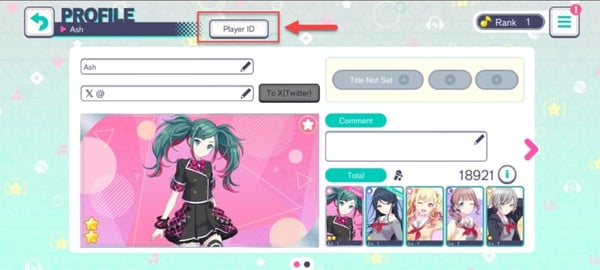
The genuinely dangerous flavor is reinstalling without a linked account. Per a 2026 r/ProjectSekai account-recovery thread, wiping and reinstalling before you've linked via Player ID or a transfer ID can make everything, crystals included, look gone. It usually isn't. But clawing it back is far harder than just linking properly up front. My blunt read: most players who think they "lost" crystals never lost a thing. They're on the wrong account. Confirm which account paid before you escalate.
When official support is actually warranted
Confirmed a completed payment, restarted, restored, waited out maintenance, checked the right account, and a full 24 hours has gone by with nothing? Now you escalate. Head to in-game Menu > Support and open a ticket with the order ID and receipt you stashed earlier, per SEGA's HelpShift flow. In my read, this in-game route beats a store refund for genuinely undelivered goods, because it asks the developer to deliver what you paid for rather than rewind the transaction.
Have this ready before you open the ticket:
- Order ID / transaction ID from the store email
- A screenshot of the store purchase history reading "completed"
- Your in-game Player ID
- The date, time, and exact pack you bought
Front-load all of it. A complete first message is how you dodge the back-and-forth that stretches a one-day fix into a one-week one.
Refund routes, and why they belong at the bottom
Store refunds exist, and you should know how they work, but they sit at the floor of the decision tree for undelivered crystals.
Google Play allows refund requests within 48 hours for in-app purchases, after which they route you to the developer. On iOS, you request through reportaproblem.apple.com, and per Apple Support, eligibility shifts by region and by how long it's been since purchase.
And here's where it bites. Per Google's policy, requesting a store refund can flag your account, and the guidance is to contact the developer first for an undelivered purchase. A refund reverses the money but slams the door on actually getting the crystals, and a flagged account is a worse headache than a few hours of waiting ever was. The refund is for the case where the order genuinely failed and support can't deliver, not for the case where your crystals are twenty minutes late.
A compact way to rank the three routes:
| Route |
Proof needed |
Best for |
Risk |
| In-game SEGA support |
Order ID + receipt |
Confirmed payment, crystals not delivered |
Low — asks for delivery |
| Google Play refund |
Order in store history |
Genuinely failed order, within 48h |
Can flag account |
| Apple refund |
Apple ID purchase record |
Failed order, region/time eligible |
Varies; not guaranteed |
Source: SEGA HelpShift, Google Play Support, Apple Support (2026).
Do this before refunding even crosses your mind
Money gone, crystals absent, here's the optimal sequence: verify the payment state, restart and restore, confirm you're on the account that paid, wait out any maintenance, then open an in-game ticket with your proof. Reach for a store refund only when support genuinely can't deliver.
Two pitfalls get their own warning because they produce the ugliest outcomes. First, rebuying before you've waited and verified. Per long-running r/ProjectSekai threads dating back to 2023, buying again to "force it through" is precisely how players land a double charge. And if they trashed the original receipt, they've got no proof to contest either one. Second, treating the bank charge as confirmation the game got the order. It isn't, as covered above. The two systems drift, and reading a charge notification as a delivery receipt is what kicks off the whole spiral.
If you spend at all, one habit makes all of this trivial: screenshot every purchase confirmation, every single time. Non-negotiable. Two seconds of effort, and it's the one thing that guarantees a fast resolution whenever delivery hiccups.
And if you'd rather sidestep store-delivery quirks on future top-ups, comparing where and how you buy is fair game once today's issue is sorted. Hatsune Miku: Colorful Stage! Crystals top up is one low-key option worth a look. Whatever channel you pick, the rule holds: keep the receipt.
Frequently Asked Questions
Why did my Colorful Stage crystals purchase succeed but not arrive?
Usually a desync between the billing system and the game server, or the order routing to a different linked account than the one you're looking at. Confirm the order reads "completed" (not pending) in your store history, then restart and run Restore Purchases. That clears the bulk of these before support ever enters the picture.
How long do crystals take to show up after buying?
Often within minutes, but the honest worst case is up to 24 hours from system delays, per HoYoverse Support's guidance for comparable IAP. If maintenance is active, those windows usually run 3 to 4 hours, delivery waits until the servers return, so log in again once the notice clears.
What if I was charged twice for the same crystals?
This almost always traces back to rebuying while the first transaction was still pending. Don't trash either receipt, you need both order IDs as proof. For a duplicate charge, hit SEGA in-game support first; a Google Play duplicate may also qualify inside that 48-hour refund window, but contacting the developer first avoids a refund clawing back crystals you actually want.
Will reinstalling the game restore my missing crystals?
Only if your account was linked beforehand. Reinstalling without linking via Player ID or a transfer ID can make crystals look gone when they're really stranded on the prior account, per r/ProjectSekai's recovery thread. Always confirm the account link before you reinstall, and if you bought through the web store, check the Gift Box on the correct account.
Can I get a refund if I paid but never received the crystals?
Yes, but make it your last move, not your first. Google Play handles IAP refunds within 48 hours, and Apple processes them via reportaproblem.apple.com with region- and time-based eligibility. Because a store refund can flag your account, open an in-game ticket with your order ID first so SEGA can simply deliver what you paid for.









Comments