Why the payment screenshot is the weakest proof you can save
That confirmation screen is the least useful thing you can keep. It shows a price and a green checkmark. It almost never shows the one string support actually needs to find your order. The strings that matter are the transaction ID and the order number, and those live in the store's billing record and the emailed receipt. Not the cheerful in-app success popup.
On Google Play the trail sits exactly where you'd guess, once someone points you at it. Open the Play Store app, tap your profile icon, then go Payments & subscriptions → Budget & history to see every in-app purchase including your Onmyoji jades, per Google Play Help. Tap into a specific order and the order number and date pop right up. The same dashboard holds every past in-app charge, so a top-up from three months back is still sitting there. You didn't have to save a thing.
iOS routes through the report-a-problem portal. Sign in at reportaproblem.apple.com with your Apple ID and you'll see purchase history and receipts for App Store in-app buys, according to Apple Support. Your App Store account settings get you there too. Apple keeps recent purchases retrievable from this screen, and you can ask for the receipt to be re-sent to your email. That matters more than most guides cop to. A deleted confirmation email is not a lost receipt.
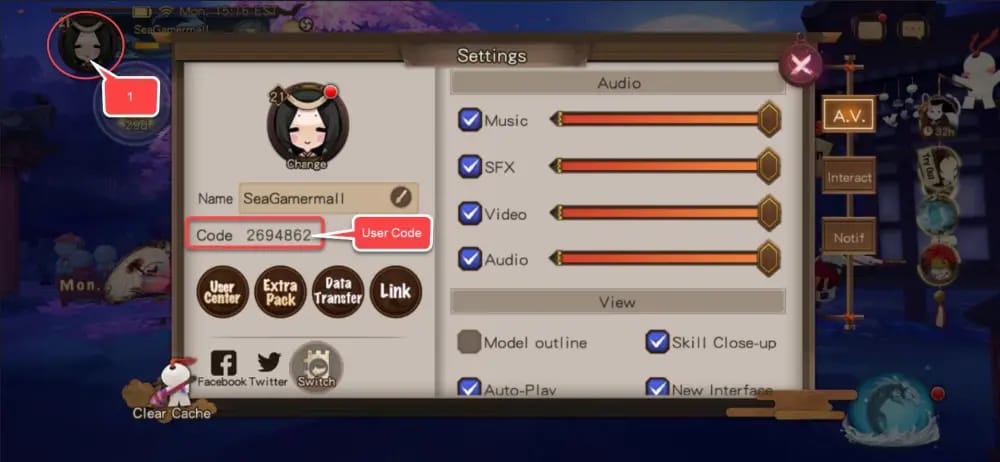
Here's why the difference counts. When you finally file, support matches your report against a transaction record on their end. A glossy "Purchase successful" image gives them nothing to search. The order number does the matching. So hold the order number and transaction ID, and ditch the payment-screen photo.
The store receipt proves you paid, not that the jades arrived

Almost every guide blurs this line, treating the store receipt like a delivery slip. It isn't. A Google Play or Apple receipt proves one thing: money left your account. Whether the premium currency actually showed up is a separate question with a separate record, and that gap is where a quick fix mutates into an ugly ticket.
S-Jades are Onmyoji's premium currency, bought through in-game purchase or the official top-up center, per NetEase Games Top-up. Delivery confirmation lives inside the game. After you pay, check your in-game mail for the top-up confirmation and any bonus jades, then look at the recharge log to see what got credited. First time a top-up "vanished" on me, it was sitting plainly in the recharge record. The store had charged me, the game had delivered, and I'd just glossed over it on a cluttered currency bar.
This is the piece worth burning into memory: the in-game recharge log can confirm delivery even when the store receipt stays vague. Store says "paid," log shows the matching credit? No missing-jades problem. The currency's there, and you owe yourself a slow second look before the panic. Store says "paid," log shows nothing? Now you've got a real case, and two records that back it.
So yeah, you may need both proofs, for separate jobs. The store record nails the payment and timestamp. The in-game record nails whether NetEase's side actually delivered. A refund or missing-currency claim hits hardest when you bring them together. The receipt proves payment; only the in-game log proves or disproves delivery.
Paid but no jades? Usually it's a delay or a wrong UID
Most "I paid and got nothing" posts fix themselves. The two culprits are dull as dishwater: a crediting delay, or jades dropped onto an account you're not currently staring at. Both feel like robbery in the moment. Neither needs a ticket.
Crediting for official top-ups usually lands instantly or within a few hours, with pending orders processed after maintenance windows, based on guidance in Onmyoji's official posts about top-up problems. When one promotional bonus failed to deliver, the team's stated fix was blunt: "For players who recharged today and did not receive the promotion, we will send the missing amount of S-Jade to you via in-game mail" (Onmyoji team, Facebook, Feb 2026). That tells you two things. Bonuses arrive by mail. And the publisher does reconcile shortfalls. So the sane rule for escalation: give it the normal window, confirm it isn't already in your log or mail, then open a ticket. As a rough line, if nothing's shown up after about 24 hours, that's when you push. Not the first five anxious minutes.
The quieter, meaner cause is a UID mismatch. If the account you funded isn't the one you're logged into (wrong region, wrong binding, wrong server picked at checkout), the jades aren't gone. They're just somewhere you can't currently see. Community reports on r/OnmyojiArena describe this exact mess: account binding to Google or Apple changes whether your order history even surfaces, and region or binding snags can bury records completely. The same threads call out topping up to the wrong UID or region as a way players "lose" jades that were, technically, delivered fine to an account they've walked away from. Verify your server and binding before you pay. Every time.

My read: treat "missing jades" as triage, not a crisis. Check the in-game recharge log and mail. Confirm the UID you paid into matches the UID you're playing on. Then, and only then, gather proof for support. Sometimes it's a genuine failure, but check the delay and the binding first, because that clears most cases without a ticket.
Third-party receipts can prove your claim — if you logged the UID
Buying jades outside the app store doesn't leave you empty-handed. It just relocates the order record, and in some ways makes it easier to find, since the platform keeps a dedicated order list instead of burying your buy among every app you've ever touched.
The non-negotiable caveat goes first. The only methods NetEase formally backs are its own. "Please be reminded that the ONLY safe and supported methods for purchases are In-game purchases and Our official top up center" (Onmyoji, Facebook, Mar 2022). That same 2022 advisory warns that unsupported third-party deals can see S-Jades clawed back into the negative, plus account restrictions or outright bans. So whatever route you pick, the one thing that protects you is logging your UID and server at the moment you buy and confirming the credit hit the right account.
That logging is also what makes a third-party order usable later. A platform that files your order against the UID you entered hands you a clean record: order reference, amount, date, destination account. You match that to your in-game recharge log. The match is the proof. Same UID, same amount, same rough timestamp. If you ever need to dig proof out down the line, keeping every order and receipt in one spot helps a lot, which is the practical pull of routing purchases through something like Onmyoji Jades Top Up top up, where the order history sits in a single account instead of scattered across store apps. (Disclosure: that's an affiliate link; the read holds without it.)
Whatever channel you go with, the discipline doesn't change from the official flow. Capture the destination UID, the amount, the reference number. Verify delivery in-game. Third-party records work fine as proof if you logged the UID. Without it, you can't show the jades reached the right account.
Why a bank chargeback can nuke your account
A bank chargeback is the worst-first move that somehow gets recommended on loop, and it's the one I'd dodge hardest. File a chargeback instead of using the store's own refund flow and you risk an account ban, per that same 2022 advisory on fraudulent and unsupported transactions. You can claw the $20 back from your bank and lose the account you've poured a year into. Lousy trade. Almost never worth it.
The right escalation runs through the store, not the bank. Google Play and Apple both run refund flows tied to the order you already located, and an official store receipt clears almost every legitimate refund case. Players overcomplicate this constantly. If the problem is non-delivery rather than buyer's remorse, the publisher path is open too: file an in-game ticket with Onmyoji support (the recommended channel), or email gameonmyoji@global.netease.com, per Official Support - Onmyoji.
For a refund or missing-currency claim, stack your proof in this order so support can move fast:
- Store order record — screenshot of the Google Play or Apple purchase history entry, showing order number and date.
- Confirmation email — the store receipt with the transaction ID; re-send it to yourself if you deleted it.
- In-game mail and recharge log — your delivery (or non-delivery) record.
- Identity fields — your UID and server, so the ticket maps to the right account.
Deleting that confirmation email before you've grabbed the transaction ID is the documented blunder that wipes out players' strongest evidence. Filing the chargeback first is the other one. Run the store flow, attach those four items, and you've cleared almost every case without ever touching your bank. Chargeback is a last resort, never an opener, because it can cost you the account.
What to actually do, every single time
Build the habit and the receipt headache just dies. Right after any top-up, grab the transaction ID and order number from the emailed receipt (not the success screen) and jot the date, amount, platform, plus the UID and server you funded. That personal purchase log, the standard thing support folks recommend, beats leaning on any single platform's record. Store histories lag. Bindings shift. Emails get trashed. Five seconds of logging now is the whole gap between a one-message ticket and a week of back-and-forth later.
Frequently Asked Questions
Where exactly is my Onmyoji order history on Google Play?
In the Play Store app: tap your profile icon, then Payments & subscriptions → Budget & history, which lists every in-app purchase including your Onmyoji jades. One quirk worth knowing. If your purchases don't show, you're probably signed into a different Google account than the one used at checkout, since the history binds to the paying account, not the device.
I was charged twice for the same top-up — what do I do?
Pull both order entries from your store history (each duplicate carries its own order number and transaction ID), then check the recharge log to see whether you were credited once or twice. If the log shows one delivery against two charges, that's a clean duplicate-charge refund case for the store flow. Steer clear of the bank chargeback route; it risks the account, per Onmyoji's 2022 advisory.
How long should I wait before assuming my jades are lost?
Official top-ups usually credit instantly or within hours, and pending orders clear after maintenance, based on Onmyoji's posts on top-up problems. Roughly 24 hours with nothing in your recharge log or mail is a fair line to escalate. Before that, the odds heavily favor a delay or a wrong-UID delivery over an actual lost payment.
Can I get the receipt re-sent if I deleted the confirmation email?
Yes, and this is the underused fix. Through reportaproblem.apple.com on iOS you can view and resurface purchase receipts, and Google Play's history keeps the order details whether or not you saved the email. A deleted confirmation is a nuisance, not a dead end, so don't let a missing email push you toward a nastier dispute.
Does support accept a third-party top-up receipt for a missing-jades claim?
Far more workable when your record shows the destination UID. Match the platform's order reference, amount, and timestamp against your in-game recharge log, then present both. Remember NetEase formally supports only in-game purchases and its official top-up center, so for unsupported routes the UID match is what makes your proof credible. Log it at purchase. Every single time.











Comments