Your sub-minute checkout is won before the clock starts
Channel speed differences are real, and they trace back to checkout flow, not sorcery. The official app runs in-app purchases through the App Store and Google Play, confirmed on the Apple App Store and Google Play listings. Those funnel through platform billing, which stacks on extra confirmation steps. UID top-ups from third parties skip all that: punch in your account ID, grab a pack, pay, and credits add automatically, per Topuplive's Party Star guide. For live gifting specifically, third-party routes win on speed.
The biggest time-saver almost every guide skips: find your UID before you touch a top-up page, not mid-scramble. Tap your profile picture and the UID, a 9 to 11 digit number, sits right under your username, per Enjoygm's top-up guide. Copy it. Drop it in your notes app. The recharge itself is four quick beats: enter UID, pick your Coin or Diamond pack, pay, coins land on their own.
Now the spot where I'd argue with the marketing. Delivery is near-instant, sure, within minutes of confirmation. But processing can back up during peak live-event traffic. So the real fast-recharge move isn't picking some magic payment channel. It's pre-loading the UID and a working method so the gateway queue is the only thing left to chance. Top up a few minutes ahead of the stampede rather than at the exact second everyone else jams the gate, and you clear faster in practice.
Cost-per-coin never improves, so chasing bonus packs is wasted effort

The number that reframes the whole "cheapest package" debate: on the pricing I pulled, cost-per-coin flatlines as packs grow. Every tier hovers around $0.00115 per coin, per Joytify's Party Star top-up pricing as of 2026.
| Pack (Coins) |
Price (USD) |
$/Coin |
| 3,350 |
$3.86 |
0.00115 |
| 6,750 |
$7.76 |
0.00115 |
| 20,250 |
$23.27 |
0.00115 |
| 40,680 |
$46.76 |
0.00115 |
| 68,000 |
$78.16 |
0.00115 |
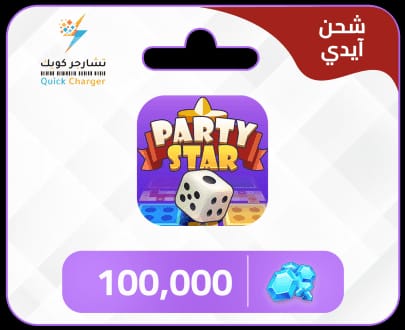
| 100,000 |
$114.94 |
0.00115 |
Source: Joytify Party Star Top Up (2026).
Look at that right column again. The 100,000-coin slab runs the identical per-coin rate as the 3,350 starter. Zero volume discount lives in these tiers. That guts the standard "buy the biggest pack for value" line. When the unit cost holds flat, the biggest pack only sinks more of your cash into a balance you might never burn through. For one timed event, the smallest pack that does the job is the right call.
One structural quirk worth filing: the smaller packs (3,350 and 6,750) arrive as Diamonds, while the bigger ones (20,250 up) arrive as Coins, per that same Topuplive guide. Both currencies fund virtual gifts to hosts across live streams and voice rooms, so for gifting the split is about pack size, not function.
How much do you genuinely need, then? Party Star publishes no public coin-cost-per-gift sheet, so I won't manufacture a conversion table out of thin air. Open the in-app gift menu, read the coin price of the exact gift you want, multiply by how many you're sending, then grab the smallest pack that clears it with a sliver of margin. One mid-tier gift? The 3,350 or 6,750 tier almost always covers you. Buying 100,000 coins to fire off a single gift is the trap.
Subtract the buffer before you read the cutoff
Last-second recharging is the top reason gifters whiff event cutoffs, and the bonus never justifies that gamble. The framework nobody bothers writing down: work backward from the cutoff, carve out a 10 to 15 minute buffer, and treat that earlier mark as your true deadline.
Why 10 to 15 minutes when delivery is "within minutes"? Because near-instant is the median, not the ugly tail. Processing queues up under peak traffic, and a gift-ranking finale is precisely when the whole room tops up at once. Gateway confirmation, credit posting, a possible app refresh, all of it nibbles seconds you flat-out don't own at the 40-second mark. I'd rather babysit idle coins for ten minutes than refresh a frozen balance while the ranking locks shut.
Timing realities to build around:
- Off-peak clears quicker. Can you top up before the event's final surge? Do it. The queue is the variable, and it's thinnest before the crowd lands.
- First-recharge bonuses won't freeze the clock. If a first-time bonus applies, claim it ahead of the event, never mid-rush. The timer won't hold while you wrangle a one-off promo.
- Don't hand a single-second margin over to "instant." Marketing says instant. Sharp gifters plan around a delay cushion regardless.
The contrarian read is plain. Most advice optimizes for the cheapest coin. With a clock running, processing speed outranks a few cents of unit price, and since unit price is flat anyway (see the table), there's no cheap-pack tradeoff to lose sleep over. Buy enough, buy early, gift on time.
"Coins not received" is almost always a typo
When the balance won't budge, the reflex is to blame the payment. With Party Star, the likelier villain is a botched UID. Entering the correct UID is the stated safeguard against routing coins to the wrong account, per the Topuplive Q&A, and one fat-fingered digit in that 9-to-11-digit string ships your coins, cleanly, to some stranger. The payment did its job. The coins simply aren't yours anymore.

Before you spiral, run the checks in this order:
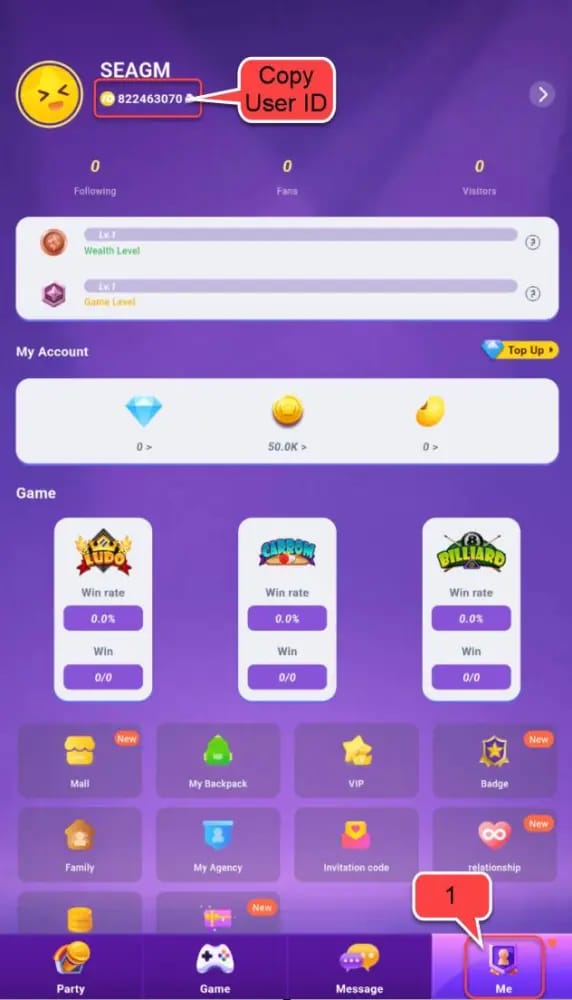
- Re-read the UID you typed against your profile. A single transposed digit is the most common reason coins "vanish." If it's off, the coins went somewhere, they didn't evaporate.
- Refresh the app. If the balance just hasn't synced yet, refreshing is the documented fix, per the same source. Near-instant delivery sometimes needs the client to re-pull your number.
- Ride out the queue. If delivery is within minutes of confirmation and you're still inside that window during a busy event, the credit is probably mid-processing, not dead.
This is why UID verification eats every other speed tip alive. A correct UID isn't only a safety thing. It deletes the most common post-payment failure outright. Verify once, save it, and you've pre-solved the issue that drives most people into a support spiral.
For account safety under pressure: confirm the UID, lean on a payment method you already trust, and don't improvise some brand-new unverified channel in the closing minutes. Pressure is exactly when people ditch the checks they'd normally run on autopilot.
My call for each kind of gifter
The right play splits cleanly by frequency, and the flat unit pricing makes both decisions trivial.
First timer, one-off event. Verify your UID, then snag a small Diamond pack (3,350 or 6,750) as a quick test gift, per Topuplive's first-recharge guidance. You prove the whole flow works on a low-stakes amount, the coins post near-instantly, and you're not parking $115 in a balance for a single stream. For one event, oversizing is pure waste. Nothing in the pricing above rewards it.
Frequent gifter. If you spread gifts across many streams, larger Coin packs get pitched as better per-coin value on third-party sites, per Joytify's framing, though on the tiers I priced the cost-per-coin holds effectively flat. So the actual upside is fewer transactions and a standing balance, not a cheaper unit rate. Buy big because you'll spend it, not because bulk pays off.
Regional access factors in too. Third-party sites accept multiple currencies including USD and AED, with pricing that shifts by site and market, per the Enjoygm and Joytify listings (2026). There's no single sourced per-market discount I'd quote across the US, SEA, India, or Brazil, so the honest move is checking your local currency option and comparing the displayed total before you pay rather than assuming one region wins everywhere.
Full transparency: this piece runs on VGTopup, itself a third-party top-up service. If you want a fast, UID-based checkout, Party Star Diamonds top up is one option worth weighing against your in-app price before the timer dies. Line up the displayed total against the App Store figure and take whichever clears faster for you.
No major dated 2026 event windows are published for Party Star that I'd stake a deadline on, so treat any in-app gift-ranking timer as the real cutoff and apply the buffer rule to that, not some calendar date you grabbed secondhand.
Frequently Asked Questions
Where do I find my Party Star UID for recharge?
Tap your profile picture inside the app. The UID shows up directly below your username and runs 9 to 11 digits, per Enjoygm's top-up guide. Copy it before you open any top-up page. One thing most people fumble: the UID isn't your display handle or @username, so don't paste the wrong string. The recharge field wants that numeric ID specifically.
Why are my Party Star coins not showing after recharge?
Usually it's a mistyped UID shipping coins to another account, not a payment failure, per the Topuplive Q&A. If the UID checks out, refresh the app. The balance sometimes just needs the client to re-sync after near-instant delivery. And since smaller packs arrive as Diamonds and bigger ones as Coins, glance at the right currency bucket before assuming nothing landed.
How long does a Party Star recharge take to arrive?
Near-instant, within minutes of payment confirmation, per multiple top-up sites in 2026. The caveat the timing hides: processing queues under peak live-event traffic, so the same top-up that posts in seconds off-peak can drag mid-finale. That's the entire reason for the 10 to 15 minute buffer.
Can I recharge Party Star coins without the app store?
Yes. Third-party UID top-ups skip the App Store and Google Play billing flow completely. You enter your UID, pick a pack, pay, and credits add automatically, per Topuplive. The official in-app route still lives on both stores if you'd rather use it, but for live gifting, third-party is the speed pick.
Is the biggest coin pack the best value?
No. On the tiers Joytify priced in 2026, cost-per-coin holds flat near $0.00115 across every pack from 3,350 up to 100,000 coins. The 100k slab saves you nothing per coin over the starter. Buy the biggest only if you'll genuinely burn through it across many streams. For one event, the smallest pack that covers your gift is the smarter buy.











Comments