"Just pay through the game with TNG" — busted for now
You open Ace Racer, tap the store, and Touch 'n Go pops up like it does in your nasi lemak delivery app, right? Nope. That's the assumption I see most in beginner threads, and it's wrong. There's no documented in-app or official TNG eWallet integration for Ace Racer top-ups, which you can confirm just by looking at what the official channel exposes. The NetEase GamesClub top-up page (2026) prices its packs in USD, not Ringgit. That detail says it all. The pipe was built for cards and global wallets, never a local e-wallet tap.
So where does TNG actually surface? On the third-party portals. SEAGM (2026) lists Ace Racer Tokens in RM and openly supports Touch 'n Go eWallet, Maybank QRPay, and DuitNow QR at checkout. That's your road. You aren't buying "inside" the game at all. You're buying a delivery routed to your account ID through a portal that actually speaks Malaysian payment.
This also answers the recurring can I top up Ace Racer Tokens without a credit card worry. Yes, and TNG is precisely how. For anyone without an international card, the e-wallet/DuitNow route isn't some hack. It's the main door.
VERDICT: busted — the TNG option lives on third-party portals, not the in-app store.
"Server ID doesn't really matter, the Player ID is enough" — busted, and this one's expensive
This belief empties wallets. Someone grabs their Player ID, pastes it, then skips or guesses the Server/Zone ID and hits pay. The tokens then route to an account that doesn't exist on the server they actually race on. Every credible third-party guide flags it: a wrong Server ID ships tokens to a phantom account, per the standard warnings on portals including MooGold. Not a scam. Not a portal glitch. A typo with no undo key.
And the bit newer players never weight properly? Wrong-server entry, not fraud, drives most of the "I paid but got nothing" panic. When somebody posts a frantic "Ace Racer Tokens top up failed but money deducted," the platform usually did exactly its job and dropped the tokens precisely where the order pointed. So the fix is dull but absolute. Nail both IDs before your finger goes anywhere near the payment button.
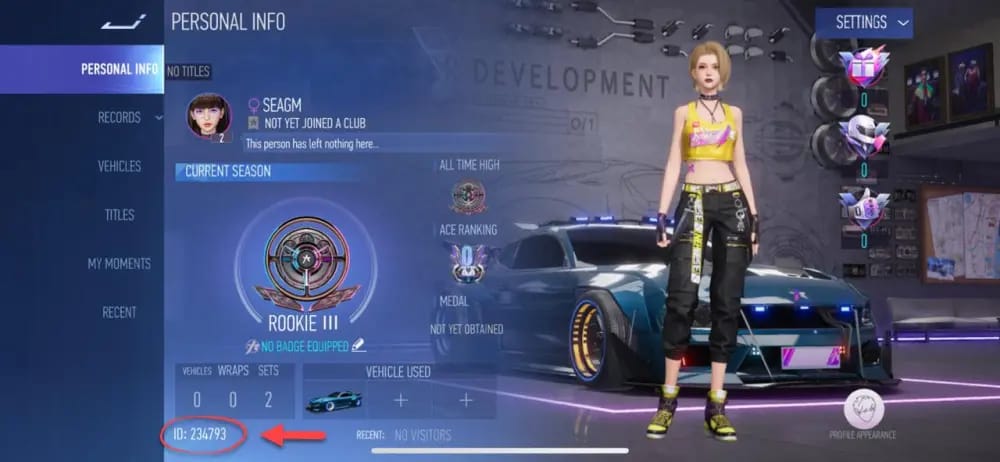
To pull them, open Ace Racer and tap your avatar in the top-left corner to reach Personal Info, where your ID sits on display (per the same third-party guides, 2026). The server/zone selector lives in that same identity layer, so copy it the moment you grab the ID instead of trusting your memory later. Returning players who swapped devices or regions should re-check, because the server you last logged into is the only one that counts, no matter where you started three years ago.
VERDICT: busted — Server ID is co-equal with Player ID, and skipping it is the number-one self-inflicted failure.
"All the packs are basically the same value" — qualified
They're not the same value, and the gap stings hardest at the exact spot beginners ignore it. Start with the published official tiers, since those give the cleanest per-token read.
| Pack (base + bonus) |
Price |
Per-token cost (base only) |
| 60 + 5 Tokens |
USD 0.99 |
~1.65¢ |
| 250 + 20 Tokens |
USD 3.99 |
~1.60¢ |
| 680 + 60 Tokens |
USD 9.99 |
~1.47¢ |
| 1180 Tokens |
higher tier |
lowest per-token |
Source: NetEase GamesClub topup page (2026). Per-token figures derived from listed base tokens; bonus tokens improve the effective rate further.
Track the right column. The raw cost per token slides downward as you climb, and the 680 + 60 pack at USD9.99 already beats the USD0.99 starter on efficiency. The bonus tokens stretch that gap wider, since they're free units stacked on top. On the Ringgit side, SEAGM lists a 180 + 9 Tokens pack at RM10.68 with TNG eWallet supported, which makes a handy TNG-payable RM anchor for sanity-checking Ace Racer Tokens price Malaysia against the USD store.
What are the tokens even for? They fund the premium layer: the rarest vehicles, the Premium Pass, luxury skins, Speedfest Supply Chests, and gold for upgrades, per Lotkeys and BitTopup descriptions (2026). Meaning the stuff you top up for tends to sit at the mid and upper tiers anyway, so habitually grabbing the tiniest pack is a slow tax you pay yourself.
VERDICT: qualified — the value gap is real and favors bigger packs, but only meaningfully once you're spending past the trial-purchase stage.

"Grab the cheapest pack first to test it works" — busted when a bonus is live
Honestly, this is the most well-meaning bad advice in the whole category. Buy the USD0.99 pack to confirm delivery before committing? Feels cautious. It's the opposite if a first-top-up bonus is active, because that multiplier fires once and once only.
The mechanic worth knowing: on plenty of portals the first-top-up bonus applies per pack tier, so one bigger opening purchase can out-earn a fistful of small ones spread over time. Blow your one-shot bonus on the 60-token starter and you've collected the multiplier on the smallest possible base, while every "real" buy afterward earns the plain rate. My read? If you're going to spend on this game at all, the first-top-up moment is the highest-ROI button you'll ever press, and it belongs on a mid or large pack. Never the trial tier.
For the F2P-curious first-time topper who truly only wants to drop RM10-ish once, fine, take the smallest viable pack and enjoy it. Just know you're trading away the best version of the bonus to do it. For the low-spender chasing best one-time value, the play is patience: wait until you're ready for a mid-tier purchase and let the first-top-up multiplier land there. That sequencing choice beats any 3% price wobble between platforms.
VERDICT: busted whenever a first-top-up bonus is on — the cheapest pack is the worst place to spend a one-time multiplier.

"If tokens don't show instantly, the top-up failed" — busted
Panic-double-paying grows straight out of this myth. A player expects "instant," sees nothing after thirty seconds, calls it dead, pays again, and now they're out double the cash chasing a single order. Reset the expectation. Typical delivery on third-party portals lands in 30 minutes or less after payment, per MooGold and BitTopup (2026). Usually it's far quicker than that ceiling, but "a few minutes" is the honest mental model, especially during promo spikes when order volume balloons. "Instant" is marketing. "Usually quick, occasionally a few minutes" is reality.
Before declaring a top-up dead, run this check order:
- Re-read your order confirmation. Does the Player ID and Server ID on it match what's in your game? If they don't, the tokens went exactly where you sent them, which is a support conversation, not a delivery delay.
- Check the in-game inbox/mail. This is the trap generic guides skip outright: tokens or pack rewards sometimes sit in your mailbox waiting on a manual claim. The top-up worked. The player simply never opened the envelope. Before filing anything, open every unread item in your in-game mail.
- Wait out the window. IDs correct, mailbox empty? Give it the realistic few-minutes-to-half-hour band before you escalate.
Three states get blurred together. Pending (payment authorizing, do nothing), failed (payment didn't go through, no money should leave you), and deducted-but-no-tokens (money gone, order processing or misrouted) each demand a different response. Treating all three as "it failed, pay again" is how a RM10 slip balloons into RM30.
VERDICT: busted — slow ≠ failed, and the inbox claim mechanic masquerades as failure constantly.

"There's no real recourse if money leaves and tokens don't" — qualified
You're nowhere near as stranded as the doom posts insist, but recourse hangs entirely on one habit you build before anything goes sideways. Screenshot the transaction reference number before you close the app or browser tab. That reference is the backbone of any support claim. Without it you're describing a payment from memory; with it you're handing support a traceable order. Skip the step and you turn a ten-minute fix into a multi-day back-and-forth.
Once the IDs check out, the mailbox is bare, and the delivery window has clearly passed, the escalation path runs like this. Open a support ticket with the portal you paid, attach the transaction reference plus a screenshot of your payment confirmation, and state the Player ID and Server ID the order targeted. For a genuine failed state where money never actually left TNG, that's a payment-side reconciliation rather than a delivery issue, so check your TNG eWallet transaction history first. A "deducted" line that later reverses means the charge never completed.
And on the recurring worry about whether portal-advertised bonus tokens actually credit: the bonus units are part of the listed pack contents (the "+5", "+20", "+60" from the official tiers carry the same logic on portals), so they should arrive with the base tokens, not on some separate trip. If base tokens land and the bonus ghosts you, that's a concrete, screenshot-able discrepancy worth a ticket. Not a vague gripe.
VERDICT: qualified — recourse exists and works, but only if you captured the reference number up front.

What to actually do instead
Strip away the folklore and the smart sequence is short. First, copy your Player ID and Server ID in one motion from the avatar menu, which kills the biggest failure mode outright. Second, decide your spend before you open any store, since the first-top-up bonus is a one-shot multiplier that belongs on a mid or large pack rather than the trial tier. Third, pay through a TNG-accepting portal and reach for DuitNow QR if your eWallet balance is thin, because it can pull from a linked bank instead of forcing you to pre-load the wallet, shaving off a whole step of friction. Fourth, screenshot the reference number, then check your in-game mail before the word "failed" even crosses your mind.
Disclosure: this guide comes from VGTopup, itself a top-up portal, so weight that as you read. The neutral point holds wherever you buy. For Malaysian players without an international card, an e-wallet route like topping up Ace Racer Tokens with Touch 'n Go eWallet is the practical method, and the value lever that dwarfs every platform price gap is which pack catches your first-top-up bonus, not which logo sits on the checkout button.
Frequently Asked Questions
What's the minimum I can top up with TNG eWallet?
The smallest commonly listed tiers hover around RM10. SEAGM's 180 + 9 Token pack runs RM10.68 with TNG supported (per SEAGM, 2026), and the official store's entry tier is the 60 + 5 pack at USD0.99. Going minimum buys you nothing extra unless you genuinely want a one-off small purchase and no first-top-up bonus is on the table.
Is Touch 'n Go eWallet safe for Ace Racer top-ups?
The payment rail itself is a mainstream Malaysian e-wallet running on DuitNow QR infrastructure, so the risk almost never sits in TNG. It sits in where you point the tokens. Confirm the portal supports TNG (SEAGM publicly does), verify your Server ID, and hang onto the transaction reference. Wrong-server entry has torched far more players than payment fraud ever has.
Can I use DuitNow QR if my eWallet balance is empty?
Yes, and that's the quiet edge. DuitNow QR can draw from a linked bank rather than demanding a pre-loaded TNG balance, so the reload step disappears. It's listed beside TNG eWallet as a supported method on SEAGM (2026), making it the smoother pick when your wallet's running low.
My tokens haven't arrived after 20 minutes — did it fail?
Probably not yet. Realistic delivery stretches up to roughly 30 minutes after payment on third-party portals (per MooGold, 2026), and during promo spikes you'll sit at the slower end of that band. Open your in-game mail first, since rewards sometimes wait there for a manual claim, then check the IDs on your order confirmation before assuming failure or paying twice.
Is it cheaper to buy via eWallet portals or the in-app/official store?
Per-token cost favors larger packs on the official NetEase tiers, where the USD9.99 pack already undercuts the starter and bonus tokens sweeten it further (per NetEase GamesClub, 2026). The bigger swing isn't the platform. It's catching your one-time first-top-up bonus on a mid or large pack. A few percent of price difference is noise next to spending that multiplier well.











Comments