
What are LifeAfter Credits and Federation Membership?
LifeAfter requires tactical resource management, base construction, and high-tier weapon maintenance to survive infected zones. To stay ahead in camp wars and difficult zone operations, players rely on two primary premium purchases: Federation Credits and the Federation Membership.
- Federation Credits: The core premium currency in LifeAfter. Credits are required to roll for rare weapon formulas, purchase premium structural formulas, acquire exclusive character outfits, and obtain vehicle skins. Credits can also be exchanged for Gold Bars and New Dollars to buy gear directly from the camp trade stall or speed up manor development.
- Federation Membership (30-Day VIP Pass): A monthly subscription pass designed for active survivors. It grants an upfront credit bundle upon activation, followed by daily resource packages, bonus Gold Bars, increased backpack carrying capacity, expanded manor storage cabinets, and reduced trading tax on the Hope 101 market.
Refilling your balance through VGTopup ensures you never run short of resources during major camp defense events or seasonal exploration raids in 2026.
How to Top Up LifeAfter Credits on VGTopup
To complete your LifeAfter recharge safely and quickly, follow these direct steps:
- Select your desired Federation Credit denomination or choose the 30-Day Federation Membership pass.
- Enter your numerical Account ID in the field provided.
- Choose your active Server from the dropdown menu.
- Review the live order total displayed in the checkout summary.
- Select your preferred payment method and confirm the transaction.
- Return to your LifeAfter game client. Your Credits or Membership benefits will appear directly on your character balance.
How to Find Your LifeAfter Account ID and Server
Your Account ID is the unique numerical identifier assigned to your survivor profile on your specific game server. You do not need to share your account login credentials to receive a top-up.
- Open LifeAfter on your mobile device or PC.
- On the main login screen, note the server name displayed at the bottom or top selection window (for example: MiskaTown, FallForest, or HopeValley).
- Log in to your character and tap your Avatar Icon in the top-left corner of the screen to open the Character Profile window.
- Locate your Account ID listed directly beneath your character name.
- Tap the copy icon next to the number to copy your ID directly.
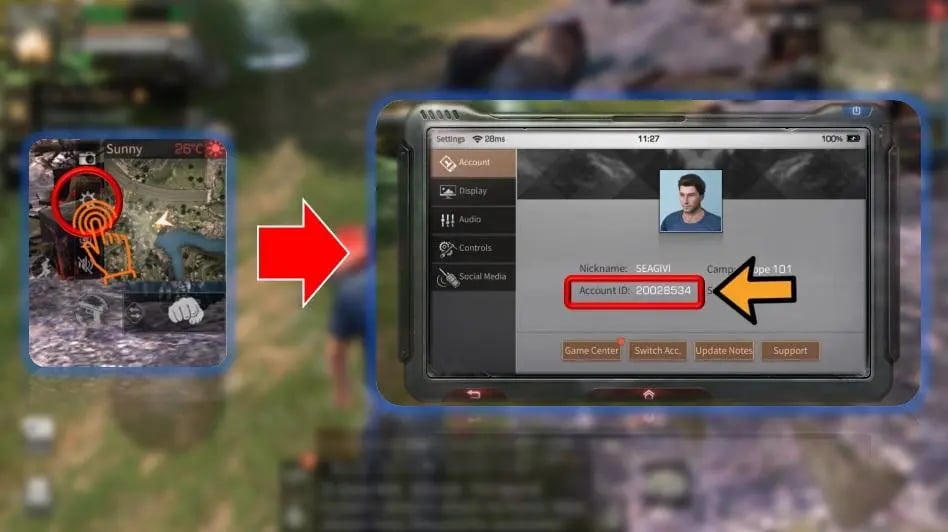
Paste this numerical sequence into the Account ID field on VGTopup and ensure your selected server matches the server name from your startup screen.
LifeAfter Server Selection & Region Compatibility Guide
LifeAfter operates multiple localized server clusters across North America, Southeast Asia, Europe, and Korea. Because character data is strictly tied to individual servers, selecting the correct server during checkout is mandatory to route your credits to the right survivor.
| Server Name | Server ID Code | Server Region |
|---|---|---|
| MiskaTown | 500001 | NA / Global |
| SandCastle | 500002 / 560003 | Global / SEA |
| MouthSwamp | 500003 | NA / Global |
| RedwoodTown | 500004 | NA / Global |
| Obelisk | 500005 | NA / Global |
| FallForest | 510001 / 560001 | Global / SEA |
| NancyCity | 520001 | Global / NA |
| CharlesTown | 520002 | Global / NA |
| SnowHighlands | 520003 | Global / NA |
| Santopany | 520004 | Global / NA |
| LevinCity | 520005 | Global / NA |
| HopeValley | 560002 | SEA |
| MountSnow | 560004 | SEA |
| St.Rona | 560005 | SEA |
| 파플래닛 | 550001 | Korea |
| 미스카대학 | 550002 | Korea |
| EasySurvival | 730001 | Special Season |
| SimpleSurvival | 720001 | Special Season |
If you play on specialized or Korean regional servers, match the exact Korean script or server name from the VGTopup server selection list to prevent processing delays.
Federation Membership Benefits vs. Credit Bundles
Deciding between buying direct Federation Credits or activating the monthly Federation Membership depends on how you spend your time in LifeAfter.
| Feature | 30-Day Federation Membership | Direct Credit Packs |
|---|---|---|
| Immediate Credits | 300 Credits upon purchase | Exact bundle value (e.g., 60 to 7,768+ Credits) |
| Daily Rewards | Daily Gold Bars, New Dollars, and materials | None |
| Backpack & Storage | Additional inventory and cabinet slots | None |
| Market Tax Discount | Reduced commission on stall sales | None |
| Formula Research | Daily resource support for formula draws | Direct credits used for instant research gacha |
| Best Used For | Daily active players building long-term camps | Immediate purchases for limited events and outfits |
If you log in every day to complete daily quests, camp patrols, and area operations, the Federation Membership offers the highest overall long-term resource efficiency. If you need immediate currency for limited gacha prize pools or vehicle draws, direct Credit packs provide immediate spending power.
Is It Safe to Top Up LifeAfter with Account ID Only?
Top-ups on VGTopup rely strictly on your public Account ID and server name.
- No Password Required: You will never be asked for your NetEase account password, Google Play credentials, Apple ID, or social logins.
- No Account Sharing: Your profile remains in your control at all times, removing any risk of unauthorized logins or account hijacking.
- Direct Balance Injection: Credits are delivered directly through the standard player routing system based on your ID, ensuring that your account status remains fully secure.
Troubleshooting LifeAfter Top-Up Delivery Issues
If your Credits or Membership do not appear immediately after completing payment on VGTopup, follow these verification steps:
- Restart the Game Client: Completely close LifeAfter from your background apps or task manager and launch it again. This forces the client to sync with the server database.
- Check Your In-Game Mail: Certain package bonuses, event items, and membership notifications arrive directly in your survivor mailbox located outside your manor.
- Confirm the Server Selection: Double-check your order receipt to make sure the selected server matches the server where your active character resides.
- Check VGTopup Order Status: View your account dashboard on VGTopup to confirm that the payment went through and the order status reads completed.
- Contact Support: If the currency has not arrived after a short wait and a client restart, submit your Order Number, Account ID, and Server name to VGTopup customer support for immediate assistance.
Frequently Asked Questions
How do I find my LifeAfter Account ID and Server?
Open LifeAfter and check the server name on the title screen. Enter the game, tap your avatar in the upper-left corner to open your profile, and find the numerical Account ID displayed under your character name.
Do I need to share my LifeAfter login password to top up?
No. VGTopup processes all LifeAfter orders using only your numerical Account ID and chosen server. Never share your password or verification codes with anyone.
What benefits do I get with the LifeAfter Federation Membership?
Activating the 30-day membership grants you 300 Federation Credits upfront, daily Gold Bar and supply packages, extra backpack and cabinet slots, reduced market sales tax, and special sign-in privileges.
How long does it take for LifeAfter Credits to reach my account?
Orders are processed promptly once payment confirmation is received. Most transactions reflect on your character balance shortly after completion. Restarting the game client helps refresh your balance.
What should I do if I entered the wrong Server or Account ID?
If your order has not yet been processed by the automated system, contact VGTopup customer support immediately with your order number and the correct Account ID/server details. If the order was already completed to an existing account, processed top-ups cannot be reversed.
Can I top up LifeAfter Credits for a friend using their ID?
Yes. You only need your friend's exact Account ID and their active server name. Enter their details on VGTopup and complete the purchase to send Credits directly to their character.
Select Denomination
Tax, payment fees and eligible coupons are calculated at checkout.
| Package | Price |
|---|---|
| 65 Credits | USD 0.72 |
| Survival Expert Card | USD 2.41 |
| Trade VIP Card | USD 2.41 |
| 330 Credits | USD 3.37 |
| Federation Membership | USD 4.01 |
| 558 Credits | USD 5.15 |
| Lucky Star | USD 7.92 |
| 1108 Credits | USD 10.55 |
| LifeAfter Fund | USD 11.88 |
| 2268 Credits | USD 21.11 |
| 3468 Credits | USD 32.99 |
| 5768 Credits | USD 52.12 |
| 7768 Credits | USD 69.93 |