
EVE Echoes AUR Top Up and How to Use It in New Eden
AUR (Aurum) is the premier currency in EVE Echoes, allowing capsuleers across New Eden to acquire exclusive ship customizations, Nanocores, supply crates, and specialized skill packages. Whether you operate in high-security space, run dangerous null-sec fleet operations, or manage planetary industrial networks, having an adequate balance of AUR gives your pilot the resources needed to progress efficiently.
Unlike standard currency earned through combat bounties and mining, AUR connects directly to premium services within the EVE Echoes store. Pilots convert AUR into PLEX to manage Omega clone status, purchase Insurance Points to replace destroyed hulls, or unlock Nanocores that grant tactical combat bonuses. On VGTopup, you can complete an EVE Echoes AUR top up directly to your character ID without sharing login credentials or compromising account security.
How to Top Up EVE Echoes AUR on VGTopup
Adding AUR to your EVE Echoes account takes only a few simple steps. The checkout system processes orders straight to the game server.
- Select your desired EVE Echoes AUR package from the denomination list on VGTopup.
- Enter your numerical EVE Echoes User ID (UID) in the required field.
- Select your Server (Aurora is the global server).
- Review your order details to ensure your User ID is entered correctly.
- Click Buy Now and select your preferred payment method on the checkout page.
- Complete the transaction. Live prices and current payment options appear on the live checkout screen.
- Open EVE Echoes on your device to confirm your new AUR balance.
How to Find Your EVE Echoes User ID and Server
To ensure your AUR arrives without delay, locate your character UID directly inside the game client.
- Launch EVE Echoes on your mobile device or emulator and log in to your character.
- Tap your character avatar in the upper-left corner of the main station or space interface.
- In the profile overview window, locate the numeric string shown directly under your character name.
- Tap the copy icon next to the number to copy your User ID to your clipboard.
- Confirm your server selection: the global live server for EVE Echoes is Aurora.
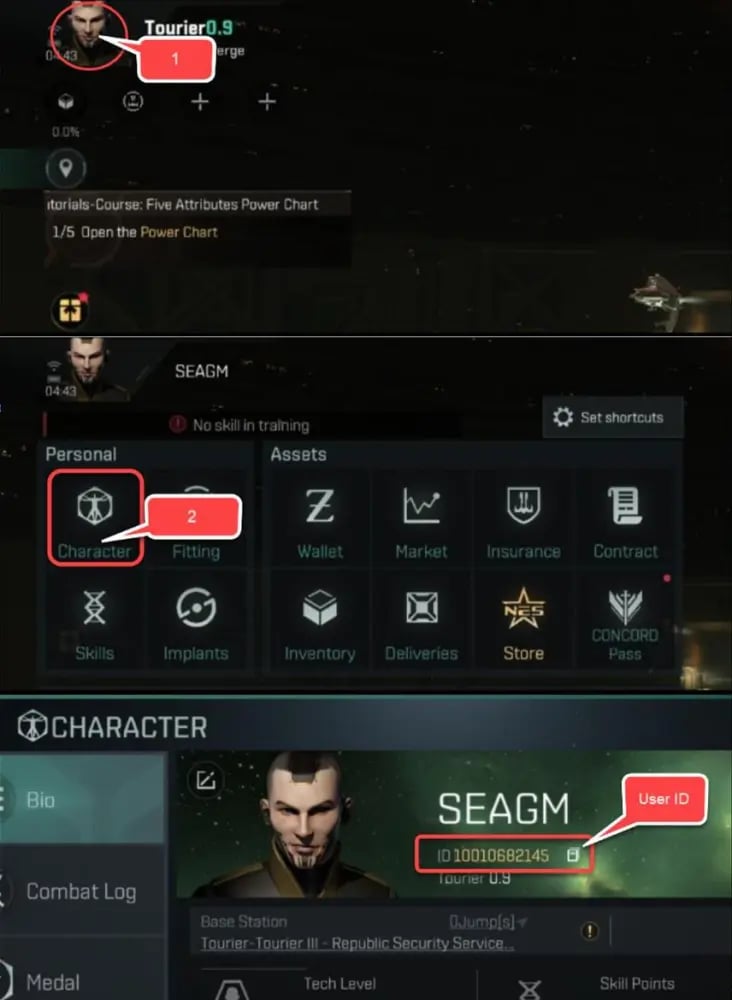
Paste this exact number into the User ID field on VGTopup before checking out.
AUR vs. PLEX vs. ISK: Understanding In-Game Currencies
New Eden relies on a three-tier economy. Knowing how AUR, PLEX, and ISK interact ensures you spend your resources effectively.
| Currency | How to Obtain | Primary Uses | Trade Status |
|---|---|---|---|
| AUR (Aurum) | Direct top up via UID | Store bundles, Nanocores, supply crates, PLEX conversion | Account-bound |
| PLEX | Convert from AUR or buy with ISK | Omega subscriptions, Market trading, Pilot services | Tradable on regional market |
| ISK | Bounties, mining, trading, industry | Market ships, modules, blueprints, planetary items | Fully tradable between pilots |
- AUR (Aurum): The primary fiat currency. AUR cannot be traded directly on the open market between pilots, which keeps your store credits secure.
- PLEX (Pilot License Extension): The bridge currency. You can convert AUR into PLEX, which can then be used to activate Basic or Standard Omega clone licenses or sold on the regional market for massive sums of ISK.
- ISK (InterStellar Kredits): The baseline currency used for everyday market operations, manufacturing fees, contract collateral, and pilot-to-pilot transactions.
Safe Direct UID Delivery: No Password Required
Security is paramount when managing an EVE Echoes pilot with months of training and billions in assets. VGTopup uses direct-to-UID server crediting, meaning you never have to provide your account password, email login, or two-factor authentication codes.
- Zero Account Access Risk: Your login credentials remain strictly in your own hands.
- No Policy Infractions: UID recharges deliver AUR through official game endpoints, keeping your account safe from unauthorized third-party login flags.
- Fast Fulfillment: Because our system routes directly to your UID and server, purchases credit to your balance as soon as payment verification completes.
What to Buy with AUR: Ship Skins, Skill Injectors, and Supplies
Pilots utilize AUR to gain strategic advantages and access high-value items that are difficult to obtain through standard gameplay.
1. Nanocores and Custom Hulls
Nanocores attach to specific ship hulls, granting substantial attribute buffs such as increased weapon damage, faster warp speeds, improved shield resistances, and enhanced mining yields. AUR packages allow you to acquire premium Nanocore upgrade materials and exclusive visual skins.
2. Skill Points and Injectors
Advancing your Tech Level (T-Level) unlocks heavier ship classes, including battlecruisers, battleships, carriers, and dreadnoughts. AUR can be converted into Skill Points or specialized booster bundles, shortening the training time needed to operate advanced weapon systems and capital hulls.
3. PLEX for Omega Clone Subscriptions
Converting AUR to PLEX allows you to maintain active Omega Duo status. Omega status unlocks double the passive skill training rate, grants access to advanced ship classes, and removes market trade restrictions imposed on Alpha clone accounts.
4. Insurance Points and Concord Pass
Losing an expensive faction cruiser or battleship in low-sec or null-sec space can set your industrial progress back significantly. Using AUR to secure Insurance Points ensures you can instantly recover destroyed hulls and fitted modules through the Concord insurance terminal.
Frequently Asked Questions About EVE Echoes AUR
How do I find my EVE Echoes User ID and Server?
Open EVE Echoes and tap your character portrait in the top-left corner of the screen. Your User ID is the numeric code listed directly below your pilot name. The main global server is Aurora. Copy this number directly into the User ID box on VGTopup.
What is the difference between AUR, PLEX, and ISK in EVE Echoes?
AUR is the premium store currency obtained through direct top up. PLEX is an exchangeable token used for Omega subscriptions and market trading. ISK is the standard in-game currency earned by completing missions, mining ore, and trading items on the market.
Do I need to share my account password to top up AUR on VGTopup?
No. VGTopup only requires your character User ID and Server name. You never need to share passwords, social login credentials, or verification codes.
What items and upgrades can I purchase with EVE Echoes AUR?
You can purchase Nanocores, limited event crates, ship skins, skill point boosters, Insurance Points, and store bundles. You can also convert AUR into PLEX to fund Omega clone licenses or trade for ISK.
Is EVE Echoes pay to play in 2026?
EVE Echoes operates on a free-to-play Alpha clone model. Free players can explore high-sec, mine basic ores, and fly light combat ships. However, an Omega clone license (purchased with AUR or PLEX) is essential for accessing advanced Tech Level ships, full market capabilities, and maximum skill training speed in 2026.
What should I do if my AUR does not appear in my account after top up?
Restart your EVE Echoes game client to refresh your server connection and wallet balance. If the AUR balance does not update within a few minutes, verify the User ID submitted on your order invoice and contact VGTopup 24/7 customer support with your order number for immediate assistance.
Select Denomination
Tax, payment fees and eligible coupons are calculated at checkout.
| Package | Price |
|---|---|
| 25 AUR | USD 0.89 |
| 125 AUR | USD 4.18 |
| 265 AUR | USD 8.35 |
| 525 AUR | USD 16.70 |
| 1315 AUR | USD 41.72 |
| Tech Leap Program | USD 64.26 |
| 2750 AUR | USD 83.46 |