Play 1: The 60-second billing reset comes first
Most botched iOS purchases trace back to a billing mismatch, not anything broken on Tango's side. Apple's own troubleshooting fingers the usual suspects: an expired card, an unpaid order still hanging around, region settings that don't line up with your card, or a payment method that's gone stale, per Apple Support.
The documented fix is almost rude in its simplicity: "Add a different payment method, then remove the old one." (Apple Support, Jun 2025). That one swap clears a shocking number of declines, because it forces the App Store to re-authorize against something fresh rather than choking on whatever it cached.
Run it in this sequence:
- Open Settings → [your name] → Payment & Shipping.
- Add a new card, then delete the old one. Order matters here. Add first.
- Look for an unpaid order. As Apple puts it, "If you still can't make a purchase, you might have an unpaid order." Settle it.
- Make sure your region setting matches your card's billing country. That mismatch is one of the sneakiest decline triggers (per Apple Support, 2026).
- Restart the app, retry once.
Works when the snag is a tired card or drifted billing info, which is the bulk of cases. Fails when the wall is region-level or sitting on Apple's end. That's the next play's territory.
Play 2: Stop mashing buy — a pending charge is a double-charge trap
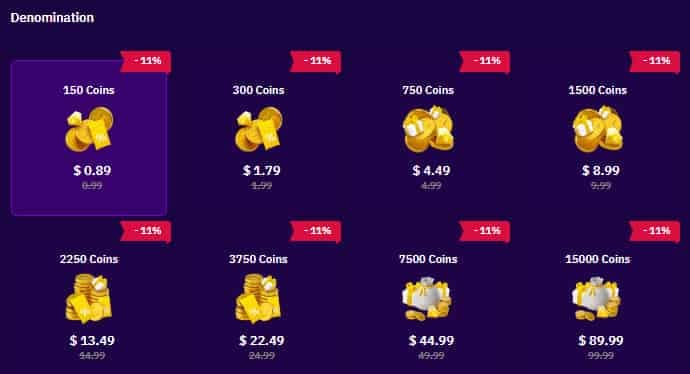
Here's the mechanic barely any guide bothers to flag. A failed Apple charge can linger as pending for up to 4 business days before it auto-reverses, according to Apple Support. Keep hammering the buy button inside that window and you might pay twice, the original hold plus your new attempt both landing. Community fix clips for "Tango Live payment failed" hammer the same point: wait for the reversal first.
So when a purchase flops and your banking app flashes a pending line, the smart play is patience, not stubbornness. Check the statement. See a pending Tango or Apple authorization? Leave it be. It dissolves on its own inside that few-day stretch.
Now for the part people get wrong. The single most-repeated tip floating around, "just reinstall the app," does basically nothing here. The handshake that broke lives on the billing side, between your card, Apple, and your account region. Wiping Tango and pulling it back down touches none of that. For a payment-failed error I'd skip the reinstall entirely and pour that time into the billing reset above.
Works when you catch the pending hold before re-buying. Saves you a refund headache. Fails when there's no pending line and your card really is the problem. Then call your bank, since stacked declines can flip a temporary block that only a new card or a quick conversation undoes (per Sikayetvar user complaints, 2025-2026).
Play 3: The web top-up is the move I default to now
This is the one I lean on these days, and not only when the App Store throws a fit. Log into tango.me from any browser, buy your coins, and they drop onto the same balance as your in-app wallet. There's no walled-off "web-only" coin pool waiting to confuse you. iOS users keep reporting clean success after switching to web once the app starts failing.
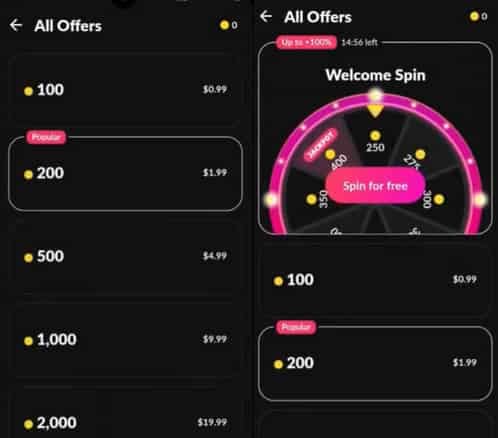
Tango spells out the steps in its own docs: "Log in to your Tango account. Click on Coin Balance and choose the amount to buy." (Tango Help Center, 2021). How it shakes out in practice:
- Open tango.me in a phone or desktop browser. Type it yourself. Don't tap a link from chat.
- Sign in with your existing Tango credentials, the same login you use on the iPhone.
- Hit Coin Balance, pick a package.
- Pay by card, prepaid, or, the quietly great option, crypto.
- Refresh the app. The balance syncs across platforms, usually within minutes for card payments (per 2026 top-up guides).
Two things tell you the web route was built for this rather than tacked on. First, it accepts a wider spread of payment methods than the iOS app does: Visa, Mastercard, Amex, prepaid, crypto, versus iOS being chained to Apple ID-linked cards and Apple Pay (per multiple 2026 guides). Second, regular web buyers rack up progress toward the Tango Loyalty Program, which dishes out coin coupons and bonuses, and yes, web purchases count toward it, per the Tango Loyalty Program help page.
Works when your login's healthy and you just want coins for less, which is nearly always. Fails when you're not certain you're on the genuine domain. Confirm the URL before you ever key in credentials (more on that below).
Play 4: The 30% gap explains why web hands you more coins
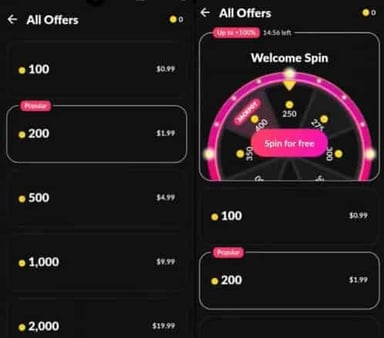
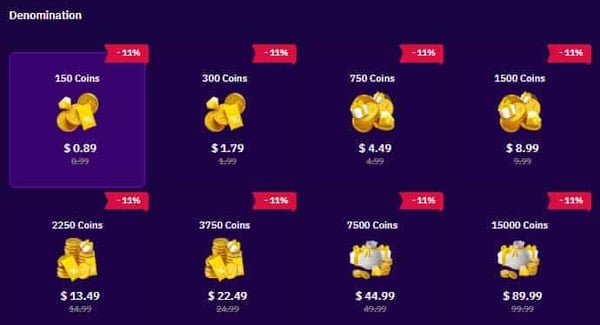
That price gap between iPhone and web isn't a fluke or some scam. It's Apple's commission, handed straight to you. Apple's standard in-app rate sits at 30% on one-off purchases for large developers, per Apple Developer. That cut is baked into every coin you buy through the app. The web portal never pays it, so Tango funnels the savings back as a bonus running up to 40%.
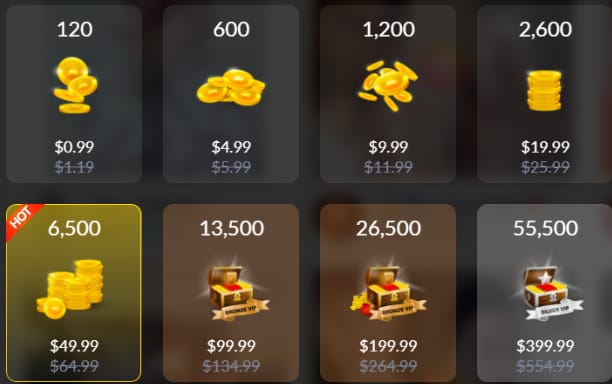
The Help Center says it flat out: "Purchasing coins on Web is cheaper than directly through apps because you can get up to 40% in coin bonuses!" (Tango Help Center, 2021).
Walk the tiers and the difference is genuinely there:
| Tier |
iOS approx price |
Coins on iOS |
Web effect (same spend) |
| Small |
$0.99 |
120 |
Higher effective with up to 40% bonus |
| Mid |
$9.99 |
1,200 |
Better value on web |
| Bulk |
$49.99 |
6,500 |
~9,100+ coins on web |
Source: TopUpLive Tango Coins Guide + Tango Help Center (2026)
That bulk row is what stopped me cold the first time I priced it. Same $49.99, roughly 6,500 coins through the App Store against around 9,100 on web once the bonus hits (per 2026 value comparisons). No rounding error makes up that spread. It's hundreds of extra coins for identical money, every single time.
How it lands depends on who you are:
- Casual gifter dropping the odd small top-up: on a $0.99 buy the per-dollar gap looks like pocket change, but you're still walking past free coins for zero added effort. Go web (per Tango's official web guide).
- Regular supporter running frequent mid-size recharges: this is where it snowballs. Every iOS top-up surrenders the 30%; every web one adds up to 40% back. Across a month of gifting, that swing is the gap between one extra big gift and nothing.
For anyone watching their spend, web shouldn't be the backup plan. It should be the first stop. The only reason it usually isn't? The app never breathes a word that the option exists. Full disclosure: VGTopup, which publishes this piece, is one third-party web channel that credits your Tango account ID. Whatever route you pick, weigh the coin-per-dollar against the official store first, and only ever credit a UID you've checked yourself.
Play 5: "Money gone, no coins" — what's actually going on
Breathe again. This is rarely theft, and on iOS it tends to sort itself out. Tango's policy reads: "If you have purchased coins in iOS application, the funds should return to the initial method of payment." (Tango Help Center, 2021). So a deducted-but-no-coins iOS buy normally resolves as an auto-return to your card once processing finishes settling, the flip side of that same multi-day pending window.
Before you escalate, run the official wait-and-check loop (per the missing coins help page):
- Wait 30 minutes. The balance can genuinely take that long to sync.
- Log out, log back in.
- Force-close, then restart the device.
- Re-check Coin Balance in your profile.
Still no coins and the charge hasn't reversed? That's your signal to ping support, and what you hand them decides how fast it gets fixed. Bring the purchase date, transaction ID, and payment proof (per Tango official help). Reach them through in-app Help & Support or the website. There's an honest split on timing: Tango's docs lean on automatic reversal for iOS, while forum reports push contacting support directly for a quicker human answer. My read is to log it with support either way the moment coins go missing past the half-hour mark, because a documented transaction ID is your leverage whether the fix arrives via auto-reversal or an agent.
One more straight note: outright refunds depend on where you bought. iOS purchases route through Apple's reportaproblem.apple.com; web ones go through Tango support. Apple processes refund requests in roughly 24–48 hours, though the cash actually landing back can take a few more days, per Apple Support.
Works when you give it the half-hour and hold onto the transaction ID. Fails when you panic-retry mid-pending and conjure the double charge the earlier play warned about.
Play 6: Check the page before you type a single character of your login

The web route is safe. On the real domain. That qualifier is the whole game. One rule outweighs the rest: type tango.me yourself, and never trust a top-up link dropped in stream chat or a DM. Community safety guides agree without exception that links from chat or DMs risk phishing or crediting the wrong person, and that you should park yourself on official tango.me or a verified UID.
A fast legitimacy gut-check:
- You typed the URL instead of tapping something a stranger sent.
- The account ID is yours — UID top-ups credit by ID, so one fat-fingered digit gifts coins to a stranger.
- No "reseller" is asking for a password — legit UID top-ups need only your Tango ID, sitting right in your app profile, never your password (per 2026 top-up guides).
On the bigger argument, are third-party UID top-ups safe or a ban risk? It's a real disagreement. One camp points to the UID-only, no-password flow and faster checkout; the other cites Tango's terms and a theoretical account hazard. My verdict tracks the official line: the safest path stays Tango's own web portal. If you do chase value through a third party, treat verifying the destination ID as non-negotiable, not a nice-to-have.
When to walk away from iPhone top-ups for good
Gift more than once in a blue moon? Drop the in-app purchase as your default and make web your standing channel. The "payment failed" error that dragged you here is, the vast majority of the time, a billing handshake, patchable in under a minute or sidestepped completely by hopping to the browser. And that browser route quietly pays you back: no 30% Apple tax, up to 40% bonus, broader payment methods, loyalty progress ticking along. The error was a nuisance. It also did you a quiet favor, nudging you toward the cheaper door.
Here's the comparison that settles the whole thing:
| Aspect |
iOS app |
Web browser |
| Commission |
30% Apple cut |
None |
| Bonus |
None standard |
Up to 40% |
| Methods |
Apple ID cards / Apple Pay |
Cards, crypto, prepaid |
| Safety |
Official app |
Official tango.me |
Source: Tango Help Center (2026)
Frequently Asked Questions
Why does my Tango payment keep failing on iPhone?
Usually it's an expired or declined card, an unpaid prior Apple order, or a region setting that doesn't match your card's billing country, all sitting on the billing side, per Apple Support (2025). Stacked declines can also trip a temporary block, and there a fresh card or a quick bank call tends to clear things before anything fancier.
Can I use my iPhone Tango account to top up on the web?
Yes, it's the same account and the same balance, with no separate web-only wallet hiding anywhere. Log into tango.me with your existing credentials and coins bought on web turn up in the app, sometimes after a refresh. The sync can take up to 30 minutes, so don't assume it flopped if the number lags for a bit.
How long do Tango coins take to credit after a web top-up?
Card payments usually credit within minutes, per 2026 top-up guides. If it's been longer than that, refresh or re-log the app before you start worrying. And if coins still haven't shown, reach support with your transaction ID rather than buying again, which only risks a second charge.
What if my Tango payment failed but money was deducted from my card?
On iOS, a deducted charge with no coins normally auto-returns to your original payment method once processing settles. It's usually a pending authorization, not a real loss, and those generally clear within 4 business days. Log it with support anyway using your transaction ID, and don't retry while that charge is still pending.
Is it actually cheaper to buy Tango coins on the web than on iPhone?
It genuinely is, because web skips Apple's 30% commission and tacks on up to a 40% bonus, per the Tango Help Center. At the $49.99 tier that's roughly 9,100 coins on web against about 6,500 in-app. Same dollars, hundreds more coins, every recharge.
👉 Tango Live Coins top up 👈
✅ Official direct recharge, 100% secure
✅ No waiting – top-up arrives in 7 seconds
✅ Big discounts, low prices to save more
✅ 7×24-hour customer service, ready to assist anytime









Comments