The username is a trap; the numeric ID is the only thing coins follow
The mixup that sinks more gift top-ups than anything else is simple. Ahlan Chat hands users a display name (the handle you see floating in voice rooms) and a totally separate numeric UID tucked into the profile. Different things. Only one of them works for a top-up.
That display name? Non-unique. Plenty of people run variations of it, and it shifts every time someone tweaks their profile. The numeric UID is the permanent fingerprint of the account. Per the Enjoygm Ahlan Top-Up Guide, the UID is what every third-party recharge surface actually keys on, and mistaking the username for the ID is the rookie error that ends in coins landing somewhere wrong.
To get the right number, walk your friend through this:
- Open the Ahlan app, tap the profile picture.
- Look right under the username. The numeric UID sits there.
- Long-press, copy it, paste it into a message back to you.
| What you're looking at |
Where it lives |
Use it for top-up? |
| Display name / username |
Top of profile, in voice rooms |
❌ Non-unique, changes, useless for delivery |
| Numeric UID |
Below username on the profile screen |
✅ The only field that routes coins |
Source: Enjoygm Ahlan Top-Up Guide (2026)
The one rule I'd carve into stone for a first-timer: copy-paste the UID, never type it. Hand-typing is exactly how a digit flips on you. An 8 turns into a 3, two numbers trade places, and suddenly you've funded a stranger. A pasted string can't fat-finger itself. And if your buddy reads the number to you over voice chat instead of texting it? You've just walked straight into the failure you were trying to dodge. Get the digits as text.
The name preview is the safety gate nobody talks about
Almost no walkthrough bothers with this part, and it's the most important screen in the whole sequence. Once you've keyed a UID into a decent top-up page, the system usually shows you the account name tied to that ID before payment. That little preview is your check. It's literally there so a wrong number gets caught before money leaves your hands.
So treat it like a stop sign, not a formality. Read the name. Is that your friend? If you entered the UID right and some stranger's name pops up, congrats, you just caught a transposition for free. Stop, recheck the digits. Name matches? Pay.
Why does this carry so much weight? Because the second a top-up to a real UID clears, those coins belong to that account. Done. The preview is the last moment you can still pull the brakes, since there's no documented official mechanism to undo it later. Blowing past this screen to "finish fast" is precisely how the wrong-ID horror stories get written. Quicker checkout isn't better checkout here. Not even close.
Step-by-step: sending coins to someone else's ID
The actual flow on UID-based services is short. The discipline lives in the verifying, not the clicking. Per the Yallaplay Ahlan Recharge Page, the usual run is: pick a pack, enter the friend's numeric UID, pay, and coins show up in a few minutes.
Here's how I'd run it so no gap opens up for an error to slip through:
- Get the UID as pasted text plus a screenshot. Ask for both. The screenshot proves the number came off the right profile.
- Pick your package (comparison's below; pick the tier, not the impulse).
- Paste the UID in. No typing.
- Stop at the name preview. Confirm it's your friend. Non-negotiable.
- Choose a payment method, pay.
- Screenshot the order confirmation the instant it lands.
One genuinely nice thing about the UID-only model: you never go near your friend's password or login. The same guide notes third-party services route purely off the numeric ID, so you can gift without anybody trading credentials, and that knocks down ban risk compared to any "just share your login" setup. You do not need your friend's password to top up their coins. A service that asks for it? Walk.
If you'd rather run that verified-UID checkout somewhere simple, Ahlan Coins top up is one route. Just confirm the name preview matches before paying, same as everywhere.
What the packages actually cost, and where the value hides
The in-app store lays everything out, which makes it the cleanest baseline for working out value. Per the Ahlan TopOne App Store Listing, four tiers run from a $1 starter up to a $50 bulk pack.
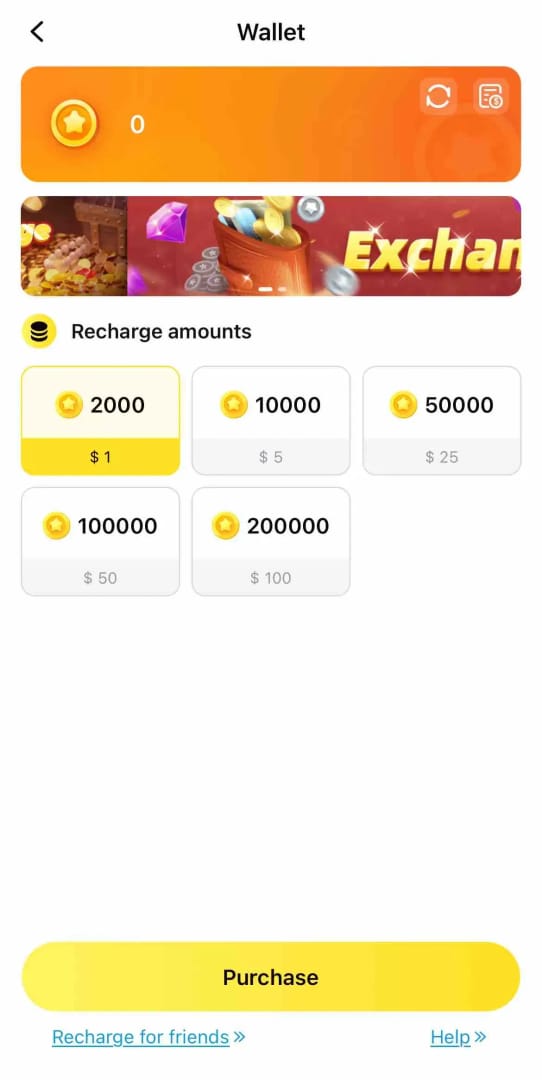
| Package |
Coins |
Price (USD) |
Cost per coin |
| Small |
2,000 |
$1.00 |
$0.00050 |
| Medium |
10,000 |
$5.00 |
$0.00050 |
| Large |
50,000 |
$25.00 |
$0.00050 |
| XL |
100,000 |
$50.00 |
$0.00050 |
Source: Ahlan TopOne App Store (2026)
Catch what the tier names quietly hide: the cost per coin sits flat at $0.0005 across every official package. Buying the $50 XL gets you zero per-coin discount over the $1 starter. Weird, right? In most coin economies the chunky bundle pays you back for going big. Not here. So on the in-app side, just buy the size you'll burn and don't overstock "for value." There's no value bump to chase.
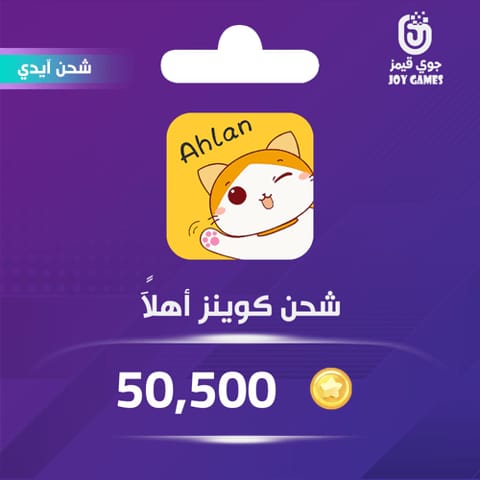
Third-party packs sing a different tune. Per the Joygames Ahlan Top Up listing, a 50,500-coin pack sits around $25.50, while a 430,000-coin pack runs roughly $215.
| Coins |
Price (AED) |
Approx USD |
| 50,500 |
93.63 |
~$25.50 |
| 323,000 |
592.59 |
~$161.00 |
| 430,000 |
788.48 |
~$215.00 |
Source: Joygames Ahlan Top Up (2026)
Work out that bottom row, though. About $215 for 430,000 coins lands near $0.0005 per coin, and the 50,500 pack at ~$25.50 sits close to the same. So the loud "third-party is just cheaper" line goes soft once you normalize per coin. Community feedback per Google Play Ahlan Reviews does grumble that in-app coins feel expensive and that third-party can undercut them, but there's no official side-by-side, and the per-coin figures up there don't open a big gap. My read: don't pick a channel chasing a discount that mostly isn't there. Pick whichever checkout lets you verify the UID cleanly. And heads up, third-party packs are often priced in AED on UAE-leaning sites, so your card might catch a currency conversion.
Confirming the coins actually landed (and the lag that scares everyone)
Coins usually show up within a few minutes to near-instant on third-party services, per the Enjoygm and Yallaplay guides. That little window is the source of more "it didn't work!!" messages than any real failure.
Here's a mechanic worth keeping in your back pocket. A top-up can read successful on your order screen while the coins are still processing on your friend's account. Friend checks their balance ten seconds after you pay and freaks? That's not a busted transaction, that's delivery lag. Let the whole few-minute window run before anybody sounds the alarm.
Real confirmation looks like:
- Your side: an order confirmation or receipt showing the UID, the coin amount, a success status. Screenshot it right away, it's the only leverage you've got if things go sideways.
- Your friend's side: the fresh coin balance reflected in-app once the processing window closes, ideally screenshotted back to you.
Only after that full window's passed and the receipt says success and the balance still hasn't budged should you call it a genuine "not credited" case instead of plain old lag.
You sent coins to the wrong ID; here's the honest part
I'll be straight, because the sugarcoated guides do real damage on this one. A wrong-ID top-up is usually final. No official Ahlan refund or top-up policy page turned up in searches, and across the third-party services I checked (Enjoygm, Yallaplay, and others like Z2U), no official refund policy for wrong-ID transactions exists, with every one of them telling you to double-check the UID precisely because there's no guaranteed reversal. The realistic odds of clawing back coins sent to a valid-but-wrong account are slim. That's not me being gloomy, that's just what the missing refund mechanism is telling you.
If it does happen, your first ten minutes still count:
- Capture everything. Screenshot the order receipt, the UID you keyed, and the original UID your friend sent. The gap between those two is your evidence.
- Hit the platform's support right away with the screenshots. Speed sometimes helps if the coins haven't been spent, though nobody's promising anything.
- Don't bank on a chargeback. Disputing the card payment can throw your account standing into question and it still won't yank coins out of a stranger's wallet.
This is exactly why I keep banging on about the preview screen and the copy-paste habit. Prevention's the only play with reliable odds. Everything past a successful wrong-ID payment is hope, not process.
Cross-region gifters, do the region check first
If you and your friend are on different regional setups, verify the region or server match before you pay, not after. Third-party pricing leaning toward AED points at a UAE-focused market, per the Joygames and App Store listings, and that framing hints account/region context can shape where coins route.
The failure mode here is genuinely ugly. A top-up can come back "successful" while the coins drop onto a same-numbered account in a different region than your friend's. The UID looked fine, the payment cleared, and the coins just aren't where your friend is sitting. For cross-region gifting, confirming the region alongside the UID is step one, not some afterthought stapled to the end of a checklist. If a service lets you specify or shows a region, match it to your friend's. If it doesn't, that ambiguity alone is reason to be extra careful with the name preview.
The one habit that kills almost every mistake
If you take nothing else from all this, take this: paste the UID, stop at the name preview, then pay. That single sequence neutralizes the two errors behind the vast majority of failed gift top-ups, hand-typed digit transposition and skipping verification to rush checkout.
For a first-time gifter, the safest path is a UID-only service so you never share login details, with a screenshot of the friend's profile UID confirmed before payment, per the Enjoygm guide's first-timer advice. For a cross-region friend, the region match becomes your literal first move. For everyone, the receipt screenshot stays non-negotiable. Costs you one tap and it's the only proof you'll hold if support ever gets involved.
The username will never matter. The payment's the easy part. The name preview is the whole job.
Frequently Asked Questions
How do I find someone's Ahlan Chat ID if they're not tech-savvy?
Have them open the app, tap their own profile picture, and read the numeric line sitting right under their username. That's the UID, per the Enjoygm Ahlan Top-Up Guide. Tell them to long-press, copy, and send it as text plus a screenshot. If they read it out loud over voice chat instead, you risk mishearing a digit, which is the exact error you're trying to head off.
Do I need my friend's password to top up their coins?
No, and refuse if any service asks. UID-based top-up routes purely on the numeric ID with zero credentials shared, which is what keeps it low-risk for bans, per the Enjoygm guide. A legit gift top-up never touches your friend's login. They keep the account fully private and you only ever handle the public UID.
Can a wrong-ID top-up actually be refunded?
Realistically, assume no. No official Ahlan refund policy turned up in searches, and third-party services including Z2U, Enjoygm, and Yallaplay publish no refund guarantee for wrong-ID transactions, telling you instead to verify the UID upfront. You can still report it immediately with screenshots, and occasionally that helps before coins are spent, but treat recovery as a long shot, not a right.
Why hasn't my friend received the coins yet?
Usually it's just normal processing lag. Delivery typically runs from a few minutes to near-instant on third-party services per the Enjoygm and Yallaplay guides, and a balance can lag even after your order reads success. Wait out the full few-minute window before worrying. For cross-region pairs, also check the coins didn't route to a same-numbered account somewhere else.
Is third-party top-up safer or riskier than buying in-app for a gift?
Both work; the deciding factor is verification, not the channel. The in-app App Store listing is fully transparent on price, while reputable UID services let you gift without sharing logins, per the Enjoygm guide. The genuine risk on either side is sending to the wrong ID, so go with whichever checkout shows you a clear account-name preview, and stick to a reputable site to dodge scams, as Google Play reviews caution.











Comments