
Douyin Top Up: Buy Douyin Diamonds Instantly
Douyin Diamonds (抖币, also known as Doubi) are the official virtual currency used across the mainland Chinese version of Douyin. Users use Diamonds to interact with creators, send virtual gifts during live broadcasts, purchase special entry effects, join creator fan clubs, and access premium interactive features.
Acquiring Douyin Diamonds directly within the app requires a mainland Chinese bank card or verified local payment accounts. For international users, overseas Chinese, and global fans, VGTopup provides an accessible direct top-up solution. You only need your Douyin User ID (UID) to complete an order. Check the live denomination options above on VGTopup to view current rates and select the package that fits your needs.
Douyin vs. International TikTok: Platform Compatibility
Before placing an order, confirm which platform version your account belongs to. ByteDance operates separate applications with independent account systems, currencies, and server architectures.
| Feature | Douyin (Mainland China) | Douyin Volcano Edition (火山版) | TikTok (Global) |
|---|---|---|---|
| Target Region | Mainland China | Mainland China (Lite/Shorts) | International / Global |
| In-App Currency | Douyin Diamonds (抖币) | Volcano Diamonds (火苗/火币) | TikTok Coins |
| Account Format | Numeric ID / Custom Douyin ID | Volcano ID | Username (@handle) |
| VGTopup Service | Supported on this page | Not Supported here | Requires TikTok Top Up |
Recharges purchased on this page credit exclusively to mainland Douyin accounts. International TikTok accounts and Douyin Volcano Edition accounts cannot receive these Diamonds. Verify that you have the standard Chinese Douyin app installed before ordering.
How to Find and Copy Your Douyin User ID (UID)
To ensure your Diamonds arrive quickly and without error, submit your exact Douyin User ID. Do not submit your display nickname, as nicknames are customizable, can change at any time, and are not unique.
- Open the Douyin app on your mobile device.
- Tap the profile icon labeled 我 (Me) in the bottom-right corner of the screen.
- Locate the profile area below your avatar and nickname.
- Find the row showing 抖音号: (Douyin ID) followed by numbers, letters, or underscores.
- Tap the copy icon next to your ID or tap and hold the ID number to copy it to your clipboard.
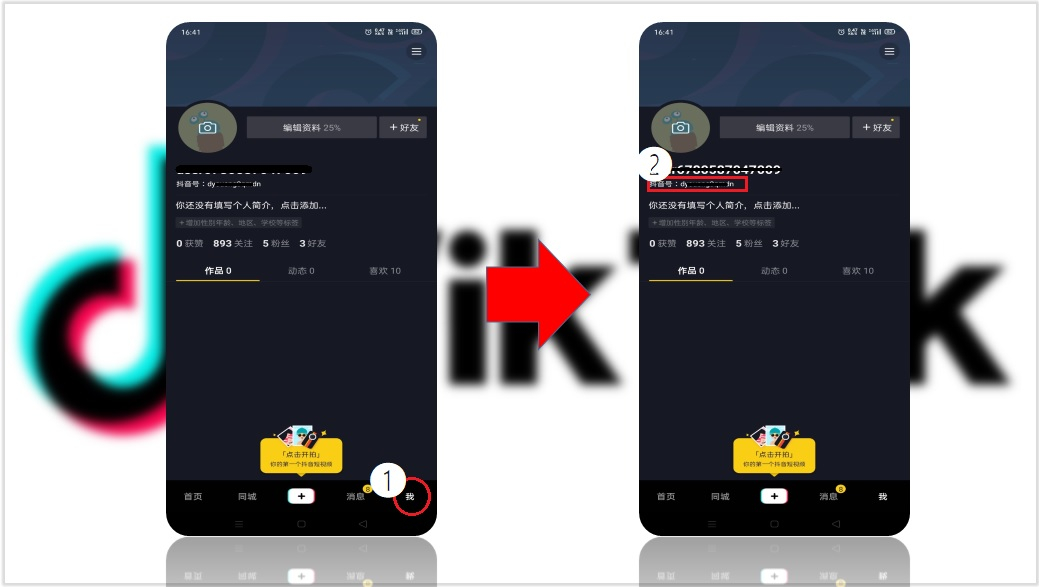
If you have never customized your Douyin ID, the app displays a system-generated numeric string. If you customized it, copy that exact string. Both formats function properly on VGTopup.
Step-by-Step Guide to Top Up Douyin Diamonds on VGTopup
Ordering Douyin Diamonds through VGTopup requires only a few straightforward steps:
- Select Your Diamond Package: Review the available Diamond denominations listed on the VGTopup product page and pick the amount you want to purchase.
- Input Your Douyin UID: Paste your copied Douyin ID into the required account field. Check that no accidental spaces or punctuation marks were copied with the text.
- Proceed to Checkout: Click the purchase button to move to the secure payment screen.
- Select Your Payment Method: Choose from the available international payment options supported at checkout.
- Complete the Transaction: Confirm your payment details. Once the transaction processes, the system credits the Diamonds directly to your Douyin account balance.
Live pricing, exchange rates, and denomination tiers are displayed in real time on the order selection module.
Recharging Douyin Outside China Without Chinese Bank Cards
Purchasing Diamonds directly inside the Douyin application presents major payment barriers for users residing outside mainland China. The native app typically requires:
- A verified mainland Chinese identity card (身份证).
- A bank account issued by a financial institution in mainland China.
- A real-name verified WeChat Pay or Alipay account tied to domestic banking rails.
VGTopup eliminates these barriers by accepting international payment channels at checkout. You do not need a domestic Chinese bank card, Chinese phone number verification, or mainland documentation to buy Douyin Diamonds for yourself or to send gifts to your favorite creators.
How to Check Your Douyin Diamond Balance in the App
Once your transaction completes, you can verify your updated balance directly inside the Douyin app. Because the app uses a Chinese-language interface, follow these navigation steps:
- Open Douyin and tap 我 (Me) in the bottom-right corner.
- Tap the menu icon (three horizontal lines) in the upper-right corner of your profile screen.
- Select 钱包 (My Wallet) from the side menu list.
- In the wallet overview, look for the section marked 我的资产 (My Assets) or tap directly on 抖币 (Doubi / Diamonds).
- Your total available Diamond balance will be displayed on screen. Refresh the page if you just completed your order.
Account Security: UID-Only Direct Recharge
Security is a fundamental part of the top-up process on VGTopup. We operate strictly through direct account crediting using your public Douyin User ID.
- No Passwords Required: You never need to share your Douyin password, SMS verification codes, or login credentials.
- No Account Handover: You do not need to grant temporary access to your account or scan unfamiliar QR codes.
- Safe Transactions: Your personal login data remains secure on your personal device at all times.
Always protect your account by keeping your login details private and never sharing account passwords with any third party.
Frequently Asked Questions
What is the difference between Douyin and TikTok accounts?
Douyin is built for users in mainland China, while TikTok is designed for international markets. Although both are owned by ByteDance, they operate on separate servers and have distinct account databases. Douyin uses Douyin Diamonds (抖币), whereas TikTok uses TikTok Coins. You cannot log into Douyin with TikTok credentials, and top-ups made for Douyin cannot transfer to TikTok.
How do I find my Douyin User ID for top up?
Open the Douyin app, tap the 我 (Me) tab in the lower-right corner, and look directly beneath your profile picture and nickname. Copy the string shown next to 抖音号:. Enter this exact ID during checkout on VGTopup.
Can I recharge Douyin Diamonds if I live outside mainland China?
Yes. VGTopup enables international users, overseas students, and global creators to top up Douyin accounts from anywhere in the world using international checkout methods, bypassing mainland payment restrictions.
Do I need to provide my Douyin account password for recharge?
No. VGTopup only requires your Douyin User ID (UID). We never request passwords, verification codes, or access tokens.
Can Douyin Diamonds be used on Douyin Volcano Edition (火山版)?
No. Douyin Volcano Edition operates a separate in-app currency system called Volcano Diamonds (火苗). The services on this page are dedicated exclusively to the standard mainland Douyin app.
What should I do if my Douyin Diamonds do not arrive immediately?
First, check your Douyin wallet by going to 我 > Menu > 钱包 > 抖币 and refreshing the screen. If the Diamonds do not show up after a short period, contact the VGTopup 24/7 customer support team with your order number and Douyin UID for prompt assistance.
Can I get a refund if I enter the wrong Douyin UID?
Because top-up orders are processed automatically to the account ID provided at checkout, recharges sent to an existing, valid UID entered by mistake cannot be reversed or refunded. Always double-check your Douyin ID before confirming payment to prevent misdirected orders.
Select Denomination
Tax, payment fees and eligible coupons are calculated at checkout.
| Package | Price |
|---|---|
| Douyin TikTok(CN) - 600 Coins | USD 8.61 |
| Douyin TikTok(CN) - 980 Coins | USD 14.07 |
| Douyin TikTok(CN) - 1980 Coins | USD 28.41 |
| Douyin TikTok(CN) - 2000 Coins | USD 28.70 |
| Douyin TikTok(CN) - 2980 Coins | USD 42.73 |
| Douyin TikTok(CN) - 3000 Coins | USD 43.05 |
| Douyin TikTok(CN) - 5000 Coins | USD 71.74 |
| Douyin TikTok(CN) - 5180 Coins | USD 74.31 |
| Douyin TikTok(CN) - 6000 Coins | USD 86.09 |
| Douyin TikTok(CN) - 8000 Coins | USD 114.78 |
| Douyin TikTok(CN) - 10000 Coins | USD 143.47 |
| Douyin TikTok(CN) - 15980 Coins | USD 229.29 |
| Douyin TikTok(CN) - 19800 Coins | USD 284.07 |
| Douyin TikTok(CN) - 20000 Coins | USD 286.93 |
| Douyin TikTok(CN) - 30000 Coins | USD 430.40 |
| Douyin TikTok(CN) - 300 Coins | USD 4.31 |