Can't find Hero Rally in your event tab? Here's the likely story
Lilith keeps AFK Journey on a dense, rotating event calendar, and event names get translated, regionally staggered, sometimes renamed between test builds and live. So when a community-circulated name refuses to resolve to anything you can actually open, it's usually one of four things:
- A leaked or datamined name for an event not yet pushed to your region.
- A regional or translation variant of something you already own under a different label. Login marathons and "all-hero" trials get re-skinned constantly.
- A mislabeled spending event. Recharge bundles and milestone tracks superficially resemble a "rally" because both use a points-style progress bar.
- Or it just isn't in the current version, which is the honest read today.
What to do about it is simple. Open the in-game Events tab, check the official AFK Journey site or the developer's social channels for the active schedule, then cross-reference the wiki's events section. Those are your authorities. A threshold that isn't printed on the real event panel doesn't exist for planning purposes, however confident some third-party page sounds. Verify it lives in your client before you plan a single thing around it.
Don't top up just to clear a milestone tier
I'll commit to this one plainly, because it protects more wallets than anything else here: for any AFK Journey milestone event, paying real money solely to clear the final tier is poor value. The pattern repeats across every event the game runs. Headline reward tiers sit comfortably inside reach of daily logins and routine tasks, and those last one or two milestones are engineered to be the stingiest points-per-effort stretch on the whole track.
Now the mechanical reason a lot of guides skip over. In these events, finishing a task usually fills both the milestone progress bar and an event-currency wallet at once. Two separate systems, one action feeding both. Players who don't clock this assume they need to "buy more points." You don't. Point progress arrives as a byproduct of the same dailies you'd grind regardless.
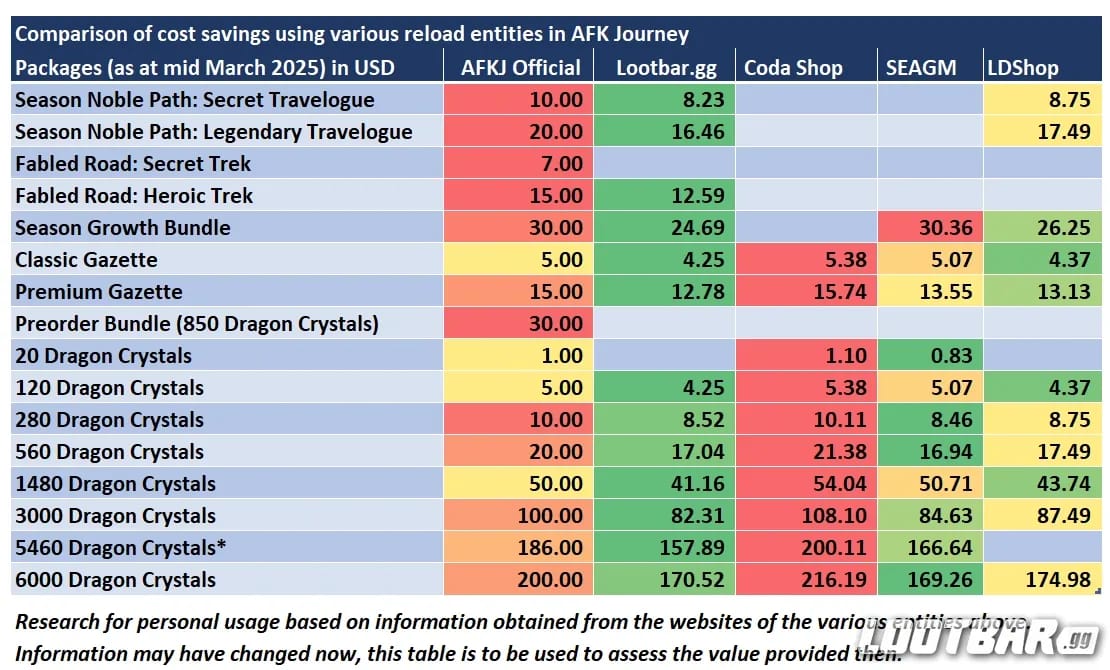
A top-up earns its keep only when the pack's actual contents are something you already wanted and the event bonus is gravy on top. Buying a diamond bundle you had no plans for, purely to shove a bar past one last threshold, is the textbook FOMO trap. If you've genuinely decided a diamond pack fits your roster, then sure, weigh your in-game offer against any outside option on price and bonus first. AFK Journey Top Up recharge is one transparent channel to compare against your in-client packs, but the logic doesn't change: buy the pack for the pack, never for the bar.
My read after watching these cycles repeat: diamonds and hero shards from a milestone track compound across your account's entire life, while a single event-exclusive hero rarely justifies reshuffling anything you've built. Pocket the progression currency. Let the timer scream.
F2P? Showing up every day beats any single big push
For free players, the variable that decides everything isn't spending. It's whether you log in every single day of the window. Skipping daily tasks for even a couple of days is the most common reason players come up short of a top milestone, and it's not close. The reason is structural: dailies repeat and front-load, so a skipped day is points gone forever, and there's no fat one-time task waiting at the end to bail you out.
Cleanest F2P loop for any event of this shape:
- Day one, knock out every one-time task first. Those are your campaign / Dream Realm / Arena "reach X" objectives that drop a chunk of points the instant you finish.
- Then settle into the daily repeatables. Same quick rhythm, every day, for the full window.
- Pre-stage progression before the event opens, if you see it coming. Some one-time tasks (advance a campaign stage, clear a Dream Realm boss, hit an Arena rank) can be parked in advance. Push that progress the day before launch and you bank a wall of instant points the moment the event flips on. When something's rumored, deliberately hold back a stage or two.
That pre-staging trick alone separates coasting to the top tier from white-knuckling it on the final day. Daily consistency carries the average player across the line. Pre-staging is what gets you there with breathing room. Build the habit of checking what's rumored, then sit on a stage.
Funnel event currency into one carry, don't browse the whole shop
The shop, not the milestone diamonds, is where the real planning happens, and it's where accounts quietly bleed value. Milestone diamonds are fixed. You hit thresholds, you get them, there's no cleverness involved. Event currency is a budget you allocate, and allocation is the part that wins or loses accounts.
Here's how I'd rank event-shop spending:
| Priority |
Spend on |
Why |
| 1 |
Shards/copies for a hero you already own and use |
Directly raises a unit you actually field — highest, most certain ROI |
| 2 |
Diamonds, if offered at a favorable rate |
Fungible, compounds account-wide, never wasted |
| 3 |
Targeted gear/progression mats for your main team |
Real power if it slots into units you run |
| 4 |
Breadth pulls / random hero shards |
Spreads investment thin; usually the worst value |
One governing idea runs underneath all of it: concentrate, don't diversify. Pour shards into a single carry instead of dusting three heroes you'll never properly invest in. A hero pushed to a genuine breakpoint reshapes your account. Three heroes nudged a sliver each change nothing.
Two timing cautions, straight from how these shops actually behave:
- Unspent event currency typically expires or converts when the event closes. Don't hoard it expecting a rollover.
- But waiting until the literal final day carries its own danger. A restock, a reset edge case, a maintenance window can strand currency you meant to burn. Spend down with a buffer, not in the last hour.
Pick your carry early and feed it the whole budget.
Chasing the exclusive hero? For new accounts, usually skip it

The "free hero" headline is the flimsiest reason to grind one of these hard, and I'll take the unpopular side. An event-highlighted hero is often overrated for newer accounts, because a unit only plays as well as the team wrapped around it. Drop a flashy carry onto a fresh roster with no synergy pieces, no Resonating Hall investment, no supporting faction core, and it falls well short of the trailer.
For a day-one beginner, the diamonds and shards on the track are worth far more than the marquee unit. They accelerate the foundation you're actually missing. For an established account that already owns the supporting cast, the exclusive hero gets genuinely interesting, because there's finally a team to express its kit. That's the honest split. The hero's value scales with what you've already assembled, not with how loud the banner is.
So when a guide tells you to "reorganize your account" around an event hero, ignore it, unless you're already deep enough that one well-placed unit is the single piece you were missing.
Quick reference: who should grind, and how hard
| Player profile |
Recommended action |
Reason |
| F2P (zero spend) |
Log in daily, clear one-time tasks day one, pre-stage if possible |
Top tiers are consistency-gated, not spend-gated — daily attendance is the whole game |
| Low-spender ($5/mo pass) |
Run the pass, treat event as free bonus, no extra top-up |
Your pass + dailies realistically covers the reachable tiers |
| Day-1 beginner |
Chase diamonds/shards, not the exclusive hero; fund foundation |
You lack the team to use a marquee carry; progression currency compounds |
| Returning veteran |
Pre-stage one-time tasks, target the exclusive hero only if it fills a gap |
You have the supporting cast to make a featured unit worth it |
One line apiece: F2P, just show up. Low-spender, your pass already carries you. Beginner, take the boring diamonds and smile. Veteran, the hero's finally worth a look. Match the effort to your profile and stop second-guessing.
The slow leaks that quietly wreck an event run
Four traps recur across AFK Journey's milestone events, and every one is dodgeable:
- Skipping dailies. Covered already, still the top killer of top-tier completion. There's no catch-up mechanic for missed daily points.
- Topping up to finish the last tier when logins plus dailies would've nearly delivered you there free. You pay cash for the least rewarding stretch of the whole track.
- Hoarding currency to the final day and gambling against expiry or a restock / reset quirk. Spend with a cushion.
- Scattering shards across heroes. Breadth feels productive. It isn't. One funded carry beats three half-baked benchwarmers every time.
There's a sneaky fifth, too: assuming the milestone bar and the event wallet are the same pot, then fretting about "spending points." They're separate. One task feeds both at once. Once that clicks, you stop chasing phantom extra points and the whole event reads cleaner.
Frequently Asked Questions
How long does the Hero Rally event last in AFK Journey?
There's no confirmed window live right now, so any duration you see quoted can't be checked against the client. AFK Journey's milestone events generally run a fixed multi-day stretch with daily-task gating, and the real dates always print on the in-game panel. Trust the Events tab and the official announcement channels over a third-party date.
Does Hero Rally give a free hero?
Plenty of AFK Journey event tracks do spotlight a highlighted or exclusive hero, but I'd file that under the least important reason to grind. On a new account, the diamonds and shards compound across your roster's lifetime far more than one marquee unit you can't yet support. Confirm a specific event actually grants a hero on its official reward track before you build plans around it.
What happens to unspent event currency after the event ends?
In these events, shop currency usually expires or converts at close. Rollovers are rare. Spend it down before the final stretch with a buffer, since last-day spending opens you up to restock timing, reset oddities, or maintenance windows that strand currency you meant to use. Don't ride it to the wire.
Can F2P players complete the event without spending?
For the reachable headline tiers, yes. These events lean on daily consistency far more than on cash. The trap isn't your wallet, it's missing login days, because nothing recovers skipped daily points. Clear one-time tasks on day one, run your daily loop without fail, and the top tiers land in range without paying a cent.
Which heroes should I invest event rewards into?
Pour everything into one carry you already field instead of thinning it out. A hero pushed to a real breakpoint reshapes your account; three units nudged a little reshape nothing. Newer players, favor fungible diamonds and shards for a unit you own over chasing an event-exclusive hero whose kit you can't yet support with the right team around it.










Comments