An Onmyoji direct ID top up credits S-Jade and Jade to an account using only the player's numeric Character ID. These browser-based orders bypass Google Play and Apple App Store in-app billing systems to avoid storefront payment errors and device restrictions without requiring passwords. Live package pricing depends on your region and payment method, visible on the Onmyoji Jade top up page.
Where to Find Onmyoji User ID for Top Up
Entering the wrong numeric sequence sends purchased currency to another account or triggers an automated gateway rejection.
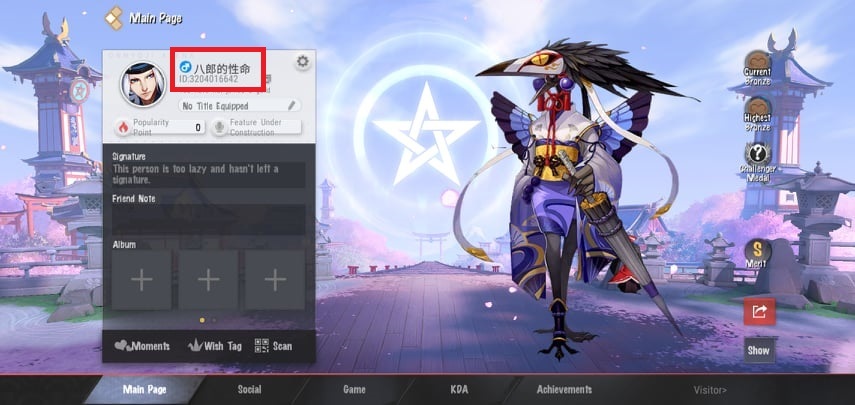
To copy your numeric Character ID:
- Launch Onmyoji on mobile or PC.
- Tap your character avatar in the upper-left corner of the Courtyard to open the profile screen.
- Find the numeric User ID listed directly beneath your nickname.
- Copy the digits before entering checkout (VGTopup).
Legitimate direct ID checkouts never ask for passwords, login emails, or two-factor authentication codes. Keep those private; direct top-ups require only the public numeric ID.
Direct Player ID Mechanics: S-Jade Web Payment vs App Store
Mobile storefronts frequently introduce checkout friction through regional currency blocks, device spending limits, or failed billing transactions. Buying S-Jade through external web portals routes currency to the account via direct server-side API crediting instead.
Pricing also varies significantly by storefront. As verified on 2026-09-27, App Store in-app purchase tiers show regional price gaps reaching 55% between national storefronts, while Google Play tiers show spreads of up to 214% across territories (OpenTheRank). These disparities make direct player ID purchases a practical alternative.
| Feature | Web Direct ID Top Up | Native App Store / Google Play IAP |
|---|
| Account Input | Public numeric Character ID only | Operating system account login (Apple ID / Google account) |
| Password Handshake | None required | App store password, biometrics, or device passkey |
| Hardware Requirement | Any desktop or mobile web browser | Compatible iOS or Android device running store services |
| PC Client Usability | Full support without mobile emulation | Unavailable or limited on standalone PC clients |
| Title Compatibility | Turn-based RPG only | Bound strictly to downloaded application build |
Browser payment routes also give PC players a direct method for how to buy Onmyoji S-Jade on PC without downloading Android emulators or configuring mobile billing accounts.
How to Buy Onmyoji S-Jade on PC and Mobile via UID
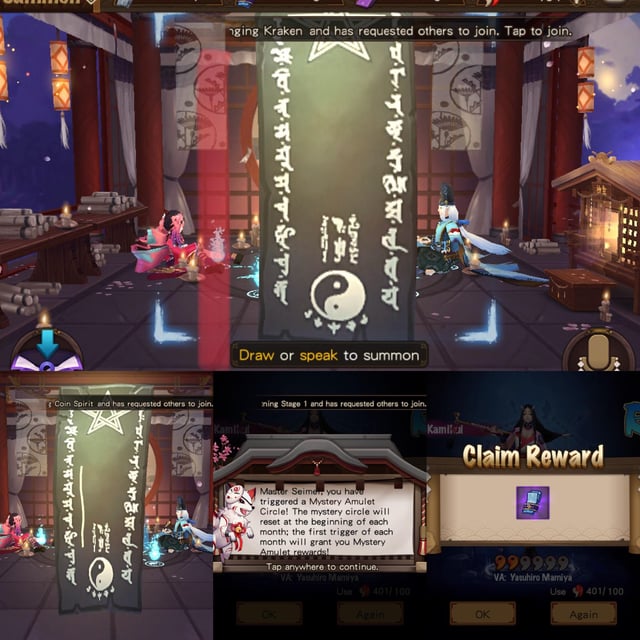
Purchasing currency through a web portal takes four steps on desktop or mobile browsers:
- Select the flagship Onmyoji listing on an external platform such as VGTopup.
- Choose your Jade or S-Jade denomination.
- Enter your numeric Character ID into the user ID field.
- Complete payment using your preferred payment method.
The server updates your in-game balance directly upon authorization. No voucher codes or redemption steps are required.
Denominations and Conversion Mechanics
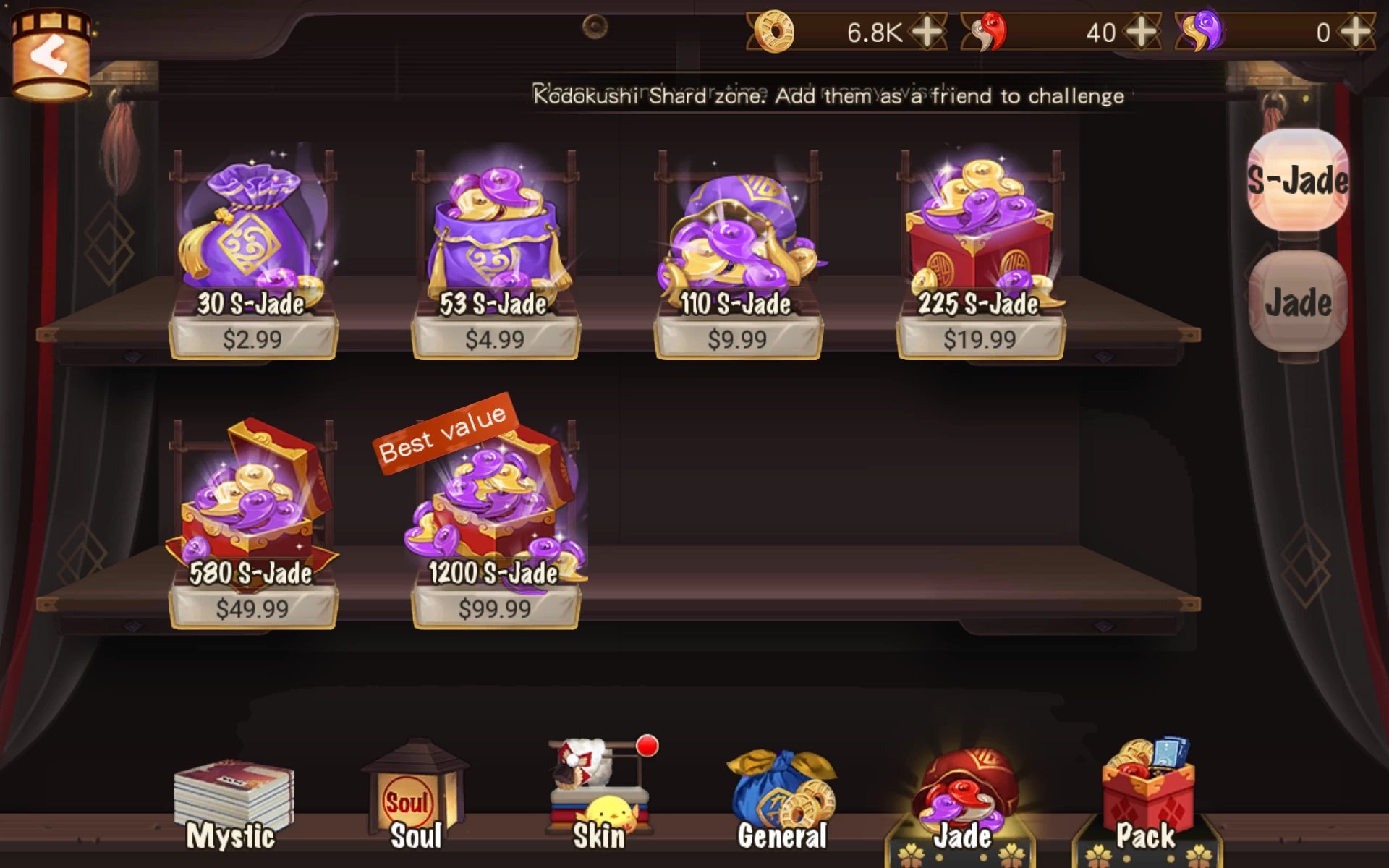
S-Jade acts as the primary paid cash currency in Onmyoji. It unlocks time-limited gift packs, Talisman Pass upgrades, and shop-exclusive character skins.
Players can also convert S-Jade to standard Jade at a 1:1 ratio. Standard Jade buys summon bundles—such as 11 Mystery Amulets for 1,000 Jade—along with daily AP stamina refills and basic store items (VGTopup).
| Package Denomination | Currency Type | Primary In-Game Function | Pricing Information |
|---|
| 60 Jade | Direct Credited Currency | Minor resource and AP top-ups | Check live product page at checkout |
| 300 Jade | Direct Credited Currency | Daily shop bundles and refills | Check live product page at checkout |
| 680 Jade | Direct Credited Currency | Gift packs and regular summoning stock | Check live product page at checkout |
| 1280 Jade | Direct Credited Currency | Talisman Pass tiers and bundle options | Check live product page at checkout |
| 3280 Jade | Direct Credited Currency | Bulk summoning and premium packages | Check live product page at checkout |
| 6480 Jade | Direct Credited Currency | High-volume summons and exclusive skin tiers | Check live product page at checkout |
Listing names vary between storefronts. Some merchants label bundles simply as Jade, while others distinguish S-Jade or Soul Jade. Verify live package details, payment gateway fees, and regional taxes before finalizing payment.
Currency bought for the flagship turn-based RPG does not transfer across the franchise. You cannot credit or spend these packages in Onmyoji Arena (MOBA), Onmyoji: The Card Game, or Onmyoji: King (VGTopup).
Checkout requirements vary depending on the recharge provider. Platforms like VGTopup require only the numeric User ID, querying player databases directly. Other services, such as 94LIVES, require both the numeric Game ID and your specific regional server name to credit soul jade packages (94LIVES).
When server selection is prompted, check whether your profile belongs to Global, English, or another regional cluster. A mismatch between your server selection and User ID causes automated dispatch failures or order timeouts.
In-Game Delivery Checks and Troubleshooting
Most web orders process within minutes. Automated dispatch on sites like 94LIVES often fulfills orders in under 1 minute during normal server operations (94LIVES), though routine server maintenance can delay arrival.
If your balance does not update promptly, follow these diagnostic steps:
- Restart the Onmyoji client completely to trigger a fresh sync with the game server.
- Check your Courtyard mailbox and bag inventory; several bundle types arrive as mail attachments.
- Double-check your order receipt to confirm the entered User ID matches your in-game profile.
- If the balance is still missing after verifying your ID, open a support ticket on the recharge portal with your order number (VGTopup).
Frequently Asked Questions
Do I need to provide my Onmyoji password to top up via direct ID?
No. Direct ID top-ups require only your public numeric User ID. You should never share your account password, email login credentials, or verification codes (VGTopup).
Where can I find my Onmyoji User ID?
Launch Onmyoji, tap your character avatar in the upper-left corner of the Courtyard screen to open your profile, and locate the numeric Character ID printed directly beneath your nickname (VGTopup).
What is the conversion rate between S-Jades and regular Jades?
S-Jades convert into standard Jades at an exact 1:1 ratio. Players can convert S-Jades at any time to buy standard shop items, stamina refills, and Mystery Amulet summoning packs (VGTopup).
Can Onmyoji Jade top-ups be credited to Onmyoji Arena?
No. Purchases for the flagship turn-based RPG Onmyoji are strictly non-compatible with spin-off games such as Onmyoji Arena or Onmyoji: The Card Game (VGTopup).




Comments