
Ludo Club Top Up for Cash and Coins
Staying ahead on the board in Ludo Club requires smart tactical moves and enough resources to enter high-stakes rooms. Whether you play classic board matches with friends or enter competitive Rush tables against international players, running out of Coins or Cash stops your progress. VGTopup provides an instant Ludo Club top up service that credits your account directly using only your Player UID.
You do not need to share login credentials, link third-party accounts, or wait for manual verification. Select your package, enter your UID, complete the checkout, and receive your balance straight to your in-game profile. Current rates, available packs, and special promotional bundles are visible on the live VGTopup checkout page.
How to Top Up Ludo Club Cash and Coins with UID
Recharging your balance on VGTopup takes less than two minutes. Follow these simple steps to complete your order:
- Select Your Desired Currency Package: Choose the amount of Ludo Club Coins, Cash, or combo packs you want to add to your game profile.
- Provide Your Player UID: Type your numeric or alphanumeric Ludo Club UID accurately into the input box.
- Proceed to Checkout: Review your order summary and choose your preferred payment method on the secure checkout screen.
- Finalize Payment: Complete the transaction. The delivery system verifies your UID and deposits the purchased resources directly to your game balance.
- Check Your In-Game Inventory: Open or refresh Ludo Club to see your updated Cash and Coins totals.
How to Locate Your Ludo Club Player UID in Settings
Your Ludo Club Player UID is a unique identifier tied to your profile. You only need this string to receive purchases or send gifts to other players. Finding it inside the game client is straightforward.
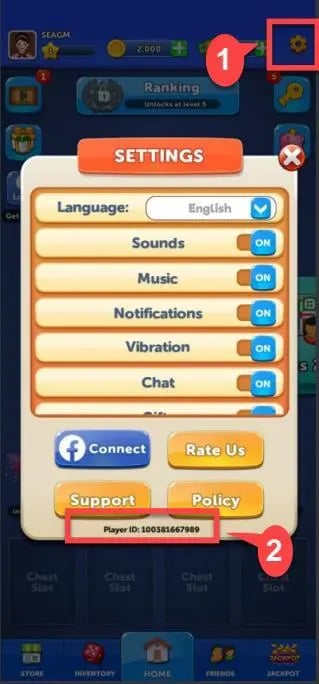
- Open Ludo Club on your phone or tablet.
- Tap your Profile Avatar located in the top-left corner of the main lobby screen.
- Alternatively, tap the Gear / Settings icon in the top-right corner.
- Look below your username or at the bottom of the profile pop-up window to find your UID (a series of numbers or characters).
- Tap the small Copy icon next to the number to copy it straight to your clipboard, preventing any manual typing errors when ordering on VGTopup.
Ludo Club Currencies Explained: Cash vs Coins Usage and Benefits
Depending on your app version, update schedule, or region, you might see in-game currencies referred to as Cash, Coins, or Gems. Understanding how each resource functions helps you choose the right pack for your playstyle.
| Currency Type | Primary In-Game Purpose | How to Spend It | Why You Need It || :--- | :--- | :--- | :--- | :--- | :--- | :--- | :--- | :--- || Coins | Main match entry currency | Table fees, Rush mode wagers, friendly private matches | Required to start games and multiply your winnings on high-tier boards. || Cash / Gems | Premium utility resource | Dice re-rolls, custom dice skins, profile frames, lucky rollbacks | Gives tactical second-chances on crucial rolls and unlocks exclusive cosmetics. |
Coins
Coins represent the core circulating currency in Ludo Club. Every time you enter a 2-player or 4-player classic match, a percentage of your Coins is placed into the pot. Winning the match gives you the combined prize pool. If your Coin balance drops below the minimum entry fee, you cannot queue for standard matches until you collect daily free gifts, watch ads, or recharge your stash on VGTopup.
Cash and Gems
Cash (frequently referred to as Gems in specific regional localizations) is the premium currency. Its most powerful tactical function is the Dice Re-roll. If you roll an unfavorable number at a critical point near the home triangle or right before capturing an opponent piece, Cash lets you roll again. Cash also unlocks unique dice animations, premium emojis, board themes, and thematic avatar frames.
How to Send Ludo Club Cash and Coins as a Gift to Friends
Because VGTopup processes top-ups using only the recipient's Player UID, you can easily surprise your friends or guildmates with balance refills without ever touching their private logins.
- Ask your friend to copy their Player UID from their in-game profile menu.
- Open the Ludo Club product page on VGTopup.
- Choose the Coins or Cash bundle you wish to send them.
- Paste your friend's UID into the player input box instead of your own.
- Complete the checkout process.
- The resources will deposit directly into your friend's game profile automatically. Once the transaction completes, notify them to refresh their game client to claim their new balance.
Account Safety: UID-Only Top Up Without Passwords
Account safety is a major priority when buying mobile game currencies online. Traditional top-up methods that require your Facebook, Google Play, Apple ID, or phone login credentials expose your account to unauthorized access and security risks.
VGTopup eliminates these risks completely through a 100% password-free system:- No Login Sharing: We never request your passwords, two-factor authentication codes, or recovery emails.- Direct UID Routing: Delivery systems credit the funds directly to the public player ID recognized by the game server.- No Device Takeover: Your active game sessions remain uninterrupted, and your personal account data stays private.- Risk-Free Transactions: UID-based recharges protect you from account locks and third-party credential leaks.
Troubleshooting Guide: What to Do If Your Coins Do Not Appear Immediately
Top-ups through VGTopup are processed rapidly, but network delays or cached data inside the mobile client can occasionally delay visual updates. If your newly purchased Cash or Coins do not show up right away, use the following checklist:
- Restart the Game App: Force close the Ludo Club application on your mobile device and restart it. This forces the client to sync with the central server and fetch your updated inventory.
- Check Your Order Receipt: Check your confirmation email or order history on VGTopup to confirm the UID submitted matches your current in-game profile.
- Switch Network Connections: A weak Wi-Fi or mobile data connection can prevent the game lobby from updating currency counters. Toggle airplane mode or switch to a stable connection.
- Verify Account Profile: If you run multiple accounts or switch between guest profiles and social accounts, ensure you are logged into the exact profile tied to the UID you submitted.
- Contact VGTopup Support: If your balance does not reflect after a few minutes, reach out to the VGTopup customer support team with your order ID and UID for instant assistance and verification.
Frequently Asked Questions
How do I top up Cash and Coins in Ludo Club?
To top up, select your currency pack on VGTopup, input your in-game Player UID, and complete your purchase. The system delivers the Cash and Coins directly to your game account without requiring any login credentials.
Where can I find my Ludo Club Player UID?
Open Ludo Club and tap your profile avatar in the upper-left corner or open the Settings menu. Your UID is displayed under your profile name. Tap the copy icon next to it to paste it directly into the order field on VGTopup.
Do I need to provide my Ludo Club password to top up?
No. VGTopup only requires your public Player UID. You never have to share your password, social media logins, or one-time verification codes.
Can I buy Ludo Club Cash and Coins for a friend?
Yes. Enter your friend's Player UID in the UID field during the checkout process on VGTopup. The purchased Coins or Cash will be delivered straight to their game account.
What is the difference between Cash and Coins in Ludo Club?
Coins are spent as entry wagers for standard board matches and Rush games. Cash (also called Gems in some versions) is the premium currency used for dice re-rolls during matches, buying custom dice skins, and unlocking cosmetic items.
What should I do if my Ludo Club order has not arrived?
Restart the Ludo Club app to refresh your profile balance. If the new total does not appear, verify that the UID you entered on your receipt matches your profile, then contact VGTopup support with your order number for quick resolution.
Select Denomination
Tax, payment fees and eligible coupons are calculated at checkout.
| Package | Price |
|---|---|
| 120 Cash | USD 0.56 |
| 37,500 Coins | USD 0.56 |
| 190,000 Coins | USD 1.13 |
| 250 Cash | USD 1.13 |
| 700 Cash | USD 2.82 |
| 1,300,000 Coins | USD 5.63 |
| 3,300,000 Coins | USD 7.89 |
| 3,200 Cash | USD 11.27 |
| 13,500,000 Coins | USD 16.90 |
| 10,800 Cash | USD 33.80 |
| 70,000,000 Coins | USD 50.70 |
| 20,000 Cash | USD 56.39 |